Introduction and a problem

Azurelight

New member
Local time
12:38 AM
Messages
3
Hi All

I recently installed windows 7 and so far I am very pleased with it.

There is just one problem: I can not seem to install things from my CD-drive (this includes office 2007). I get an error message which is :"D:\ is not a valid win32-program"


Any idea of why this is?

Thank you for any help in advance.
 

My Computer

OS
Windows 7 32-bit
Hi All

I recently installed windows 7 and so far I am very pleased with it.

There is just one problem: I can not seem to install things from my CD-drive (this includes office 2007). I get an error message which is :"D:\ is not a valid win32-program"


Any idea of why this is?

Thank you for any help in advance.

I was having a little problem with my DVD Drive after I installed Win 7. Download this program, Imgburn. It is a good burning program that is free. See if it makes any difference. Get it here. The Official ImgBurn Website
 

My Computer

Computer type
PC/Desktop
Computer Manufacturer/Model Number
Custom Build
OS
Windows 7 Home Premium 32-Bit - Build 7600 SP1
CPU
Intel Core i3-2120 3.30Ghz
Motherboard
Asus P8Z68-V LX Intel Z68 Socket H2 ATX
Memory
Kingston 4 GB DDR3 1333 mhz
Graphics Card(s)
AMD Radeon HD6670
Sound Card
Sound Blaster Audigy SE 24-Bit
Monitor(s) Displays
Asus VE228
Screen Resolution
1440 X 900
Hard Drives
OCZ Vertex 3 120 GB Sata 3 SSD ==
Kingston SH103/S3 120 G Hyper X 120 GB SSD ==
Western Digital 500 GB Caviar Green 7200 RPM ==
PSU
Corsair CX600M == 600 Watt
Case
NZXT Apollo - Silver with Clear Side Panel
Cooling
Three 120 mm Fans
Keyboard
Microsoft Natural 4000
Mouse
Microsoft Custom Optical 3000
Internet Speed
AT&T Fiber Optic Wireless Network
Antivirus
Microsoft Security Essentials
Browser
Chrome
Other Info
120 mm Blue LED Fan -- Three Blue LED Lazer Light Sticks
Hi All

I recently installed windows 7 and so far I am very pleased with it.

There is just one problem: I can not seem to install things from my CD-drive (this includes office 2007). I get an error message which is :"D:\ is not a valid win32-program"


Any idea of why this is?

Thank you for any help in advance.

Did you clean install or upgrade. If you did an upgrade, I suggest you start over and do a clean install. Are you trying to install 64 bit program on a32 bit OS? It sound like that might be the problem. Right click on my computer, go to properties and you can see if you are 32 bit or 64 bit. Your programs must be the same.
 

My Computer

Computer type
PC/Desktop
Computer Manufacturer/Model Number
Dell XPS 420
OS
Windows 10, Home Clean Install
CPU
Intel Core2 processsor Q8200(2.33Ghz 1333FSB) Quad Core Tech
Motherboard
Dell
Memory
6 gb
Graphics Card(s)
ATI Radeon 256MB HD3650
Sound Card
Intergrated 7.1 Channel Audio
Monitor(s) Displays
Dell SP2009W 20"
Hard Drives
640 GB Serial ATA Hard drive
Cooling
Fan
Keyboard
Dell USB Keyboard
Mouse
Dell Premium Optical USB
Internet Speed
DSL 2.85
I don't think as such, that I ran a clean install. The harddrive I installed it on alredy had XP on it. This reulted, among other things, in the creation of a windows.old folder, but I thought it innert. It seems I might have been wrong.

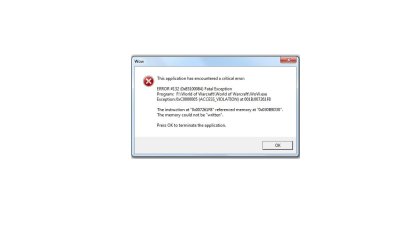
I also got a wier error message from my wow today:


It seems they might be interarelated.

Just i case it wasnt alredy obvious, I am hardly a comuter wiz. :(

Thx for the ideas though....will try the program

Also FyI: I installed 32-bit.
 

Attachments

  • Error message.jpg
    Error message.jpg
    23.6 KB · Views: 18
Last edited:

My Computer

OS
Windows 7 32-bit
If you had XP you did a clean install. That is the only way.
 

My Computer

Computer type
PC/Desktop
Computer Manufacturer/Model Number
Dell XPS 420
OS
Windows 10, Home Clean Install
CPU
Intel Core2 processsor Q8200(2.33Ghz 1333FSB) Quad Core Tech
Motherboard
Dell
Memory
6 gb
Graphics Card(s)
ATI Radeon 256MB HD3650
Sound Card
Intergrated 7.1 Channel Audio
Monitor(s) Displays
Dell SP2009W 20"
Hard Drives
640 GB Serial ATA Hard drive
Cooling
Fan
Keyboard
Dell USB Keyboard
Mouse
Dell Premium Optical USB
Internet Speed
DSL 2.85
If you had XP you did a clean install. That is the only way.

As far as I know, you are correct, but if a clean install was done, why is there a windows.old folder?

EDIT: Now that I think about it, I believe that I had a windows.old after a clean install also. I guess it is created by default.
 

My Computer

Computer Manufacturer/Model Number
DIY
OS
W7x64 Pro, SuSe 12.1/** W7 x64 Pro, XP MCE
CPU
Phenom II 1090T w/Noctua NH-D14 /**4400+ X2 w/CM Hyper TX 3
Motherboard
ASRock 890FX Deluxe 4/**A8N-SLI
Memory
2 x 2GB Patriot PGS34g1600LLKA/**4x1GB Corsair VS
Graphics Card(s)
EVGA GTX460 SC/**EVGA 8800GTS
Sound Card
Asus Xonar D2X/**Xonar D1
Monitor(s) Displays
Acer X233H, Dell E152FPc /**LG M237-WD
Screen Resolution
1920x1080 & 1024x768/**1980x1080
Hard Drives
WDC 2TB, 1.5TB, 1TB, 500GB,Seagate 500GB , Maxtor 80GB /**500GB Seagate & WDC 1TB Black
PSU
CM RS600 w/ APC BX1000G/**Antec 500 TP w/ APC BX1000
Case
HAF922/**Antec 1040IIB
Cooling
3x200mm, 1x140 and 1x120mm/**5x80mm fans
Keyboard
Logitech Media USB/**Saitek Eclipse
Mouse
Cordless Trackman Wheel/**Ditto
Internet Speed
3.3Mbps
Other Info
SB 560 5.1 w/ Sennheiser RS140/**Creative T20 speakers, Dvico FusionHDTV7 Gold RT, Cisco E3000, HP 5510V AIO, Linksys E3000, Belkin F5U237 hub and **F5D8055 adapter
(** = 2nd rig)
If you had XP you did a clean install. That is the only way.

As far as I know, you are correct, but if a clean install was done, why is there a windows.old folder?

EDIT: Now that I think about it, I believe that I had a windows.old after a clean install also. I guess it is created by default.

You have a windows.old with a clean or custom install. NO windows.old with an upgrade. No windows.old with a clean, clean install (format)
 

My Computer

Computer type
PC/Desktop
Computer Manufacturer/Model Number
Dell XPS 420
OS
Windows 10, Home Clean Install
CPU
Intel Core2 processsor Q8200(2.33Ghz 1333FSB) Quad Core Tech
Motherboard
Dell
Memory
6 gb
Graphics Card(s)
ATI Radeon 256MB HD3650
Sound Card
Intergrated 7.1 Channel Audio
Monitor(s) Displays
Dell SP2009W 20"
Hard Drives
640 GB Serial ATA Hard drive
Cooling
Fan
Keyboard
Dell USB Keyboard
Mouse
Dell Premium Optical USB
Internet Speed
DSL 2.85
I decided to do a CLean CLean install (Format). However, I now have problems with the CD-Drive again. It appears that the drivers are not currently installed. which prevents me from installing the OS. However, the computer also seems to be unable to detect the drivers (for the CD reader) from the containing medium (which is , of course , not a cd).

The CD drive is a Pioneer DVR-111. Any one else had issues with those?
 

My Computer

OS
Windows 7 32-bit
You have a windows.old with a clean or custom install. NO windows.old with an upgrade. No windows.old with a clean, clean install (format)

If you have more than one physical drive, and install Win7 on a different (formatted) disk to the previous OS, you will get a windows.old.
 

My Computer

Computer type
PC/Desktop
Computer Manufacturer/Model Number
Custom
OS
7 x64 Ultimate
CPU
AMD Ryzen 5
Motherboard
Gigabyte GA-AB350-Gaming
Memory
16GB DDR4
Graphics Card(s)
Radeon R7 360
Monitor(s) Displays
2 x Dell U2518D
Screen Resolution
2560x1440 2560x1440
Hard Drives
WD 500GB x2
Samsung SSD 128MB (OS)
XPG SX8200 Pro M.2 2280 1TB
PSU
Antec 500
Cooling
Hyper 212 EVO
Keyboard
Logitech cordless K800
Mouse
Logitech M510
Antivirus
Avira
Back
Top