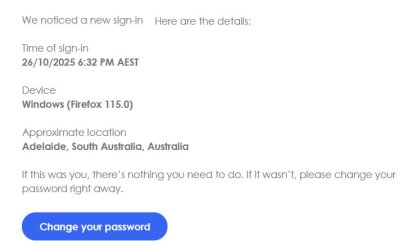
Every single piece of data is either sent by you or can be obtained as part of the connection needed to fetch a webpage. You can hide or change some of them to some degree.
Here's where each one came from:
Time of sign-in:
Pretty much self explanatory, it's the server time when the request was made. Since this value is completely outside your control, you cannot do anything about it.
Device:
This piece of data comes from the user agent you send in each and every request from the browser. It's part of the HTTP standard and considered good etiquete to send who you are and browsers often send this. You can view this exact value in the browser's developer tools. There are many extensions that allow you to change this piece of data to whatever you want, thus impersonating another browser or removing it completely. Since the user agent is controled by your computer, the server puts blind trust into it and will believe anything you send.
This is how websites actually know your OS: they have no idea and no way to know and rely on what the browser sends.
Approximate location:
This is derived from your IP address. Every network connection use IP addresses as part of the basic protocol infrastructure. Those addreses, on the public internet, are assigned by organizations that segment and distribute them. By looking up those assignments you can know who owns it and their geographical location, up to some point, thus knowing any IP address gives an idea of where that address is (not exactly, but within a reasonable approximation). There are many websites that give this information, it's trivial to obtain. Since your IP address is part of each request you made, each webserver you contact can know this.
The only way around this is not doing the connection yourself. VPNs are an example of this, they work as proxies, you connect to the VPN and the VPN sends the request, thus the website sees the VPN's IP and not yours, thus masking your real location (that's how VPNs bypass geoblocking). Of course, the VPN operator does see your real IP and they're who do know your real location, there is no way around that.
As for why do such messages often include that data, it's because it gives you information to make an informed decision on what to do with it. If you see a login attempt from a far away place using a browser you don't recognize, it's likely a hacking attempt and you may consider changing your password. But if it says your city and your everyday browser, it's clear that it was you and there's nothing bad about it.