Intrusion

ColourOz

New member
Power User
Local time
12:21 AM
Messages
75
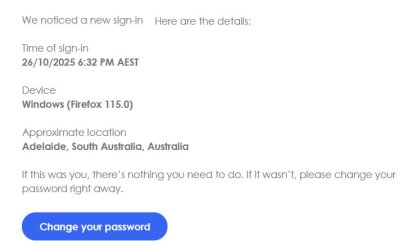
Is there a way in which I can 'hide' computer details from companies when ie logging in? I understand that an IP address is essential, but location and device I fail to see the relevancy. The choice of device and location should be at ones discretion. Is there software that I can install or is it manipulating a file?

This is an example of my whinge:
new sign in..jpg
 
Last edited:

My Computer

Computer type
PC/Desktop
Computer Manufacturer/Model Number
Custom built
OS
Windows 7 Ultimate x64 SP1
CPU
Intel i7 6700
Motherboard
Asus H170-Pro
Memory
Crucial 16 GB (x1)
Graphics Card(s)
Nvidia GeForce GTX1050Ti
Sound Card
(incorporated with Nvidia Graphics Card)
Monitor(s) Displays
LG HDR WFHD 29" Model 705948
Screen Resolution
3840 x 2160
Hard Drives
1 x M.2 2TB, 1 x WD black 1TB
PSU
650 W
Case
traditional design
Cooling
2 fans
Keyboard
Wireless
Mouse
Wireless
Internet Speed
NBN fixed wireless
Antivirus
Microsoft Security Essentials
Browser
Mozilla
Other Info
*Acer Ultrabook, 500GB M.2, 8GB RAM - partitioned Win7 & Linux Mint
*Gigabyte Mini-PC (x64) 1TB HDD, 8GB RAM Windows7

*Windows7 setup identical to Main computer*
you could use a browser with a built in vpn, and select a dummy IP...( i use Opera on mine free.. but browser only)

however the sign-in details you posted are a security feature and will pop up now and again...
like if you swap to Opera it will appear again

so only half an answer
 

My Computer

Computer type
PC/Desktop
Computer Manufacturer/Model Number
medionl/Aspire 6930G/acer x55a
OS
W7 home premium 32bit/W7HP 64bit/w10 tp insider ring
CPU
E5300 dual core
Motherboard
medion MS7366
Memory
3gb
Graphics Card(s)
Nvidia Geforce 7100 Nforce 630i
Monitor(s) Displays
avixc
Internet Speed
n (isp resticted to 72)
Antivirus
mse/pands
Browser
palemoon
Other Info
Belkin Fd7050 n USB using Railink RT2870 drivers, more upto date
Thank you Torchwood for your reply. I am connected to NordVPN and able to change locations, although it does revert to the set location. My main interest is the device, OS and browser I am using. There must be a way to stop companies snooping. Browser extensions are not helpful. Maybe I should be living in a cocoon!
 

My Computer

Computer type
PC/Desktop
Computer Manufacturer/Model Number
Custom built
OS
Windows 7 Ultimate x64 SP1
CPU
Intel i7 6700
Motherboard
Asus H170-Pro
Memory
Crucial 16 GB (x1)
Graphics Card(s)
Nvidia GeForce GTX1050Ti
Sound Card
(incorporated with Nvidia Graphics Card)
Monitor(s) Displays
LG HDR WFHD 29" Model 705948
Screen Resolution
3840 x 2160
Hard Drives
1 x M.2 2TB, 1 x WD black 1TB
PSU
650 W
Case
traditional design
Cooling
2 fans
Keyboard
Wireless
Mouse
Wireless
Internet Speed
NBN fixed wireless
Antivirus
Microsoft Security Essentials
Browser
Mozilla
Other Info
*Acer Ultrabook, 500GB M.2, 8GB RAM - partitioned Win7 & Linux Mint
*Gigabyte Mini-PC (x64) 1TB HDD, 8GB RAM Windows7

*Windows7 setup identical to Main computer*

My Computer

Computer type
PC/Desktop
Computer Manufacturer/Model Number
medionl/Aspire 6930G/acer x55a
OS
W7 home premium 32bit/W7HP 64bit/w10 tp insider ring
CPU
E5300 dual core
Motherboard
medion MS7366
Memory
3gb
Graphics Card(s)
Nvidia Geforce 7100 Nforce 630i
Monitor(s) Displays
avixc
Internet Speed
n (isp resticted to 72)
Antivirus
mse/pands
Browser
palemoon
Other Info
Belkin Fd7050 n USB using Railink RT2870 drivers, more upto date
Every single piece of data is either sent by you or can be obtained as part of the connection needed to fetch a webpage. You can hide or change some of them to some degree.

Here's where each one came from:

Time of sign-in:
Pretty much self explanatory, it's the server time when the request was made. Since this value is completely outside your control, you cannot do anything about it.

Device:
This piece of data comes from the user agent you send in each and every request from the browser. It's part of the HTTP standard and considered good etiquete to send who you are and browsers often send this. You can view this exact value in the browser's developer tools. There are many extensions that allow you to change this piece of data to whatever you want, thus impersonating another browser or removing it completely. Since the user agent is controled by your computer, the server puts blind trust into it and will believe anything you send.
This is how websites actually know your OS: they have no idea and no way to know and rely on what the browser sends.

Approximate location:
This is derived from your IP address. Every network connection use IP addresses as part of the basic protocol infrastructure. Those addreses, on the public internet, are assigned by organizations that segment and distribute them. By looking up those assignments you can know who owns it and their geographical location, up to some point, thus knowing any IP address gives an idea of where that address is (not exactly, but within a reasonable approximation). There are many websites that give this information, it's trivial to obtain. Since your IP address is part of each request you made, each webserver you contact can know this.
The only way around this is not doing the connection yourself. VPNs are an example of this, they work as proxies, you connect to the VPN and the VPN sends the request, thus the website sees the VPN's IP and not yours, thus masking your real location (that's how VPNs bypass geoblocking). Of course, the VPN operator does see your real IP and they're who do know your real location, there is no way around that.

As for why do such messages often include that data, it's because it gives you information to make an informed decision on what to do with it. If you see a login attempt from a far away place using a browser you don't recognize, it's likely a hacking attempt and you may consider changing your password. But if it says your city and your everyday browser, it's clear that it was you and there's nothing bad about it.

 

My Computer

Computer type
Laptop
Computer Manufacturer/Model Number
Toshiba Sattelite A665-S6092
OS
Windows 7 Ultimate x64
CPU
Intel Core i7-740QM
Memory
8 GB DDR3
Graphics Card(s)
NVIDIA GeForce 330GT
Screen Resolution
1366x768
Hard Drives
Samsung 840 SSD 500GB
1TB USB3 external HD
Cooling
Coolermaster Notepal U3 notebook cooling pad
Internet Speed
3mbps ASDL
Antivirus
ClamWin 0.98.7
Browser
Opera 12.17 x86 (main), Firefox 38 (sec), IE11 (last resort)
Back
Top