This is a really weird problem, and I found another person asking the same question in vista forums, but he had no responses.
This is Windows 7 x64 by the way.
Recently, when I've been trying to attach files to my emails,
(Microsoft® Office Outlook® Web Access
for Exchange Server 2003)
they just don't show up in the folder, it's as if they aren't there and have never been there.
I know for a fact that they are, because I can browse my folders normally and they are there, I can open them, edit, etc.
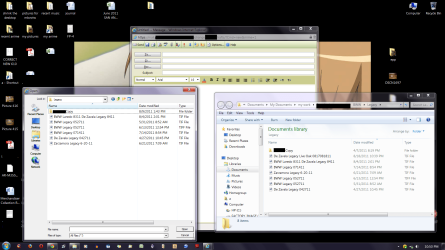
As a matter of fact, I opened the folder to show all the files, and beside it I tried to attach from the same folder. Looking at the folders side by side, they look alike, except the one I want to attach simply isn't showing up in the "attach file" window.
I know they're there, the computer know they're there, but outlook exchange doesn't know they're there.
The only way I've found around this is that I have to move the file or copy the file and put it somewhere else and then I can attach them. I just made a folder for them on the desktop and once I put them there, I can at least attach what I need to the email, but I don't want to have to start doing this every time.
Yes, I know about hidden folders and files, I've already got that checked off in the folder options and it's not that.
I've found no other references to this through searching, except for someone asking the same question as I stated above.
Does anyone have any suggestions or possibly a fix? Thanks in advance
This is Windows 7 x64 by the way.
Recently, when I've been trying to attach files to my emails,
(Microsoft® Office Outlook® Web Access
for Exchange Server 2003)
they just don't show up in the folder, it's as if they aren't there and have never been there.
I know for a fact that they are, because I can browse my folders normally and they are there, I can open them, edit, etc.
As a matter of fact, I opened the folder to show all the files, and beside it I tried to attach from the same folder. Looking at the folders side by side, they look alike, except the one I want to attach simply isn't showing up in the "attach file" window.
I know they're there, the computer know they're there, but outlook exchange doesn't know they're there.
The only way I've found around this is that I have to move the file or copy the file and put it somewhere else and then I can attach them. I just made a folder for them on the desktop and once I put them there, I can at least attach what I need to the email, but I don't want to have to start doing this every time.
Yes, I know about hidden folders and files, I've already got that checked off in the folder options and it's not that.
I've found no other references to this through searching, except for someone asking the same question as I stated above.
Does anyone have any suggestions or possibly a fix? Thanks in advance
My Computer
- OS
- windows 7