Invisible Hard Drive

patrickt

New member
Power User
Local time
6:29 PM
Messages
108
Location
Oaxaca, Mexico
I have two hard drives. I've been running Win7 x32. Tonight I installed Win7x64. I installed it by mistake on my data drive. No problem running it. I can see both hard drives when I look in System or in Computer Management but not in Devices and not when I open Computer.

In Computer Management I told it to set up the drive for indexing and it did. Since it has system files I can't format it.
 

My Computer

Computer Manufacturer/Model Number
Home Built
OS
Windows7 beta 7000
CPU
Intel E6550
Motherboard
Intel DP35DP
Memory
8Gb
Graphics Card(s)
Nvidia 8500 GT
Sound Card
Intel onboard sound
Monitor(s) Displays
Two Gateway 22" LCD monitors
Screen Resolution
1680x1050
Hard Drives
Two 500Gb 7200rpm SATA
Does it have a drive letter ?

If not, rt click it in Disk Management and add a drive letter - the one it offers should be fine.

Hope it helps

SIW2
 

My Computers

System One System Two

  • Computer type
    PC/Desktop
    OS
    7 X64
    CPU
    i5 8400
    Motherboard
    gigabyte b365m ds3h
    Memory
    2x8gb 3200mhz
    Hard Drives
    various
    PSU
    pure power 11 400w cm
    Case
    Coolermaster
    Cooling
    cryorig m9i
  • Computer type
    PC/Desktop
    OS
    7x64
    CPU
    g5400
    Motherboard
    ga b365m ds3h
    Memory
    8gb ddr4 2400
    PSU
    xfx pro 450w
But it is best to hide Operating Sys Drives in Different Boot-ups
I Do this so Different OS will not check them

Also Use Vista Boot 3.3
 

My Computer

OS
Win 7 beta
Win7 doesnt show empty drives by default. To view them go to tools/options in windows explorder and select the view tab. Untick hide empty drives in the computer folder.
 

My Computer

Computer Manufacturer/Model Number
self built
OS
Windows 7 Professional 64-bit
CPU
Intel E8400 3GHz
Motherboard
Intel DX48BT2
Memory
Kingston PC3-10700H 4Gb
Graphics Card(s)
XFX Radeon HD 5850 BlackEd.
Sound Card
Asus Xonar DG
Monitor(s) Displays
2x Samsung SM-T220HD 22"
Screen Resolution
1680x1050 on two monitors
Hard Drives
OCZ Vertex 2 120gb 3.5" (OS)
Seagate Momentus XT 500gb
Samsung F3 1Tb (games)
2x Samsung F1 1Tb
PSU
Thermaltake ToughPower 850w
Case
Thermaltake Armor
Cooling
Scythe Mugen II
Keyboard
Microsoft Comfort Curve USB
Mouse
Razer Diamondback 3G
Internet Speed
8128/443
Hi Patrickt,

It is possible to change System drives. I have all my boot partitions set up as potential System partitions - just need to hand the Active flag to whichever I choose.

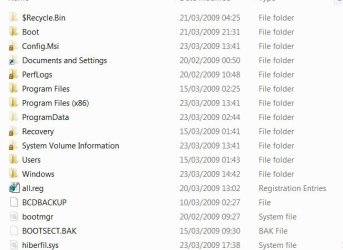
If you go to Folder options >View> untick Hide protected operating system files>Apply>OK.

You can see this on the System drive - the Boot folder and bootmgr.

BOOTFILES-1-2009-03-23_182600.jpg

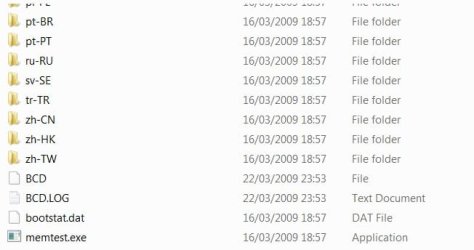
Boot folder contains BCD.

BOOTFOLDER-2-2009-03-23_184238.jpg

It may be easier and nearly as quick for you to reinstall 7x64 on the 7x32 drive - I assume that is what you originally planned.

Hope it helps.
 

My Computers

System One System Two

  • Computer type
    PC/Desktop
    OS
    7 X64
    CPU
    i5 8400
    Motherboard
    gigabyte b365m ds3h
    Memory
    2x8gb 3200mhz
    Hard Drives
    various
    PSU
    pure power 11 400w cm
    Case
    Coolermaster
    Cooling
    cryorig m9i
  • Computer type
    PC/Desktop
    OS
    7x64
    CPU
    g5400
    Motherboard
    ga b365m ds3h
    Memory
    8gb ddr4 2400
    PSU
    xfx pro 450w
Does it have a drive letter ?

If not, rt click it in Disk Management and add a drive letter - the one it offers should be fine.

Hope it helps

SIW2


thank you very much
 

My Computer

Computer type
PC/Desktop
Computer Manufacturer/Model Number
Custom
OS
Windows 7 Ultimate 64Bit
CPU
Intel 2500K
Motherboard
MSI Z68A-G43
Memory
Corsair 1866Mhz 2x4GB
Graphics Card(s)
Sapphire R7 265
Sound Card
Creative Sound Blaster Audigy Value
Monitor(s) Displays
AOC F22S+ 21.5"
Screen Resolution
1920x1080
Hard Drives
Kingston 120GB SSD
Samsung HD502HJ 500GB
PSU
Xigmatek X-Calibre 600W 80+
Case
Aerocool Cyborgx
Cooling
Thermaltake Frio
Keyboard
Microsoft Multimedia Keyboard
Mouse
Logitech G502
Internet Speed
16MBp/s
Antivirus
I do not use
Browser
Generally Google Chrome
Back
Top