Invisible shutdown menu problem

Bigling

New member
Local time
6:07 AM
Messages
4
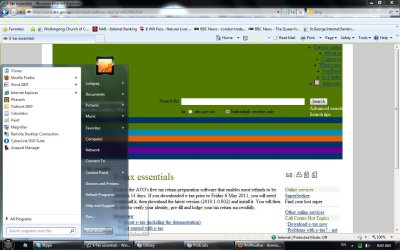
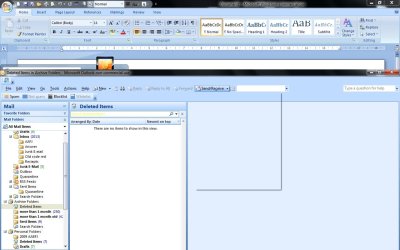
When I press the button for the shutdown menu, that which displays is clear on clear - the text is invisible. The popup descriptions that appears when the mouse is hovered over these invisible items is black on clear . . . a little imagination provides the answer. Nevertheless it is annoying, and affects Outlook 2007 Enterprise edition also - certain buttons when pressed for pull-down menus also display invisible text. I upgraded from Vista in the hope of remedying this alas to no effect. Hours of internet searching provides no solution other than finding a fellow sufferer who asked the same question in a forum, to which the reply was crickets chirping. Any help?
 

My Computer

OS
windows 7 32 bit
Hi, and welcome to SevenForums.
Did you install any third-party themes or customization packs for icons or something? That would certainly explain what's happening, though it would be nice to post a screenshot if you can to show us exactly what you mean.
 

My Computer

Computer type
Laptop
Computer Manufacturer/Model Number
Custom
OS
Windows 7 Home Premium x64
CPU
Intel Core i5 2500K
Motherboard
MSI MS-7750
Memory
8GB DDR3
Graphics Card(s)
nVidia GeForce GTX650 Ti BOOST
Sound Card
Realtek
Monitor(s) Displays
21' Philips
Screen Resolution
Full HD
Hard Drives
1TB
PSU
500W
Thank you Gornot for your reply. There is not and has never been any third party software installed to customise the windows experience. It was an out-of-the-box HP Compaq notebook computer for my wife. No icon packs, themes or display mods. Hopefully the screenshot I uploaded will tell more - the shutdown menu is displayed as a transparency with no text. Another shot shows Outlook 2007's send/receive menu in all its nothingness. Any help appreciated.
 

Attachments

  • screenshot.jpg
    screenshot.jpg
    116.7 KB · Views: 19
  • screenshot1.jpg
    screenshot1.jpg
    89.1 KB · Views: 14
  • screenshot2.jpg
    screenshot2.jpg
    97.7 KB · Views: 14

My Computer

OS
windows 7 32 bit
I haven't seen that before.

When did it start?

You upgraded from Vista by in - place upgrade?

You say it happened on Vista too.

Was that from the moment you got the pc ?

Does it happen in a different user account?
 

My Computers

System One System Two

  • Computer type
    PC/Desktop
    OS
    7 X64
    CPU
    i5 8400
    Motherboard
    gigabyte b365m ds3h
    Memory
    2x8gb 3200mhz
    Hard Drives
    various
    PSU
    pure power 11 400w cm
    Case
    Coolermaster
    Cooling
    cryorig m9i
  • Computer type
    PC/Desktop
    OS
    7x64
    CPU
    g5400
    Motherboard
    ga b365m ds3h
    Memory
    8gb ddr4 2400
    PSU
    xfx pro 450w
It started in Vista, perhaps around the time of an abortive installation of Everything. This program blue screened the OS and required a restart to "Last Known Good". This is the only instance of difficulty the notebook has had (that I recall). Though I note that Outlook 2007 (with Exchange) causes the computer to run at 100% CPU.
 

My Computer

OS
windows 7 32 bit
Do you get it in all user accounts?

That is odd - I have been using Everything for a long time - Vista and 7 - no problems.
 

My Computers

System One System Two

  • Computer type
    PC/Desktop
    OS
    7 X64
    CPU
    i5 8400
    Motherboard
    gigabyte b365m ds3h
    Memory
    2x8gb 3200mhz
    Hard Drives
    various
    PSU
    pure power 11 400w cm
    Case
    Coolermaster
    Cooling
    cryorig m9i
  • Computer type
    PC/Desktop
    OS
    7x64
    CPU
    g5400
    Motherboard
    ga b365m ds3h
    Memory
    8gb ddr4 2400
    PSU
    xfx pro 450w
Hi, you might try and use the non-aero themes and see if your menus come back. I know it's not a solution but would be interesting to see?
Also try going to the desktop, right click>Personalisation>Window color>Adavnced options. Hit the drop-down menu for "menu" and see what color it is set to. You may have to do this with a non-aero theme. you can play around with the text's color as well.
View attachment 154071
 
Last edited:

My Computer

Computer type
PC/Desktop
Computer Manufacturer/Model Number
Home Built Desktop By DataTech
OS
Windows 7 Ultimate X64 SP1
CPU
Intel i5-2550K, Differing ~4.4-4.8GHz No built in GPU
Motherboard
ASUS P8Z68-V PRO/GEN3
Memory
16GB G.Skill Sniper 1866MHz @ 2133MHz 2x8GB
Graphics Card(s)
ASUS GTX650TIB-DC2OC-2GD5, (650TI Boost)
Sound Card
Onboard Realtek 5-1
Monitor(s) Displays
Samsung P2570HD
Screen Resolution
1920x1080
Hard Drives
Samsung 840 Pro 256GB SSD for OS, 500GB Seagate Constellation (Enterprise drive) for Data
PSU
Corsair HX650W
Case
Inwin Dragon Rider
Cooling
Hyper 212 EVO w/two Noctua fans, push-pull, @1300 RPM
Keyboard
E-Z Eyes, bright yellow keys with large characters
Mouse
steelseries SENSEI Laser Pro Gaming
Internet Speed
48-51Mbs Mbs down, 11 Mbs up Xfinity Cable
Antivirus
Norton Internet Security 2013
Browser
IE 10, Opera, Pale Moon if needed
Other Info
4 case fans, LG BluRay-RE, ASUS DVD-RW, Mr. Fusion power supply, 1.21 gigawatts.
Menu is a pale pink and text (font) is Segoe UI in black. A change of theme makes no difference to the font colour of nothing in the pull-up Shut-down menu. Interestingly the pop-up tips such as "this restarts your computer" still appears when hovering.
SIW2 asked "Does it happen in a different user account?" Should I create a different user account to find out? At the mo there is only 'Compaq'.
 

My Computer

OS
windows 7 32 bit
Yes create another account with admin priveleges.
 

My Computer

Computer type
PC/Desktop
Computer Manufacturer/Model Number
Home Built Desktop By DataTech
OS
Windows 7 Ultimate X64 SP1
CPU
Intel i5-2550K, Differing ~4.4-4.8GHz No built in GPU
Motherboard
ASUS P8Z68-V PRO/GEN3
Memory
16GB G.Skill Sniper 1866MHz @ 2133MHz 2x8GB
Graphics Card(s)
ASUS GTX650TIB-DC2OC-2GD5, (650TI Boost)
Sound Card
Onboard Realtek 5-1
Monitor(s) Displays
Samsung P2570HD
Screen Resolution
1920x1080
Hard Drives
Samsung 840 Pro 256GB SSD for OS, 500GB Seagate Constellation (Enterprise drive) for Data
PSU
Corsair HX650W
Case
Inwin Dragon Rider
Cooling
Hyper 212 EVO w/two Noctua fans, push-pull, @1300 RPM
Keyboard
E-Z Eyes, bright yellow keys with large characters
Mouse
steelseries SENSEI Laser Pro Gaming
Internet Speed
48-51Mbs Mbs down, 11 Mbs up Xfinity Cable
Antivirus
Norton Internet Security 2013
Browser
IE 10, Opera, Pale Moon if needed
Other Info
4 case fans, LG BluRay-RE, ASUS DVD-RW, Mr. Fusion power supply, 1.21 gigawatts.
Back
Top