Invisible space below taskbar, mouse gets "lost"

instinctive33

New member
Local time
10:56 AM
Messages
8
Hello,

I have a very strange problem recently which seriously inhibits my workflow, hope I can explain:

Normally, when I want to do something on the taskbar, I will unconsciously move the mouse very far to the bottom (actually, farther than it can really go on the screen) so that I *know* that I *must* be on the taskbar, and then hit some buttons there.

Recently, however, this has stopped working, and I very often simply missed buttons.

Now, I've found the explanation:

The mouse suddenly can get FAR BELOW the taskbar!!! When I'm at the screen's bottom edge and keep moving the mouse down, the mouse cursor actually DOES disappear BELOW the screen and goes further down and down and down... I then need to move it an equal amount up again until it reappears from below.

What the heck is happening here, does anyone know?

I have a dual monitor setup, with different resolutions, if that matters (it shouldn't though...)

Thanks
 

My Computer

Computer type
PC/Desktop
Computer Manufacturer/Model Number
Asus X93SV
OS
Windows 7 Home x64
Memory
4GB
Bump. No solution for this? :(
 

My Computer

Computer type
PC/Desktop
Computer Manufacturer/Model Number
Asus X93SV
OS
Windows 7 Home x64
Memory
4GB
Mine does as well, but if, while as far down as I can go, I move the mouse right or left, the icon's on the Taskbar are highlighted as it moves under them.

Do you see this also?
 

My Computer

Computer type
PC/Desktop
Computer Manufacturer/Model Number
Lenovo IdeaCenter 450
OS
Windows 10 Pro X64
CPU
Intel Quad Core i7-4770 @ 3.4Ghz
Memory
16.0GB PC3-12800 DDR3 SDRAM 1600 MHz
Graphics Card(s)
Intel Integrated HD Graphics
Sound Card
Realtek HD Audio
Monitor(s) Displays
HP 22" LCD
Screen Resolution
1680 x 1050
Hard Drives
250GB Samsung EVO SATA-3 SSD
2TB Seagate ST2000DM001 SATA-2
1.5TB Seagate ST3150041AS SATA
Keyboard
Dell USB
Mouse
Lenovo USB
Internet Speed
Cable via Road Runner 3MB Upload, 30MB Download
Antivirus
Windows Defender, MBAM Pro, MBAE
Browser
Seamonkey
Other Info
UEFI/GPT
PLDS DVD-RW DH16AERSH
Mine works as Ztruker does.
If you look very closely you will notice the the very tip of the cursor is their.
It's tinny.
 

My Computer

Computer type
PC/Desktop
Computer Manufacturer/Model Number
Home made Desktop
OS
Windows 10 Pro. 64/ version 1709 Windows 7 Pro/64
CPU
Intel i7-6800K @ 4.3
Motherboard
ASUS X-99 Deluxe II
Memory
Corsair Platinum 16 gig @2400
Graphics Card(s)
EVGA GTX 1070 OC
Monitor(s) Displays
Asus 27" LED LCD/VE278Q
Screen Resolution
1920-1080 or 1280-720 HDMI
Hard Drives
INTEL SSD 730-240 Gb Sata 3.0/
PSU
EVGA Platium 1200W
Case
Phanteks Luxe Tempered Glass 8 fans/ one radiator
Cooling
XSPC/ Water Cooled CPU
Keyboard
Das 4 Professional
Mouse
Logitech M705/MX Anywhere 2-S
Internet Speed
100 mbits
Antivirus
Microsoft Security Essentials/ Malwarebytes Premium 3.0/ SAS
Browser
I.E. 11 default/Firefox/ ISP Time Warner Cable/Spectrum
Other Info
LG BluRay Burner/
Sound system-KLipsch-THX/
Icy Dock ssd Hot Swap bays.
Eh, no, there's no tip to be seen, and the task icon / text isn't highlighted, either. The mouse is actually far below the screen. It "leaves" the screen downwards into computer hell.
 

My Computer

Computer type
PC/Desktop
Computer Manufacturer/Model Number
Asus X93SV
OS
Windows 7 Home x64
Memory
4GB
I have a dual monitor setup, with different resolutions, if that matters (it shouldn't though...)

Do you use Extended or Duplicate displays (in Screen Resolution) ?
Check to make sure that setting didn't somehow get changed.

Also make sure each monitor is set to the correct resolution.
You may need to re-boot with both monitors turned on to make sure each monitor works correctly.
 

My Computer

Computer type
PC/Desktop
Computer Manufacturer/Model Number
home built
OS
Multi-Boot W7_Pro_x64 W8.1_Pro_x64 W10_Pro_x64 +Linux_VMs +Chromium_VM
CPU
AMD Athlon II x4 620
Motherboard
Gigabyte GA-MA785G-UD3H
Memory
6GB GSkill DDR2 800
Graphics Card(s)
AMD 4670 GPU + AMD 4200 IGP
Sound Card
on board Realtek ALC889A
Monitor(s) Displays
RCA 40" LCD TV, Insignia 32" LCD TV, HP 15" LCD monitor
Screen Resolution
1680 x 1050
Hard Drives
OCZ Vertex 3 120GB,
Samsung F3 1TB (3),
Several others - WD, Seagate, Hitachi, ...
PSU
Corsair 500 W
Case
Rosewill mid tower
Cooling
CM 90mm rifle
Keyboard
Gyration wireless, Logitech wireless, Dell USB wired
Mouse
Gyration wireless, Logitech wireless, V7 USB wired
Internet Speed
Spectrum - 100Mbps D / 10Mbps U
Antivirus
Avast, MBAM3, EMET, WinPatrol
Browser
Pale Moon, Firefox, IE
Other Info
2 multi-boot PC's
Mainly HTPC/Office/Gen purpose (no gaming).
Trendnet USB KVM.
LG DVD burner/Blue Ray Player.
Tray system for removable SATA backup drives.

Not currently OCd, under-volted.
I use Hybrid sleep, rarely re-boot or shutdown.

Hauppauge HD-PVR, Avermedia PCIe TV Tuner, Hauppauge PCI TV Tuner.
Hey, sorry been a bit busy...

Well, the main display is set to its native resolution, the built-in display (it's a laptop) to a non-native one, as the native one is far too high for me to be able to see anything. However, that shouldn't be a problem as I haven't changed either resolution, or for that matter anything regarding the display settings, and formerly, the mouse cursor stopped correctly at the bottom edge of the main (external) display.

What else could be causing this, it's driving me nuts.
 

My Computer

Computer type
PC/Desktop
Computer Manufacturer/Model Number
Asus X93SV
OS
Windows 7 Home x64
Memory
4GB
Bump. No solution for this?

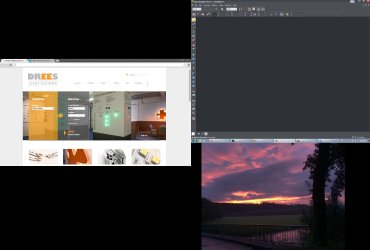
I just made a screenshot with some graphics software, and in that screenshot, the "void" below the screen is actually visible! The screenshot is twice as high as the actual screen, and the rest is filled with desktop background. What the hell is going on here???
 

My Computer

Computer type
PC/Desktop
Computer Manufacturer/Model Number
Asus X93SV
OS
Windows 7 Home x64
Memory
4GB
Set the resolution to native just as a test. Does the problem go away? If so you need to find a res that doe3s not give you this problem.

Can you post the screen shot you made?
 

My Computer

Computer type
PC/Desktop
Computer Manufacturer/Model Number
Lenovo IdeaCenter 450
OS
Windows 10 Pro X64
CPU
Intel Quad Core i7-4770 @ 3.4Ghz
Memory
16.0GB PC3-12800 DDR3 SDRAM 1600 MHz
Graphics Card(s)
Intel Integrated HD Graphics
Sound Card
Realtek HD Audio
Monitor(s) Displays
HP 22" LCD
Screen Resolution
1680 x 1050
Hard Drives
250GB Samsung EVO SATA-3 SSD
2TB Seagate ST2000DM001 SATA-2
1.5TB Seagate ST3150041AS SATA
Keyboard
Dell USB
Mouse
Lenovo USB
Internet Speed
Cable via Road Runner 3MB Upload, 30MB Download
Antivirus
Windows Defender, MBAM Pro, MBAE
Browser
Seamonkey
Other Info
UEFI/GPT
PLDS DVD-RW DH16AERSH
Is that a single screen shot of what you see ?
Or, did you take 3 screen shots and combine them into 1 image to upload here ?

Sorry for my dumb question, but I'm not sure what I'm looking at, and what you see :confused: :o
 

My Computer

Computer type
PC/Desktop
Computer Manufacturer/Model Number
home built
OS
Multi-Boot W7_Pro_x64 W8.1_Pro_x64 W10_Pro_x64 +Linux_VMs +Chromium_VM
CPU
AMD Athlon II x4 620
Motherboard
Gigabyte GA-MA785G-UD3H
Memory
6GB GSkill DDR2 800
Graphics Card(s)
AMD 4670 GPU + AMD 4200 IGP
Sound Card
on board Realtek ALC889A
Monitor(s) Displays
RCA 40" LCD TV, Insignia 32" LCD TV, HP 15" LCD monitor
Screen Resolution
1680 x 1050
Hard Drives
OCZ Vertex 3 120GB,
Samsung F3 1TB (3),
Several others - WD, Seagate, Hitachi, ...
PSU
Corsair 500 W
Case
Rosewill mid tower
Cooling
CM 90mm rifle
Keyboard
Gyration wireless, Logitech wireless, Dell USB wired
Mouse
Gyration wireless, Logitech wireless, V7 USB wired
Internet Speed
Spectrum - 100Mbps D / 10Mbps U
Antivirus
Avast, MBAM3, EMET, WinPatrol
Browser
Pale Moon, Firefox, IE
Other Info
2 multi-boot PC's
Mainly HTPC/Office/Gen purpose (no gaming).
Trendnet USB KVM.
LG DVD burner/Blue Ray Player.
Tray system for removable SATA backup drives.

Not currently OCd, under-volted.
I use Hybrid sleep, rarely re-boot or shutdown.

Hauppauge HD-PVR, Avermedia PCIe TV Tuner, Hauppauge PCI TV Tuner.
Well, this is the idea that the graphics application on the right has of "Entire Screen" when I choose the capture area. This also used to be different, a few weeks ago the screenshots still ended at the bottom of the taskbar.

I suspect that during some Windows Update, the graphics drivers got updated to a newer, more buggy version, but obviously I can't tell for sure.

Sorry for being such a pest but I don't know if I'm supposed to find this problem entertaining, interesting or frustrating ;)
 

My Computer

Computer type
PC/Desktop
Computer Manufacturer/Model Number
Asus X93SV
OS
Windows 7 Home x64
Memory
4GB
Sorry but I don't see it. I'm sure it's obvious to you :) but not to me.

Does your display have a Auto adjustment button? If so, have you tried it?
 

My Computer

Computer type
PC/Desktop
Computer Manufacturer/Model Number
Lenovo IdeaCenter 450
OS
Windows 10 Pro X64
CPU
Intel Quad Core i7-4770 @ 3.4Ghz
Memory
16.0GB PC3-12800 DDR3 SDRAM 1600 MHz
Graphics Card(s)
Intel Integrated HD Graphics
Sound Card
Realtek HD Audio
Monitor(s) Displays
HP 22" LCD
Screen Resolution
1680 x 1050
Hard Drives
250GB Samsung EVO SATA-3 SSD
2TB Seagate ST2000DM001 SATA-2
1.5TB Seagate ST3150041AS SATA
Keyboard
Dell USB
Mouse
Lenovo USB
Internet Speed
Cable via Road Runner 3MB Upload, 30MB Download
Antivirus
Windows Defender, MBAM Pro, MBAE
Browser
Seamonkey
Other Info
UEFI/GPT
PLDS DVD-RW DH16AERSH
you can always check what windows update updated. have you checked what it updated? also have you tried a restore point before the problem started?
 

My Computer

Computer type
PC/Desktop
Computer Manufacturer/Model Number
dell xps 9000
OS
win 10
Back
Top