- Local time
- 7:30 PM
- Messages
- 275
what is the relationship between IP address and WIFI router?
My Computer
- Computer Manufacturer/Model Number
- MP Mini Netbook 110
- OS
- Win7 Starter 32 bits


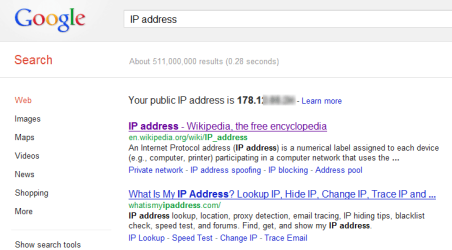

There are two kinds of IP addresses, public (external) and private (internal). Your router or modem (both WiFi and LAN) have a public IP address. This address is to your modem / router as what your home address is to your house; it helps the network traffic to find to and from all PCs and other networked devices on your local home network.
Type IP address to Google and you can see your router's public IP address on the first line, followed by an excellent article of IP addresses on Wikipedia.
View attachment 223321
Each and every device on your network have then a private IP address, given by the router. Think a private IP as the door number, the public IP tells how to find your house, the private IP how to find "the door", your PC.
The router then acts like the doorman in an apartment block, delivering incoming traffic to individual devices using private IPs and collecting outgoing traffic and sending it further using the public IP. These private IP addresses belong normally to one of the following three groups which are reserved for private use:
Normally the one ending with 0 is not used so a quite typical default setting of a router is itself to have the private IP ending with 1 and then all other devices starting from 2. Using my home network as an example I have following setup:
- 10.0.0.0 to 10.255.255.255
- 172.16.0.0 to 172.31.255.255
- 192.168.0.0 to 192.168.255.25
My public IP at the moment is 172.X.X.X (using Xs because it is never a good idea to reveal your public IP!), so here's an example:
- Router: 192.168.1.1
- Network printer: 192.168.1.2
- Network storage: 192.168.1.3 and 192.168.1.4
- My desktop: 192.168.1.5
- My laptop:192.168.1.6
- etc...
IP address can be static (always the same) or dynamic (different when disconnected and reconnected). Normally, at least here in Europe, the public IP is always dynamic if you have not especially ordered (with extra cost) a static public IP. If you reset your router and go again to Google typing IP address you should notice you have got a new public IP. Same thing if you shut down or disconnect all your PCs then reconnect them in different order you might notice that a desktop that had 192.168.1.6 might next time when booted / connected have the IP 192.168.1.11.
- I type www.sevenforums.com to my browser's addressbar on my laptop
- Laptop sends the router information that I would like to open Seven Forums website
- Router goes and gets Seven Forums front page from the net
- Page arrives, router checks which private IP had asked that information and sends it back to my laptop using the private, internal address
I have set my home network to use static private IP's. Especially with network printers and storages it is important and makes life easier when these devices can always be found using the same private IP.
Please notice I wanted to simplify things as much as possible so the above is not as accurate explanation it could be!
Kari
