IP Addresses & Win 7 Homegroup

jetrep

New member
Local time
8:25 AM
Messages
4
Location
Dallas/Fort Worth, TX
I just replaced an AT&T 2Wire881 wireless modem and router with a Netgear DG834Gv4. Prior to this replacement I was able to establish a Homegroup between my desktop running Windows 7 Home Premium and my laptop eMachines running Windows 7 Home Premium.
My desktop network adapter is an onboard Realtek RTL8168C(P)/8111 PCI-E Gigabit Ethernet NIC (NDIS 6.20).
My laptop eMachines has an Atheros AR5B95 Wireless Network Adapter, an Atheros AR8132 PCI-E Fast Ethernet Controller and lists a Microsoft Virtual WiFi Miniport Adapter.
Both machines have the same IP address??? Shouldn't these be different, i.e.,
sequential?
My biggest problem is that I am now unable to setup a Homegroup. My laptop can access the desktop, however the desktop can not access the laptop. Also can not map the network?
I have browsed most posts and tried all the radio buttons to allow access, but no luck.
Any help is appreciated.
 

My Computer

Computer Manufacturer/Model Number
Home Builder
OS
Windows 7 x64 Home Premium OEM
CPU
AMD PII x3 710
Motherboard
Gigabyte GA-MA78GM-US2H
Memory
Patriot Viper II 8GB (4 x 2GB) 240-Pin DDR2 PC8500
Graphics Card(s)
GIGABYTE GV-R467ZL-1GI Radeon HD 4670 1GB 128-bit DDR3 PCI
Sound Card
Onboard Audio Realtek ALC889A, 8 Channels
Monitor(s) Displays
ASUS VH226H 21.5" 2ms(GTG) HDMI Widescreen LCD Monitor
Screen Resolution
1920 x 1080
Hard Drives
1 ea. HITACHI 500GB SERIAL ATA/300 16MB BUFFER
2ea, Samsung 320GB Serial ATA 16MB Buffer
PSU
CoolMax 500W ATX
Case
Very, very old.......
Cooling
Never enough
Keyboard
Microsoft Wireless MultiMedia Keyboard 1.0A
Mouse
Microsoft Wireless Optical Mouse 2.0A
Internet Speed
DSL
Under device manager in both computers what comes up under Network adapters?
 

My Computer

Computer Manufacturer/Model Number
Packard Bell IMEDIA D2315 AIO
OS
Microsoft Windows Vista Home Premium
CPU
Intel Pentium Dual Core E2180 2.0ghz
Motherboard
Denver 10 Motherboard
Memory
2.0gb RAM
Graphics Card(s)
Nvidia GeForce 7100 / Nvidia nForce 630i
Sound Card
Unsure
Monitor(s) Displays
Viseo 191Ws LCD Display
Screen Resolution
1440x900
Hard Drives
Seagate Barracuda 7200.10 220 GB Hard Disk
Internet Speed
50MB
You could always try using a static IP address on both machines.

Firstly Open "control panel" click on "network and sharing center"

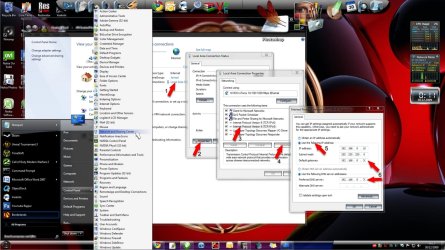
Click on "local area connection (1)" then follow the image clicking through to (5)
Once at 5 enter your IP address .... this will depend on what address your network is running on (I'm hoping that you know this already) I've given an example. If you router is set to eg 192.168.0.1 then you will need to enter this into the "default gateway" and "preferred DNS (6)" (I've marked the last number with an "X" as this could differ) When you enter your IP address just change the last number to anything between say 10 - 20 eg. 192.168.0.10
 

Attachments

  • static_IP.jpg
    static_IP.jpg
    181.1 KB · Views: 3,133

My Computer

Computer type
PC/Desktop
Computer Manufacturer/Model Number
Self Built
OS
Windows 7 Ultimate 64bit
CPU
AMD Phenom Quad core 9950 black edition
Motherboard
Gigabyte
Memory
16Gb
Graphics Card(s)
2x XFX Radeon 5850
Sound Card
PCI Express X-Fi Titanium / Logitech G35
Monitor(s) Displays
2x HP 2410i
Screen Resolution
1920x1080
Hard Drives
2x 500Gb Seagate
1x 300Gb Seagate
1x 1Tb Seagate
2x 1Tb Hitatchi
PSU
Jean Tech Storm 700W
Case
Cooler Master COSMOS S
Cooling
Akasa Evo Blue Pro
Keyboard
Logitech G15
Mouse
Mad Catz M.M.O. 7
Internet Speed
12mb
Yes both machines need their own IP address.

You should first try to leave the Homegroup from both machines and then set up the Homegroup again. Your new router should be working fine for Windows 7. It should also have no problem assigning IP addresses to each machine. These things are automatic these days far as I know.

http://www.sevenforums.com/tutorials/43980-homegroup-leave.html?filter
 
Last edited:

My Computer

Computer type
PC/Desktop
Computer Manufacturer/Model Number
Home built
OS
Windows 7 Ult, Windows 8.1 Pro,
CPU
Q9650-4.275GHz, E8600 4.5GHz, E6750-3.8GHz
Motherboard
Evga 780i FTW
Memory
G.Skill PC2 9600 1200Mhz 5 5 5 15 2T
Graphics Card(s)
GTX480
Sound Card
Asus Xonar D2
Monitor(s) Displays
HannsG
Screen Resolution
1680X1050
Hard Drives
GSkill Phoenix Pro 120GB SSD
PSU
ThermalTake Toughpower 1000Watt modular
Case
ThermalTake XaserV
Cooling
Xigmatek S1283
Keyboard
Logitech G15
Mouse
Logitech G9
Internet Speed
T1
Under device manager in both computers what comes up under Network adapters?

Desktop Network Adapter is: Realtek RTL8168C(P)/8111 PCI-E Gigabit Ethernet NIC (NDIS 6.20).

Laptop Adapters are: Atheros AR5B95 Wireless Network Adapter
An Atheros AR8132 PCI-E Fast Ethernet Controller
Also lists a Microsoft Virtual WiFi Miniport Adapter
 

My Computer

Computer Manufacturer/Model Number
Home Builder
OS
Windows 7 x64 Home Premium OEM
CPU
AMD PII x3 710
Motherboard
Gigabyte GA-MA78GM-US2H
Memory
Patriot Viper II 8GB (4 x 2GB) 240-Pin DDR2 PC8500
Graphics Card(s)
GIGABYTE GV-R467ZL-1GI Radeon HD 4670 1GB 128-bit DDR3 PCI
Sound Card
Onboard Audio Realtek ALC889A, 8 Channels
Monitor(s) Displays
ASUS VH226H 21.5" 2ms(GTG) HDMI Widescreen LCD Monitor
Screen Resolution
1920 x 1080
Hard Drives
1 ea. HITACHI 500GB SERIAL ATA/300 16MB BUFFER
2ea, Samsung 320GB Serial ATA 16MB Buffer
PSU
CoolMax 500W ATX
Case
Very, very old.......
Cooling
Never enough
Keyboard
Microsoft Wireless MultiMedia Keyboard 1.0A
Mouse
Microsoft Wireless Optical Mouse 2.0A
Internet Speed
DSL
You could always try using a static IP address on both machines.

Firstly Open "control panel" click on "network and sharing center"

Click on "local area connection (1)" then follow the image clicking through to (5)
Once at 5 enter your IP address .... this will depend on what address your network is running on (I'm hoping that you know this already) I've given an example. If you router is set to eg 192.168.0.1 then you will need to enter this into the "default gateway" and "preferred DNS (6)" (I've marked the last number with an "X" as this could differ) When you enter your IP address just change the last number to anything between say 10 - 20 eg. 192.168.0.10

Thanks Poo Man UK, I got the IP address changed to a static IP address on the laptop and allowed the desktop to aquire an IP address automatically. The 192.168.0.1 you referenced is correct.
For some reason I am still unable to access files on my laptop in the homegroup mode. There must be a setting on the laptop that has changed or that is blocking access from an outside computer. Checked out every permission I know of but no luck. I may disable the Kaspersky firewall on both machines and try that.
I can access files from the laptop that reside on my desktop via the homegroup without a problem, just can't go the other direction. Also my network configuration does not show the laptop and when I click on properties I get a popup that says unable to access laptop PC.
Win troubleshooting says everything is configured properly, but can't find a problem or resolution.
Anyhow not a big issue.....that's why God made jump drives. Thanks again for an expert tutorial in establishing the static IP address.

Cheers,

Jetrep
 

My Computer

Computer Manufacturer/Model Number
Home Builder
OS
Windows 7 x64 Home Premium OEM
CPU
AMD PII x3 710
Motherboard
Gigabyte GA-MA78GM-US2H
Memory
Patriot Viper II 8GB (4 x 2GB) 240-Pin DDR2 PC8500
Graphics Card(s)
GIGABYTE GV-R467ZL-1GI Radeon HD 4670 1GB 128-bit DDR3 PCI
Sound Card
Onboard Audio Realtek ALC889A, 8 Channels
Monitor(s) Displays
ASUS VH226H 21.5" 2ms(GTG) HDMI Widescreen LCD Monitor
Screen Resolution
1920 x 1080
Hard Drives
1 ea. HITACHI 500GB SERIAL ATA/300 16MB BUFFER
2ea, Samsung 320GB Serial ATA 16MB Buffer
PSU
CoolMax 500W ATX
Case
Very, very old.......
Cooling
Never enough
Keyboard
Microsoft Wireless MultiMedia Keyboard 1.0A
Mouse
Microsoft Wireless Optical Mouse 2.0A
Internet Speed
DSL
Back
Top