Solved Ip already assigned to different device.

VladimirSD

New member
Local time
5:59 PM
Messages
10
So i got the error saying that my computer was using the same IP address as another device in the house... Well i went into command prompt and did ipconfig /release ipconfig /renew and restarted my computer and that didn't work. Now when i use Ethernet my internet doesn't work but i connect to my WiFi and the internet cuts out every so often. Excuse my language but What the hell is going on? I'm honestly not sure what I'm doing here anymore... Help me please i'm really confused and have almost no time to fix this...
 

My Computer

OS
Windows 7 Home Premium 64bit
Memory
3 GB
Graphics Card(s)
nVidia GTX 550 ti
Screen Resolution
1920 x 1080
Hard Drives
1000 GB HDD
PSU
Corsair TX600W
Welcome to Seven Forums,

By any chance do you have any devices that you have assigned Static IP(s)? This need to be excluded or outside of your DHCP range in your router configuration to avoid conflicting IPs in your network. Modern routers will show the IP/Mac Addresses of each device in your network.

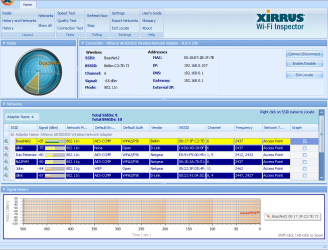
For your wireless issue can you please install and run Xirrus Wi-Fi Inspector?
To run Xirrus Wi-Fi Inspector, double click the Xirrus icon on your Desktop, you may use the Windows 7 snipping tool to crop or Paint by tapping the Print screen key on your keyboard, open up Paint (Click on Start>All Programs>Accessories>Paint) then choose Edit from the Menu and select Paste, then save it and please attach the file on your next post.
 
Last edited:

My Computer

Computer Manufacturer/Model Number
Lenovo Desktop/Samsung Laptop
OS
Win7 & Win8 64bit
CPU
Intel i5
Internet Speed
Charter-20 Mbps
Antivirus
Avast
Browser
FF, IE9 and Chrome
Ok i uploaded a picture of the xirrus program and ipconfig /all in cmd.
 

Attachments

  • Capture1.PNG
    Capture1.PNG
    48.4 KB · Views: 12
  • Capture.PNG
    Capture.PNG
    11.7 KB · Views: 11

My Computer

OS
Windows 7 Home Premium 64bit
Memory
3 GB
Graphics Card(s)
nVidia GTX 550 ti
Screen Resolution
1920 x 1080
Hard Drives
1000 GB HDD
PSU
Corsair TX600W
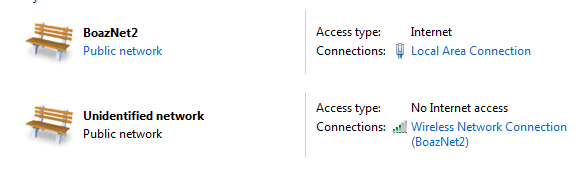
I also thought i'd add this because this confused me so much.
 

Attachments

  • Capture2.PNG
    Capture2.PNG
    6.3 KB · Views: 7

My Computer

OS
Windows 7 Home Premium 64bit
Memory
3 GB
Graphics Card(s)
nVidia GTX 550 ti
Screen Resolution
1920 x 1080
Hard Drives
1000 GB HDD
PSU
Corsair TX600W
It seems as something on your LAN is getting or has been assigned a Static IP that your computers wired NIC is trying to use.

That unidentified network may be a Guest network on your router. If you haven't turned off that feature it is best to do so. Or if you feel you need or want it set it to a different SSID name and make sure you assign a Password to it.

You should try turning everything off, router, all computers, phones and pads. Then power up the router and one device at a time. First the computer that is having the conflict.

Could also be someone hacked into your wireless network and has changed some settings or assigned themselves a static IP that your computer normally gets.

Might be best to change the wireless password.
 

My Computer

OS
7 x64
Your ipconfig /all shows you have DHCP enabled on your system on wireless and ethernet connection no conflict there.

Another computer/s in the household may have a fixed(static) ip address please check other computers or devices in the household for any ip addresses that match those above.

Also you can change those connections from a public network to a home network by right clicking on public network and selecting Home network.

Edit: Also try changing the channel on your router to channel to avoid interference.
 

My Computer

Computer Manufacturer/Model Number
HP Compaq 6715B
OS
Windows 7 Ultimate x64
CPU
AMD turion 64x2 TL-64 2.2Ghz
Motherboard
HC030
Memory
Sodimm DDR2 4GB
Graphics Card(s)
ATI Radeon 1250 128MB IGP
Hard Drives
Fujitsu Siemens 500GB sata 3.0 Gb/s
I'm resetting my router. Perhaps this will stop it from reassigning the same ip to different devices. Will let you know if this works thanks for all the help.
 

My Computer

OS
Windows 7 Home Premium 64bit
Memory
3 GB
Graphics Card(s)
nVidia GTX 550 ti
Screen Resolution
1920 x 1080
Hard Drives
1000 GB HDD
PSU
Corsair TX600W
For everyone who may have had this problem. My friend called the router company and had to type in the default gateway into the browser and reboot it manually then had to do some other things he couldn't explain properly. But for all who have this problem, just call the router company and they will help out.
 

My Computer

OS
Windows 7 Home Premium 64bit
Memory
3 GB
Graphics Card(s)
nVidia GTX 550 ti
Screen Resolution
1920 x 1080
Hard Drives
1000 GB HDD
PSU
Corsair TX600W
Glad your issue is now resolved thanks for posting back.
 

My Computer

Computer Manufacturer/Model Number
HP Compaq 6715B
OS
Windows 7 Ultimate x64
CPU
AMD turion 64x2 TL-64 2.2Ghz
Motherboard
HC030
Memory
Sodimm DDR2 4GB
Graphics Card(s)
ATI Radeon 1250 128MB IGP
Hard Drives
Fujitsu Siemens 500GB sata 3.0 Gb/s
Back
Top