Solved ipconfig/ all unrecognized or incomplete command line

brenassi

New member
Local time
10:00 AM
Messages
7
hi
was working just hours ago (ipconfig/ all) then had to do a hard reset on router as i forgot password and now when i try ipconfig it doesn't recognize.
have tried turning pc, modern and router off. the ipconfig.exe is in the folder its meant to be in. i can only think I've done something not quite right in setting up router perhaps, normally i think the ip and or subnet, dns, gateway change when setting up router in this case they have remained the same
 

My Computer

Computer type
PC/Desktop
Computer Manufacturer/Model Number
custom build
OS
Win 7 pro 64bit
CPU
intell i7 3770k
Memory
8gb
Graphics Card(s)
amd radeon HD 7970
Monitor(s) Displays
view sonic 22"
Screen Resolution
1920x1080
Hard Drives
1 TB
PSU
500 watt
Case
gladiator 600
Cooling
air
Keyboard
Logitech g19
Mouse
cyborg rat 9
Internet Speed
100mbps
Antivirus
Avg, Anti malwarebytes pro
Browser
ff, chrome
Welcome to the Seven Forums.

It sounds like the environmental variable named Path has lost some info or some files got messed up.

Code:
[COLOR=Red]%SystemRoot%\system32[/COLOR];%SystemRoot%;%SystemRoot%\System32\Wbem;%SYSTEMROOT%\System32\WindowsPowerShell\v1.0\
Without that part, ipconfig might fail to work.
The Path info in the code box above is from a fresh install of W7 - not much installed. You don't want to copy/paste the info above into your Path variable - doing so could break other things. It might be best if you post what you have for your Path variable and let us decide how to go forward from there. Let us know if you need the steps to find/post that info.

You might also want to run this scan:
http://www.sevenforums.com/tutorials/1538-sfc-scannow-command-system-file-checker.html
 

My Computer

Computer type
Laptop
Computer Manufacturer/Model Number
Employer provided Dell Latitude
OS
W7 Pro SP1 64bit
CPU
i7
Memory
8GB
Graphics Card(s)
Intel HD Graphics
Hard Drives
crappy SSD
Antivirus
Employer mandated Symantec Endpoint Protection
Browser
Pale Moon 64bit, IE11 64bit & Chrome 64bit
Hi thanks for fast reply. yes will need steps to find it please
 

My Computer

Computer type
PC/Desktop
Computer Manufacturer/Model Number
custom build
OS
Win 7 pro 64bit
CPU
intell i7 3770k
Memory
8gb
Graphics Card(s)
amd radeon HD 7970
Monitor(s) Displays
view sonic 22"
Screen Resolution
1920x1080
Hard Drives
1 TB
PSU
500 watt
Case
gladiator 600
Cooling
air
Keyboard
Logitech g19
Mouse
cyborg rat 9
Internet Speed
100mbps
Antivirus
Avg, Anti malwarebytes pro
Browser
ff, chrome
Let's run the SFC scan first and see if that fixes things.

I've confirmed that ipconfig.exe is one of the files that the scan checks & replaces if it can.
 

My Computer

Computer type
Laptop
Computer Manufacturer/Model Number
Employer provided Dell Latitude
OS
W7 Pro SP1 64bit
CPU
i7
Memory
8GB
Graphics Card(s)
Intel HD Graphics
Hard Drives
crappy SSD
Antivirus
Employer mandated Symantec Endpoint Protection
Browser
Pale Moon 64bit, IE11 64bit & Chrome 64bit
run SFC scan removed 230 errors still no fix though
 

My Computer

Computer type
PC/Desktop
Computer Manufacturer/Model Number
custom build
OS
Win 7 pro 64bit
CPU
intell i7 3770k
Memory
8gb
Graphics Card(s)
amd radeon HD 7970
Monitor(s) Displays
view sonic 22"
Screen Resolution
1920x1080
Hard Drives
1 TB
PSU
500 watt
Case
gladiator 600
Cooling
air
Keyboard
Logitech g19
Mouse
cyborg rat 9
Internet Speed
100mbps
Antivirus
Avg, Anti malwarebytes pro
Browser
ff, chrome
Restart the computer and run the SFC scan again please.

I'll work on the screens to get you to the path info.
 

My Computer

Computer type
Laptop
Computer Manufacturer/Model Number
Employer provided Dell Latitude
OS
W7 Pro SP1 64bit
CPU
i7
Memory
8GB
Graphics Card(s)
Intel HD Graphics
Hard Drives
crappy SSD
Antivirus
Employer mandated Symantec Endpoint Protection
Browser
Pale Moon 64bit, IE11 64bit & Chrome 64bit
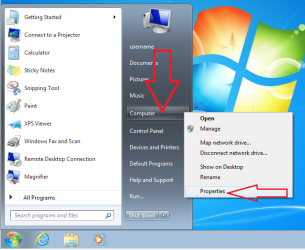
Click on Start, then right click on Computer and select Properties.

path1.png

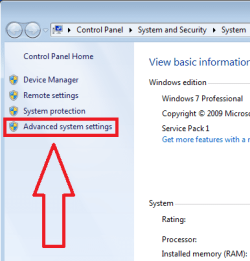
path2.png

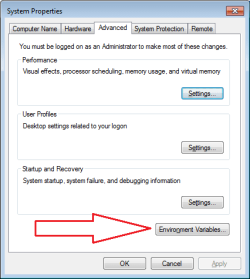
path3.png


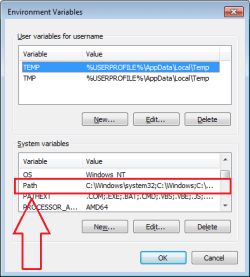
Scroll down a bit and then double click on Path.

path4.png


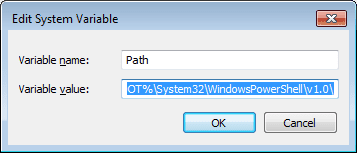
The last window (shown below) should have the Path info already selected.

path5.png

Just copy/paste/post that info and Cancel your way out of those windows.
 

My Computer

Computer type
Laptop
Computer Manufacturer/Model Number
Employer provided Dell Latitude
OS
W7 Pro SP1 64bit
CPU
i7
Memory
8GB
Graphics Card(s)
Intel HD Graphics
Hard Drives
crappy SSD
Antivirus
Employer mandated Symantec Endpoint Protection
Browser
Pale Moon 64bit, IE11 64bit & Chrome 64bit
C:\Program Files (x86)\NVIDIA Corporation\PhysX\Common;C:\Program Files (x86)\AMD APP\bin\x86_64;C:\Program Files (x86)\AMD APP\bin\x86;C:\Program Files (x86)\Intel\iCLS Client\;C:\Program Files\Intel\iCLS Client\;%SystemRoot%\system32;%SystemRoot%;%SystemRoot%\System32\Wbem;%SYSTEMROOT%\System32\WindowsPowerShell\v1.0\;C:\Program Files\Intel\Intel(R) Management Engine Components\DAL;C:\Program Files\Intel\Intel(R) Management Engine Components\IPT;C:\Program Files (x86)\Intel\Intel(R) Management Engine Components\DAL;C:\Program Files (x86)\Intel\Intel(R) Management Engine Components\IPT;C:\Program Files (x86)\ATI Technologies\ATI.ACE\Core-Static
 

My Computer

Computer type
PC/Desktop
Computer Manufacturer/Model Number
custom build
OS
Win 7 pro 64bit
CPU
intell i7 3770k
Memory
8gb
Graphics Card(s)
amd radeon HD 7970
Monitor(s) Displays
view sonic 22"
Screen Resolution
1920x1080
Hard Drives
1 TB
PSU
500 watt
Case
gladiator 600
Cooling
air
Keyboard
Logitech g19
Mouse
cyborg rat 9
Internet Speed
100mbps
Antivirus
Avg, Anti malwarebytes pro
Browser
ff, chrome
C:\Program Files (x86)\NVIDIA Corporation\PhysX\Common;C:\Program Files (x86)\AMD APP\bin\x86_64;C:\Program Files (x86)\AMD APP\bin\x86;C:\Program Files (x86)\Intel\iCLS Client\;C:\Program Files\Intel\iCLS Client\;%SystemRoot%\system32;%SystemRoot%;%SystemRoot%\System32\Wbem;%SYSTEMROOT%\System32\WindowsPowerShell\v1.0\;C:\Program Files\Intel\Intel(R) Management Engine Components\DAL;C:\Program Files\Intel\Intel(R) Management Engine Components\IPT;C:\Program Files (x86)\Intel\Intel(R) Management Engine Components\DAL;C:\Program Files (x86)\Intel\Intel(R) Management Engine Components\IPT;C:\Program Files (x86)\ATI Technologies\ATI.ACE\Core-Static
So much for that idea. The correct info is in there to find that file named ipconfig.exe.

Can you manually find that file?

Did the second SFC scan find/fix things.

Hopefully, one of the scans will eventually say no integrity problems found.
 

My Computer

Computer type
Laptop
Computer Manufacturer/Model Number
Employer provided Dell Latitude
OS
W7 Pro SP1 64bit
CPU
i7
Memory
8GB
Graphics Card(s)
Intel HD Graphics
Hard Drives
crappy SSD
Antivirus
Employer mandated Symantec Endpoint Protection
Browser
Pale Moon 64bit, IE11 64bit & Chrome 64bit
No need for any of that as it's a simple syntax error. Try ipconfig /all, not ipconfig/ all
 

My Computer

Computer type
PC/Desktop
Computer Manufacturer/Model Number
PC Specialist Custom
OS
Windows 7 Pro 64 bit
CPU
Intel i5
Motherboard
ASUS® H81M-PLUS
Memory
8GB KINGSTON DUAL-DDR3 1600MHz
Graphics Card(s)
2GB AMD RADEON™ R7 250
Hard Drives
120GB KINGSTON V300 SSD
1TB WD CAVIAR BLACK WD1003FZEX
yes I manually found it before i posted its where is meant to be. 2nd scan found 2 errors and 3rd scan found 1. i just noticed if i type this into run cmd /k ipconfig /all the info i need is there however just cant do it while in cmd even running as admin
 

My Computer

Computer type
PC/Desktop
Computer Manufacturer/Model Number
custom build
OS
Win 7 pro 64bit
CPU
intell i7 3770k
Memory
8gb
Graphics Card(s)
amd radeon HD 7970
Monitor(s) Displays
view sonic 22"
Screen Resolution
1920x1080
Hard Drives
1 TB
PSU
500 watt
Case
gladiator 600
Cooling
air
Keyboard
Logitech g19
Mouse
cyborg rat 9
Internet Speed
100mbps
Antivirus
Avg, Anti malwarebytes pro
Browser
ff, chrome
worked thanks alot. strange though was doing it with the space previously
 

My Computer

Computer type
PC/Desktop
Computer Manufacturer/Model Number
custom build
OS
Win 7 pro 64bit
CPU
intell i7 3770k
Memory
8gb
Graphics Card(s)
amd radeon HD 7970
Monitor(s) Displays
view sonic 22"
Screen Resolution
1920x1080
Hard Drives
1 TB
PSU
500 watt
Case
gladiator 600
Cooling
air
Keyboard
Logitech g19
Mouse
cyborg rat 9
Internet Speed
100mbps
Antivirus
Avg, Anti malwarebytes pro
Browser
ff, chrome
I should have mentioned that it is best to restart the computer after each SFC scan.

Try a few more until you get a clean on with no integrity errors
or
until it says that it can not fix what it found.
 

My Computer

Computer type
Laptop
Computer Manufacturer/Model Number
Employer provided Dell Latitude
OS
W7 Pro SP1 64bit
CPU
i7
Memory
8GB
Graphics Card(s)
Intel HD Graphics
Hard Drives
crappy SSD
Antivirus
Employer mandated Symantec Endpoint Protection
Browser
Pale Moon 64bit, IE11 64bit & Chrome 64bit
Good to hear that it is working :-)
 

My Computer

Computer type
Laptop
Computer Manufacturer/Model Number
Employer provided Dell Latitude
OS
W7 Pro SP1 64bit
CPU
i7
Memory
8GB
Graphics Card(s)
Intel HD Graphics
Hard Drives
crappy SSD
Antivirus
Employer mandated Symantec Endpoint Protection
Browser
Pale Moon 64bit, IE11 64bit & Chrome 64bit
Thanks for the time you've been a great help. No errors on 4th scan and restart each time. Will be marking thread as solved
 

My Computer

Computer type
PC/Desktop
Computer Manufacturer/Model Number
custom build
OS
Win 7 pro 64bit
CPU
intell i7 3770k
Memory
8gb
Graphics Card(s)
amd radeon HD 7970
Monitor(s) Displays
view sonic 22"
Screen Resolution
1920x1080
Hard Drives
1 TB
PSU
500 watt
Case
gladiator 600
Cooling
air
Keyboard
Logitech g19
Mouse
cyborg rat 9
Internet Speed
100mbps
Antivirus
Avg, Anti malwarebytes pro
Browser
ff, chrome
You are welcome...

...and you have helped me too :-)

I've been looking for a case when it took multiple SFC scans to fix multiple problems. Your case is the first one that I've ever seen require that. There is some debate as to the need to do the scan over and over.
 

My Computer

Computer type
Laptop
Computer Manufacturer/Model Number
Employer provided Dell Latitude
OS
W7 Pro SP1 64bit
CPU
i7
Memory
8GB
Graphics Card(s)
Intel HD Graphics
Hard Drives
crappy SSD
Antivirus
Employer mandated Symantec Endpoint Protection
Browser
Pale Moon 64bit, IE11 64bit & Chrome 64bit
Back
Top