IPv6 and Networking Homegroups

latherton

New member
Local time
2:35 PM
Messages
20
I am trying to connect using homegroups, but am new to Networking; not sure where the problem has originated. I am operating Windows 7 on a desktop and Laptop through wireless connection - with AVG virus software currently.
I have checked my IPv6 connectivity and it states - no internet access; Please advise how to turn this on, or step by step instructions to help as this is my first time using.
 

My Computer

Computer Manufacturer/Model Number
Dell
OS
Windows 7
I am trying to connect using homegroups, but am new to Networking; not sure where the problem has originated. I am operating Windows 7 on a desktop and Laptop through wireless connection - with AVG virus software currently.
I have checked my IPv6 connectivity and it states - no internet access; Please advise how to turn this on, or step by step instructions to help as this is my first time using.

Hi and welcome Latherton

There are many things that could be causing that. It could easily be AVG. It could be homegroup itself.

Can you tell us more about your network setup

router, cable modem, pc's wifi cards, etc


thanks

ken
 

My Computer

Computer Manufacturer/Model Number
HP Pavillion dv-7 1005 Tx
OS
Win 8 Release candidate 8400
CPU
[email protected]
Memory
4 gigs
Graphics Card(s)
Nvidia 9600M
Sound Card
HD built-in
Monitor(s) Displays
17" Wxga
Screen Resolution
1440x900
Cooling
none
Internet Speed
45Mb down 5Mb up
I am trying to connect using homegroups, but am new to Networking; not sure where the problem has originated. I am operating Windows 7 on a desktop and Laptop through wireless connection - with AVG virus software currently.
I have checked my IPv6 connectivity and it states - no internet access; Please advise how to turn this on, or step by step instructions to help as this is my first time using.

IPv6 is used only on the LAN, it says "no internet connection" for everyone.

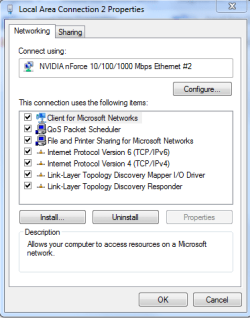
It works perfectly when it looks like the first picture.

You just need to make sure it's check as enabled like in the second picture.

Although you might need to give AVG firewall some permissions to work correctly.

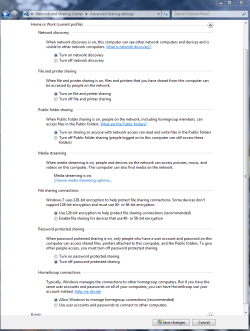
Go into Advanced Network settings and set Homegroup up like in the third picture.
 

Attachments

  • IPv6 no internet conn..PNG
    IPv6 no internet conn..PNG
    10.4 KB · Views: 56
  • IPv6 check.PNG
    IPv6 check.PNG
    13.1 KB · Views: 72
  • Home or work homegroup enable.PNG
    Home or work homegroup enable.PNG
    45 KB · Views: 414

My Computer

Computer type
PC/Desktop
Computer Manufacturer/Model Number
Home built
OS
Windows 7 Ult, Windows 8.1 Pro,
CPU
Q9650-4.275GHz, E8600 4.5GHz, E6750-3.8GHz
Motherboard
Evga 780i FTW
Memory
G.Skill PC2 9600 1200Mhz 5 5 5 15 2T
Graphics Card(s)
GTX480
Sound Card
Asus Xonar D2
Monitor(s) Displays
HannsG
Screen Resolution
1680X1050
Hard Drives
GSkill Phoenix Pro 120GB SSD
PSU
ThermalTake Toughpower 1000Watt modular
Case
ThermalTake XaserV
Cooling
Xigmatek S1283
Keyboard
Logitech G15
Mouse
Logitech G9
Internet Speed
T1
Thank you, it is checked as in picture above; I am a very new user and know that I am missing details. My laptop is currently set up through a wireless linksys router. If I remove AVG will it help?
 

My Computer

Computer Manufacturer/Model Number
Dell
OS
Windows 7
Thank you, it is checked as in picture above; I am a very new user and know that I am missing details. My laptop is currently set up through a wireless linksys router. If I remove AVG will it help?

For more details have a look at this Msoft link.
Share libraries with your homegroup

AVG may cause problems, you might want to disable it before you set up the network.
 

My Computer

Computer type
PC/Desktop
Computer Manufacturer/Model Number
Home built
OS
Windows 7 Ult, Windows 8.1 Pro,
CPU
Q9650-4.275GHz, E8600 4.5GHz, E6750-3.8GHz
Motherboard
Evga 780i FTW
Memory
G.Skill PC2 9600 1200Mhz 5 5 5 15 2T
Graphics Card(s)
GTX480
Sound Card
Asus Xonar D2
Monitor(s) Displays
HannsG
Screen Resolution
1680X1050
Hard Drives
GSkill Phoenix Pro 120GB SSD
PSU
ThermalTake Toughpower 1000Watt modular
Case
ThermalTake XaserV
Cooling
Xigmatek S1283
Keyboard
Logitech G15
Mouse
Logitech G9
Internet Speed
T1
I am using AVG 9 Anti-virus on several networked machines (x64 and x32) and none have required any changes with AVG to access each other or the internet.
 

My Computer

Computer type
PC/Desktop
Computer Manufacturer/Model Number
Custom
OS
7 x64 Ultimate
CPU
AMD Ryzen 5
Motherboard
Gigabyte GA-AB350-Gaming
Memory
16GB DDR4
Graphics Card(s)
Radeon R7 360
Monitor(s) Displays
2 x Dell U2518D
Screen Resolution
2560x1440 2560x1440
Hard Drives
WD 500GB x2
Samsung SSD 128MB (OS)
XPG SX8200 Pro M.2 2280 1TB
PSU
Antec 500
Cooling
Hyper 212 EVO
Keyboard
Logitech cordless K800
Mouse
Logitech M510
Antivirus
Avira
I am using AVG 9 Anti-virus on several networked machines (x64 and x32) and none have required any changes with AVG to access each other or the internet.

Well then you should be fine then right?
 

My Computer

Computer type
PC/Desktop
Computer Manufacturer/Model Number
Home built
OS
Windows 7 Ult, Windows 8.1 Pro,
CPU
Q9650-4.275GHz, E8600 4.5GHz, E6750-3.8GHz
Motherboard
Evga 780i FTW
Memory
G.Skill PC2 9600 1200Mhz 5 5 5 15 2T
Graphics Card(s)
GTX480
Sound Card
Asus Xonar D2
Monitor(s) Displays
HannsG
Screen Resolution
1680X1050
Hard Drives
GSkill Phoenix Pro 120GB SSD
PSU
ThermalTake Toughpower 1000Watt modular
Case
ThermalTake XaserV
Cooling
Xigmatek S1283
Keyboard
Logitech G15
Mouse
Logitech G9
Internet Speed
T1
Thanks Roger - I have the same set up it sounds - AVG 9 and desktop 32 bit Windows; Laptop 64 bit windows. What am I doing wrong that I am unable to see my network and join the homegroup? Any help would be very much appreciated
 

My Computer

Computer Manufacturer/Model Number
Dell
OS
Windows 7
I am using AVG 9 Anti-virus on several networked machines (x64 and x32) and none have required any changes with AVG to access each other or the internet.

Well then you should be fine then right?

Should be ... but still no homegroup!
 

My Computer

Computer type
PC/Desktop
Computer Manufacturer/Model Number
Custom
OS
7 x64 Ultimate
CPU
AMD Ryzen 5
Motherboard
Gigabyte GA-AB350-Gaming
Memory
16GB DDR4
Graphics Card(s)
Radeon R7 360
Monitor(s) Displays
2 x Dell U2518D
Screen Resolution
2560x1440 2560x1440
Hard Drives
WD 500GB x2
Samsung SSD 128MB (OS)
XPG SX8200 Pro M.2 2280 1TB
PSU
Antec 500
Cooling
Hyper 212 EVO
Keyboard
Logitech cordless K800
Mouse
Logitech M510
Antivirus
Avira
Thanks Roger - I have the same set up it sounds - AVG 9 and desktop 32 bit Windows; Laptop 64 bit windows. What am I doing wrong that I am unable to see my network and join the homegroup? Any help would be very much appreciated


Have you set both computers to the same workgroup? At least then you would know if your network fundamentals are sound and you can isolate the issues to homegroup.
 

My Computer

Computer type
PC/Desktop
Computer Manufacturer/Model Number
Custom
OS
7 x64 Ultimate
CPU
AMD Ryzen 5
Motherboard
Gigabyte GA-AB350-Gaming
Memory
16GB DDR4
Graphics Card(s)
Radeon R7 360
Monitor(s) Displays
2 x Dell U2518D
Screen Resolution
2560x1440 2560x1440
Hard Drives
WD 500GB x2
Samsung SSD 128MB (OS)
XPG SX8200 Pro M.2 2280 1TB
PSU
Antec 500
Cooling
Hyper 212 EVO
Keyboard
Logitech cordless K800
Mouse
Logitech M510
Antivirus
Avira
Chev65; Thanks for the link - I have set up the homegroup - I only want to see it from my laptop - do I have to select to share in order to view this?
 

My Computer

Computer Manufacturer/Model Number
Dell
OS
Windows 7
There are quite a few problems with wireless adaptors lately, hard to say for sure if that might be it. Is the laptop plugged in or wireless?
 

My Computer

Computer type
PC/Desktop
Computer Manufacturer/Model Number
Home built
OS
Windows 7 Ult, Windows 8.1 Pro,
CPU
Q9650-4.275GHz, E8600 4.5GHz, E6750-3.8GHz
Motherboard
Evga 780i FTW
Memory
G.Skill PC2 9600 1200Mhz 5 5 5 15 2T
Graphics Card(s)
GTX480
Sound Card
Asus Xonar D2
Monitor(s) Displays
HannsG
Screen Resolution
1680X1050
Hard Drives
GSkill Phoenix Pro 120GB SSD
PSU
ThermalTake Toughpower 1000Watt modular
Case
ThermalTake XaserV
Cooling
Xigmatek S1283
Keyboard
Logitech G15
Mouse
Logitech G9
Internet Speed
T1
I am a very novice user - How do I set to 'workgroup'? I would really like to use homegroup as this is why I purchased Windows 7
 

My Computer

Computer Manufacturer/Model Number
Dell
OS
Windows 7
Wireless laptop - but it is only 2 months old
 

My Computer

Computer Manufacturer/Model Number
Dell
OS
Windows 7
I am a very novice user - How do I set to 'workgroup'? I would really like to use homegroup as this is why I purchased Windows 7


Start > Computer > [right click] Properties

Computer Name, domain, workgroup settings

Change Settings

Name your computer and name a workgroup. All your computers should have the same workgroup name. Leave domain (Network ID) alone.
 

My Computer

Computer type
PC/Desktop
Computer Manufacturer/Model Number
Custom
OS
7 x64 Ultimate
CPU
AMD Ryzen 5
Motherboard
Gigabyte GA-AB350-Gaming
Memory
16GB DDR4
Graphics Card(s)
Radeon R7 360
Monitor(s) Displays
2 x Dell U2518D
Screen Resolution
2560x1440 2560x1440
Hard Drives
WD 500GB x2
Samsung SSD 128MB (OS)
XPG SX8200 Pro M.2 2280 1TB
PSU
Antec 500
Cooling
Hyper 212 EVO
Keyboard
Logitech cordless K800
Mouse
Logitech M510
Antivirus
Avira
There are tutorials like this one all over the internet. This should make it easy for you latherton. Homegroup will only work with other Windows 7 computers in the network.
Set up HomeGroup in Windows 7
 

My Computer

Computer type
PC/Desktop
Computer Manufacturer/Model Number
Home built
OS
Windows 7 Ult, Windows 8.1 Pro,
CPU
Q9650-4.275GHz, E8600 4.5GHz, E6750-3.8GHz
Motherboard
Evga 780i FTW
Memory
G.Skill PC2 9600 1200Mhz 5 5 5 15 2T
Graphics Card(s)
GTX480
Sound Card
Asus Xonar D2
Monitor(s) Displays
HannsG
Screen Resolution
1680X1050
Hard Drives
GSkill Phoenix Pro 120GB SSD
PSU
ThermalTake Toughpower 1000Watt modular
Case
ThermalTake XaserV
Cooling
Xigmatek S1283
Keyboard
Logitech G15
Mouse
Logitech G9
Internet Speed
T1
Thanks, I think I have been through just about every tutorial in last 3 days; I am definitely missing something.
 

My Computer

Computer Manufacturer/Model Number
Dell
OS
Windows 7

My Computer

Computer type
PC/Desktop
Computer Manufacturer/Model Number
Home built
OS
Windows 7 Ult, Windows 8.1 Pro,
CPU
Q9650-4.275GHz, E8600 4.5GHz, E6750-3.8GHz
Motherboard
Evga 780i FTW
Memory
G.Skill PC2 9600 1200Mhz 5 5 5 15 2T
Graphics Card(s)
GTX480
Sound Card
Asus Xonar D2
Monitor(s) Displays
HannsG
Screen Resolution
1680X1050
Hard Drives
GSkill Phoenix Pro 120GB SSD
PSU
ThermalTake Toughpower 1000Watt modular
Case
ThermalTake XaserV
Cooling
Xigmatek S1283
Keyboard
Logitech G15
Mouse
Logitech G9
Internet Speed
T1
I think the main problem is that my laptop is not allowing me to access the network that my desktop is using.... I have no idea how to correct this.
 

My Computer

Computer Manufacturer/Model Number
Dell
OS
Windows 7
If you already set up homegroups up on the desktop first, you should have recieved a homegroup password when you did that. For me, the second I install Windows 7 on another machine in my network, I'm greeted with a prompt to type in the homegroup password right then and there and that's it, I'am connected.

I'am not sure if you have gone through that procedure or not but that is the way it's supposed to work.
 

My Computer

Computer type
PC/Desktop
Computer Manufacturer/Model Number
Home built
OS
Windows 7 Ult, Windows 8.1 Pro,
CPU
Q9650-4.275GHz, E8600 4.5GHz, E6750-3.8GHz
Motherboard
Evga 780i FTW
Memory
G.Skill PC2 9600 1200Mhz 5 5 5 15 2T
Graphics Card(s)
GTX480
Sound Card
Asus Xonar D2
Monitor(s) Displays
HannsG
Screen Resolution
1680X1050
Hard Drives
GSkill Phoenix Pro 120GB SSD
PSU
ThermalTake Toughpower 1000Watt modular
Case
ThermalTake XaserV
Cooling
Xigmatek S1283
Keyboard
Logitech G15
Mouse
Logitech G9
Internet Speed
T1
Back
Top