ipv6 how do i turn it on

Maxheadroom

New member
Power User
VIP
Local time
4:54 PM
Messages
246
trying to connect to homegroup but my ipv6 is turned off by administrator (dont remember doing that)
how do i turn it back on?
thanks
 

My Computer

Computer Manufacturer/Model Number
home built
OS
windows 7 64bit build 7600
CPU
Intel I7 920
Motherboard
ASUS P6T Deluxe V2
Memory
Corsair 6GB (3x2GB) 1600MHz Triple Channel i7
Graphics Card(s)
XFX RADEON HD 5870
Sound Card
Creative Xfi Elite pro
Monitor(s) Displays
Hyundai W240D 24" Samsung Syncmaster 930
Screen Resolution
1920x1200 and 1280x1024
Hard Drives
WD Velociraptor 150gb
Western Digital WD7502ABYS 750GB Raid Edition
PSU
Corsair 850W TX Series PSU
Case
Coolermaster HAF 932 Full Tower
Cooling
Noctua NH-U12P
Keyboard
logitech G15 orange
Mouse
logitech mx revolution
Internet Speed
13mb
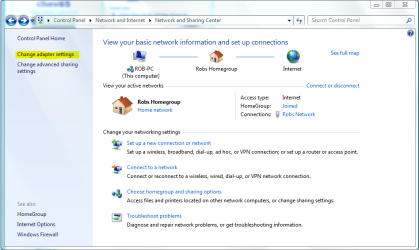
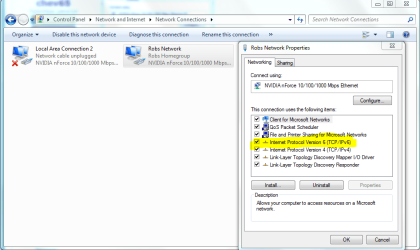
Usually just unchecking or checking it in network properties will turn it on or off.
 

Attachments

  • CHANGE ADAPTOR SETTINGS.PNG
    CHANGE ADAPTOR SETTINGS.PNG
    125.5 KB · Views: 887
  • IPv6 HIGHLIGHTED.PNG
    IPv6 HIGHLIGHTED.PNG
    105.6 KB · Views: 1,440

My Computer

Computer type
PC/Desktop
Computer Manufacturer/Model Number
Home built
OS
Windows 7 Ult, Windows 8.1 Pro,
CPU
Q9650-4.275GHz, E8600 4.5GHz, E6750-3.8GHz
Motherboard
Evga 780i FTW
Memory
G.Skill PC2 9600 1200Mhz 5 5 5 15 2T
Graphics Card(s)
GTX480
Sound Card
Asus Xonar D2
Monitor(s) Displays
HannsG
Screen Resolution
1680X1050
Hard Drives
GSkill Phoenix Pro 120GB SSD
PSU
ThermalTake Toughpower 1000Watt modular
Case
ThermalTake XaserV
Cooling
Xigmatek S1283
Keyboard
Logitech G15
Mouse
Logitech G9
Internet Speed
T1
trying to connect to homegroup but my ipv6 is turned off by administrator (dont remember doing that)
how do i turn it back on?
thanks

goto your network and sharing centre then click change adapter settings then right click properties on your network adapter and you should be able to select the "tick box" or install your ipv6 :geek:

hope this helps :)
 

My Computer

Computer Manufacturer/Model Number
built my own
OS
win7 ultimate / virtual box
CPU
Intel Core i7 3770K,1155, Ivy Bridge
Motherboard
MSI Z77A-G43
Memory
GSkill Ripjaws Z Series 1600 CL 9.0 16GB
Graphics Card(s)
KFA2 GeForce GTX 670 EX OC 2048MB GDDR5 PCI-E gfx card
Sound Card
onboard Nvidia HDMI audio
Monitor(s) Displays
ASUS VK222H 22" widescreen LCD monitor
Screen Resolution
1680x1050
Hard Drives
Kingston 128gb SSD
OCZ Vertex 90gb SSD
500GB WDCaviar 16mb 5000KS
320GB WDCaviar 16mb 3200AAKS sata 2
1TB Samsung 16mb HD103SJ sata 2
PSU
Corsair HX 750W ATX2.2 Modular
Cooling
Antec 25 Kuhler H2O 620
Keyboard
logitech
Mouse
logitech MX518
Internet Speed
7mb adsl
the internet prtocol version 6 (TCP/IPv6) is already ticked in there, when i highlight it i only get the option to install, the uninstall option is grayed out.
so if i click on install i get asked to select network feature type if i then click on either client or service i then get the window with
"click the network service that you want to install, then click ok. if you have an installation disk for this feature click have disc"
" but the window is empty so no network service to choose and i dont know what disc its going on about.
 

My Computer

Computer Manufacturer/Model Number
home built
OS
windows 7 64bit build 7600
CPU
Intel I7 920
Motherboard
ASUS P6T Deluxe V2
Memory
Corsair 6GB (3x2GB) 1600MHz Triple Channel i7
Graphics Card(s)
XFX RADEON HD 5870
Sound Card
Creative Xfi Elite pro
Monitor(s) Displays
Hyundai W240D 24" Samsung Syncmaster 930
Screen Resolution
1920x1200 and 1280x1024
Hard Drives
WD Velociraptor 150gb
Western Digital WD7502ABYS 750GB Raid Edition
PSU
Corsair 850W TX Series PSU
Case
Coolermaster HAF 932 Full Tower
Cooling
Noctua NH-U12P
Keyboard
logitech G15 orange
Mouse
logitech mx revolution
Internet Speed
13mb
the internet prtocol version 6 (TCP/IPv6) is already ticked in there, when i highlight it i only get the option to install, the uninstall option is grayed out.
so if i click on install i get asked to select network feature type if i then click on either client or service i then get the window with
"click the network service that you want to install, then click ok. if you have an installation disk for this feature click have disc"
" but the window is empty so no network service to choose and i dont know what disc its going on about.

Try the steps listed here to get it working again. I can't say for sure what the problem might be because I have never had a single problem getting IPv6 to work for me, basically it just works with no user input required.

Cannot join workgroup because "IPV6 is disabled by administrator".
 

My Computer

Computer type
PC/Desktop
Computer Manufacturer/Model Number
Home built
OS
Windows 7 Ult, Windows 8.1 Pro,
CPU
Q9650-4.275GHz, E8600 4.5GHz, E6750-3.8GHz
Motherboard
Evga 780i FTW
Memory
G.Skill PC2 9600 1200Mhz 5 5 5 15 2T
Graphics Card(s)
GTX480
Sound Card
Asus Xonar D2
Monitor(s) Displays
HannsG
Screen Resolution
1680X1050
Hard Drives
GSkill Phoenix Pro 120GB SSD
PSU
ThermalTake Toughpower 1000Watt modular
Case
ThermalTake XaserV
Cooling
Xigmatek S1283
Keyboard
Logitech G15
Mouse
Logitech G9
Internet Speed
T1
yes that link got it working thankyou
 

My Computer

Computer Manufacturer/Model Number
home built
OS
windows 7 64bit build 7600
CPU
Intel I7 920
Motherboard
ASUS P6T Deluxe V2
Memory
Corsair 6GB (3x2GB) 1600MHz Triple Channel i7
Graphics Card(s)
XFX RADEON HD 5870
Sound Card
Creative Xfi Elite pro
Monitor(s) Displays
Hyundai W240D 24" Samsung Syncmaster 930
Screen Resolution
1920x1200 and 1280x1024
Hard Drives
WD Velociraptor 150gb
Western Digital WD7502ABYS 750GB Raid Edition
PSU
Corsair 850W TX Series PSU
Case
Coolermaster HAF 932 Full Tower
Cooling
Noctua NH-U12P
Keyboard
logitech G15 orange
Mouse
logitech mx revolution
Internet Speed
13mb
Those TechNet links come in handy. It must have been disabled internally for some reason. That link covered most problems associated with IPv6 problems so I figured it might help.

I'm glad you are up and running again. ;)
 

My Computer

Computer type
PC/Desktop
Computer Manufacturer/Model Number
Home built
OS
Windows 7 Ult, Windows 8.1 Pro,
CPU
Q9650-4.275GHz, E8600 4.5GHz, E6750-3.8GHz
Motherboard
Evga 780i FTW
Memory
G.Skill PC2 9600 1200Mhz 5 5 5 15 2T
Graphics Card(s)
GTX480
Sound Card
Asus Xonar D2
Monitor(s) Displays
HannsG
Screen Resolution
1680X1050
Hard Drives
GSkill Phoenix Pro 120GB SSD
PSU
ThermalTake Toughpower 1000Watt modular
Case
ThermalTake XaserV
Cooling
Xigmatek S1283
Keyboard
Logitech G15
Mouse
Logitech G9
Internet Speed
T1

My Computer

Computer Manufacturer/Model Number
built my own
OS
win7 ultimate / virtual box
CPU
Intel Core i7 3770K,1155, Ivy Bridge
Motherboard
MSI Z77A-G43
Memory
GSkill Ripjaws Z Series 1600 CL 9.0 16GB
Graphics Card(s)
KFA2 GeForce GTX 670 EX OC 2048MB GDDR5 PCI-E gfx card
Sound Card
onboard Nvidia HDMI audio
Monitor(s) Displays
ASUS VK222H 22" widescreen LCD monitor
Screen Resolution
1680x1050
Hard Drives
Kingston 128gb SSD
OCZ Vertex 90gb SSD
500GB WDCaviar 16mb 5000KS
320GB WDCaviar 16mb 3200AAKS sata 2
1TB Samsung 16mb HD103SJ sata 2
PSU
Corsair HX 750W ATX2.2 Modular
Cooling
Antec 25 Kuhler H2O 620
Keyboard
logitech
Mouse
logitech MX518
Internet Speed
7mb adsl
yes that link got it working thankyou

what worked for you , was it a reinstall of the driver ?

yes m8,
i uninstalled Teredo tunneling Pseudo-interface from the network adapters in device manager, i rebooted my machine and then when i looked in device manager for Teredo tunneling Pseudo-interface it had gone which was a bit annoying cause then i didnt know how to reinstall it, but after a little look around on google it said about viewing hidden devices in device manager and there it was reinstalled and working properly, tried homegroup again and it worked straight off.
in the end a very easy procedure really just seemed to take ages to do.
 
Last edited:

My Computer

Computer Manufacturer/Model Number
home built
OS
windows 7 64bit build 7600
CPU
Intel I7 920
Motherboard
ASUS P6T Deluxe V2
Memory
Corsair 6GB (3x2GB) 1600MHz Triple Channel i7
Graphics Card(s)
XFX RADEON HD 5870
Sound Card
Creative Xfi Elite pro
Monitor(s) Displays
Hyundai W240D 24" Samsung Syncmaster 930
Screen Resolution
1920x1200 and 1280x1024
Hard Drives
WD Velociraptor 150gb
Western Digital WD7502ABYS 750GB Raid Edition
PSU
Corsair 850W TX Series PSU
Case
Coolermaster HAF 932 Full Tower
Cooling
Noctua NH-U12P
Keyboard
logitech G15 orange
Mouse
logitech mx revolution
Internet Speed
13mb
Back
Top