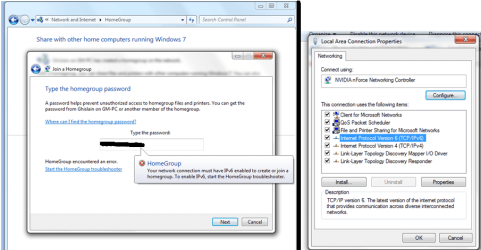
IPv6 is on, but can't join homegroup!

shawn10

New member
Hey everyone!

So I recently installed Windows 7 Ultimate 32-bits on my computer.

When I go in the control panel, to create a homegroup, it asks me what I want to share, then I click on next, and it says it won't create a homegroup because I need to have Internet Protocol V6 (IPv6) activated.

So I went to the network and sharing center, in the CP, change adapter settings, right-clicked on my connection, clicked on properties, and, yes, IPv6 was on.
So I tried again and it still won't work. I tried turning it off, trying it again then turning it back on again, nothing. I updated my driver for the Ethernet, still won't work.

So I tried creating a homegroup on another computer, it worked, but I can't join on my computer for same reason.

Anyone have this problem?
 

My Computer

Computer Manufacturer/Model Number
Custom
OS
Windows 7 Ultimate (32-bits)
CPU
AMD Athlon 64 X2 Dual Core Processor 6000+ 3.10 GHz
Motherboard
Biostar MCP6P M2+
Memory
3 GB
Graphics Card(s)
ATI Radeon X1950
Monitor(s) Displays
Acer AL2016W (20 in)
Hard Drives
300 GB
Hey everyone!

So I recently installed Windows 7 Ultimate 32-bits on my computer.

When I go in the control panel, to create a homegroup, it asks me what I want to share, then I click on next, and it says it won't create a homegroup because I need to have Internet Protocol V6 (IPv6) activated.

So I went to the network and sharing center, in the CP, change adapter settings, right-clicked on my connection, clicked on properties, and, yes, IPv6 was on.
So I tried again and it still won't work. I tried turning it off, trying it again then turning it back on again, nothing. I updated my driver for the Ethernet, still won't work.

So I tried creating a homegroup on another computer, it worked, but I can't join on my computer for same reason.

Anyone have this problem?

Shawn

Haven't heard of that problem but you dont have to use homegroup to network. You can use workgroup. That would also avoid the IPv6 problem because workgroup doesn't need it and workgroup is easier to share.

Hope this helps

Ken
 

My Computer

Computer Manufacturer/Model Number
HP Pavillion dv-7 1005 Tx
OS
Win 8 Release candidate 8400
CPU
[email protected]
Memory
4 gigs
Graphics Card(s)
Nvidia 9600M
Sound Card
HD built-in
Monitor(s) Displays
17" Wxga
Screen Resolution
1440x900
Cooling
none
Internet Speed
45Mb down 5Mb up
One thing that may be causing problems with this is if you are using a router/switch between the Windows 7 machines in a potential homegroup the router/switch has to be compatible with IPv6.

some older hardware may not be fully compatible and this produce an error
 

My Computers

System One System Two

  • Computer type
    PC/Desktop
    Computer Manufacturer/Model Number
    ChillBlast - Custom to my design
    OS
    Windows 11 Pro x64 [Latest Release and Release Preview]
    CPU
    Ryzen 9 5950X, 3.8 - 5.2 MHz
    Motherboard
    Asus Prime X570-Pro
    Memory
    64GB [2 x 32GB] DDR4 3200MHz
    Graphics Card(s)
    4GB NVIDIA GEFORCE GTX 1650 Ti
    Sound Card
    On-board SPDIF to 5.1 System + HDMI [5.1 system]
    Monitor(s) Displays
    32" UHD 32 Bit HDR Monitor + 43" UHD 4K 32Bit HDR TV
    Screen Resolution
    2 x 3840 x 2160 @60Hz
    Hard Drives
    1TB M2 SSD OS, 500GB Fast Access SSD, 2 x 8TB Data + Various Externals from 1TB to 4TB, 10TB NAS
    PSU
    NZXT C750 80 PLUS Gold 750W Modular PSU
    Case
    Workstation Case [Matt Black]
    Cooling
    NZXT Kraken X63 280mm CPU Cooler +2x Quiet Case fans
    Keyboard
    Logitech Wireless MX Keys & K400 + others
    Mouse
    Logitech Wireless MX Master 3S
    Internet Speed
    920 MB Down 50 MB Up
    Antivirus
    BitDefender Total Security Pro
    Browser
    Chrome (always run latest Non-Beta)
    Other Info
    Also run ...
    Laptop - Quad 8GB - Windows 10 Pro x64
    Nexus 7 Android tablet x2
    Samsung 10.2" tablet
    Blackview TAB 8 4G Android Tablet c/w Keyboard
    Wacom Intuos Pro Medium Pen Pad
    Wacom Intuos Pro Small Pen Pad
    Wacom Expresskeys Remote
    Loopdeck+ Graphics Controller
    Shuttle Pro v2 Control
  • Computer type
    Laptop
    System Manufacturer/Model Number
    Dell XPS 17 10750H
    OS
    Windows 11 Pro x64 Latest RP
    CPU
    Intel I7 10750H 5.0GHz
    Motherboard
    Dell XPS
    Memory
    32GB [2x16GB] DDR4 2933 MHz
    Graphics Card(s)
    nVidia GTX1650Ti 4 GB GDDR6
    Sound Card
    Stock [Realtek] 4 Speaker
    Monitor(s) Displays
    17" IPS UHD+ Infinity Edge Touchscreen
    Screen Resolution
    3840 x 2400
    Hard Drives
    2TB M2 NVMe, 4TB External + various 500GB & 1TB External NVMe (also have access to spinner HDD from
    PSU
    Stock
    Case
    Stock XPS Aluminium & Carbon Fibre
    Cooling
    Stock - Active Fan Control
    Keyboard
    Backlit + Various Logitech
    Mouse
    Stock Track Pad + Logitech MX Trackball
    Internet Speed
    72 MB Down 18MB Up
    Browser
    Chrome
    Other Info
    Also run ...
    Laptop - Quad 8GB - Windows 10 Pro x64
    Nexus 7 Android tablet x2
    10.2" tablet
    Sony Z3 Android Smartphone
    Wacom Intuos Pro Medium Pen Pad
    Wacom Intuos Pro Small Pen Pad
    Wacom Expresskeys Remote
    Loopdeck+ Graphics Controller
    Shuttle Pro v2 Control Pad
    10TB NAS
Workgroup?

Is workgroup the same thing as public folder sharing, as seen in Windows Vista? I am very familiar with the Start, Network feature in Vista and I have seen this in Windows 7. What is the difference between workgroup and homegroup? I wanted to create a homegroup because I thought it would be easier to share media and files around the 8 computers in the house.

My hardware is pretty decent. I bought this new ``Biostar`` motherboard a couple of months ago on TigerDirect, and my router is a Belkin N+, which I bought this summer, around mid-July at Futureshop.

The computer I used to create the workgroup has a 6-year old wireless adapter card in it, and it worked. My computer, with the Biostar motherboard (lol), is wired to the router... the only problem is the IPv6... is there something to configure in the router in order to make it work?

I took screenshots and attached them to this post. Thanks!!
 

Attachments

  • ipV6 PROBLEM.png
    ipV6 PROBLEM.png
    183.3 KB · Views: 1,028

My Computer

Computer Manufacturer/Model Number
Custom
OS
Windows 7 Ultimate (32-bits)
CPU
AMD Athlon 64 X2 Dual Core Processor 6000+ 3.10 GHz
Motherboard
Biostar MCP6P M2+
Memory
3 GB
Graphics Card(s)
ATI Radeon X1950
Monitor(s) Displays
Acer AL2016W (20 in)
Hard Drives
300 GB
Is workgroup the same thing as public folder sharing, as seen in Windows Vista? I am very familiar with the Start, Network feature in Vista and I have seen this in Windows 7. What is the difference between workgroup and homegroup? I wanted to create a homegroup because I thought it would be easier to share media and files around the 8 computers in the house. Both win 7 and vista have sharing of public folders. the difference between workgroup and homegroupis that workgroup can funtion in envirnments where there are servers and controllers. Homegroup cant. homegroup needs IPv6 and workgroup doesn't. In terms of connecting a home network it has turned out that the workgroup is easier. Also IPv6 isnt even being used YET and older devices cant handle it

My hardware is pretty decent. I bought this new ``Biostar`` motherboard a couple of months ago on TigerDirect, and my router is a Belkin N+, which I bought this summer, around mid-July at Futureshop.

The computer I used to create the workgroup has a 6-year old wireless adapter card in it, and it worked. My computer, with the Biostar motherboard (lol), is wired to the router... the only problem is the IPv6... is there something to configure in the router in order to make it work? If you are in a workgroup it doesnt even need to be on

I took screenshots and attached them to this post. Thanks!!

As to what is preventing you from networking in homegroup (or is it a workgroup now) im not sure of yet.

Are both computers able to access the internet?

Is this a typical setup cable modem>router>pC's

thanks

Ken
 

My Computer

Computer Manufacturer/Model Number
HP Pavillion dv-7 1005 Tx
OS
Win 8 Release candidate 8400
CPU
[email protected]
Memory
4 gigs
Graphics Card(s)
Nvidia 9600M
Sound Card
HD built-in
Monitor(s) Displays
17" Wxga
Screen Resolution
1440x900
Cooling
none
Internet Speed
45Mb down 5Mb up
Is workgroup the same thing as public folder sharing, as seen in Windows Vista? I am very familiar with the Start, Network feature in Vista and I have seen this in Windows 7. What is the difference between workgroup and homegroup? I wanted to create a homegroup because I thought it would be easier to share media and files around the 8 computers in the house. Both win 7 and vista have sharing of public folders. the difference between workgroup and homegroupis that workgroup can funtion in envirnments where there are servers and controllers. Homegroup cant. homegroup needs IPv6 and workgroup doesn't. In terms of connecting a home network it has turned out that the workgroup is easier. Also IPv6 isnt even being used YET and older devices cant handle it

My hardware is pretty decent. I bought this new ``Biostar`` motherboard a couple of months ago on TigerDirect, and my router is a Belkin N+, which I bought this summer, around mid-July at Futureshop.

The computer I used to create the workgroup has a 6-year old wireless adapter card in it, and it worked. My computer, with the Biostar motherboard (lol), is wired to the router... the only problem is the IPv6... is there something to configure in the router in order to make it work? If you are in a workgroup it doesnt even need to be on

I took screenshots and attached them to this post. Thanks!!

As to what is preventing you from networking in homegroup (or is it a workgroup now) im not sure of yet.

Are both computers able to access the internet?

Is this a typical setup cable modem>router>pC's

thanks

Ken


Yeah, cable modem, then router, then computers :)
 

My Computer

Computer Manufacturer/Model Number
Custom
OS
Windows 7 Ultimate (32-bits)
CPU
AMD Athlon 64 X2 Dual Core Processor 6000+ 3.10 GHz
Motherboard
Biostar MCP6P M2+
Memory
3 GB
Graphics Card(s)
ATI Radeon X1950
Monitor(s) Displays
Acer AL2016W (20 in)
Hard Drives
300 GB
s

can both computer access the internet?

please type this in search cmd>ipconfig /all and take a screenshot of the output. You can also use the built in snipping tool by typing snipping tool in search.

You can upload it by using the attachment icon(shaped like a paperclip) in the reply form

thanks

Ken
 

My Computer

Computer Manufacturer/Model Number
HP Pavillion dv-7 1005 Tx
OS
Win 8 Release candidate 8400
CPU
[email protected]
Memory
4 gigs
Graphics Card(s)
Nvidia 9600M
Sound Card
HD built-in
Monitor(s) Displays
17" Wxga
Screen Resolution
1440x900
Cooling
none
Internet Speed
45Mb down 5Mb up
s

can both computer access the internet?

please type this in search cmd>ipconfig /all and take a screenshot of the output. You can also use the built in snipping tool by typing snipping tool in search.

You can upload it by using the attachment icon(shaped like a paperclip) in the reply form

thanks

Ken

Sure, yes they can all access the internet perfectly fine. What is this `prefered` thing beside the IPv4 adress?
 
Last edited:

My Computer

Computer Manufacturer/Model Number
Custom
OS
Windows 7 Ultimate (32-bits)
CPU
AMD Athlon 64 X2 Dual Core Processor 6000+ 3.10 GHz
Motherboard
Biostar MCP6P M2+
Memory
3 GB
Graphics Card(s)
ATI Radeon X1950
Monitor(s) Displays
Acer AL2016W (20 in)
Hard Drives
300 GB
Solution

Thanks Ken! But I found a solution to my problem. Apparently, not sure why, but Windows did not change the settings in the registry after enabling IPv6. I found a solution over here.


For anyone else having this problem:


1. Click Start. Search for run and press enter. In the field, type regedit and press OK.

2. In the registry, navigate to the following [COLOR=#7DA7D9 ! important][FONT=&quot][COLOR=#7DA7D9 ! important][FONT=&quot]registry [/FONT][COLOR=#7DA7D9 ! important][FONT=&quot]key[/FONT][/COLOR][/FONT][/COLOR][/COLOR]
[HKEY_LOCAL_MACHINE\SYSTEM\CurrentControlSet\Services\Tcpip6\Parameters]
HKEY_LOCAL_MACHINE
\SYSTEM
\CurrentControlSet
\Services
\Tcpip6
\Parameters
3. In the right pane, right-click on “DisabledComponents” and select modify. In the value data field, type “0″ (without quotations) and press OK.
4. Reboot your computer and it should work. It did for me. :D
 

My Computer

Computer Manufacturer/Model Number
Custom
OS
Windows 7 Ultimate (32-bits)
CPU
AMD Athlon 64 X2 Dual Core Processor 6000+ 3.10 GHz
Motherboard
Biostar MCP6P M2+
Memory
3 GB
Graphics Card(s)
ATI Radeon X1950
Monitor(s) Displays
Acer AL2016W (20 in)
Hard Drives
300 GB
I dont' even have "disabledcomponents" listed.
 

My Computer

OS
Windows 7
CPU
i5
Motherboard
Gigabyte P55-UD3R
Memory
4gb
Graphics Card(s)
8800GTS 512
Sound Card
Auzentech Prelude 7.1
Monitor(s) Displays
HP w2207
Keyboard
G15
Mouse
G5
have had this problem and the only way out was to create homegroup with a temporary user and then share libraries of your main account. You can delete the temp. user later on.
I can consistently reproduce this problem by placing my user profile folder to a different partition,
C:\ for Windows etc.
D:\Username (ProfilesDirectory="D:\" in HKEY_LOCAL_MACHINE\SOFTWARE\Microsoft\Windows NT\CurrentVersion\ProfileList)

Definite bug
 

My Computer

OS
Windows 7
CPU
i5
Motherboard
Gigabyte P55-UD3R
Memory
4gb
Graphics Card(s)
8800GTS 512
Sound Card
Auzentech Prelude 7.1
Monitor(s) Displays
HP w2207
Keyboard
G15
Mouse
G5
Anyone?
 

My Computer

OS
Windows 7
CPU
i5
Motherboard
Gigabyte P55-UD3R
Memory
4gb
Graphics Card(s)
8800GTS 512
Sound Card
Auzentech Prelude 7.1
Monitor(s) Displays
HP w2207
Keyboard
G15
Mouse
G5
shawn10's Solution Worked for me.

I had Vista x64 preinstalled on my laptop and I upgraded to Win7 Ultimate.
Could not connect to HomeGroup due to lacking IPV6. I did what shawn10 recommended, rebooted and then I could immediately connect to the HomeGroup (with password since I created the HomeGroup on my stationary some time ago)

THANK YOU Shawn10
 

My Computer

Computer Manufacturer/Model Number
HP HDX X18-1000EO
OS
Windows 7
CPU
Mobile DualCore Intel Core 2 Duo T9400, 2533 MHz (9.5 x 267)
Motherboard
Hewlett-Packard HP HDX 18 Notebook PC
Memory
Samsung M4 70T5663QZ3-CF7
Graphics Card(s)
nVIDIA GeForce 9600M GT (HP)
Sound Card
nVIDIA HDMI @ Intel 82801IB
Monitor(s) Displays
Samsung 184HT03-001
Hard Drives
Drive #1 - ST9250827AS (232 GB)
Drive #2 - ST9250827AS (232 GB)
PSU
Battery + Externan
Case
Laptop
Cooling
Default
Thanks Ken! But I found a solution to my problem. Apparently, not sure why, but Windows did not change the settings in the registry after enabling IPv6. I found a solution over here.


For anyone else having this problem:


1. Click Start. Search for run and press enter. In the field, type regedit and press OK.

2. In the registry, navigate to the following [COLOR=#7DA7D9 ! important][FONT=&quot][COLOR=#7DA7D9 ! important][FONT=&quot]registry [/FONT][COLOR=#7DA7D9 ! important][FONT=&quot]key[/FONT][/COLOR][/FONT][/COLOR][/COLOR]
[HKEY_LOCAL_MACHINE\SYSTEM\CurrentControlSet\Services\Tcpip6\Parameters]
HKEY_LOCAL_MACHINE
\SYSTEM
\CurrentControlSet
\Services
\Tcpip6
\Parameters
3. In the right pane, right-click on “DisabledComponents” and select modify. In the value data field, type “0″ (without quotations) and press OK.
4. Reboot your computer and it should work. It did for me. :D

Thought i would bump this thread rather than start a new one.

i was having the same problem as Shawn10, gettting the ipv6 is disabled message when trying to set up homegroup. its the first time i have had this problem, and i have been using homegroup since the pre beta stage.

This is the first time i have tried to set up a homegroup with windows 7 build 7600 x64 on both my laptop and desktop. i have had no issue with any of the pre beta builds, RC, or even with my desktop running the RC & laptop Build 7600, but now that i have retail on both i am getting nowhere fast.

To start with I was completely unable to create a homegroup on either. I was getting the IPV6 error

When i followed the instructions in Shawn10's post, and i set Disabled Components to 0, I am able to create a homegroup and have the laptop join it with out issue, but neither recognises each other after this point. When I go back to the registry i notice that Disabled Components has reset itself from "0" to "ff"

Is there anyway to stop this resetting itself?

I will be very grateful for any help in resolving this matter.
 

My Computer

Computer Manufacturer/Model Number
Custom Built
OS
Windows 7 Home Premium x64
CPU
AMD Phenom II x4 955 Black edition 3.2GHz
Motherboard
Asus M4N82 Deluxe nForce 980a SLi
Memory
4GB DDR2 PC2-5300 667
Graphics Card(s)
Nvidia XFX 8500GT 512MB x 2 SLi Enabled
Sound Card
On Board
Monitor(s) Displays
Cibox 22" W/Screen
Screen Resolution
1680 x 1050
Hard Drives
Samsung HD501J 500GB
Seagate External HD 320GB
PSU
Arctic Power 700W
Case
iCute Silver ATX
Cooling
Arctic Cooling Freezer Pro 64
Keyboard
MS Media Center Remote KB
Mouse
Trust MI-4910D Wireless 5 Button
Internet Speed
40MB

My Computer

Computer Manufacturer/Model Number
Mesh PC
OS
Win 7
CPU
Intel core 2 duo
Memory
4 gig
Hard Drives
1 x250 gig
1 x 500 gig
Mouse
MS lasermouse 5000 -'cos it scrolls smoothly, no wheel click
Internet Speed
10mb - cable
Other Info
The mouse took most research. I hate that click on the wheel, this one has the old fashioned smooth wheel. There aren't many about.
Thanks for the replies Guys, but i decided to set up a network workgroup instead, which i was able to do without any issues whatsoever. TBH it was my own stubborness that led to me persisiting with the homegroup :D

I thought the idea of homegroup was so that even the least knowledgable of users could share files across a network? :confused:


Do you have to do this on all computer's?

TBH it was inconsistent, one minute i would be able to create a homegroup, and even on occasion join it, and i would get the user icon, but nothing happened when i clicked on it.

then i would leave it and try again, and it wouldn't even recognise the same computer it had done minutes previously

Then i would get the ipv6 is disabled error message


http://www.sevenforums.com/network-sharing/38207-homegroup-2.html


Crazily, Win7 sees IPv6 as disabled unless there is a disableditems key that says nothing is disabled.
:eek:

i set the disabled components from ff that it was showing to 0, then restart. i would then get the option to set up the homegroup, but still could not join them. When i looked in the registry again, the disabled components value had reset itself to ff.

it was at this point i gave up on the hoimegroup, and had a workgroup set up in a couple of minutes, and 2 days later it is still working perfectly

I have been using 7 since build 6801, and have never had issue with the homegroup, it always found itself without much intervention from myself. It worked when both PC's were pre beta, when they were both beta, when they were both RC, when they were a combo of RC & Retail, but not when they were both retail :confused:

thanks very much for taking the time to reply guys :thumbsup:
 

My Computer

Computer Manufacturer/Model Number
Custom Built
OS
Windows 7 Home Premium x64
CPU
AMD Phenom II x4 955 Black edition 3.2GHz
Motherboard
Asus M4N82 Deluxe nForce 980a SLi
Memory
4GB DDR2 PC2-5300 667
Graphics Card(s)
Nvidia XFX 8500GT 512MB x 2 SLi Enabled
Sound Card
On Board
Monitor(s) Displays
Cibox 22" W/Screen
Screen Resolution
1680 x 1050
Hard Drives
Samsung HD501J 500GB
Seagate External HD 320GB
PSU
Arctic Power 700W
Case
iCute Silver ATX
Cooling
Arctic Cooling Freezer Pro 64
Keyboard
MS Media Center Remote KB
Mouse
Trust MI-4910D Wireless 5 Button
Internet Speed
40MB
Thanks Shawn10, fixed all my computers! Going to use your fix on my friends computers too!
 

My Computer

OS
Windows 7
CPU
AMD Turion 64 X2 Mobile TL-60 2.00 GHz
Motherboard
Quanta 30CF 85.26
Memory
4 GB DDR2 PC-5300
Graphics Card(s)
Nvidia GeForce 7150M/nForce 630M
Sound Card
Conexant High Definition SmartAudio 221
Monitor(s) Displays
Generic PnP Monitor
Screen Resolution
1280x800 @ 60Hz AR 16:10
Hard Drives
Seagate ST9200827AS 200GB
Internet Speed
Cox Communications 30MB Down / 3MB Up
From memory the registry disablement of IPv6 is not a default feature from fresh build. I'm sure it was done manually post build. Anyway good to see issue solved.
 

My Computer

Computer Manufacturer/Model Number
Lenovo ThinkPad T60
OS
Windows 7 Ultimate 64Bit
CPU
GenuineIntel Intel(R) Core(TM) DuoCore T2400 @ 1.83GHz
Motherboard
Intel(R) 82801G (ICH7 Family)
Memory
2.00 GB
Graphics Card(s)
Mobile Intel(R) 945 Express Chipset
Sound Card
SoundMAX Integrated Digital HD Audio
Monitor(s) Displays
ThinkPad Display
Screen Resolution
1400x1050
Hard Drives
100Gb SATA
Keyboard
Standard Keyboard
Mouse
HID-compliant Mouse
Internet Speed
Cable Broadband - 54Mbps
Other Info
Intel(R) PRO/1000 PL Network Connection
11a/b/g Wireless LAN Mini PCI Express Adapter
MY GOD

Thank you Shawn10

I've been trying to find a fix for this forever!
Just found your log and its worked a treat.
Been using Win7 beta and RC for about 12 months, just upgraded with a family pack and you've helped sort this problem

Well done
 

My Computer

Computer Manufacturer/Model Number
sony / asus / toshiba / hand-built / dell / merion
OS
win7 / win7 / win7 / win7 / vista / xp
Back
Top