Ipv6 no Internet connection

Woodhouse588

New member
Local time
12:11 AM
Messages
19
My pc has been running on our wireless network well for ages and suddenly the Internet doesn't work anymore. I went on network status and it says that ipv4 has Internet connection and ipv6 doesn't. Internet explorer sometimes loads google now but nothing else and sometimes I can use Skype. Any idea how to fix this?
 

My Computer

Computer type
PC/Desktop
Computer Manufacturer/Model Number
Techsonic
OS
Windows 7 home 32 bit
Memory
4gb
Hi Woodhouse588,

Did you do any updates recently? Or any changes to the pc what so ever?
 

My Computer

Computer type
PC/Desktop
Computer Manufacturer/Model Number
Dell / Lenovo g550
OS
Windows 7 Ultimate 64-bit
CPU
Intel Core 2 Duo E6550 @2.33GHz
Motherboard
foxconn g33m02
Memory
4GB DDR"
Graphics Card(s)
NVIDIA GeForce 8600 GS
Hard Drives
HDD 1 = 150GB
HDD 2 = 1.5TB
PSU
450W
Cooling
Stock fan
Internet Speed
12Mb
Antivirus
AVG Internet Security
IPv6 doesn't have internet access for any of us and it's only used on the LAN with Windows at this point.

Have you run any virus scans lately because from what you are saying something is preventing you from using the internet.
 

My Computer

Computer type
PC/Desktop
Computer Manufacturer/Model Number
Home built
OS
Windows 7 Ult, Windows 8.1 Pro,
CPU
Q9650-4.275GHz, E8600 4.5GHz, E6750-3.8GHz
Motherboard
Evga 780i FTW
Memory
G.Skill PC2 9600 1200Mhz 5 5 5 15 2T
Graphics Card(s)
GTX480
Sound Card
Asus Xonar D2
Monitor(s) Displays
HannsG
Screen Resolution
1680X1050
Hard Drives
GSkill Phoenix Pro 120GB SSD
PSU
ThermalTake Toughpower 1000Watt modular
Case
ThermalTake XaserV
Cooling
Xigmatek S1283
Keyboard
Logitech G15
Mouse
Logitech G9
Internet Speed
T1
I ran a virus scan using norton and nothing came up. I recently installed the game days and have been playing that a lot but I don't know if that would do anything. Also I have done a full system restore which did nothing
 

My Computer

Computer type
PC/Desktop
Computer Manufacturer/Model Number
Techsonic
OS
Windows 7 home 32 bit
Memory
4gb
Make sure that the service is turned on for it.
 

My Computer

Computer type
PC/Desktop
Computer Manufacturer/Model Number
Custom Build
OS
Win 10 Pro 64
CPU
Intel Core i7 960 @3.20 GHz
Motherboard
MSI MS7522
Memory
24.0 GB DDR3
Graphics Card(s)
EVGA GTX 750Ti
Monitor(s) Displays
LG E2341 23 Inch
Screen Resolution
1920x1080
Hard Drives
1TB Western Dgital 1002FAEX-00Y9A0
1TB Hitachi HDS721010CLA322
PSU
700 Watt
Case
Haf 912
Cooling
Fans
Keyboard
Logitech MK710
Mouse
Logitech M705
Internet Speed
Cable
Antivirus
AIS 2015 .10.0.2225
Browser
Firefox 49
Other Info
MalwareBytes Anti-Rootkit utility
Ipv6

How would I check that?
 

My Computer

Computer type
PC/Desktop
Computer Manufacturer/Model Number
Techsonic
OS
Windows 7 home 32 bit
Memory
4gb
Yes put see ipv6 shouldn't cause any problems as it isn't up and running yet. Probably not for a good while either. Could you post a screen shot of Network and sharing center: Start - control panel - network and internet - networking and sharing center
 

My Computer

Computer type
PC/Desktop
Computer Manufacturer/Model Number
Dell / Lenovo g550
OS
Windows 7 Ultimate 64-bit
CPU
Intel Core 2 Duo E6550 @2.33GHz
Motherboard
foxconn g33m02
Memory
4GB DDR"
Graphics Card(s)
NVIDIA GeForce 8600 GS
Hard Drives
HDD 1 = 150GB
HDD 2 = 1.5TB
PSU
450W
Cooling
Stock fan
Internet Speed
12Mb
Antivirus
AVG Internet Security
I ran a virus scan using norton and nothing came up. I recently installed the game days and have been playing that a lot but I don't know if that would do anything. Also I have done a full system restore which did nothing

If Windows says you have IPv4 connection then it may be just a problem with Winsock or the TCP/IP stack. They are both easy to reset.

Run the following two commands "just the part in bold" one at a time, use an elevated command prompt, reboot your machine after running the commands.

If you are still having problems after that please post a screen shot of the ipconfig/all form this machine.
smile.gif


Code:
[B]netsh winsock reset catalog[/B] (reset winsock entries)

Code:
[B]netsh int ip reset reset.log hit[/B] (reset TCP/IP stack)
 

My Computer

Computer type
PC/Desktop
Computer Manufacturer/Model Number
Home built
OS
Windows 7 Ult, Windows 8.1 Pro,
CPU
Q9650-4.275GHz, E8600 4.5GHz, E6750-3.8GHz
Motherboard
Evga 780i FTW
Memory
G.Skill PC2 9600 1200Mhz 5 5 5 15 2T
Graphics Card(s)
GTX480
Sound Card
Asus Xonar D2
Monitor(s) Displays
HannsG
Screen Resolution
1680X1050
Hard Drives
GSkill Phoenix Pro 120GB SSD
PSU
ThermalTake Toughpower 1000Watt modular
Case
ThermalTake XaserV
Cooling
Xigmatek S1283
Keyboard
Logitech G15
Mouse
Logitech G9
Internet Speed
T1
tryed inputing those commands and now the pc wont connect to the network at all. plus as i am on my ipod touch how should i put a screenshot of ipconfig/all onto this post.
 

My Computer

Computer type
PC/Desktop
Computer Manufacturer/Model Number
Techsonic
OS
Windows 7 home 32 bit
Memory
4gb

My Computer

Computer type
PC/Desktop
Computer Manufacturer/Model Number
Dell / Lenovo g550
OS
Windows 7 Ultimate 64-bit
CPU
Intel Core 2 Duo E6550 @2.33GHz
Motherboard
foxconn g33m02
Memory
4GB DDR"
Graphics Card(s)
NVIDIA GeForce 8600 GS
Hard Drives
HDD 1 = 150GB
HDD 2 = 1.5TB
PSU
450W
Cooling
Stock fan
Internet Speed
12Mb
Antivirus
AVG Internet Security
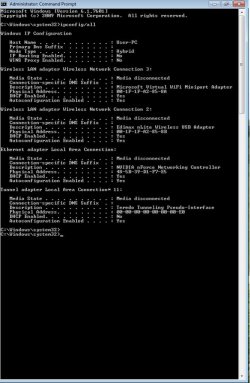
this is ip config for machine, also ipv6 now has no network access instead of no internet access.
 

Attachments

  • ImageUploadedBySeven Forums1364457783.887978.jpg
    ImageUploadedBySeven Forums1364457783.887978.jpg
    67.5 KB · Views: 8

My Computer

Computer type
PC/Desktop
Computer Manufacturer/Model Number
Techsonic
OS
Windows 7 home 32 bit
Memory
4gb
From this, it appears that you either aren't connected at all. No connection showing up here at all.

Have you tried resetting your router using the reset button on the side of the router?
 

My Computer

Computer type
PC/Desktop
Computer Manufacturer/Model Number
Home built
OS
Windows 7 Ult, Windows 8.1 Pro,
CPU
Q9650-4.275GHz, E8600 4.5GHz, E6750-3.8GHz
Motherboard
Evga 780i FTW
Memory
G.Skill PC2 9600 1200Mhz 5 5 5 15 2T
Graphics Card(s)
GTX480
Sound Card
Asus Xonar D2
Monitor(s) Displays
HannsG
Screen Resolution
1680X1050
Hard Drives
GSkill Phoenix Pro 120GB SSD
PSU
ThermalTake Toughpower 1000Watt modular
Case
ThermalTake XaserV
Cooling
Xigmatek S1283
Keyboard
Logitech G15
Mouse
Logitech G9
Internet Speed
T1
yeah and this only came like this after i put in those commands and wifi works on my xbox and ipod just not on pc.
 

My Computer

Computer type
PC/Desktop
Computer Manufacturer/Model Number
Techsonic
OS
Windows 7 home 32 bit
Memory
4gb
Back
Top