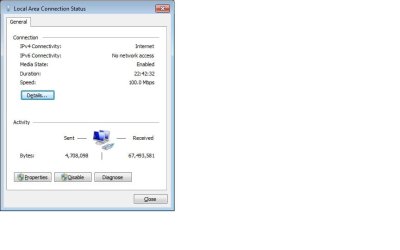
IPv6 status is "no network access"

jeepersmr

New member
Local time
9:26 AM
Messages
8
I cant see any of my computers on my LAN. I have tried to use dhcp and static ip's. also have tried unchecking the ipv6 box. no matter what i try still seeing the no network access. any ideas anyone?
 

My Computer

Computer Manufacturer/Model Number
Dell
OS
windows 7
CPU
2.0 ghz
Memory
2 gb
I cant see any of my computers on my LAN. I have tried to use dhcp and static ip's. also have tried unchecking the ipv6 box. no matter what i try still seeing the no network access. any ideas anyone?

Can I assume you are using "homegroup"? If there are mixed boxes (win 7 and other OS) you shoulld be using workgroup.

Workgroup uses IPv4 not IPv6 and on some systems has less connectivity problems.

You can verify it by creating a new network connection using workgroup. If it solves the problem you then can kill homegroup and IPv6

Let us know if you need help


Ken
 

My Computer

Computer Manufacturer/Model Number
HP Pavillion dv-7 1005 Tx
OS
Win 8 Release candidate 8400
CPU
[email protected]
Memory
4 gigs
Graphics Card(s)
Nvidia 9600M
Sound Card
HD built-in
Monitor(s) Displays
17" Wxga
Screen Resolution
1440x900
Cooling
none
Internet Speed
45Mb down 5Mb up
i am using homegroup with just the 1 OS windows 7 and my workgroup is MSHOME which all my computers use. i am able to get on the internet.
 

My Computer

Computer Manufacturer/Model Number
Dell
OS
windows 7
CPU
2.0 ghz
Memory
2 gb
also forgot to mention that all my other comuters are running XP pro
 

My Computer

Computer Manufacturer/Model Number
Dell
OS
windows 7
CPU
2.0 ghz
Memory
2 gb
I cant see any of my computers on my LAN. I have tried to use dhcp and static ip's. also have tried unchecking the ipv6 box. no matter what i try still seeing the no network access. any ideas anyone?

Actually the reason it says that is because IPv6 only works on the the LAN not the WAN. It's made that way by design IMO which is why it says "No Internet Access".

You definately do not want to use Homegroups if there are any Op systems in your network other than Windows 7. It will only cause problems for you such as you are seeing now.

There are zero good reasons to disable IPv6 or Homegroups in my opinion. Homegroups are only made to work with Windows 7 machines so you need to remove the Win 7 machine from the Homegroup and then create a Workgroup with the Win 7 machine. After that you will want to join the new Workgroup from the other XP machines,. :)

If you are still having problems getting those machines to see each other follow the post linked too below, use the tutorials as a guide for setting up your mixed network. After following the guides, if those machines still do not see each other then do the registry fix which I outlined in the post below.

http://www.sevenforums.com/network-sharing/62116-networking-7-xp-issue.html

After setting that up correctly if IPv6 isn't working right do this in the registry on the Win 7 machine. This is sometimes required after mistakingly disabling IPv6. Although you won't need IPv6 if you are only using Workgroups.
[HKEY_LOCAL_MACHINE\SYSTEM\CurrentControlSet\Services\Tcpip6\Parameters]
HKEY_LOCAL_MACHINE
\SYSTEM
\CurrentControlSet
\Services
\Tcpip6
\Parameters
3. In the right pane, right-click on “DisabledComponents” and select modify. In the value data field, type “0″ (without quotations) and press OK.

 
Last edited:

My Computer

Computer type
PC/Desktop
Computer Manufacturer/Model Number
Home built
OS
Windows 7 Ult, Windows 8.1 Pro,
CPU
Q9650-4.275GHz, E8600 4.5GHz, E6750-3.8GHz
Motherboard
Evga 780i FTW
Memory
G.Skill PC2 9600 1200Mhz 5 5 5 15 2T
Graphics Card(s)
GTX480
Sound Card
Asus Xonar D2
Monitor(s) Displays
HannsG
Screen Resolution
1680X1050
Hard Drives
GSkill Phoenix Pro 120GB SSD
PSU
ThermalTake Toughpower 1000Watt modular
Case
ThermalTake XaserV
Cooling
Xigmatek S1283
Keyboard
Logitech G15
Mouse
Logitech G9
Internet Speed
T1
it doesnt say "No Internet Access" IPv6 connectivity says no network access
 

My Computer

Computer Manufacturer/Model Number
Dell
OS
windows 7
CPU
2.0 ghz
Memory
2 gb
You do not have your network set up correctly. Please follow my entire post above.
 

My Computer

Computer type
PC/Desktop
Computer Manufacturer/Model Number
Home built
OS
Windows 7 Ult, Windows 8.1 Pro,
CPU
Q9650-4.275GHz, E8600 4.5GHz, E6750-3.8GHz
Motherboard
Evga 780i FTW
Memory
G.Skill PC2 9600 1200Mhz 5 5 5 15 2T
Graphics Card(s)
GTX480
Sound Card
Asus Xonar D2
Monitor(s) Displays
HannsG
Screen Resolution
1680X1050
Hard Drives
GSkill Phoenix Pro 120GB SSD
PSU
ThermalTake Toughpower 1000Watt modular
Case
ThermalTake XaserV
Cooling
Xigmatek S1283
Keyboard
Logitech G15
Mouse
Logitech G9
Internet Speed
T1
I followed your entire post the one thing i didnt see in the registry was "DisabledComponents" and still cannot see my xp machines, even though the xp machines can see each other
 

My Computer

Computer Manufacturer/Model Number
Dell
OS
windows 7
CPU
2.0 ghz
Memory
2 gb
That problem only occurs on the Win 7 machine when it happens so you won't need to do it on the XP machines. The other possible registry problem is mentioned in the post linked too below.

Other than that just follow the procedure's for setting up the network between Win 7 and XP, that should get you up an running with your network.
Networking 7 and XP Issue
 

My Computer

Computer type
PC/Desktop
Computer Manufacturer/Model Number
Home built
OS
Windows 7 Ult, Windows 8.1 Pro,
CPU
Q9650-4.275GHz, E8600 4.5GHz, E6750-3.8GHz
Motherboard
Evga 780i FTW
Memory
G.Skill PC2 9600 1200Mhz 5 5 5 15 2T
Graphics Card(s)
GTX480
Sound Card
Asus Xonar D2
Monitor(s) Displays
HannsG
Screen Resolution
1680X1050
Hard Drives
GSkill Phoenix Pro 120GB SSD
PSU
ThermalTake Toughpower 1000Watt modular
Case
ThermalTake XaserV
Cooling
Xigmatek S1283
Keyboard
Logitech G15
Mouse
Logitech G9
Internet Speed
T1
i tried that registry fix earlier before you gave me your registry suggestion and it didnt work either
 

My Computer

Computer Manufacturer/Model Number
Dell
OS
windows 7
CPU
2.0 ghz
Memory
2 gb
here is a screenshot of the issue im having. I cannot access my xp machines and my xp machines cant access my windows 7 machine thru my LAN
 

Attachments

  • no network access.jpg
    no network access.jpg
    21 KB · Views: 380

My Computer

Computer Manufacturer/Model Number
Dell
OS
windows 7
CPU
2.0 ghz
Memory
2 gb
Back
Top