IRQ shared between video card and gigabit NIC causing trouble

sdowney717

New member
Power User
VIP
Local time
3:02 PM
Messages
705
Been tracking down an odd glitch in HDTV playback.
the glitch I now remember only started after I plugged in the NIC Intel Pro 1000

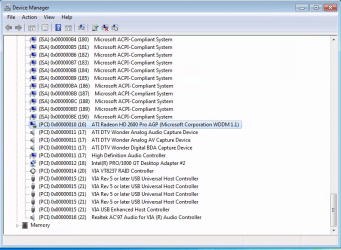
I think it has to do with IRQ 16 being shared between those 2 devices.

other than pulling the NIC, how can I force these to use a distinct IRQ?

in the bios, PNP OS is set to no.
If I set to yes, will windows then be able to force a change?
 

Attachments
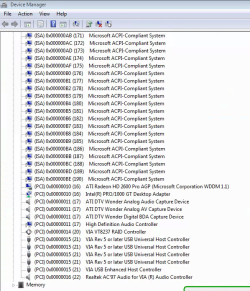
  • Screenshot from 2014-04-06 12:06:52.png
    Screenshot from 2014-04-06 12:06:52.png
    159.8 KB · Views: 19

My Computer My Computer

At a glance

Windows 7 Ultimate x64
OS
Windows 7 Ultimate x64
I dont think you can actually force a device to use a distinct irq per say. If one device is conflicting with the other; i would say go in to the windows settings like you have shown above in the image; and select let windows choose the settings(not sure what it says exactly as i havent been in there in quite some time) But i believe it will have the word automatic in it and if it will let you; choose that setting then reboot when it asks you to. EDIT: Also; You could try completely uninstalling the NIC; rebooting; and letting windows reinstall it and hopefully that will clear things up
 
Last edited:

My Computer My Computer

At a glance

Windows 7 ultimate 64-bitIntel I7 2600K 3.4ghzCorsair 16gb ddr3 1600mhzNvidia Geforce gt 430
Computer type
PC/Desktop
Computer Manufacturer/Model Number
custom built
OS
Windows 7 ultimate 64-bit
CPU
Intel I7 2600K 3.4ghz
Motherboard
Asus Evo P8P67
Memory
Corsair 16gb ddr3 1600mhz
Graphics Card(s)
Nvidia Geforce gt 430
Sound Card
Sound Blaster Titanium x-fi pci express
Monitor(s) Displays
Dell E198WFP
Hard Drives
1 western digital 2TB drive.
PSU
Antec 1200 watt
Case
Inwin Dragon Rider
Cooling
6 case supplied cooling fans
Keyboard
logitech mk700
Mouse
logitech m705
Internet Speed
25-50mbps download; 10mbps upload(i think)
Antivirus
avg free 2014
Browser
mozilla firefox
Other Info
Also have a pretty bad speaker setup which is a klipsch promedia 5.1 surround speaker setup with huge subwoofer and lg blu ray player/writer. Also a hp officejet pro 8600 plus wireless all in one and a logitech s7500 webcam.
I switched bios to plug n play OS to yes, but did not help.
I went into device resource settings for the NIC but option was greyed out.

So I moved NIC to slot furthest from AGP card and now it is on IRQ 18 :D

What is of interest is AGP slot is 16, when NIC was in PCI slot next to AGP slot it gets IRQ 16
The next PCI slot is wonder HDTV card, IRQ 17
The next PCI slot is now Intel NIC pro 1000GT and IRQ is 18

SO the bios is assigning
AGP 16
PCI slot 1 16
PCI slot 2 17
PCI slot 3 18

Is that typical?

Also, when looking at the bios boot screen, it displays assigned device IRQ, and it has the NIC on 10,
And the wonder HDTV on 11, so what is windows doing to the IRQ assignments?
Ideas? I have no idea why.
 

Attachments

  • Screenshot from 2014-04-06 13:06:20.png
    Screenshot from 2014-04-06 13:06:20.png
    144 KB · Views: 1

My Computer My Computer

At a glance

Windows 7 Ultimate x64
OS
Windows 7 Ultimate x64
Also an improvement, when WMC starts and you select TV, it used to say 'searching for tuners',
it does not do that anymore.

I have also in the bios changed the wait state for the PCI bus from 0 default disabled, thinking the PCI buss with the wonder PCI card and the NIC card needed more time to figure things out.

So will try now and see what it does. It is always a very random like unexplainable infuriating glitch which I have been trying to get straight for about 3 weeks now.
The smooth streaming of HDTV would break, smear , smudge, on all channels, stopping and starting at seemingly random times. I verified the tuner and the coax cable in another PC and was perfect.
But the act of me adding in that gigabit NIC weeks ago has me thinking I found the culprit.

Moving the NIC, on restart windows redirected and installed the driver. Question is this, are slots IRQ hard assigned or is Windows assigning IRQs?
 

My Computer My Computer

At a glance

Windows 7 Ultimate x64
OS
Windows 7 Ultimate x64
It seems to be working now. But it takes time. I went a whole week without it screwing up and then it was really awful. At least something now makes sense.
 

My Computer My Computer

At a glance

Windows 7 Ultimate x64
OS
Windows 7 Ultimate x64
HaHa, well it crapped out badly again, flipping over to the dark side.

I took another hard drive. Did another install.
This time also did the optional platform update, as I read that it addresses video improvements.

And so far it is solid, no glitching.

It is all purely a software issue. Something happens and it suddenly has an epileptic type fit, and then it goes away for awhile. Some proof of that is if you close WMC and reopen the problem goes away for awhile.
Now with this new install, all security updates and that optional platform update it has been running fine for hours.
But that is no guarantee...

This is bad enough that after this, I will give up on it if it comes back inexplicably! And use a core2duo board.

I mean it SHOULD work, because most of the time, it does work. And these cards were designed with pentium 4 systems at that time 9 years ago. Thing is win7 is a newly thrown into the mix as these were xp and vista type devices and maybe win7 is not as good, the software placing heavier demands on the PC hardware, maybe more complex or bloatware.

I tested the tuner in a core2duo 3ghz pc and it never had any troubles.

Right now very wary of installing even chrome or firefox or antivirus or anything else on this.
 

My Computer My Computer

At a glance

Windows 7 Ultimate x64
OS
Windows 7 Ultimate x64
Back
Top