Solved Is CHKDSK stuck? Might there be an alternative to CHKDSK?

Mike Lynch

New member
Pro User
VIP
Local time
2:32 PM
Messages
958
Location
Clearwater Florida
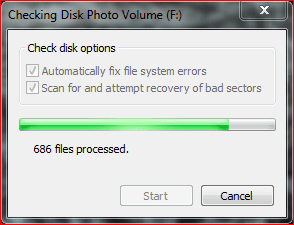
It been working on this same Record for about eight hours, should I cancel it?

Is there another Utility that I could use instead?

- - - Updated - - -

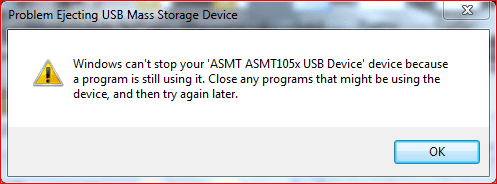
Windows-7 Pro will not let go.
Task Manager shows no Applications running.
It's been hours since I first tried.
Any ideas on how to get Windows-7 Pro to let go?
 

Attachments
  • Capture - is CHKDSK stuck.PNG
    Capture - is CHKDSK stuck.PNG
    10 KB · Views: 30
  • Capture I am really stuck.PNG
    Capture I am really stuck.PNG
    11.4 KB · Views: 30

My Computer My Computer

At a glance

Microsoft Windows 7 Professional 64-bit 7601 ...Intel(R) Core(TM) i7-3770 CPU @ 3.40GHz8.00 GBIntel(R) HD Graphics 4000
Computer type
PC/Desktop
Computer Manufacturer/Model Number
Two HP Desktops. One in the Laundry Room / Bed Room.
OS
Microsoft Windows 7 Professional 64-bit 7601 Multiprocessor Free Service Pack 1
CPU
Intel(R) Core(TM) i7-3770 CPU @ 3.40GHz
Motherboard
Hewlett-Packard 3396
Memory
8.00 GB
Graphics Card(s)
Intel(R) HD Graphics 4000
Sound Card
(1) Realtek High Definition Audio (2) Intel(R) Display Aud
Monitor(s) Displays
Hanns-G
Screen Resolution
1440 x 900 x 32 bits (4294967296 colors) @ 59 Hz
Hard Drives
(1) ATA WDC WD40EZRX-00S SCSI Disk Device (2) HP Officejet Pro 86 USB Device (3) WD My Book 1230 USB Device
PSU
Whatever came with the CMT.
Case
HP CMT Black.
Cooling
Whatever came with the CMT.
Keyboard
Logitech K740.
Mouse
Microsoft Optical Mouse 1000.
Internet Speed
Spectrum 25Mbs.
Antivirus
WebRoot, Microsoft Security Essentials.
Browser
EDGE
Other Info
HP Officejet Pro 8600 Plus.
WD MyBook 4TB.
From elevated CMD
taskkill.exe /F /FI "status eq NOT RESPONDING"

I would then try run chkdsk again if it does the same thing and hangs then i would try doing on next boot chkdsk by doing in elevated console chkdsk /x /f /r and then rebooting.

If it keeps hanging then you would need to look further into why with further tests. Windows 7 can be pretty intermittent tho it was always like this.
 

My Computers My Computers

  • At a glance

    10
    OS
    10
  • Computer type
    PC/Desktop
Thank you!

Question, how do I aim it at the Drive in question - Drive H ?

Yes, I was able to figure it out and started CHKDSK processing Drive H:

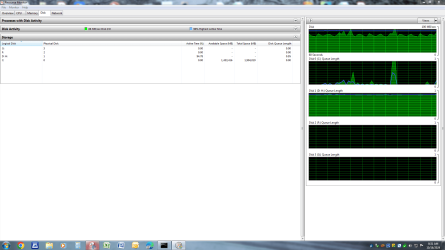
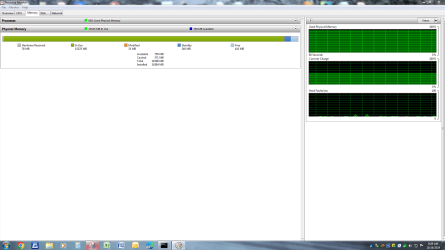
Now some startling EYE CANDY of how CHKDSK is using my PC's resources:

I have never noticed any program using MEMORY like that?

If it can and it speeds things up, so be it!

What's your opinion?

- - - Updated - - -

I despaired after 1/2 hour of waiting on CHKDSK to FIX a 500GB 7200RPM Drive.
If it couldn't show any progress or complete the job, I have a BIG problem.

I did suspect the Docking Station, so I tried a different Brand, same results.

Next, I'm going to try a Clone. This might eliminate a Hardware Problem by moving a Software Problem to a different Physical Device.
Yes, I'm grasping at straws, but I have no other alternatives in mind.

Might any Forum Member have another approach?
 

Attachments

  • Capture - chkdsk as it's running.PNG
    Capture - chkdsk as it's running.PNG
    19.4 KB · Views: 1
  • Capture - chkdsk memory usage.PNG
    Capture - chkdsk memory usage.PNG
    57.4 KB · Views: 1
  • Capture - chkdsk Disk usage.PNG
    Capture - chkdsk Disk usage.PNG
    63.3 KB · Views: 1
Last edited:

My Computer My Computer

At a glance

Microsoft Windows 7 Professional 64-bit 7601 ...Intel(R) Core(TM) i7-3770 CPU @ 3.40GHz8.00 GBIntel(R) HD Graphics 4000
Computer type
PC/Desktop
Computer Manufacturer/Model Number
Two HP Desktops. One in the Laundry Room / Bed Room.
OS
Microsoft Windows 7 Professional 64-bit 7601 Multiprocessor Free Service Pack 1
CPU
Intel(R) Core(TM) i7-3770 CPU @ 3.40GHz
Motherboard
Hewlett-Packard 3396
Memory
8.00 GB
Graphics Card(s)
Intel(R) HD Graphics 4000
Sound Card
(1) Realtek High Definition Audio (2) Intel(R) Display Aud
Monitor(s) Displays
Hanns-G
Screen Resolution
1440 x 900 x 32 bits (4294967296 colors) @ 59 Hz
Hard Drives
(1) ATA WDC WD40EZRX-00S SCSI Disk Device (2) HP Officejet Pro 86 USB Device (3) WD My Book 1230 USB Device
PSU
Whatever came with the CMT.
Case
HP CMT Black.
Cooling
Whatever came with the CMT.
Keyboard
Logitech K740.
Mouse
Microsoft Optical Mouse 1000.
Internet Speed
Spectrum 25Mbs.
Antivirus
WebRoot, Microsoft Security Essentials.
Browser
EDGE
Other Info
HP Officejet Pro 8600 Plus.
WD MyBook 4TB.

No idea tbh, that image does not tell anything except your 16gb of memory is being saturated. You would have to look in the process tab.
 

My Computers My Computers

  • At a glance

    10
    OS
    10
  • Computer type
    PC/Desktop
In the Process Tab, what should I be looking for?

Remember, I am a Novice and can look at the Problem but not recognize it.
 

My Computer My Computer

At a glance

Microsoft Windows 7 Professional 64-bit 7601 ...Intel(R) Core(TM) i7-3770 CPU @ 3.40GHz8.00 GBIntel(R) HD Graphics 4000
Computer type
PC/Desktop
Computer Manufacturer/Model Number
Two HP Desktops. One in the Laundry Room / Bed Room.
OS
Microsoft Windows 7 Professional 64-bit 7601 Multiprocessor Free Service Pack 1
CPU
Intel(R) Core(TM) i7-3770 CPU @ 3.40GHz
Motherboard
Hewlett-Packard 3396
Memory
8.00 GB
Graphics Card(s)
Intel(R) HD Graphics 4000
Sound Card
(1) Realtek High Definition Audio (2) Intel(R) Display Aud
Monitor(s) Displays
Hanns-G
Screen Resolution
1440 x 900 x 32 bits (4294967296 colors) @ 59 Hz
Hard Drives
(1) ATA WDC WD40EZRX-00S SCSI Disk Device (2) HP Officejet Pro 86 USB Device (3) WD My Book 1230 USB Device
PSU
Whatever came with the CMT.
Case
HP CMT Black.
Cooling
Whatever came with the CMT.
Keyboard
Logitech K740.
Mouse
Microsoft Optical Mouse 1000.
Internet Speed
Spectrum 25Mbs.
Antivirus
WebRoot, Microsoft Security Essentials.
Browser
EDGE
Other Info
HP Officejet Pro 8600 Plus.
WD MyBook 4TB.
scandisk and chkdsk are failures since 1985. Always recovers fragments and almost never fixes anything while often hanging for hours...
chkdsk when starts before OS (command lines) works at least better - by having unrestricted access to normally locked files by system and sometimes even saying what is wrong.

Recently I was fighting for 10 days with Kingston A1000 nvme m.2 - dumb chkdsk was reporting that everything is good while about 3gb data was inaccessible, and PC was loading about over 10 minutes when clicked on HDD. Every other hdd scanner was starting hard grinding after about 5% 7% and 10% of this faulty drive, but chkdsk was finishing in 1 minute with no errors at all.

So far I have noticed that ANY third party, low-level hdd scanner does much better job, mainly by showing you progress and log, so you could known if program froze or milling something hard.
I recommend MiniTool Partition Wizard or even GParted. Even old HDD Tune :D (paid program)
Or just use any Linux tools - this is why they are for. Even this hybrid called Hiren's 15.2 (heavily modified WinXP) or newer version if your PC is capable to run Win10PE
 

My Computers My Computers

  • At a glance

    w7rt, w7x64 pro, w10ltsc
    OS
    w7rt, w7x64 pro, w10ltsc
  • Computer type
    PC/Desktop
If it takes a long time it suggest a faulty disk goto disk makers site they normally have a free disk test specific for the drive
 

My Computer My Computer

At a glance

win 8 32 bit
Computer type
PC/Desktop
OS
win 8 32 bit
Back
Top