Is 'don't defrag your SSD' guideline still applicable? and VHD?

jonnyhotchkiss

New member
Member
VIP
Local time
1:14 PM
Messages
260
Hi, I'm kinda new (still a noob) to the VHD game.

It's the future now, and we have "Solid State Drives" (quite good ones, I'm told...)
Mine's an OCZ Vertex, 250GB, about to get re-installed [diskpart create primary partition, then drop my native VHD on it]): the original died after a month (a friend suspected it was a bootsector 0 error that cause the boot failure probs...)

Having recently read OLD comments suggesting that much of the advice on SSD optimisation is now out of date, I'm wondering if the 'don't defrag your SSD' guideline is no longer applicable, and if so whether to bother about "virtual pagefile relocation" (that's basically what RAMDisk et al is, right?)

Does anyone run native VHDs? On an SSD?! If so, prey tell, do you 'virtually defrag', inside the VHD?! Or does the 'parent volume rule' (I invented some needed terminology) dictate that, because the VHD is on an SSD, the VM doesn't require defragmenting?

(Please note this is re native VHDs, no hosts like VPC/Hyper-V/VBox... I haven't used any of them yet... my 'VM' is windows 7 64bit, on 'bare metal')

Many thanks
 

My Computer My Computer

At a glance

Windows 7 Ultimate 64bit2.28GbNVIDIA
Computer type
Laptop
Computer Manufacturer/Model Number
Dell
OS
Windows 7 Ultimate 64bit
CPU
2.2
Memory
8Gb
Graphics Card(s)
NVIDIA
Screen Resolution
1280/762
Mouse
built in pad || iphone || MS wireless
Internet Speed
100MB
Antivirus
Avast
Browser
Chrome, Chrome portable
The advice to not defrag a SSD still holds. It simply isn't necessary.
 

My Computer My Computer

At a glance

Win 7 Ultimate 64 bitIntel i7-3930KKingston HyperX Genesis 32GB Kit (8x4GB Modul...MSI R7850 Twin Frozr 2GD5/OC Radeon HD 7850 2...
Computer type
PC/Desktop
Computer Manufacturer/Model Number
Custom Build
OS
Win 7 Ultimate 64 bit
CPU
Intel i7-3930K
Motherboard
ASUS P9X79 WS
Memory
Kingston HyperX Genesis 32GB Kit (8x4GB Modules) 1600MHz DDR
Graphics Card(s)
MSI R7850 Twin Frozr 2GD5/OC Radeon HD 7850 2GB 256-bit GDDR
Sound Card
Asus Xonar Essence STX
Monitor(s) Displays
3x Asus VG248QE 24", Vizio 32" TV
Screen Resolution
1920 x 1080, ?
Hard Drives
Samsung 128GB 840 Pro SSD (1),
Samsung 4TB 850 EVO SSDs (4)
Samsung 4TB 850 EVO SSDs (16) external backup drives used in 2.5" hot swap bays in the computer.
PSU
Corsair HX750w
Case
Antec Two Hundred v2 (modified)
Cooling
Cooler Master GeminII S524 120mm (fan replaced with a 140mm)
Keyboard
Logitech G510s
Mouse
Logitech M525 (two in use)
Internet Speed
=< 32Mbps down, 8Mbps up
Antivirus
AVAST!, MBAM, SAS, Spybot S&D (all but MBAM free) Glary Util
Browser
IE11
Other Info
LSI 9211-8i HBA card (8 SATA III ports), 2.5" & 3.5" Hot Swap Bays, HooToo HT-CR001 PCI-E to USB 3.0 Internal Hub + 6 Slot Card Reader, and LG Model CH12LS28 BD-ROM Optical Drive. Also, ScanSnap S1500 ADF duplexing scanner, Canon 9000F flat bed scanner, Corsair SP2500 2.1 speakers, Samsung CLP 415nw laser color printer, Cyberpower PP2200SW UPS
Thanks Lady Fitz' :D It's not that SSD don't suffer from fragmentation though, right?

What's more, does anyone know what's happening when you're in a virtual hard-drive, running an OS (natively, fully supported by Windows, since 7)? I mean, it's a file...

I fully appreciate and agree with the information advising users to disable scheduled fragmentation on an SSD, but I wonder, of all the DEfragment tools and technologies, if any can or should be used inside a VHD...


(If anyone knows {'for a fact' :} that fragmentation does not occur on an SSD, or that defragmentating "inside the Native VHD/VM" on an SSD is recommended/ok/cool... please holler :)
 

My Computer My Computer

At a glance

Windows 7 Ultimate 64bit2.28GbNVIDIA
Computer type
Laptop
Computer Manufacturer/Model Number
Dell
OS
Windows 7 Ultimate 64bit
CPU
2.2
Memory
8Gb
Graphics Card(s)
NVIDIA
Screen Resolution
1280/762
Mouse
built in pad || iphone || MS wireless
Internet Speed
100MB
Antivirus
Avast
Browser
Chrome, Chrome portable
Fragmentation does occur within SSDs but, since there isn't a mechanical arm swinging heads back and forth over one or more platters, it's not a problem. The controller can easily handle it. It's a bad idea to defrag an SSD because it adds unnecessary writes that can shorten the write life of the SSD. I just checked mine; it's 12% fragmented and it still is running just fine.

I have no clue about within a VM but I suspect the same will hold true.
 

My Computer My Computer

At a glance

Win 7 Ultimate 64 bitIntel i7-3930KKingston HyperX Genesis 32GB Kit (8x4GB Modul...MSI R7850 Twin Frozr 2GD5/OC Radeon HD 7850 2...
Computer type
PC/Desktop
Computer Manufacturer/Model Number
Custom Build
OS
Win 7 Ultimate 64 bit
CPU
Intel i7-3930K
Motherboard
ASUS P9X79 WS
Memory
Kingston HyperX Genesis 32GB Kit (8x4GB Modules) 1600MHz DDR
Graphics Card(s)
MSI R7850 Twin Frozr 2GD5/OC Radeon HD 7850 2GB 256-bit GDDR
Sound Card
Asus Xonar Essence STX
Monitor(s) Displays
3x Asus VG248QE 24", Vizio 32" TV
Screen Resolution
1920 x 1080, ?
Hard Drives
Samsung 128GB 840 Pro SSD (1),
Samsung 4TB 850 EVO SSDs (4)
Samsung 4TB 850 EVO SSDs (16) external backup drives used in 2.5" hot swap bays in the computer.
PSU
Corsair HX750w
Case
Antec Two Hundred v2 (modified)
Cooling
Cooler Master GeminII S524 120mm (fan replaced with a 140mm)
Keyboard
Logitech G510s
Mouse
Logitech M525 (two in use)
Internet Speed
=< 32Mbps down, 8Mbps up
Antivirus
AVAST!, MBAM, SAS, Spybot S&D (all but MBAM free) Glary Util
Browser
IE11
Other Info
LSI 9211-8i HBA card (8 SATA III ports), 2.5" & 3.5" Hot Swap Bays, HooToo HT-CR001 PCI-E to USB 3.0 Internal Hub + 6 Slot Card Reader, and LG Model CH12LS28 BD-ROM Optical Drive. Also, ScanSnap S1500 ADF duplexing scanner, Canon 9000F flat bed scanner, Corsair SP2500 2.1 speakers, Samsung CLP 415nw laser color printer, Cyberpower PP2200SW UPS
(Why am I harrassing you good people?! Knowledge, my friends :D Powerful knowledge)

one day, My shiny new 30 day old SSD failed to boot to it's native VHD
(the only installed OS, ie a file, practically the only file allegedly sitting on the SSD )

Not knowing WHY a CRITICAL "bootsector fail" occur{s|ed}, or how the MFT relates to the BCD stuff when using native VHDs, and any/ALL other 'elements' in this ... souffle...

Just saw this, makes me wonder if native VHDs ain't so magic after all...

Whenever anyone mentions that a product can handle Master File Table fragmentation, they certainly have my attention. Windows products will typically create an MFT that's barely large enough to accommodate a bare-bones operating system. This of course means that, as soon as you begin adding applications and files, NTFS will expand the MFT INCREMENTALLY and, because this table is itself a file, that spells fragmentation. The problem here is, in the absence of a defragmentation utility capable of addressing this level of fragmentation, performance can only degrade over time. I liken this insanity to a public library deciding it 's not necessary to place all the pages of a book together in one place, as long as the card catalogue system knows where they can be retrieved. But, as if that's not enough, say they took this one step further and decided it's not even necessary to provide a centralized card catalog large enough to accommodate all available shelf space, as long as you add more card catalog units as shelves fill up - and it won't even matter WHERE in the building they're located, as long as you keep track of that also! And the icing on the cake is, when this card catalogue system becomes too unwieldy, you can then justify migrating to a new and bigger facility! If this doesn't sound like planned redundancy, why do people typically figure it's time to upgrade when their "defragmented" and well-protected computers have slowed down to a crawl?


I still haven't figured out a bulletproof contingency plan ("recovery" was eventually, laboriously, manually fluked (partition magic restore mbr may have helped access the vhd via diskpart to mount [xcopied files from mounted, unbootable vhd), data only... ie the OS, program files, 100s of manhours making windows work just right.. gone...

Right now I'm seeing:

Native VHD: Dangerously cool theoretically almost ideal situation...
MFT is a file, even on SSDs it's still a file, and as such susceptible to fragmentation...

I hope that makes sense. I'll shut up now...

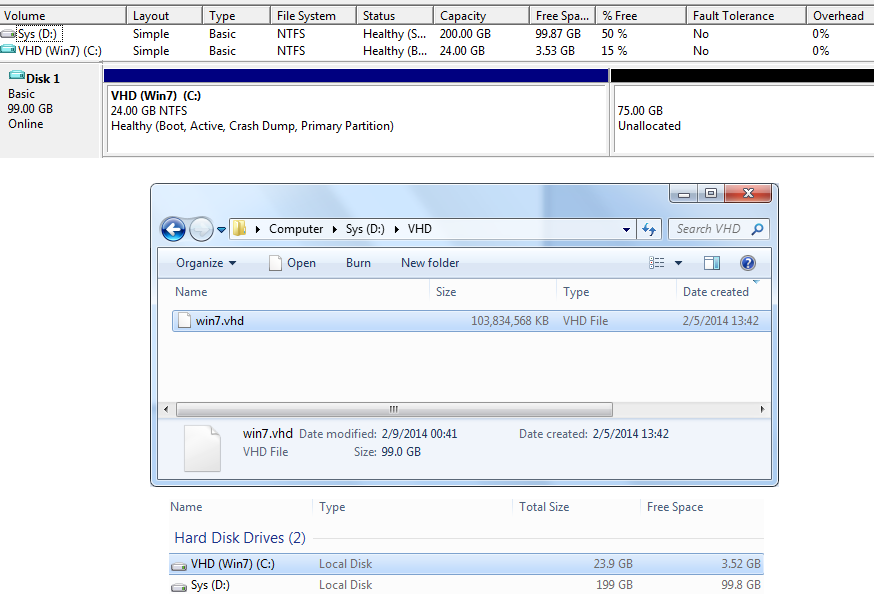
Back to seeing if diskpart's compact command, outside the "native V-OS" ie san VHDresizer... will enable the size of the newly shrank VHD's volume capacity (90g>>>25g, 65gig now unallocated) to be reflected in the
FLGGaFN.png
residing on the active primary partition ... :what:
 

My Computer My Computer

At a glance

Windows 7 Ultimate 64bit2.28GbNVIDIA
Computer type
Laptop
Computer Manufacturer/Model Number
Dell
OS
Windows 7 Ultimate 64bit
CPU
2.2
Memory
8Gb
Graphics Card(s)
NVIDIA
Screen Resolution
1280/762
Mouse
built in pad || iphone || MS wireless
Internet Speed
100MB
Antivirus
Avast
Browser
Chrome, Chrome portable
I should add, since that occasion, I had another
QphUk27.png
... it was whilst trying to fix this that I caused super weirdness (misused/misunderstood Win PE? incompatability with my 'unique setup'?? rootkit infection?!! Wish I knew how to debug)
 

My Computer My Computer

At a glance

Windows 7 Ultimate 64bit2.28GbNVIDIA
Computer type
Laptop
Computer Manufacturer/Model Number
Dell
OS
Windows 7 Ultimate 64bit
CPU
2.2
Memory
8Gb
Graphics Card(s)
NVIDIA
Screen Resolution
1280/762
Mouse
built in pad || iphone || MS wireless
Internet Speed
100MB
Antivirus
Avast
Browser
Chrome, Chrome portable
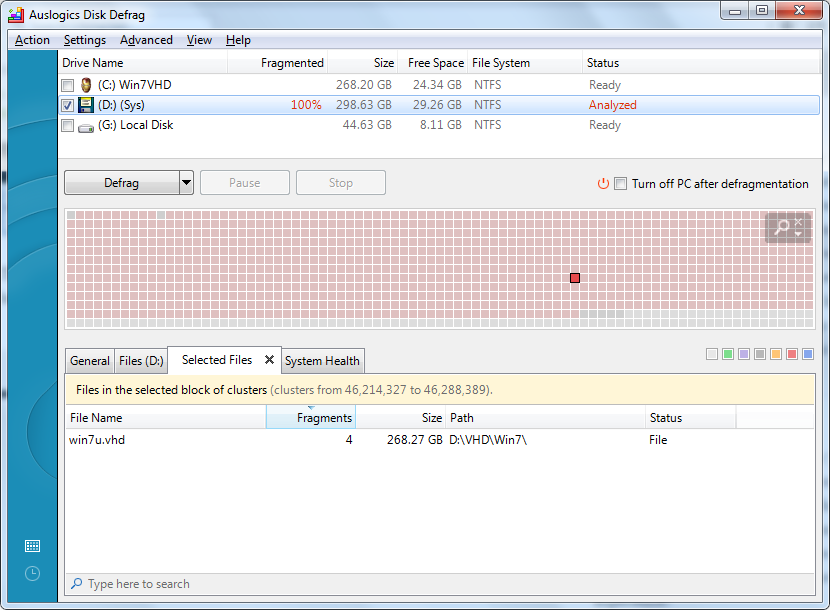
Maybe a monthly "analyse/defragment MFT" (SSD friendly) app is what we're after... there are tools that allow you to defrag specific files, right?

This intrigued me, but I have no visibility of these files (even with dir /ah)
 

My Computer My Computer

At a glance

Windows 7 Ultimate 64bit2.28GbNVIDIA
Computer type
Laptop
Computer Manufacturer/Model Number
Dell
OS
Windows 7 Ultimate 64bit
CPU
2.2
Memory
8Gb
Graphics Card(s)
NVIDIA
Screen Resolution
1280/762
Mouse
built in pad || iphone || MS wireless
Internet Speed
100MB
Antivirus
Avast
Browser
Chrome, Chrome portable
jonnyhotchkiss;2684794...[QUOTE said:
Whenever anyone mentions that a product can handle Master File Table fragmentation, they certainly have my attention. Windows products will typically create an MFT that's barely large enough to accommodate a bare-bones operating system. This of course means that, as soon as you begin adding applications and files, NTFS will expand the MFT INCREMENTALLY and, because this table is itself a file, that spells fragmentation. The problem here is, in the absence of a defragmentation utility capable of addressing this level of fragmentation, performance can only degrade over time. I liken this insanity to a public library deciding it 's not necessary to place all the pages of a book together in one place, as long as the card catalogue system knows where they can be retrieved. But, as if that's not enough, say they took this one step further and decided it's not even necessary to provide a centralized card catalog large enough to accommodate all available shelf space, as long as you add more card catalog units as shelves fill up - and it won't even matter WHERE in the building they're located, as long as you keep track of that also! And the icing on the cake is, when this card catalogue system becomes too unwieldy, you can then justify migrating to a new and bigger facility! If this doesn't sound like planned redundancy, why do people typically figure it's time to upgrade when their "defragmented" and well-protected computers have slowed down to a crawl?
...[/QUOTE]

I don't totally agree with this analogy. Random storage is actually the most efficient way to store materials and actually will reduce the amount of space required. When materials are stored in some kind of an order to facilitate finding it, either empty space has to be reserved for known incoming replacement stock and for possible future stock and/or existing material has to be moved around to make room for incoming stock. One is a waste of space and the other involves unnecessary labor, also a waste. However, a good locator system allows one to put material anywhere there is a convenient empty space and will guide someone retrieving the material to where it is located. It also can allow for more efficient stock rotation. A really good locator system will also specify where to put incoming materials based on available space and need for quick access. For example, slow moving stock would be put up high and far from the collection point whereas faster moving items would be put down low and closer to the collection point.

Companies with large warehouses (such as Amazon.com) have been using random storage for a long time. I worked in warehousing for 30 years and places like Westinghouse and (incredible as it may seem) the U.S. Army had been using random storage successfully for a long time even back then; that fact was an argument I used when trying to convince management, especially in IT, to do the same where I worked (it had finally been partially implemented when I retired).

Where the library analogy falls apart is the assumption of a physical card catalog. Except for maybe small school and town libraries, pretty much all libraries use digital card catalogues on PCs or dumb terminals. While it is still desirable to group books according to subject (such as under the old Dewey Decimal System) to minimize show leather wear when retrieving multiple books on similar subjects and to facilitate browsing, it's really not necessary to locate books precisely in alphabetical order by category and author name anymore; in fact doing so wastes space and labor, same as in the previous example. All that is really needed is to locate the book by row, column, and shelf; finding it after that would be fairly fast. Even this example is rapidly being rendered moot because books are rapidly being digitized. Digital books are far more efficient to store, locate, and retrieve than physical books. Digital books, as long as they are properly backed up (a critical point), are also more durable than physical books, are far easier, not to mention faster, to search within, and require far less space to store. A small server the size of a closet can replace a huge physical building. The books do not need to be accessed from a central point, either. One can now access many books from libraries all over the world from a single, conveniently located PC. Eventually, all libraries will be fully digitized (although I probably won't be around to see it but that's because I've already been around a long time). Heck, I'm in the process of digitizing my own personal library to simplify cataloging and accessing my books and to dramatically reduce the amount of space and weight needed to store them (a small amount of space on five HDDs, including four backups, instead of in forty heavy boxes).

The same is true with SSDs. The controller is capable of retrieving data, even if badly fragmented, without any hiccups unless the fragmentation becomes really bad. By the time that happens (if it happens), if the SSD is being used for the OS and Programs only, a clean reinstall would probably be in order anyway. If (a big if) data being stored on the SSD becomes too badly fragmented, a clean erase and restoring of the data would also probably be more efficient than trying to do a defrag.
 

My Computer My Computer

At a glance

Win 7 Ultimate 64 bitIntel i7-3930KKingston HyperX Genesis 32GB Kit (8x4GB Modul...MSI R7850 Twin Frozr 2GD5/OC Radeon HD 7850 2...
Computer type
PC/Desktop
Computer Manufacturer/Model Number
Custom Build
OS
Win 7 Ultimate 64 bit
CPU
Intel i7-3930K
Motherboard
ASUS P9X79 WS
Memory
Kingston HyperX Genesis 32GB Kit (8x4GB Modules) 1600MHz DDR
Graphics Card(s)
MSI R7850 Twin Frozr 2GD5/OC Radeon HD 7850 2GB 256-bit GDDR
Sound Card
Asus Xonar Essence STX
Monitor(s) Displays
3x Asus VG248QE 24", Vizio 32" TV
Screen Resolution
1920 x 1080, ?
Hard Drives
Samsung 128GB 840 Pro SSD (1),
Samsung 4TB 850 EVO SSDs (4)
Samsung 4TB 850 EVO SSDs (16) external backup drives used in 2.5" hot swap bays in the computer.
PSU
Corsair HX750w
Case
Antec Two Hundred v2 (modified)
Cooling
Cooler Master GeminII S524 120mm (fan replaced with a 140mm)
Keyboard
Logitech G510s
Mouse
Logitech M525 (two in use)
Internet Speed
=< 32Mbps down, 8Mbps up
Antivirus
AVAST!, MBAM, SAS, Spybot S&D (all but MBAM free) Glary Util
Browser
IE11
Other Info
LSI 9211-8i HBA card (8 SATA III ports), 2.5" & 3.5" Hot Swap Bays, HooToo HT-CR001 PCI-E to USB 3.0 Internal Hub + 6 Slot Card Reader, and LG Model CH12LS28 BD-ROM Optical Drive. Also, ScanSnap S1500 ADF duplexing scanner, Canon 9000F flat bed scanner, Corsair SP2500 2.1 speakers, Samsung CLP 415nw laser color printer, Cyberpower PP2200SW UPS
The reason that data fragmentation on an HDD can become a noticable problem is because the data is stored on a magnetic platter that is accessed via a read/write head. The read/write head needs to move to the actual physical location on the platter where a piece of data is stored before it can be accessed, and if the HDD is fragmented too much there is time lost as the platter and read/write head moves to each required location while having to make multiple passes over the platter.

On an SSD, access times are almost non-existant compared to HDDs because there are absolutely no moving parts, any location on an SSD can be accessed almost immediately and equally. Yes, the data does get fragmented, but the fragmentation simply has no effect on an SSD.

I will also add that with today's HDDs which are much faster than the HDDs of "ye olde times", defragmentation has lost much of its everyday relevance as an HDD even with noticable levels of fragmentation will still yield quick access and response times. Barring some specialized heavy workloads, it's usually not even worth the time nor the stress put on the HDD to go about defragging it.
 

My Computer My Computer

At a glance

Windows 7 Ultimate x64 SP1Intel Core i7 2700K @ 3.5GHz (TurboBoost disa...16GB (4x4GB) Kingston HyperX DDR3 1600MHz @ 1...Nvidia EVGA GeForce GTX 1060 6GB
Computer type
PC/Desktop
Computer Manufacturer/Model Number
N/A (custom-built)
OS
Windows 7 Ultimate x64 SP1
CPU
Intel Core i7 2700K @ 3.5GHz (TurboBoost disabled)
Motherboard
ASUS P8Z68-V/GEN3
Memory
16GB (4x4GB) Kingston HyperX DDR3 1600MHz @ 1333MHz
Graphics Card(s)
Nvidia EVGA GeForce GTX 1060 6GB
Sound Card
Realtek High Definition Audio (motherboard integrated)
Monitor(s) Displays
NEC Multisync EX231W
Screen Resolution
1920x1080 @ 60Hz via DVI-D
Hard Drives
2x Western Digital 1TB SATA3 Caviar Black Internal HDD // 1x WD 500GB USB 3.0 "My Passport Essential" External HDD // 1x WD 1TB USB 3.0 "My Passport Essential" External HDD // 2x WD 2TB USB 3.0 "My Passport Essential" External HDD
PSU
Corsair Professional Series Gold AX850
Case
Antec 300
Cooling
Air-cooling
Keyboard
Steelseries 6Gv2
Mouse
Steelseries Sensei RAW Glossy, Logitech M500
Internet Speed
DSL (AT&T)
Antivirus
Microsoft Security Essentials
Browser
Pale Moon, Mozilla Firefox 12, Opera 12, Chromium, IE9
Other Info
Virtual Machines (VirtualBox):
* Japanese Windows XP Professional SP3
* Japanese Windows 7 Professional SP1
Back
Top