Solved Is it dead gpu?

PavelChehoff

New member
Member
Local time
12:55 AM
Messages
69
Hi guys.
I had few problems recently with my system. My computer (or just monitor/grapchic card [not sure]) was swithcing to power save mode on its own when all power settings are set to stay on all the time. the only way to get of the power save mode was to restart system.
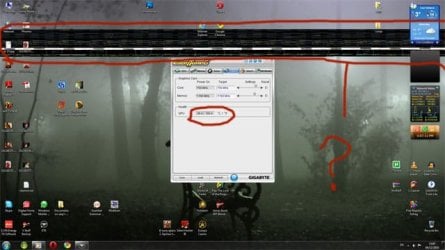
Today I got new issue on top of all. Strange lines and dots acros desktop.

Whats wrong?
Thats very strange as few month ago I replaced GPU as previous one die. There was no any output signal.
I have recently change cpu and psu you can see up to date system below.
Any help will be great as I dont really know what to think.

I got:
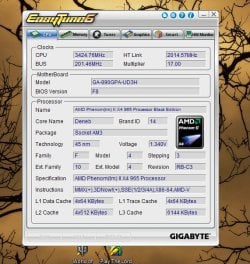
GA-890GPA-UD3H with bios F8
AMD Phenom II x4 965
Ram:2x2Gb + 2x1Gb all Corsair
Sapphire ATI Radeon HD 5750 Vapor-X 1024MB
PSU 850W
 

Attachments
  • desktop.jpg
    desktop.jpg
    50.4 KB · Views: 63

My Computer

OS
windows 7 home premium
It sure sounds like a GPU that's going or having problems. Are all it's drivers up to date? Do you have any other GPU you could replace this with to see if the condition goes away?
 

My Computer

Computer type
PC/Desktop
Computer Manufacturer/Model Number
A blend of brains, brawn and dumb luck.
OS
Windows 7 Ultimate 64
CPU
i7 3770k OC'd 4.6 @ 1.17v, also FX 8120 & i5 miniITX
Motherboard
MSI P67A-GD80 b3
Memory
32 gb G.Skill Sniper DDR3 10-12-12-31 @ 2133
Graphics Card(s)
XFX Radeon 7870 2GB DDR5
Sound Card
Sound Blaster Z Series Card
Monitor(s) Displays
(2) LG LED 23" 1920 x 1080 2ms Monitors via mini d-port
Screen Resolution
1680 X 1050 p
Hard Drives
Samsung 256 gb 830 SSD sata III
(1) 1 tb WD Black
(2) 1 tb Hitachi deskmates/sata II
(2) 1 tb WD green/sata II
(2) 3 tb Seagate Barracuda
(1) 120 gb OCZ Vertex SS
(1) Drobo 5N w/5 Seagate 3tb
PSU
EVGA modular 1000G2 80% gold rating & APC 1200 RS
Case
CoolerMaster Storm Styker
Cooling
7 case fans 140mm & 120mm, NZXT Kraken X60
Keyboard
(2) Logitech Illuminated Keyboards (1) usb (1) wireless
Mouse
Logitech G700 & T-BC21 - nano nx for the laptop
Internet Speed
Basic 120mbps down
Antivirus
Trend Micro Titanium Max Security & Malwarebytes Premium
Browser
Chrome and IE 10
Other Info
5 Noctua case fans + 3 Noctua in p/p on NZXT cooler
Integrated hot swap drive bays for 2.5" Drives
(2) Lite-on dvd/cd/Blu Ray optical 22X
Integrated fan controller and led on/off
HP Officejet Pro 8630 all-n-one
Hot-swappable 3.5" hard drive bay
Netgear Nighthawk router
Asus USB 3 & sata 6 PCIe card
Vantec IDE to sata adptr./Ultra sata adptr
Lenovo L420 i5 lappy with m sata
Drobo 5N advanced NAS
For sure it is your GPU cpu is fine the Gpu will botch a screen like that
 

My Computer

Computer type
PC/Desktop
Computer Manufacturer/Model Number
CoreI7-6700K MrFingerIII Special Builds
OS
Windows 10 Home Premium 64bit sp1
CPU
Intel I7-6700K @ 4.6 Ghz 1.344 volts everyday OC
Motherboard
Asrock Fatality K6 Z170 Socket 1151
Memory
32GB G-Skill TridentZ 3200mhz 16-18-18-38 DDR4
Graphics Card(s)
Sli Gigabyte Windforce GTX 980 G1
Sound Card
AC97 Creative Rage Tactic 3D Headphones Bluetooth
Monitor(s) Displays
27" Asus ROG Swift PG278Q G-Sync 48" Vizio Smart HD TV
Screen Resolution
2560x1440p 27"- 48" Currently Gaming at 2560x1440p Res 2K
Hard Drives
250GB Samsung Evo840SSD Seagate baracuda 500 GB WD Mybook 500Gb 1TB Seagate Barracuda
PSU
HX1050w Corsair Silver 80plus certified crosfire/sli
Case
Enthod Pro Full Tower
Cooling
Corsair H110i GT 280 mm High Performance WaterBlock
Keyboard
Logitech wireless keyboard
Mouse
Logitech wireless mouse
Internet Speed
Cox Cable 100+ mb
Antivirus
WebRoot Spysweeper with Antivirus
Browser
IE-10, Chrome, Opera
Other Info
My Other Rig is a AMD FX8320E @4.6Ghz 16GB Ballistic Sport Ram
Mobo Asrock Fatality 990FX 120GB OCZ SSD 1TB Seagate Barracuda Corsair H75 Cooling PSU Corsair CX750
GPU GTX Gigabyte 970G1
right. I can borrow my brother gpu which completely same. we bought two identical or I have gpu build on mobo. Question: why two gpu going down on one mobo within the 6 months?
I download latest CCC yesterday, no difference. So what technically could cause that problem?
 

My Computer

OS
windows 7 home premium
I can't answer that other than tell you that I've been right where you are. Only it's with a BFG GTX 260 OC and after going through two to get one that worked I'm beginning to get those same distortions on solid black fields. I on the other hand have no recourse as my lifetime warranty blew up when BFG backed out of the market. Break out the little violins !
 

My Computer

Computer type
PC/Desktop
Computer Manufacturer/Model Number
A blend of brains, brawn and dumb luck.
OS
Windows 7 Ultimate 64
CPU
i7 3770k OC'd 4.6 @ 1.17v, also FX 8120 & i5 miniITX
Motherboard
MSI P67A-GD80 b3
Memory
32 gb G.Skill Sniper DDR3 10-12-12-31 @ 2133
Graphics Card(s)
XFX Radeon 7870 2GB DDR5
Sound Card
Sound Blaster Z Series Card
Monitor(s) Displays
(2) LG LED 23" 1920 x 1080 2ms Monitors via mini d-port
Screen Resolution
1680 X 1050 p
Hard Drives
Samsung 256 gb 830 SSD sata III
(1) 1 tb WD Black
(2) 1 tb Hitachi deskmates/sata II
(2) 1 tb WD green/sata II
(2) 3 tb Seagate Barracuda
(1) 120 gb OCZ Vertex SS
(1) Drobo 5N w/5 Seagate 3tb
PSU
EVGA modular 1000G2 80% gold rating & APC 1200 RS
Case
CoolerMaster Storm Styker
Cooling
7 case fans 140mm & 120mm, NZXT Kraken X60
Keyboard
(2) Logitech Illuminated Keyboards (1) usb (1) wireless
Mouse
Logitech G700 & T-BC21 - nano nx for the laptop
Internet Speed
Basic 120mbps down
Antivirus
Trend Micro Titanium Max Security & Malwarebytes Premium
Browser
Chrome and IE 10
Other Info
5 Noctua case fans + 3 Noctua in p/p on NZXT cooler
Integrated hot swap drive bays for 2.5" Drives
(2) Lite-on dvd/cd/Blu Ray optical 22X
Integrated fan controller and led on/off
HP Officejet Pro 8630 all-n-one
Hot-swappable 3.5" hard drive bay
Netgear Nighthawk router
Asus USB 3 & sata 6 PCIe card
Vantec IDE to sata adptr./Ultra sata adptr
Lenovo L420 i5 lappy with m sata
Drobo 5N advanced NAS
so would it mean that I need to contact the gpu seller asking for replace? What fault I should state?
 

My Computer

OS
windows 7 home premium
right. I can borrow my brother gpu which completely same. we bought two identical or I have gpu build on mobo. Question: why two gpu going down on one mobo within the 6 months?
I download latest CCC yesterday, no difference. So what technically could cause that problem?

Overclocking the GPU can cause an early demise.

Overclocking the PCIe bus as well.

Ap
 

My Computer

Computer Manufacturer/Model Number
Assembled in my workshop
OS
Windows 7 Home Premium
CPU
Intel Core 2 Duo @ 3.00gHz
Motherboard
Gigabyte GA-P35-S3G
Memory
4 GB
Graphics Card(s)
ATI Radeon HD 2600 XT
Sound Card
RME 24/96 Card, Realtek Internal Audio PreSonus FireStudio
Monitor(s) Displays
Acer 1917 (x2)
Screen Resolution
1280 x 1024 on both monitors
Hard Drives
Three 250GB Seagate SATA Barracuda 7200rpm
PSU
Rosewill 500-watt
Case
Rosewill mid-tower
Cooling
Noctua NH-U9B (CPU), PwrSupply fan + single large case Fan
Keyboard
Macally w/2/USB ports.
Mouse
Trackman Wheel
Other Info
Event 20/20 bas studio monitors, Yamaha sub.
Rackmount Korg/Roland/Yamaha synthesizers,
Cubase MIDI/audio recording. Sony Soundforge audio/mastering software. CD Architect Mastering. RME & Presonus audio interfaces.
right. I can borrow my brother gpu which completely same. we bought two identical or I have gpu build on mobo. Question: why two gpu going down on one mobo within the 6 months?
I download latest CCC yesterday, no difference. So what technically could cause that problem?

Overclocking the GPU can cause an early demise.

Overclocking the PCIe bus as well.

Ap

Everything set as Auto. I dont think I have overclocked anything, system good enough for me with standard dimensions. but any worth to check what should i do?
 

My Computer

OS
windows 7 home premium
Just contact the GPU manufacturer and tell them the screen issue and they may recommend a RMA return or better yet a pay in advance return where you pay for the replacement unit and send them the faulty one for a full credit to your credit card or something similar.
 

My Computer

Computer type
PC/Desktop
Computer Manufacturer/Model Number
A blend of brains, brawn and dumb luck.
OS
Windows 7 Ultimate 64
CPU
i7 3770k OC'd 4.6 @ 1.17v, also FX 8120 & i5 miniITX
Motherboard
MSI P67A-GD80 b3
Memory
32 gb G.Skill Sniper DDR3 10-12-12-31 @ 2133
Graphics Card(s)
XFX Radeon 7870 2GB DDR5
Sound Card
Sound Blaster Z Series Card
Monitor(s) Displays
(2) LG LED 23" 1920 x 1080 2ms Monitors via mini d-port
Screen Resolution
1680 X 1050 p
Hard Drives
Samsung 256 gb 830 SSD sata III
(1) 1 tb WD Black
(2) 1 tb Hitachi deskmates/sata II
(2) 1 tb WD green/sata II
(2) 3 tb Seagate Barracuda
(1) 120 gb OCZ Vertex SS
(1) Drobo 5N w/5 Seagate 3tb
PSU
EVGA modular 1000G2 80% gold rating & APC 1200 RS
Case
CoolerMaster Storm Styker
Cooling
7 case fans 140mm & 120mm, NZXT Kraken X60
Keyboard
(2) Logitech Illuminated Keyboards (1) usb (1) wireless
Mouse
Logitech G700 & T-BC21 - nano nx for the laptop
Internet Speed
Basic 120mbps down
Antivirus
Trend Micro Titanium Max Security & Malwarebytes Premium
Browser
Chrome and IE 10
Other Info
5 Noctua case fans + 3 Noctua in p/p on NZXT cooler
Integrated hot swap drive bays for 2.5" Drives
(2) Lite-on dvd/cd/Blu Ray optical 22X
Integrated fan controller and led on/off
HP Officejet Pro 8630 all-n-one
Hot-swappable 3.5" hard drive bay
Netgear Nighthawk router
Asus USB 3 & sata 6 PCIe card
Vantec IDE to sata adptr./Ultra sata adptr
Lenovo L420 i5 lappy with m sata
Drobo 5N advanced NAS
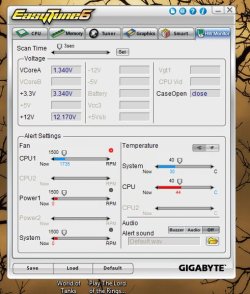
You didn't mention what case you are using for your PC. Heat is the biggest killer of GPU's.
Try pulling the side door off the case and see if that helps. If not the card is probably toast.
If you end up getting another card try installing an extra fan inside the case infront of the
HHD and direct the air into the case or leave the case door open and see what temps are like.
I have the same card and my temps rarely go over 55c. Mind you I have good air flow.
You also need to clean the GPU fan occasionally especially if you live in a dusty area
or have your computer on carpet.
 
Last edited:

My Computer

Computer type
PC/Desktop
Computer Manufacturer/Model Number
Acer M5641
OS
Windows 7 Home Premium 64bit
CPU
Q6600
Motherboard
Nvidia MCP73PV
Memory
4GB.
Graphics Card(s)
Sapphire Vapor-X 5750
Sound Card
XFI Extreem music
Monitor(s) Displays
Acer X223W
Screen Resolution
1680x1050
Hard Drives
WD10 02FAEX
WD64 00AAKS
PSU
stock 450w
Case
acer
Cooling
stock
Keyboard
Microsoft Digital Media Pro.
Mouse
Logitech MX620
Internet Speed
49.51Mbs down 4.98Mbs up 17.6ms ping
Antivirus
MSE
Browser
Waterfox
Other Info
Shaw Cable
Netgear R6200
What PSU brand is it? What is the rail info?
 

My Computer

Computer Manufacturer/Model Number
Self-Built
OS
Windows 7 Ultimate x64
CPU
AMD Phenom 965 @ 3.4GHz w/ Thermaltake Contac 29 (updraft)
Motherboard
Gigabyte 790GPT-UD3H w/ F3 BIOS & IGP disabled
Memory
Kingston 8GB DDR3 1333MHz 9-9-9-24 (2 x 4GB kits)
Graphics Card(s)
Sapphire 6870 1GB GDDR5 (reference model)
Sound Card
Onboard Realtek 889A codec
Monitor(s) Displays
BenQ 22" M2200HD
Screen Resolution
1920x1080
Hard Drives
1 x Seagate Barracuda 7200.12 1TB 7200RPM w/32MB cache
PSU
Xigmatek NRP-MC651 650w 80+ bronze certified
Case
Antec Two Hundred
Cooling
1 x 140mm exhaust top, 1 x 120mm exhaust rear
Keyboard
Stock PS/2 model
Mouse
Razer Salmosa
Internet Speed
ADSL2+/ 2MB/s
You didn't mention what case you are using for your PC. Heat is the biggest killer of GPU's.
Try pulling the side door off the case and see if that helps. If not the card is probably toast.
If you end up getting another card try installing an extra fan inside the case infront of the
HHD and direct the air into the case or leave the case door open and see what temps are like.
I have the same card and my temps rarely go over 55c. Mind you I have good air flow.
You also need to clean the GPU fan occasionally especially if you live in a dusty area
or have your computer on carpet.

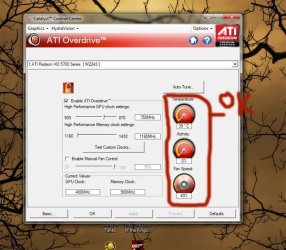
Thats my temp. I tried with open case before as I thought its overheat, no difference.
I will try to reinstall windows tonight, maybe that will help.
 

Attachments

  • Untitled-2.jpg
    Untitled-2.jpg
    77.5 KB · Views: 15
  • Untitled-4.jpg
    Untitled-4.jpg
    98.3 KB · Views: 7
  • Untitled-6.jpg
    Untitled-6.jpg
    70.6 KB · Views: 6

My Computer

OS
windows 7 home premium
It might be the PSU - Powercool looks like a $15 rebadged OEM unit. Do you have another to swap it out?
 

My Computer

Computer Manufacturer/Model Number
Self-Built
OS
Windows 7 Ultimate x64
CPU
AMD Phenom 965 @ 3.4GHz w/ Thermaltake Contac 29 (updraft)
Motherboard
Gigabyte 790GPT-UD3H w/ F3 BIOS & IGP disabled
Memory
Kingston 8GB DDR3 1333MHz 9-9-9-24 (2 x 4GB kits)
Graphics Card(s)
Sapphire 6870 1GB GDDR5 (reference model)
Sound Card
Onboard Realtek 889A codec
Monitor(s) Displays
BenQ 22" M2200HD
Screen Resolution
1920x1080
Hard Drives
1 x Seagate Barracuda 7200.12 1TB 7200RPM w/32MB cache
PSU
Xigmatek NRP-MC651 650w 80+ bronze certified
Case
Antec Two Hundred
Cooling
1 x 140mm exhaust top, 1 x 120mm exhaust rear
Keyboard
Stock PS/2 model
Mouse
Razer Salmosa
Internet Speed
ADSL2+/ 2MB/s
i CAN TOOK OUT MY BROTHER PSU BUT ITS ONLY 400w OR 550w Dont remember now.
 

My Computer

OS
windows 7 home premium
As long as its a quality unit from Antec, Corsair, Enermax, Seasonic etc.
 

My Computer

Computer Manufacturer/Model Number
Self-Built
OS
Windows 7 Ultimate x64
CPU
AMD Phenom 965 @ 3.4GHz w/ Thermaltake Contac 29 (updraft)
Motherboard
Gigabyte 790GPT-UD3H w/ F3 BIOS & IGP disabled
Memory
Kingston 8GB DDR3 1333MHz 9-9-9-24 (2 x 4GB kits)
Graphics Card(s)
Sapphire 6870 1GB GDDR5 (reference model)
Sound Card
Onboard Realtek 889A codec
Monitor(s) Displays
BenQ 22" M2200HD
Screen Resolution
1920x1080
Hard Drives
1 x Seagate Barracuda 7200.12 1TB 7200RPM w/32MB cache
PSU
Xigmatek NRP-MC651 650w 80+ bronze certified
Case
Antec Two Hundred
Cooling
1 x 140mm exhaust top, 1 x 120mm exhaust rear
Keyboard
Stock PS/2 model
Mouse
Razer Salmosa
Internet Speed
ADSL2+/ 2MB/s
I see you have your core over clocked try setting it back to defaults and see what happens.
These are my temps a couple of minutes after playing Halo2 a notorious card warmer.
View attachment 120563
And I run my card on a 400w PSU
 
Last edited:

My Computer

Computer type
PC/Desktop
Computer Manufacturer/Model Number
Acer M5641
OS
Windows 7 Home Premium 64bit
CPU
Q6600
Motherboard
Nvidia MCP73PV
Memory
4GB.
Graphics Card(s)
Sapphire Vapor-X 5750
Sound Card
XFI Extreem music
Monitor(s) Displays
Acer X223W
Screen Resolution
1680x1050
Hard Drives
WD10 02FAEX
WD64 00AAKS
PSU
stock 450w
Case
acer
Cooling
stock
Keyboard
Microsoft Digital Media Pro.
Mouse
Logitech MX620
Internet Speed
49.51Mbs down 4.98Mbs up 17.6ms ping
Antivirus
MSE
Browser
Waterfox
Other Info
Shaw Cable
Netgear R6200
The temps are fine. My 6870 can hit 60 after 6 hours of gaming.
 

My Computer

Computer Manufacturer/Model Number
Self-Built
OS
Windows 7 Ultimate x64
CPU
AMD Phenom 965 @ 3.4GHz w/ Thermaltake Contac 29 (updraft)
Motherboard
Gigabyte 790GPT-UD3H w/ F3 BIOS & IGP disabled
Memory
Kingston 8GB DDR3 1333MHz 9-9-9-24 (2 x 4GB kits)
Graphics Card(s)
Sapphire 6870 1GB GDDR5 (reference model)
Sound Card
Onboard Realtek 889A codec
Monitor(s) Displays
BenQ 22" M2200HD
Screen Resolution
1920x1080
Hard Drives
1 x Seagate Barracuda 7200.12 1TB 7200RPM w/32MB cache
PSU
Xigmatek NRP-MC651 650w 80+ bronze certified
Case
Antec Two Hundred
Cooling
1 x 140mm exhaust top, 1 x 120mm exhaust rear
Keyboard
Stock PS/2 model
Mouse
Razer Salmosa
Internet Speed
ADSL2+/ 2MB/s
Not really talking about the temps now more about the core overclock, could be your card just doesn't like
being overclocked. Try setting it back to defaults and see what happens.
 

My Computer

Computer type
PC/Desktop
Computer Manufacturer/Model Number
Acer M5641
OS
Windows 7 Home Premium 64bit
CPU
Q6600
Motherboard
Nvidia MCP73PV
Memory
4GB.
Graphics Card(s)
Sapphire Vapor-X 5750
Sound Card
XFI Extreem music
Monitor(s) Displays
Acer X223W
Screen Resolution
1680x1050
Hard Drives
WD10 02FAEX
WD64 00AAKS
PSU
stock 450w
Case
acer
Cooling
stock
Keyboard
Microsoft Digital Media Pro.
Mouse
Logitech MX620
Internet Speed
49.51Mbs down 4.98Mbs up 17.6ms ping
Antivirus
MSE
Browser
Waterfox
Other Info
Shaw Cable
Netgear R6200
Back
Top