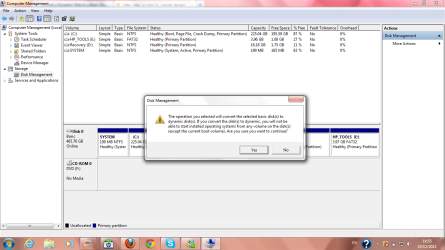
is it good convert to dynamic disk

jugurtha12

New member
Local time
12:28 PM
Messages
1
Dear friends , Every time I try to do shrink to driver C in my computer after completing the right procedures , it is going good , it gives unallocated space but when I try to format it at the end send a message to convert the disk , please help me how to make the partition , becaus ethe disc C have 450 GB.

This is the message shown :

The operation you selected will convert the selected basic disk to dynamik disk , If you convert the disk to dynamik you will not be able to start installed operating systems from any volume on the disk , are you sure want to continue (yes ) or (no)?:(

Please help me in this message to get another partition of the drive C :cry:
 

Attachments

  • Untitled.png
    Untitled.png
    198.1 KB · Views: 22

My Computer

OS
windows 7 ultimate 64 bit

My Computer

Computer type
Laptop
Computer Manufacturer/Model Number
MSI GE72VR Apache Pro-416
OS
Windows 10x64 Build 1709
CPU
Intel i7 7700HQ Kaby Lake
Motherboard
Micro-Star Intl. MS-179B (U3C1)
Memory
16 GB DDR4 @2400
Graphics Card(s)
Nvidia Geforce GTX 1060
Screen Resolution
1920x1080 120Hz
Hard Drives
256 GB Nvme M.2 SSD

1TB HDD@7200
Cooling
Cooler Blast 4
Keyboard
Steel Series
Antivirus
Bit Defender Free
Browser
Edge

My Computer

Computer type
PC/Desktop
Computer Manufacturer/Model Number
Self Built
OS
Win 10 Pro x64
CPU
Intel I5-2500K @3.3GHz
Motherboard
Asrock P67 Extreme4
Memory
16GB G.Skill Ripjaws X (4x4GB)
Graphics Card(s)
EVGA GeForce 750 Ti SC 2GB
Sound Card
ASUS Xonar DG 5.1 Channels 24-bit 96KHz PCI Interface Sound
Monitor(s) Displays
auria eq2367
Screen Resolution
1920 x 1080
Hard Drives
250GB Samsung 850 EVO SSD
1TB WD Blue
1TB Hitachi
PSU
SeaSonic X 650W 80 Plus Gold
Case
Corsair Obsidian 750D
Cooling
Corsair H60, Three 140mm case fans
Keyboard
Logitech Wireless Keyboard K520
Mouse
Logitech Wireless Mouse M310
Internet Speed
Wave Broadband ~ 100 dn 5 up
Antivirus
Windows Defender, Malwarebytes Premium
Browser
Edge, IE11, Chrome
Other Info
Laptop specs: HP g7-1365dx /
CPU: AMD A6-3420M APU with Radeon(tm) HD Graphics /
RAM: Crucial 8Gb (2x4Gb) /
SSD: Crucial M4-CT128M4SSD2 ATA Device/ FW 000F /
GFX: AMD Radeon HD 6520G /
OS: Windows 10 Pro x64
Hint: be very careful. Read the tutorials & ask questions.

Do you have any imaging program and an external disk? Always good to have access to a complete backup (or clone) in case something does not go according to plan. As an absolute minimum, backup all your personal files.
 

My Computer

Computer type
Laptop
Computer Manufacturer/Model Number
Dell \ Lenovo\ HP \ Toshiba
OS
W7, W8.1
Antivirus
MSE, Malwarebytes
Browser
FF
Derek is correct for how to keep HP's preinstalled Recovery and Tools partitions bootable while adding new partition(s) without ruining your install by converting to Dynamic:

From Partition Wizard right click C to convert to Modify>Set to Logical, then shrink C as much as you want to add as many new Logical partitions as you want: How to set partition as Primary or Logical.
Partition or Volume - Shrink
Partition or Volume - Create New

If you need to shrink C more than Disk mgmt allows after defrag, then use the PW boot disk only which will not fail: Partition Wizard Resize Partition Video Help.
 
Just a small addition to Greg's post

From Partition Wizard right click C to convert to Logical

After right clicking on C, you have to go to Modify - there you can convert to logical.
 

My Computer

Computer Manufacturer/Model Number
HP, Dell, Gateway, Toshiba - 4 laptops and 2 desktops
OS
Vista, Windows7, Mint Mate, Zorin, Windows 8
CPU
from 1.6GHz Duo to i7
Monitor(s) Displays
2x HP w2207
Hard Drives
5x HDD, 7x SSD, 12x Externals
Keyboard
with trackball - no mices
Mouse
Trackball mice
Internet Speed
DSL 6000
Back
Top