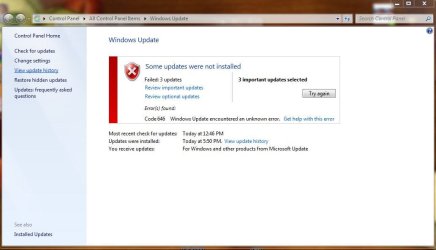
is it just me?

jaypels

New member
Power User
Local time
8:59 AM
Messages
162
is it just me or these 3 updates always get this error code? i've been trying to download them since yesterday but still the same error.
 

Attachments

  • update.JPG
    update.JPG
    62.8 KB · Views: 22
  • error.JPG
    error.JPG
    46.5 KB · Views: 19

My Computer

Computer Manufacturer/Model Number
Desktop is a DIY and laptop is an Acer Aspire 4745
OS
7 all the way!
CPU
core 2 duo (desktop) i5 (laptop)
Motherboard
asus for desktop
Memory
2gb for both machines
Graphics Card(s)
nvidia 512mb GS for desktop; hd 5470 for laptop
Monitor(s) Displays
19" AOC 913fw
This will allow you to reset and re-register Windows Update, and clear the view update history details. It will not uninstall any installed Windows Update.

This may also be handy to help if you are having a problem updating with Windows Update.

Windows Update - Reset
 

My Computer

Computer type
PC/Desktop
Computer Manufacturer/Model Number
LENOVO K450 @3.0GHZ
OS
64-bit Windows 8.1 Pro
CPU
Core(TM) i5 CPU 4330 Haswell @ 3.20GHz
Motherboard
LENOVO
Memory
12.00 GB
Graphics Card(s)
Intel(R) HD Graphics
Sound Card
Intel HD integtrated
Monitor(s) Displays
HP 25' ISP Monitor
Screen Resolution
1900/1020
Hard Drives
(1) ST1000DM003-1CH162 (2) Generic STORAGE DEVICE USB Device (3) Generic STORAGE DEVICE USB Device
Internet Speed
100mb down/10mb up
If you are using any third party firewall turn it off then re run the update, and if you just use windows firewall .............
  1. Open the Control Panel and select Security.
  2. Select Turn Windows Firewall on or off.
  3. Select Off (not recommended), click Apply and then OK.
  4. Back at the Windows Update screen, click the Try again button.
  5. The download(s) and installation should start…
  6. and this time successfully install. If a restart is required, make sure to re-enable your Firewall once your PC restarts.

let us know if that works for you :geek:
 

My Computer

Computer Manufacturer/Model Number
built my own
OS
win7 ultimate / virtual box
CPU
Intel Core i7 3770K,1155, Ivy Bridge
Motherboard
MSI Z77A-G43
Memory
GSkill Ripjaws Z Series 1600 CL 9.0 16GB
Graphics Card(s)
KFA2 GeForce GTX 670 EX OC 2048MB GDDR5 PCI-E gfx card
Sound Card
onboard Nvidia HDMI audio
Monitor(s) Displays
ASUS VK222H 22" widescreen LCD monitor
Screen Resolution
1680x1050
Hard Drives
Kingston 128gb SSD
OCZ Vertex 90gb SSD
500GB WDCaviar 16mb 5000KS
320GB WDCaviar 16mb 3200AAKS sata 2
1TB Samsung 16mb HD103SJ sata 2
PSU
Corsair HX 750W ATX2.2 Modular
Cooling
Antec 25 Kuhler H2O 620
Keyboard
logitech
Mouse
logitech MX518
Internet Speed
7mb adsl
From your first image I think you have only problem with updates for Office not with updates strickly for system.

First try install these updates manually from Microsoft Download Center Microsoft Download Center ,if it fail too the only solution what I can see is unistall Office and reinstall it again
 
Last edited:

My Computer

Computer Manufacturer/Model Number
Custom made
OS
Windows 7 Professional x64 PL
CPU
AMD Athlon 4450e
Motherboard
Giga-Byte GA-MA69G-S3H
Memory
GoodRam DDR2 2x2048MB (FSB 800MHz)
Graphics Card(s)
nVidia GeForce 9600GT (G94-300) 1024 MB
Monitor(s) Displays
SAMSUNG SyncMaster HS2P301688
Hard Drives
Seagate ST3750330AS 750GB
PSU
Corsair 550W
Cooling
AeroCool ExtremeEngine 3T
i tried sir ickymay's suggestion first because it seems to have less work. due to that, i found out my firewall in turned off. there are two things you must know. i never turn off my firewall and im the only one using this laptop. any idea how it got turned off? i'll try sir tew's suggestion after the firewall issue is resolved..
 

My Computer

Computer Manufacturer/Model Number
Desktop is a DIY and laptop is an Acer Aspire 4745
OS
7 all the way!
CPU
core 2 duo (desktop) i5 (laptop)
Motherboard
asus for desktop
Memory
2gb for both machines
Graphics Card(s)
nvidia 512mb GS for desktop; hd 5470 for laptop
Monitor(s) Displays
19" AOC 913fw
i tried sir ickymay's suggestion first because it seems to have less work. due to that, i found out my firewall in turned off. there are two things you must know. i never turn off my firewall and im the only one using this laptop. any idea how it got turned off? i'll try sir tew's suggestion after the firewall issue is resolved..

Is that built-in firewall? http://www.sevenforums.com/tutorials/522-windows-firewall-turn-off.html if it is any 3p firewall you must find yourself deeply in options..

If it doesn't work try my suggestions from post 4.
 

My Computer

Computer Manufacturer/Model Number
Custom made
OS
Windows 7 Professional x64 PL
CPU
AMD Athlon 4450e
Motherboard
Giga-Byte GA-MA69G-S3H
Memory
GoodRam DDR2 2x2048MB (FSB 800MHz)
Graphics Card(s)
nVidia GeForce 9600GT (G94-300) 1024 MB
Monitor(s) Displays
SAMSUNG SyncMaster HS2P301688
Hard Drives
Seagate ST3750330AS 750GB
PSU
Corsair 550W
Cooling
AeroCool ExtremeEngine 3T
i did a manual download of the update and thanks to sir flavius' suggestion, my office is updated. :D but my question still pertains, how did my windows firewall got turned off? i do not have a third party firewall since i trust windows firewall enough to do it for me. any ideas how it got turned off? and as to system security, i use kaspersky internet security, malwarebytes, superantispyware and spyware blaster. i scan my system atleast once every two weeks using the first three programs and i only visit safe sites.

 

My Computer

Computer Manufacturer/Model Number
Desktop is a DIY and laptop is an Acer Aspire 4745
OS
7 all the way!
CPU
core 2 duo (desktop) i5 (laptop)
Motherboard
asus for desktop
Memory
2gb for both machines
Graphics Card(s)
nvidia 512mb GS for desktop; hd 5470 for laptop
Monitor(s) Displays
19" AOC 913fw
i did a manual download of the update and thanks to sir flavius' suggestion, my office is updated. :D but my question still pertains, how did my windows firewall got turned off? i do not have a third party firewall since i trust windows firewall enough to do it for me. any ideas how it got turned off? and as to system security, i use kaspersky internet security, malwarebytes, superantispyware and spyware blaster. i scan my system atleast once every two weeks using the first three programs and i only visit safe sites.

Sorry.I misunderstand you.Kaspersky Internet Security have already it's own firewall thus Windows firewall was disabled and it is OK.I glad your problem is already resolved :).
 

My Computer

Computer Manufacturer/Model Number
Custom made
OS
Windows 7 Professional x64 PL
CPU
AMD Athlon 4450e
Motherboard
Giga-Byte GA-MA69G-S3H
Memory
GoodRam DDR2 2x2048MB (FSB 800MHz)
Graphics Card(s)
nVidia GeForce 9600GT (G94-300) 1024 MB
Monitor(s) Displays
SAMSUNG SyncMaster HS2P301688
Hard Drives
Seagate ST3750330AS 750GB
PSU
Corsair 550W
Cooling
AeroCool ExtremeEngine 3T
i already turned it on the moment i saw it was turned off sir. my question was how it got turned off. but maybe i'm just paranoid enough. ;) i'll just watch it for now and notify you guys when my firewall turns itself off again. but for now, my question is answered and you can now close the thread. as usual, a big thank you to tews for the quickest reply, a thank you to ickymay for without his suggestion, i would not notice my firewall got turned off and a special thank you to flavius for the many suggestions. :D
 

My Computer

Computer Manufacturer/Model Number
Desktop is a DIY and laptop is an Acer Aspire 4745
OS
7 all the way!
CPU
core 2 duo (desktop) i5 (laptop)
Motherboard
asus for desktop
Memory
2gb for both machines
Graphics Card(s)
nvidia 512mb GS for desktop; hd 5470 for laptop
Monitor(s) Displays
19" AOC 913fw
i already turned it on the moment i saw it was turned off sir. my question was how it got turned off. but maybe i'm just paranoid enough. ;) i'll just watch it for now and notify you guys when my firewall turns itself off again. but for now, my question is answered and you can now close the thread. as usual, a big thank you to tews for the quickest reply, a thank you to ickymay for without his suggestion, i would not notice my firewall got turned off and a special thank you to flavius for the many suggestions. :D

as flavius said when you installed kaspersky then that program will turn off windows firewall ;)

personally I don't like kaspersky as it's too aggressive/intrusive and just using windows firewall with MSE is good enough protection :geek:
 

My Computer

Computer Manufacturer/Model Number
built my own
OS
win7 ultimate / virtual box
CPU
Intel Core i7 3770K,1155, Ivy Bridge
Motherboard
MSI Z77A-G43
Memory
GSkill Ripjaws Z Series 1600 CL 9.0 16GB
Graphics Card(s)
KFA2 GeForce GTX 670 EX OC 2048MB GDDR5 PCI-E gfx card
Sound Card
onboard Nvidia HDMI audio
Monitor(s) Displays
ASUS VK222H 22" widescreen LCD monitor
Screen Resolution
1680x1050
Hard Drives
Kingston 128gb SSD
OCZ Vertex 90gb SSD
500GB WDCaviar 16mb 5000KS
320GB WDCaviar 16mb 3200AAKS sata 2
1TB Samsung 16mb HD103SJ sata 2
PSU
Corsair HX 750W ATX2.2 Modular
Cooling
Antec 25 Kuhler H2O 620
Keyboard
logitech
Mouse
logitech MX518
Internet Speed
7mb adsl
personally I don't like kaspersky as it's too aggressive/intrusive

This was the same conclusion I had back when I was trying to decide which to go with.
I hear good things about it, but for me, it wanted to block many things that were safe or of no threat.
Could have been user error though :)
 

My Computer

Computer Manufacturer/Model Number
Custom (Self Build)
OS
Windows 7 Home Premium 64bit
CPU
Intel Core i7 2700k
Motherboard
eVGA P67 SLI
Memory
8GB Mushkin Redline Ridgebacks @1866
Graphics Card(s)
EVGA GTX570 SC
Sound Card
XiFi Titanium HD
Monitor(s) Displays
LG W2453V
Screen Resolution
1920x1080
Hard Drives
Intel 320 80GB -- Intel X25-V 40GB --WD Black 1TB x2 -- WD Blue 640GB
PSU
Seasonic x750
Case
Corsair 600T SE White
Cooling
eVGA Superclocked CPU Cooler
Keyboard
Saitek Cyborg
Antivirus
Kaspersky
Browser
IE
Other Info
LG BD/DVD
Back
Top