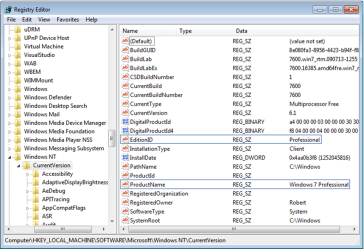
I am currently running Win 7 Ult 64 on my desktop.
I am building a new system & want to use my Win 7 Ult key on it. From what I've read, there is no reason I can't move it to another machine (it's not an OEM copy). I want SUA on my main PC.
The reason I'd like to downgrade is to use my old box for HTPC tinkering and whatnot, and I already bought a new edition of Win 7 to use for that purpose (still will use 64 bit). I *could* do a clean install, but it would be nice to have my settings saved, etc (nothing getting recycled from old box except one data HDD). I don't *need* Ultimate to tinker with a HTPC, and not being made of $$, I don't want to buy another Ultimate copy again.
I am building a new system & want to use my Win 7 Ult key on it. From what I've read, there is no reason I can't move it to another machine (it's not an OEM copy). I want SUA on my main PC.
The reason I'd like to downgrade is to use my old box for HTPC tinkering and whatnot, and I already bought a new edition of Win 7 to use for that purpose (still will use 64 bit). I *could* do a clean install, but it would be nice to have my settings saved, etc (nothing getting recycled from old box except one data HDD). I don't *need* Ultimate to tinker with a HTPC, and not being made of $$, I don't want to buy another Ultimate copy again.
My Computer
- OS
- Win 7 Ult & Win 7 Pro