is it possible to download all win7 updates at once? win7

biftekaki

New member
Local time
12:12 PM
Messages
7
hello
iam a linux user and i have trouble to understand how windows updater works.
it seems like win7 download every restart a little bit of the updates.and not all at once.
i fixing pcs laptops for my family and vms. i am trying to cut time.
is it possible? to download all at once?
when iam trying to install software there is always a problem with .net or something else.
and how can i keep win7 small size at the same time?
is it possible?
thank you very much

iam using using mostly win7 64bit home.
something like ninite for win updates would be perfect
 

My Computer My Computer

At a glance

Linux User !!!
Computer type
PC/Desktop
OS
Linux User !!!
Last edited:

My Computers My Computers

  • At a glance

    7 X64i5 84002x8gb 3200mhz
    Computer type
    PC/Desktop
    OS
    7 X64
    CPU
    i5 8400
    Motherboard
    gigabyte b365m ds3h
    Memory
    2x8gb 3200mhz
    Hard Drives
    various
    PSU
    pure power 11 400w cm
    Case
    Coolermaster
    Cooling
    cryorig m9i
  • At a glance

    7x64g54008gb ddr4 2400
    Computer type
    PC/Desktop
    OS
    7x64
    CPU
    g5400
    Motherboard
    ga b365m ds3h
    Memory
    8gb ddr4 2400
    PSU
    xfx pro 450w
Hi biftekaki,

Welcome to SevenForums!

Is it possible? To download all at once?
When I am trying to install software there is always a problem with .net or something else.

On a clean install, there are at present, over 240+ WU updates. Now rather than letting M$ WU update your OS, which involves many hours of downloading, installing and re-booting, you can use DISM++ to do it all for you.

DISM++ - Basic Overview

DISM++ is a FREE implementation tool that has the ability to perform Windows Updates [WU]. Some of the advantages [but not all] are:

[1] The GUI is very easy to understand and use.
[2] It is much faster than M$’s WU because it uses a different engine.
[3] It downloads the DB from M$, scans your OS, and then lists the updates available.
[4] It gives you the option of what you want to install.
[5] It doesn’t install superseded updates like M$ does.
[6] It warns you of any suspect and Telemetry updates, and any updates that have known issues.
[7] It doesn’t require re-booting between updates.
[8] It can be used to either update an install.wim image offline, or to update the LIVE OS.

I hope this helps!
 

My Computer My Computer

At a glance

Win 7 HP SP1 64-bit Vista HB SP2 32-bit Linux...Intel(R) Pentium(R) CPU P6200 @ 2.13GHz4.00 GBIntel(R) Graphics Media Accelerator HD
Computer type
Laptop
Computer Manufacturer/Model Number
Fujitsu LIFEBOOK
OS
Win 7 HP SP1 64-bit Vista HB SP2 32-bit Linux Mint 18.3
CPU
Intel(R) Pentium(R) CPU P6200 @ 2.13GHz
Motherboard
FUJITSU FJNBB06
Memory
4.00 GB
Graphics Card(s)
Intel(R) Graphics Media Accelerator HD
Sound Card
[1] Realtek High Definition Audio [2] Intel(R) Display Audio
Screen Resolution
1366 x 768 x 32 bits (4294967296 colors) @ 59 Hz
Hard Drives
TOSHIBA MK5076GSX
Antivirus
AVG FREE
wow i could saved so much time.
thank you so much for the fast answer.
is there a way to use a minimal win7 instalation. to save space on harddrive.
whitout the need to update .whitout the time waisting waiting update to finish to restart

edit:
how many gb is a minimal win7 install with updates?30gbs?
 
Last edited:

My Computer My Computer

At a glance

Linux User !!!
Computer type
PC/Desktop
OS
Linux User !!!
hello again.
it dosent stop updating.am i doing something wrong?
the programm finds always new updates.
is there a way to install all updates?
thanks
 

My Computer My Computer

At a glance

Linux User !!!
Computer type
PC/Desktop
OS
Linux User !!!
Yes, check all the boxes on DISM++. Your system specs don't say how much RAM you have. If it's 4gb or less you will most likely run out of memory trying to install all at once.
 

My Computer My Computer

At a glance

Win 10 x64, Linux Lite, Win 7 x64, BlackArch,...
Computer type
PC/Desktop
Computer Manufacturer/Model Number
HP Desktop & Compaq Laptop
OS
Win 10 x64, Linux Lite, Win 7 x64, BlackArch, & Kali
Hard Drives
Samsung 850 Pro 256Gb,
Hitachi HDD 1Tb,
Crucial MX SSD 250Gb
Segate 3Tb USB 3.0 Ext. Backup HDD
Internet Speed
150Mbps dn, 20Mbps up
Antivirus
Avast Free, Malwarebytes Anti-Exploit & Anti-Ransomware
Browser
Firefox, Chrome, Opera, & VPN
yes this happens i have only 4gb ram not enough memory.
I am testing it on an old i5 sony laptop.
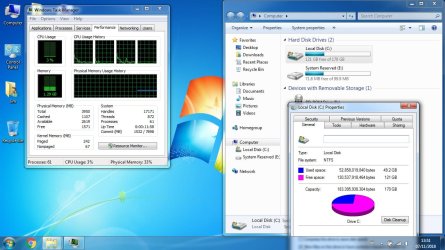
its a clean windows install and it is at 60gb????wtf happen here how can i delete not needed files anyone?
i didn't install anything only win7pro +updates. is that normal to be up to date and hard drive full?
is there a app for clean up?
 

My Computer My Computer

At a glance

Linux User !!!
Computer type
PC/Desktop
OS
Linux User !!!

My Computer My Computer

At a glance

Win 7 HP SP1 64-bit Vista HB SP2 32-bit Linux...Intel(R) Pentium(R) CPU P6200 @ 2.13GHz4.00 GBIntel(R) Graphics Media Accelerator HD
Computer type
Laptop
Computer Manufacturer/Model Number
Fujitsu LIFEBOOK
OS
Win 7 HP SP1 64-bit Vista HB SP2 32-bit Linux Mint 18.3
CPU
Intel(R) Pentium(R) CPU P6200 @ 2.13GHz
Motherboard
FUJITSU FJNBB06
Memory
4.00 GB
Graphics Card(s)
Intel(R) Graphics Media Accelerator HD
Sound Card
[1] Realtek High Definition Audio [2] Intel(R) Display Audio
Screen Resolution
1366 x 768 x 32 bits (4294967296 colors) @ 59 Hz
Hard Drives
TOSHIBA MK5076GSX
Antivirus
AVG FREE
Hi biftekaki,

It's a clean windows install and it is at 60gb????wtf happen here how can I delete not needed files anyone?
I didn't install anything only win7pro +updates. is that normal to be up to date and hard drive full?

Did you delete ALL the partitions to leave a single partition of un-allocated space during the clean install?

I hope this helps!
 

My Computer My Computer

At a glance

Win 7 HP SP1 64-bit Vista HB SP2 32-bit Linux...Intel(R) Pentium(R) CPU P6200 @ 2.13GHz4.00 GBIntel(R) Graphics Media Accelerator HD
Computer type
Laptop
Computer Manufacturer/Model Number
Fujitsu LIFEBOOK
OS
Win 7 HP SP1 64-bit Vista HB SP2 32-bit Linux Mint 18.3
CPU
Intel(R) Pentium(R) CPU P6200 @ 2.13GHz
Motherboard
FUJITSU FJNBB06
Memory
4.00 GB
Graphics Card(s)
Intel(R) Graphics Media Accelerator HD
Sound Card
[1] Realtek High Definition Audio [2] Intel(R) Display Audio
Screen Resolution
1366 x 768 x 32 bits (4294967296 colors) @ 59 Hz
Hard Drives
TOSHIBA MK5076GSX
Antivirus
AVG FREE
yes a clean install. repartition the hard drive.nothing on it.no old or hidden partition.
strange very strange.
very strange properties of c: say 32gb i miscalculated sorry.

this thing is strange .if i update my linux destop it is up to date in an hour maybe and it dose not take 2 days to update. and its still not done
any ideas to cut corners if i have to do this multiple times?

edit:
so this is realy strealy strange:
if i click on properties of the c: drive it show 52 gb
when i mark all folders in c: and click properies it shows 32gb
(maybe hidden folders?)
 

My Computer My Computer

At a glance

Linux User !!!
Computer type
PC/Desktop
OS
Linux User !!!
Hi biftekaki,

yes a clean install. repartition the hard drive. nothing on it. no old or hidden partition.

OK, so you were left with a single partition of un-allocated space.

very strange properties of c: say 32gb i miscalculated sorry.

That is more like it with ALL the updates included!

this thing is strange. if i update my linux destop it is up to date in an hour maybe and it dose not take 2 days to update. and its still not done. any ideas to cut corners if i have to do this multiple times?

Windows is totally different to Linux and shouldn't be used as a comparison.
Yes, as mentioned by SIW2 and myself, DISM++.

edit:
so this is realy strealy strange:
if i click on properties of the c: drive it show 52 gb
when i mark all folders in c: and click properies it shows 32gb
(maybe hidden folders?)

Did you run this [click the link] => Disk Cleanup : Extended.
It will get rid of all the temporary and unnecessary files. It will make a difference!

I hope this helps!
 

My Computer My Computer

At a glance

Win 7 HP SP1 64-bit Vista HB SP2 32-bit Linux...Intel(R) Pentium(R) CPU P6200 @ 2.13GHz4.00 GBIntel(R) Graphics Media Accelerator HD
Computer type
Laptop
Computer Manufacturer/Model Number
Fujitsu LIFEBOOK
OS
Win 7 HP SP1 64-bit Vista HB SP2 32-bit Linux Mint 18.3
CPU
Intel(R) Pentium(R) CPU P6200 @ 2.13GHz
Motherboard
FUJITSU FJNBB06
Memory
4.00 GB
Graphics Card(s)
Intel(R) Graphics Media Accelerator HD
Sound Card
[1] Realtek High Definition Audio [2] Intel(R) Display Audio
Screen Resolution
1366 x 768 x 32 bits (4294967296 colors) @ 59 Hz
Hard Drives
TOSHIBA MK5076GSX
Antivirus
AVG FREE
this getting stranger and stranger...
i made the clean up with the command line now its the 3rd day iam update win7 .
any ideas to cut corners? i will try dism++ to clean up.but i dont know what update i dont need...

thank so much for the help
 

Attachments

  • Untitled.jpg
    Untitled.jpg
    124.9 KB · Views: 1

My Computer My Computer

At a glance

Linux User !!!
Computer type
PC/Desktop
OS
Linux User !!!
Hi biftekaki,

any ideas to cut corners?

Yes, as mentioned by SIW2 and myself, DISM++. The reasons why are as I posted in post #3.

i will try dism++ to clean up.

You don't use DISM++ to cleanup! You use => Disk Cleanup : Extended.

but i dont know what update i dont need...

You use DISM++ to update the OS with the critical and recommended updates, the ones that are already ticked, as opposed to the un-ticked ones which are similar to the WU optional updates.

I hope this helps!
 

My Computer My Computer

At a glance

Win 7 HP SP1 64-bit Vista HB SP2 32-bit Linux...Intel(R) Pentium(R) CPU P6200 @ 2.13GHz4.00 GBIntel(R) Graphics Media Accelerator HD
Computer type
Laptop
Computer Manufacturer/Model Number
Fujitsu LIFEBOOK
OS
Win 7 HP SP1 64-bit Vista HB SP2 32-bit Linux Mint 18.3
CPU
Intel(R) Pentium(R) CPU P6200 @ 2.13GHz
Motherboard
FUJITSU FJNBB06
Memory
4.00 GB
Graphics Card(s)
Intel(R) Graphics Media Accelerator HD
Sound Card
[1] Realtek High Definition Audio [2] Intel(R) Display Audio
Screen Resolution
1366 x 768 x 32 bits (4294967296 colors) @ 59 Hz
Hard Drives
TOSHIBA MK5076GSX
Antivirus
AVG FREE
i did exacly what you sad.still 43gb this cant be right.
i think the best thing is to reinstall windows and install only security updates?
i want a secure slim system!
 
Last edited:

My Computer My Computer

At a glance

Linux User !!!
Computer type
PC/Desktop
OS
Linux User !!!
Back
Top