is it possible to have multiple sessions of chrome?

Dorfdad

New member
Member
Power User
VIP
Local time
1:33 AM
Messages
204
Location
Philadelphia, PA
Is it possible to have multiple sessions of chrome open at once? Not websites but the actually application itself?

is there a hack or trick to doing this? anyone know?

Before you ask WHY!? Im trying to have my google application shortcuts to run in thier own tab on the taskbar. I hate that slacker radio, gmail and all other application shortcuts run under the 1st chrome window that is launched.
 

My Computer My Computer

At a glance

Windows 7 7264AMD Phenon X4955 Black Edition 3.2 Quad Core8GB CORSAIR XMS3 DHX 4GB 240-Pin DDR3 SDRAM D...SAPPHIRE Radeon HD 4890 1GB 256-bit GDDR5 PCI...
OS
Windows 7 7264
CPU
AMD Phenon X4955 Black Edition 3.2 Quad Core
Motherboard
ASUS M4A79T Deluxe AM3 DDR3 AMD 790FX ATX AMD Motherboard
Memory
8GB CORSAIR XMS3 DHX 4GB 240-Pin DDR3 SDRAM DDR3 1600
Graphics Card(s)
SAPPHIRE Radeon HD 4890 1GB 256-bit GDDR5 PCI Exp 2.0 16x
Sound Card
Onboard Asus
Monitor(s) Displays
Hanns G 28" Widscreen Baby!
Screen Resolution
1900x1200
Hard Drives
Western Digital Caviar Black WD1001FALS 1TB 7200 RPM 32MB Cache SATA 3.0Gb

Western Digital 320gb 7200 RPM 16MB Cache
PSU
CORSAIR CMPSU-750TX 750W ATX12V / EPS12V
Case
Custom Made ATX
Cooling
Air
Keyboard
Microsoft Wired for gaming
Mouse
Wired for gaming 2200
Internet Speed
Comcast 24GB
picture 1:

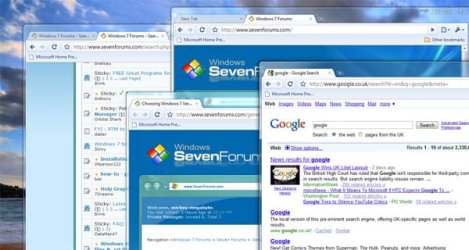
with me, i can double-click on the chrome shortcut in start menu to open another instance.

or middle-click pinned taskbar icon.

or you can just drag a tab onto your desktop to make a new chrome window.

is this what you meant?

picture 2:

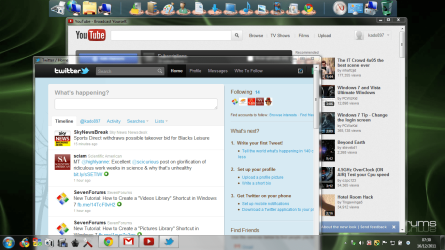
or right-click taskbar >> properties >> taskbar buttons >> never combine - but this will effect all your taskbar entries, not just chrome
 

Attachments

  • multichrome.jpg
    multichrome.jpg
    37.6 KB · Views: 152
  • task.JPG
    task.JPG
    18.5 KB · Views: 35

My Computer My Computer

At a glance

ultimate 64 sp1i5 2500K [email protected]8 gigs GSkill Ripjaws 1600amd hd6950
Computer Manufacturer/Model Number
mickey megabyte 1234
OS
ultimate 64 sp1
CPU
i5 2500K [email protected]
Motherboard
MSI P67A-GD53
Memory
8 gigs GSkill Ripjaws 1600
Graphics Card(s)
amd hd6950
Sound Card
creative x-fi gamer
Monitor(s) Displays
samsung 24"
Screen Resolution
1920x1080
Hard Drives
ocz vertex 2e 60 gig, samsung f3 1tb, buffalo 2tb ext
PSU
antec 550
Case
antec three hundred
Cooling
i'm a cooling fan
Keyboard
saitek eclipse ii
Mouse
logitech g3
Internet Speed
about 4 Mbps
Other Info
i love win7
No thats not what I mean. I have chrome shortcut on the taskbar. I cant launch two sessions of the program. If I click on chrome again once its already open it just take me to the open chrome sessions.


I want to be able to open chrome than open chrome again in effect running two seperate copies of chrome at the same time. Not a session of one chrome.
 

My Computer My Computer

At a glance

Windows 7 7264AMD Phenon X4955 Black Edition 3.2 Quad Core8GB CORSAIR XMS3 DHX 4GB 240-Pin DDR3 SDRAM D...SAPPHIRE Radeon HD 4890 1GB 256-bit GDDR5 PCI...
OS
Windows 7 7264
CPU
AMD Phenon X4955 Black Edition 3.2 Quad Core
Motherboard
ASUS M4A79T Deluxe AM3 DDR3 AMD 790FX ATX AMD Motherboard
Memory
8GB CORSAIR XMS3 DHX 4GB 240-Pin DDR3 SDRAM DDR3 1600
Graphics Card(s)
SAPPHIRE Radeon HD 4890 1GB 256-bit GDDR5 PCI Exp 2.0 16x
Sound Card
Onboard Asus
Monitor(s) Displays
Hanns G 28" Widscreen Baby!
Screen Resolution
1900x1200
Hard Drives
Western Digital Caviar Black WD1001FALS 1TB 7200 RPM 32MB Cache SATA 3.0Gb

Western Digital 320gb 7200 RPM 16MB Cache
PSU
CORSAIR CMPSU-750TX 750W ATX12V / EPS12V
Case
Custom Made ATX
Cooling
Air
Keyboard
Microsoft Wired for gaming
Mouse
Wired for gaming 2200
Internet Speed
Comcast 24GB
Middle click the chrome icon - does it still take you to the current session?
 

My Computers My Computers

  • At a glance

    Windows 11 21H2 Current buildAMD Ryzen 9 3950X4 * 32 GB - Corsair Vengeance 3600 MHzEVGA GeForce RTX 3080 Ti XC3 ULTRA GAMING (12...
    Computer type
    PC/Desktop
    Computer Manufacturer/Model Number
    The Beast Model A (homebrew)
    OS
    Windows 11 21H2 Current build
    CPU
    AMD Ryzen 9 3950X
    Motherboard
    MSI MEG X570 GODLIKE
    Memory
    4 * 32 GB - Corsair Vengeance 3600 MHz
    Graphics Card(s)
    EVGA GeForce RTX 3080 Ti XC3 ULTRA GAMING (12G-P5-3955-KR)
    Sound Card
    Realtek® ALC1220 Codec
    Monitor(s) Displays
    2x Eve Spectrum ES07D03 4K Gaming Monitor (Matte) | Eve Spec
    Screen Resolution
    3x 3840 x 2160
    Hard Drives
    3x Samsung 980 Pro NVMe PCIe 4 M.2 2 TB SSD (MZ-V8P2T0B/AM) } 3x Sabrent Rocket NVMe 4.0 1 TB SSD
    PSU
    PC Power & Cooling’s Silencer Series 1050 Watt, 80 Plus Plat
    Case
    Fractal Design Define 7 XL Dark ATX Full Tower Case
    Cooling
    SteelSeries Apex Pro Wired Gaming Keyboard
    Keyboard
    SteelSeries Apex Pro
    Mouse
    Logitech MX Master 3S | MX Master 3 for business
    Internet Speed
    AT&T LightSpeed Gigabit Duplex Ftth
    Antivirus
    Windows Defender + MB 3
    Browser
    Nightly (default) + Firefox (stable),Chrome, Edge
  • At a glance

    ChromeOS Flex Dev Channel (current)Intel(R) Core(TM) i5-6300U CPU @ 2.40GHz, 250...16 GBIntel(R) HD Graphics 520
    Computer type
    PC/Desktop
    System Manufacturer/Model Number
    Dell Latitude E5470
    OS
    ChromeOS Flex Dev Channel (current)
    CPU
    Intel(R) Core(TM) i5-6300U CPU @ 2.40GHz, 2501 Mhz, 2 Core(s), 4 Logical Processor(s)
    Motherboard
    Dell
    Memory
    16 GB
    Graphics Card(s)
    Intel(R) HD Graphics 520
    Sound Card
    Intel(R) HD Graphics 520 + RealTek Audio
    Monitor(s) Displays
    Dell laptop display 15"
    Screen Resolution
    1920 * 1080
    Hard Drives
    Toshiba 128GB M.2 22300 drive
    INTEL Cherryville 520 Series SSDSC2CW180A 180 GB SATA III SSD
    PSU
    Dell
    Case
    Dell
    Cooling
    Dell
    Keyboard
    Dell
    Mouse
    Logitech MX Master 3S (shared w. Sys 1) | Dell TouchPad
    Internet Speed
    AT&T LightSpeed Gigabit Duplex Ftth
If you drag one of the tabs outside the window, it creates a new window.

You can also grab a single tab window and drag it into an existing window.

In that case Chrome merges the two sessions to one.


Also in win7, if chrome is already opened, right clicking on chrome button in the taskbar should give you the option to open other instance.

good luck
 

My Computer My Computer

At a glance

Win7 Build 7600 x86Pentium II 300MHz32mb EDO RAMDiamond Viper
OS
Win7 Build 7600 x86
CPU
Pentium II 300MHz
Motherboard
Asus
Memory
32mb EDO RAM
Graphics Card(s)
Diamond Viper
Sound Card
Soundblaster 16
Monitor(s) Displays
14" AOC CRT 16K color
Screen Resolution
800x600
Hard Drives
300mb Quantum fireball
PSU
110 Watts
Cooling
Passive
Keyboard
Trust Ergonomic
Mouse
Generic
Internet Speed
256K u 128K d
sorry, it seems that i don't understand what you were after. :confused:

isn't picture 1 what you wanted? middle clicking your taskbar button will give you multiple instances of chrome? you can close one instance down without affecting the others.

picture 2 shows separate taskbar buttons.
 

My Computer My Computer

At a glance

ultimate 64 sp1i5 2500K [email protected]8 gigs GSkill Ripjaws 1600amd hd6950
Computer Manufacturer/Model Number
mickey megabyte 1234
OS
ultimate 64 sp1
CPU
i5 2500K [email protected]
Motherboard
MSI P67A-GD53
Memory
8 gigs GSkill Ripjaws 1600
Graphics Card(s)
amd hd6950
Sound Card
creative x-fi gamer
Monitor(s) Displays
samsung 24"
Screen Resolution
1920x1080
Hard Drives
ocz vertex 2e 60 gig, samsung f3 1tb, buffalo 2tb ext
PSU
antec 550
Case
antec three hundred
Cooling
i'm a cooling fan
Keyboard
saitek eclipse ii
Mouse
logitech g3
Internet Speed
about 4 Mbps
Other Info
i love win7
You can use two different sessions.
One using the Chrome Incognito Window (Private Browsing) and the other using regular Chrome Window.

So if you open a new Window (it would not work with a new tab in current window), using Ctrl-Shift-N (instead of Ctrl-N),
or open through the menu [Spanner Icon]->New Incognito Window, you can instantiate another completely separate session. All incognito windows would share one session, and all non-incognito windows would share another.

I am also looking for a way for multiple sessions in Chrome (I need more than two).
 

My Computer My Computer

At a glance

Windows 7 Professional x64
OS
Windows 7 Professional x64
If you've Pinned the program to taskbar, you should have the ability to generate another instance of it when you rightclick the taskbar icon and choose it's Program name.
 
Last edited:
You can create an Incognito window from the task bar on chrome taskbar icon.

I found an extension that allows you to open new Google window in a complete different session (though this extension is not searchable from chrome web store).

Musatcha.com / New Chrome Session - Google Chrome Extension

This works but I am not sure whether it is safe to use it.
 

My Computer My Computer

At a glance

Windows 7 Professional x64
OS
Windows 7 Professional x64
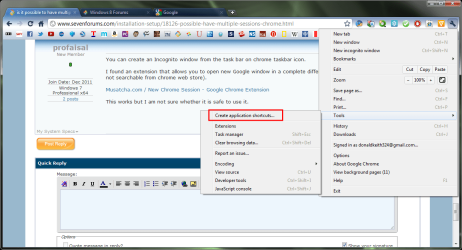
If this is what you want.

screenshot78_2011-12-16.png


then just create the App by navigating to the site you want and "wrench->tools->create application Shortcuts"

screenshot79_2011-12-16.png
 

My Computer My Computer

At a glance

Microsoft Windows 7 Home Premium 64-bit Servi...Intel(R) Core(TM) i3 CPU M 330 @ 2.13GHz8 GB DDR3Intel(R) HD Graphics
Computer type
Laptop
Computer Manufacturer/Model Number
Hewlett-Packard/G62-107SA Notebook
OS
Microsoft Windows 7 Home Premium 64-bit Service Pack 1
CPU
Intel(R) Core(TM) i3 CPU M 330 @ 2.13GHz
Motherboard
Hewlett-Packard 1425
Memory
8 GB DDR3
Graphics Card(s)
Intel(R) HD Graphics
Sound Card
Realtek High Definition Audio
Monitor(s) Displays
Builtin
Screen Resolution
1366 x 768 x 32 bits (4294967296 colors) @ 60 Hz
Hard Drives
250 GB SATA Hard Disk Drive 7200 rpm
2TB Seagate GoFlex USB 2 Drive
1TB Iomega Prestige USB 2 Drive
1.5TB Iomega Prestige USB 2 Drive (Samsung)
2TB WD MyBook Live NAS.
Mouse
Logitech Anywhere MX
Internet Speed
152 Mbs download 10 Mbs upload
Antivirus
Norton 360
Browser
Chrome
Welcome to Seven Forums Bdobek. Using profiles is a good solution.
 

My Computer My Computer

At a glance

Microsoft Windows 7 Home Premium 64-bit Servi...Intel(R) Core(TM) i3 CPU M 330 @ 2.13GHz8 GB DDR3Intel(R) HD Graphics
Computer type
Laptop
Computer Manufacturer/Model Number
Hewlett-Packard/G62-107SA Notebook
OS
Microsoft Windows 7 Home Premium 64-bit Service Pack 1
CPU
Intel(R) Core(TM) i3 CPU M 330 @ 2.13GHz
Motherboard
Hewlett-Packard 1425
Memory
8 GB DDR3
Graphics Card(s)
Intel(R) HD Graphics
Sound Card
Realtek High Definition Audio
Monitor(s) Displays
Builtin
Screen Resolution
1366 x 768 x 32 bits (4294967296 colors) @ 60 Hz
Hard Drives
250 GB SATA Hard Disk Drive 7200 rpm
2TB Seagate GoFlex USB 2 Drive
1TB Iomega Prestige USB 2 Drive
1.5TB Iomega Prestige USB 2 Drive (Samsung)
2TB WD MyBook Live NAS.
Mouse
Logitech Anywhere MX
Internet Speed
152 Mbs download 10 Mbs upload
Antivirus
Norton 360
Browser
Chrome
As of 2014-10-05, the easiest way to run multiple sessions, versions or instances of Chrome is to use Google Chrome Portable, downloaded from:
Google Chrome Portable | PortableApps.com - Portable software for USB, portable and cloud drives

Currently I'm running 4 separate instances of Google Chrome v37.0.2062.124. One instance is installed and three other instances of Google Chrome are portable.

Here's how my Windows 7 Taskbar looks like when all 4 instances of Chrome are opened:

Taskbar%20chrome.png


If you want to change Google Chrome icon that is shown on the Windows Taskbar once Google Chrome is started, then you should follow this link:
windows 8 - Is it possible to customize taskbar icons? If so how? - Super User

The answer is given in comments: you need to change icons that are stored in chrome.dll using Resource Tuner (use Trial version) or Resource Hacker (free).

I've used IcoFX (Trial version) to generate various .ico icons.
 

My Computer My Computer

At a glance

Windows 7 Ultimate x64
Computer type
PC/Desktop
OS
Windows 7 Ultimate x64
hi, this might fit your need better than PortableChrome.

Check out the "user-data-dir" flag. It's used this way:

chrome.exe --user-data-dir=D:\MySeparateChromeFolder

Before using this flag, create the D:\MySeparateChromeFolder (change the name and location to whatever you want), but don't put anything in it. Then run the above command (with your desired name and location) from a command-window, the Run box, or make a new shortcut containing this command.

This will launch a completely independent Chrome -- more extreme than profiles. Chrome launched with this flag will have almost nothing in common with Chrome launched without this flag. It will have separate extensions, history, settings, bookmarks, etc, and other startup flags used with this instance will have no affect on other chrome instances.

This may be preferable to PortableChrome, because it does not require a separate installation of Chrome, but still gives extreme separation.
 

My Computer My Computer

At a glance

Windows 8 x64
Computer type
Laptop
Computer Manufacturer/Model Number
Asus
OS
Windows 8 x64
At first I was using Chrome Portable approach posted above.
Then I switched to using setup (installed) versions of Google Chrome + Google Chrome Canary + Chromium.

Now johnywhy posted even better solution: user-data-dir flag.

I've just tested user-data-dir flag and it works just fine.

One thing to keep in mind is if you're creating a custom folder for your new separate instance of Chrome and the path to that folder has some spaces, put the path in quotes "":

Code:
--user-data-dir="C:\Users\Me\AppData\Local\Google\Chrome\Chrome Work"

If one is creating a shortcut to a separate instance of Chrome by using Right mouse click - New - Shortcut, location of the item should look something like this:

Code:
C:\Users\Me\AppData\Local\Google\Chrome\Application\chrome.exe --user-data-dir="C:\Users\Me\AppData\Local\Google\Chrome\Chrome Work"

Thank you, johnywhy.
 

My Computer My Computer

At a glance

Windows 7 Ultimate x64
Computer type
PC/Desktop
OS
Windows 7 Ultimate x64
Also consider adding Session Manager to each Google Chrome. With session manager, you can "snapshot" the desired tabs, and whenever you want -- click Session Manager, click desired saved session, and it will ADD [**] those tabs to the tab line. Reason for mentioning this: with just two clicks, you can have what you want on the tab line.
[**] However, you do have to close the unwanted tabs forced on you by ThePowersThatBe just before invoking a saved session from within Session Manager.
 

My Computer My Computer

At a glance

Windows 7 Professional 64-bitDesktop i5; Acers i5 & i7desktop 16GB; 1 Acer 8GB & 1 Acer 16GB
Computer type
PC/Desktop
Computer Manufacturer/Model Number
Antec desktop; Acer Aspire laptops
OS
Windows 7 Professional 64-bit
CPU
Desktop i5; Acers i5 & i7
Memory
desktop 16GB; 1 Acer 8GB & 1 Acer 16GB
Hard Drives
1TB split into 2 equal partitions [OS and data] usable by RJS
Internet Speed
AT&T DSL
Browser
FF, GChrome, msIE
Other Info
Windows 7 Firewall, Emsisoft AM/AV, MSE [scan-only], SpywareBlaster, Ruiware/BillP combine
Back
Top