Solved Is it possible to open 'bookmarks' without opening the browser?

Melita

New member
Power User
VIP
Local time
11:00 PM
Messages
293
Location
Canada
I am using Firefox and IE. Is there a way to open 'Bookmarks' or 'Favorites' pages, without first opening the browser.

Thank you,
 

My Computer My Computer

At a glance

Windows 7 Home Premium 64bitAMD Dual Core C-502GB DDR3/320GB HDDAMD Radeon HD 6250
Computer Manufacturer/Model Number
Laptop - Acer Aspire 5250-BZ479
OS
Windows 7 Home Premium 64bit
CPU
AMD Dual Core C-50
Memory
2GB DDR3/320GB HDD
Graphics Card(s)
AMD Radeon HD 6250
Monitor(s) Displays
15.6" HD LED LCD
Internet Speed
ADSL
I suppose so
Your favorites are in a folder inside your user folder so just make a shortcut to it and open it,
Click start and click on your user name listed near the top/ right
There you'll see the favorites folder Open it and right click the folder you want to access and send to Desktop create shortcut :/
Never tried it though,
Cheers.
 

My Computer My Computer

At a glance

Win-7-Pro64bit 7-H-Prem-64biti7-5930K 2nd i9-9940x both water blocked VRM'...Trident-z 3200C14 2nd Trident-z 3600C16EVGA 1080ti ftw3 2nd Titan Xp both water blocked
Computer type
PC/Desktop
Computer Manufacturer/Model Number
Custom assembled by me :}
OS
Win-7-Pro64bit 7-H-Prem-64bit
CPU
i7-5930K 2nd i9-9940x both water blocked VRM's too
Motherboard
ASUS SABERTOOTH X99 2nd ASUS x299 Apex
Memory
Trident-z 3200C14 2nd Trident-z 3600C16
Graphics Card(s)
EVGA 1080ti ftw3 2nd Titan Xp both water blocked
Sound Card
Built-in Realtek
Monitor(s) Displays
1-AOC G2460PG 24"G-Sync 144Hz/ 2nd 1-ASUS VG248QE 24" 144Hz
Screen Resolution
1920 x 1080 144Hz
Hard Drives
2-Samsung M.2 Evo & Evo Plus
2-Samsung 850 EVO 500GB SSD's/ 3-2.5 W.D. Black 1tb-&3-1tb/3-3.5 WD Black 1tb hdd's
PSU
EVGA SuperNOVA 1000-P2 2nd 1200-P2
Case
2-Corsair Obsidian Series 450D Black ATX Mid Tower
Cooling
Custom water loops
Keyboard
Logitech G710+/ 2nd Logitech G910
Mouse
2-RedDragon M901 Perdition 16400 dpi Gaming mouse = wired
Internet Speed
Comcast Ping 19ms 89.31mbps download speed 6.12mbps upload
Antivirus
Malwarebytes Pro/ Superantispyware Pro
Browser
FireFox & Pale moon
Other Info
2nd ASUS X299 Apex/Intel i9-9940x with Custom water loop/7H-Prem-x64/Corsair 450D case/Ram Trident-z 3600C16 4x8gb / Samsung970Evo plus 500gb SSD/Dual ssd EZ swap evo/PSU EVGA SuperNova 1200w-P2 80+Platinum/GPU Titan Xp /8-ML-140 on push-pull on 2-280GTX rads
Thank you, It works for IE! Any ideas about Firefox Bookmarks?

Regards,
 

My Computer My Computer

At a glance

Windows 7 Home Premium 64bitAMD Dual Core C-502GB DDR3/320GB HDDAMD Radeon HD 6250
Computer Manufacturer/Model Number
Laptop - Acer Aspire 5250-BZ479
OS
Windows 7 Home Premium 64bit
CPU
AMD Dual Core C-50
Memory
2GB DDR3/320GB HDD
Graphics Card(s)
AMD Radeon HD 6250
Monitor(s) Displays
15.6" HD LED LCD
Internet Speed
ADSL
Hi thanks,
I have no idea what to do about Firefox :/
Cheers.
 

My Computer My Computer

At a glance

Win-7-Pro64bit 7-H-Prem-64biti7-5930K 2nd i9-9940x both water blocked VRM'...Trident-z 3200C14 2nd Trident-z 3600C16EVGA 1080ti ftw3 2nd Titan Xp both water blocked
Computer type
PC/Desktop
Computer Manufacturer/Model Number
Custom assembled by me :}
OS
Win-7-Pro64bit 7-H-Prem-64bit
CPU
i7-5930K 2nd i9-9940x both water blocked VRM's too
Motherboard
ASUS SABERTOOTH X99 2nd ASUS x299 Apex
Memory
Trident-z 3200C14 2nd Trident-z 3600C16
Graphics Card(s)
EVGA 1080ti ftw3 2nd Titan Xp both water blocked
Sound Card
Built-in Realtek
Monitor(s) Displays
1-AOC G2460PG 24"G-Sync 144Hz/ 2nd 1-ASUS VG248QE 24" 144Hz
Screen Resolution
1920 x 1080 144Hz
Hard Drives
2-Samsung M.2 Evo & Evo Plus
2-Samsung 850 EVO 500GB SSD's/ 3-2.5 W.D. Black 1tb-&3-1tb/3-3.5 WD Black 1tb hdd's
PSU
EVGA SuperNOVA 1000-P2 2nd 1200-P2
Case
2-Corsair Obsidian Series 450D Black ATX Mid Tower
Cooling
Custom water loops
Keyboard
Logitech G710+/ 2nd Logitech G910
Mouse
2-RedDragon M901 Perdition 16400 dpi Gaming mouse = wired
Internet Speed
Comcast Ping 19ms 89.31mbps download speed 6.12mbps upload
Antivirus
Malwarebytes Pro/ Superantispyware Pro
Browser
FireFox & Pale moon
Other Info
2nd ASUS X299 Apex/Intel i9-9940x with Custom water loop/7H-Prem-x64/Corsair 450D case/Ram Trident-z 3600C16 4x8gb / Samsung970Evo plus 500gb SSD/Dual ssd EZ swap evo/PSU EVGA SuperNova 1200w-P2 80+Platinum/GPU Titan Xp /8-ML-140 on push-pull on 2-280GTX rads
Launching links via shortcuts

Suggestions:

Shortcuts can simply specify the website URL and file path to the browser's executable like this:

http://www.sevenforums.com/tutorials/60274-internet-website-shortcut-create.html

Just change the path so that it shows the Firefox executable.

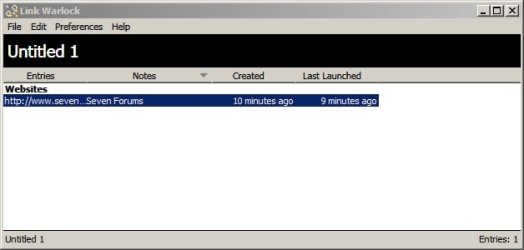
Or if you like you can try Link Warlock

Add entries under the "Websites" group name and choose which browser you require to launch links.

Here's one I've just created. I used this program in the past but don't use it currently.

Link Warlock.jpg

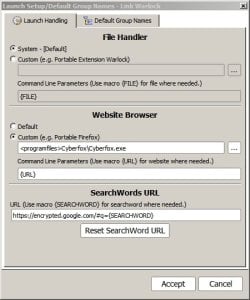
Set browser:

Launch Setup_Default Group Names - Link Warlock.jpg

In fact it's even possible to add a website shortcut to your desktop right click menu:

http://www.sevenforums.com/customization/321233-add-sevenforums-shortcut-context-menu.html

Or you can use something like SideSlide but that's probably overkill!
 

My Computer My Computer

At a glance

Microsoft Windows 7 Home Premium 64-bit 7601 ...AMD C-60 APU with Radeon(tm) HD Graphics4.00 GBAMD Radeon HD 6290 Graphics
Computer type
Laptop
Computer Manufacturer/Model Number
ASUS
OS
Microsoft Windows 7 Home Premium 64-bit 7601 Multiprocessor Free Service Pack 1
CPU
AMD C-60 APU with Radeon(tm) HD Graphics
Motherboard
ASUSTeK COMPUTER INC. X501U
Memory
4.00 GB
Graphics Card(s)
AMD Radeon HD 6290 Graphics
Sound Card
(1) AMD High Definition Audio Device (2) Realtek High Defi
Screen Resolution
1366 x 768 x 32 bits (4294967296 colors) @ 60 Hz
Hard Drives
Hitachi HTS545050A7E380 SATA Disk Device
Antivirus
Comodo CIS & FW, SecureAplus App Whitelisting, Threatfire
Browser
Cyberfox 64bit, Opera 64bit, Airfox
Other Info
Spy-The-Spy, HitmanPro.Alert, Norton Connect Safe, MJRegWatcher, BitDefender TrafficLight, Voodoo Shield, Zemana AntiMalware
Thank you. This is very helpful. When it comes to Firefox bookmarks library, (the one that opens when you click Bookmarks>Show All Bookmarks, on the browser menu). It has no URL and the page simply says 'Library'.

The only way to open the library is to first open the Firefox browser to access the 'Menu', and then click Bookmarks>Show All Bookmarks. I wonder whether some method is there to open the library without having to open the Browser first. Like the method 'ThrashZone' gave me above, for IE.

Regards,
 

My Computer My Computer

At a glance

Windows 7 Home Premium 64bitAMD Dual Core C-502GB DDR3/320GB HDDAMD Radeon HD 6250
Computer Manufacturer/Model Number
Laptop - Acer Aspire 5250-BZ479
OS
Windows 7 Home Premium 64bit
CPU
AMD Dual Core C-50
Memory
2GB DDR3/320GB HDD
Graphics Card(s)
AMD Radeon HD 6250
Monitor(s) Displays
15.6" HD LED LCD
Internet Speed
ADSL
See: Profiles - Where Firefox stores your bookmarks, passwords and other user data
Finding your profile without opening Firefox

1. From the Start Screen, click the Desktop tile. The Desktop view will open.
2. From the Desktop, hover in the lower right-hand corner to access the Charms.
3. Select the Search charm. The Search sidebar will open.
4. In the search box, type %APPDATA%\Mozilla\Firefox\Profiles\, without pressing Enter. A list of profiles will appear.
5. Click on the profile with “default” in the name to open it in a window.

While the instructions are Win8 style (use of charms), there is still pertitnent information ...
Navigate to the FF profile directory
%APPDATA%\Mozilla\Firefox\Profiles\

then drill down to the profile with default in it's name.

I haven't used FF for a while, so I'm not sue if you can go much further ... because:

What information is stored in my profile?

Bookmarks and Browsing History: The places.sqlite file contains all your Firefox bookmarks and the list of all the websites you’ve visited. The bookmarkbackups folder stores bookmark backup files, which can be used to restore your bookmarks. For more information, see Create bookmarks to save your favorite webpages and Restore bookmarks from backup or move them to another computer.

The SQLite filetype is a database file and probably can't be read without an application:
The SQLite Database File Format

Mozilla support might have some methods that you could use, see: https://support.mozilla.org/en-US/products/firefox

Note: Due to IE's odd cookie retention I regularly move my bookmarks to a separate folder and place a shortcut to that folder in both the IE favorites folder and the links folder on my user profile.
What's the odd cookie retention? If you delete browser history when you close IE, cookies can only be preserved if they are in the IE favorites folder.

I only want to preserve certain cookies - banking and other sites that I log into on a frequent basis, plus a few that nag me for some action if the cookie isn't accessible).

To make that easier to manage, I created a Preserve folder in the IE Favorites and place the bookmarks for sites I want to retain cookies in that folder. It's a bit convoluted, but it makes moving new bookmarks to my secondary bookmarks folder really easy - all I have to do is move every except the Preserve folder to the other location.

I end up with a small list in my normal IE Favorites and can look at all the bookmarks in my archive if I need to, either in IE or in Explorer.

What I'd like IE to do is more like cCleaner and allow you to specify the cookies to keep - seems a lot more simple than my workaround.
 

My Computer My Computer

At a glance

x64 (6.3.9600) Win8.1 Pro & soon dual boot x6...AMD A6-3420M APU with Radeon(tm) HD Graphics6.00 GBAMD Radeon(TM) HD 6520G
Computer type
Laptop
Computer Manufacturer/Model Number
HP Pavilion dv6-6c10us
OS
x64 (6.3.9600) Win8.1 Pro & soon dual boot x64 (6.1.7601) Win7_SP1 HomePrem
CPU
AMD A6-3420M APU with Radeon(tm) HD Graphics
Motherboard
Hewlett-Packard 1805
Memory
6.00 GB
Graphics Card(s)
AMD Radeon(TM) HD 6520G
Sound Card
(1) AMD High Definition Audio Device (2) IDT High Definiti
Monitor(s) Displays
HP W2072a 20" LCD (1600 x 900) @ 60 Hz
Screen Resolution
1366 x 768 x 32 bits (4294967296 colors) @ 60 Hz
Hard Drives
ST640LM0 00 HM641JI SATA Disk Device
Keyboard
Logitech k520 wireless KB
Mouse
Logitech m320 wireless mouse (bundled with KB)
Internet Speed
15/5 | 54 MB Wireless 'n'
Antivirus
Realtime: Defender or Avast | On-demand: Malwarebytes, ESET
Browser
IE 11 on Win8, IE 10 on win 7
Other Info
Media: [Gimp, Audacity, VLC] || Comm: [WEmail 2012, Skype] || Productivity: [OpenOffice,| Textpad] || Utils: [Sysinternals, cCleaner, Speccy, Defraggler]
Thank you. This is very helpful. When it comes to Firefox bookmarks library, (the one that opens when you click Bookmarks>Show All Bookmarks, on the browser menu). It has no URL and the page simply says 'Library'.

The only way to open the library is to first open the Firefox browser to access the 'Menu', and then click Bookmarks>Show All Bookmarks. I wonder whether some method is there to open the library without having to open the Browser first. Like the method 'ThrashZone' gave me above, for IE.

Regards,

I think you have to export the bookmarks to do that.
 

My Computer My Computer

At a glance

x64 (6.3.9600) Win8.1 Pro & soon dual boot x6...AMD A6-3420M APU with Radeon(tm) HD Graphics6.00 GBAMD Radeon(TM) HD 6520G
Computer type
Laptop
Computer Manufacturer/Model Number
HP Pavilion dv6-6c10us
OS
x64 (6.3.9600) Win8.1 Pro & soon dual boot x64 (6.1.7601) Win7_SP1 HomePrem
CPU
AMD A6-3420M APU with Radeon(tm) HD Graphics
Motherboard
Hewlett-Packard 1805
Memory
6.00 GB
Graphics Card(s)
AMD Radeon(TM) HD 6520G
Sound Card
(1) AMD High Definition Audio Device (2) IDT High Definiti
Monitor(s) Displays
HP W2072a 20" LCD (1600 x 900) @ 60 Hz
Screen Resolution
1366 x 768 x 32 bits (4294967296 colors) @ 60 Hz
Hard Drives
ST640LM0 00 HM641JI SATA Disk Device
Keyboard
Logitech k520 wireless KB
Mouse
Logitech m320 wireless mouse (bundled with KB)
Internet Speed
15/5 | 54 MB Wireless 'n'
Antivirus
Realtime: Defender or Avast | On-demand: Malwarebytes, ESET
Browser
IE 11 on Win8, IE 10 on win 7
Other Info
Media: [Gimp, Audacity, VLC] || Comm: [WEmail 2012, Skype] || Productivity: [OpenOffice,| Textpad] || Utils: [Sysinternals, cCleaner, Speccy, Defraggler]
FF Bookmarks

I guessed that you were having trouble with your bookmarks. Try this add on:

https://addons.mozilla.org/en-US/firefox/addon/bookmark-sorter/?src=api

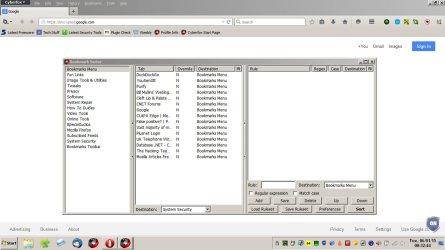
If you install it and click the icon in the toolbar you should see something like this:

Bookmark Sorter.jpg

If you see bookmarks library in the left pane - click on it. If you see anything else in the left pane try clicking on each entry. If all your bookmarks are listed somewhere in any or all of the entries - exit bookmark sorter and go back into your FF bookmarks and create new subfolders for bookmark categories then use bookmark sorter to move them into folders. It works best if you expand the window to full screen. Highlight a bookmark and select the destination folder. You can edit multiple entries at the same time then click "Sort"

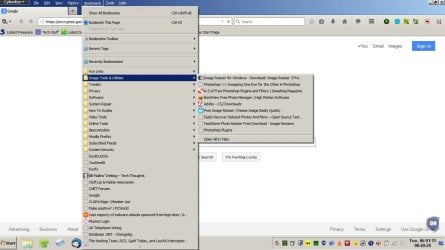
You end up with something like this - bookmarks divided into folders:

Bookmarks.jpg
 
Last edited:

My Computer My Computer

At a glance

Microsoft Windows 7 Home Premium 64-bit 7601 ...AMD C-60 APU with Radeon(tm) HD Graphics4.00 GBAMD Radeon HD 6290 Graphics
Computer type
Laptop
Computer Manufacturer/Model Number
ASUS
OS
Microsoft Windows 7 Home Premium 64-bit 7601 Multiprocessor Free Service Pack 1
CPU
AMD C-60 APU with Radeon(tm) HD Graphics
Motherboard
ASUSTeK COMPUTER INC. X501U
Memory
4.00 GB
Graphics Card(s)
AMD Radeon HD 6290 Graphics
Sound Card
(1) AMD High Definition Audio Device (2) Realtek High Defi
Screen Resolution
1366 x 768 x 32 bits (4294967296 colors) @ 60 Hz
Hard Drives
Hitachi HTS545050A7E380 SATA Disk Device
Antivirus
Comodo CIS & FW, SecureAplus App Whitelisting, Threatfire
Browser
Cyberfox 64bit, Opera 64bit, Airfox
Other Info
Spy-The-Spy, HitmanPro.Alert, Norton Connect Safe, MJRegWatcher, BitDefender TrafficLight, Voodoo Shield, Zemana AntiMalware
I just now downloaded & installed the toys mentioned above for my Firefox, thanks you all! :)
 

My Computer My Computer

At a glance

Windows 7 Professional 64-bitDesktop i5; Acers i5 & i7desktop 16GB; 1 Acer 8GB & 1 Acer 16GB
Computer type
PC/Desktop
Computer Manufacturer/Model Number
Antec desktop; Acer Aspire laptops
OS
Windows 7 Professional 64-bit
CPU
Desktop i5; Acers i5 & i7
Memory
desktop 16GB; 1 Acer 8GB & 1 Acer 16GB
Hard Drives
1TB split into 2 equal partitions [OS and data] usable by RJS
Internet Speed
AT&T DSL
Browser
FF, GChrome, msIE
Other Info
Windows 7 Firewall, Emsisoft AM/AV, MSE [scan-only], SpywareBlaster, Ruiware/BillP combine
I guessed that you were having trouble with your bookmarks. Try this add on:

https://addons.mozilla.org/en-US/firefox/addon/bookmark-sorter/?src=api

If you install it and click the icon in the toolbar you should see something like this...........................................
I got this one and it is going to make my life a lot easier!

(1) Is there a keyboard short cut to open the complete Bookmarks Library in Firefox (without first opening the Browser)? If not, is it possible to make one?

(2) What is best way to 'back up' the Bookmarks Library?

Regards,
 
Last edited:

My Computer My Computer

At a glance

Windows 7 Home Premium 64bitAMD Dual Core C-502GB DDR3/320GB HDDAMD Radeon HD 6250
Computer Manufacturer/Model Number
Laptop - Acer Aspire 5250-BZ479
OS
Windows 7 Home Premium 64bit
CPU
AMD Dual Core C-50
Memory
2GB DDR3/320GB HDD
Graphics Card(s)
AMD Radeon HD 6250
Monitor(s) Displays
15.6" HD LED LCD
Internet Speed
ADSL
Bookmarks backup - Firefox

I guessed that you were having trouble with your bookmarks. Try this add on:

https://addons.mozilla.org/en-US/firefox/addon/bookmark-sorter/?src=api

If you install it and click the icon in the toolbar you should see something like this...........................................
I got this one and it is going to make my life a lot easier!

(1) Is there a keyboard short cut to open the complete Bookmarks Library in Firefox (without first opening the Browser)? If not, is it possible to make one?

(2) What is best way to 'back up' the Bookmarks Library?

Regards,


Well personally I just make a copy of the Profiles folder and Profiles.ini file in order to back up the entire FF profile and if things screw up I just clean install FF and copy the backed up Profiles folder and Profiles.ini file back into FF.

Bookmarks are stored in the following location:

%APPDATA%\Mozilla\Firefox\Profiles\

copy and paste the text into Explorer address bar.

In the Profiles folder there's a file names places.sqlite and that's where your bookmarks are stored. You can open the file with your text editor if you want to look inside it:
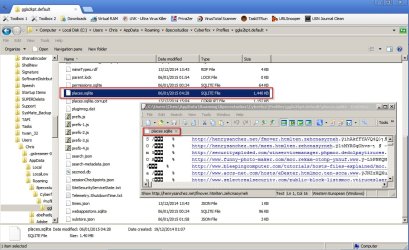
Places SQLITE.jpg

If you want to backup only your bookmarks - make a copy.

Note: Things look different in my screenshots because I'm using Cyberfox rather than Firefox but you don't need to worry about that!

Backing up Firefox:

Personally I'd use MozBackup (if you want to back up your FF profile and selectively choose elements to restore - like bookmarks)

MozBackup - Backup tool for Firefox and Thunderbird

There's a downloadable PDF user guide here:

h**p://mozbackup.jasnapaka.com/soubory/mozbackup-howto.pdf

Screenshot from the user guide:
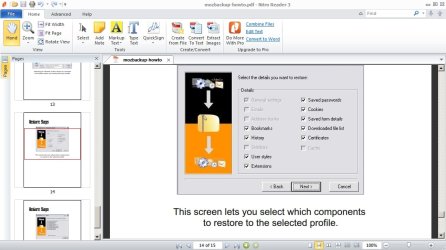
mozbackup-howto.pdf - Nitro Reader 3.jpg

The user guide explains in detail how to backup and restore your FF profile or elements of it.

The other way is to start FF and go to bookmarks > Show all bookmarks then choose import/export and export the bookmarks to an html file. You can then re-import them in the same way.


Re: (1) Is there a keyboard short cut to open the complete Bookmarks Library in Firefox (without first opening the Browser)? If not, is it possible to make one?

Well it's getting slightly technical here but.... if you export your bookmarks to an html file then convert i to a text file with the .txt file extension it's possible to open it with you text editor and clean it up then use Link Warlock (the program that I mentioned in an earlier post) to import the text file and have it open full screen showing all your bookmarks. If you click any entry FF launch and open the bookmarked page. It would take some effort to do it that way.

Another way that I can think of is to export your FF bookmarks and import them into IE. You could then make a copy of the Favorites folder modify all of the shortcuts in that folder to open in FF instead of IE when clicked on.

There might be better ways. I'll have a think and post back here if anything comes to mind.

 

My Computer My Computer

At a glance

Microsoft Windows 7 Home Premium 64-bit 7601 ...AMD C-60 APU with Radeon(tm) HD Graphics4.00 GBAMD Radeon HD 6290 Graphics
Computer type
Laptop
Computer Manufacturer/Model Number
ASUS
OS
Microsoft Windows 7 Home Premium 64-bit 7601 Multiprocessor Free Service Pack 1
CPU
AMD C-60 APU with Radeon(tm) HD Graphics
Motherboard
ASUSTeK COMPUTER INC. X501U
Memory
4.00 GB
Graphics Card(s)
AMD Radeon HD 6290 Graphics
Sound Card
(1) AMD High Definition Audio Device (2) Realtek High Defi
Screen Resolution
1366 x 768 x 32 bits (4294967296 colors) @ 60 Hz
Hard Drives
Hitachi HTS545050A7E380 SATA Disk Device
Antivirus
Comodo CIS & FW, SecureAplus App Whitelisting, Threatfire
Browser
Cyberfox 64bit, Opera 64bit, Airfox
Other Info
Spy-The-Spy, HitmanPro.Alert, Norton Connect Safe, MJRegWatcher, BitDefender TrafficLight, Voodoo Shield, Zemana AntiMalware
If your default browser is Firefox you can create a folder for bookmarks on your desktop and drag and drop bookmarks into it.
 

My Computer My Computer

At a glance

Microsoft Windows 7 Home Premium 64-bit 7601 ...AMD C-60 APU with Radeon(tm) HD Graphics4.00 GBAMD Radeon HD 6290 Graphics
Computer type
Laptop
Computer Manufacturer/Model Number
ASUS
OS
Microsoft Windows 7 Home Premium 64-bit 7601 Multiprocessor Free Service Pack 1
CPU
AMD C-60 APU with Radeon(tm) HD Graphics
Motherboard
ASUSTeK COMPUTER INC. X501U
Memory
4.00 GB
Graphics Card(s)
AMD Radeon HD 6290 Graphics
Sound Card
(1) AMD High Definition Audio Device (2) Realtek High Defi
Screen Resolution
1366 x 768 x 32 bits (4294967296 colors) @ 60 Hz
Hard Drives
Hitachi HTS545050A7E380 SATA Disk Device
Antivirus
Comodo CIS & FW, SecureAplus App Whitelisting, Threatfire
Browser
Cyberfox 64bit, Opera 64bit, Airfox
Other Info
Spy-The-Spy, HitmanPro.Alert, Norton Connect Safe, MJRegWatcher, BitDefender TrafficLight, Voodoo Shield, Zemana AntiMalware
Hello Callender,

I am really thankful for this enormous amount of information. Never expected so much for so little! I can now explore all avenues and decide what is best for me. Your explanations are easily understood, that I have no questions about them either :D

Kind regards,
 
Last edited:

My Computer My Computer

At a glance

Windows 7 Home Premium 64bitAMD Dual Core C-502GB DDR3/320GB HDDAMD Radeon HD 6250
Computer Manufacturer/Model Number
Laptop - Acer Aspire 5250-BZ479
OS
Windows 7 Home Premium 64bit
CPU
AMD Dual Core C-50
Memory
2GB DDR3/320GB HDD
Graphics Card(s)
AMD Radeon HD 6250
Monitor(s) Displays
15.6" HD LED LCD
Internet Speed
ADSL
Back
Top