Solved Is it possible to pre-install Z390 USB Drivers in Win7?

termblue

New member
Local time
1:53 PM
Messages
3
Little background info: I've got a working version of Win7 Ultimate that I am currently using, but am upgrading motherboard/cpu to an Aorus Z390 Pro Wifi and i9-9900k.
This Z390 board does NOT have a PS/2, so there's no way to use a mouse/keyboard without the 'updated' drivers.

I've seen a LOT of forum posts about how to include drivers for the Z390 boards to support USB devices into boot.wim / Windows installation iso for INSTALLATION of Win7... ( https://www.sevenforums.com/installation-setup/415754-update-your-win-7-installation-media.html ) but I was hoping to not have to do a complete reinstall.

I was wondering if there was a way to pre-install/preload these drivers in my currently working version of Win7 BEFORE I change motherboards?

I have iusb3hub, iusb3hcs, and iusb3xhc from where SIW2 posted them here: https://www.sevenforums.com/drivers/414172-need-driver-intel-uhd620-post3438905.html#post3438905

Is there a program or method that will force the drivers to install before I change motherboards so I can use a keyboard/mouse?

MANY THANKS!
 

My Computer My Computer

At a glance

Win 7 Ultimate X64
Computer type
PC/Desktop
Computer Manufacturer/Model Number
Custom build
OS
Win 7 Ultimate X64

My Computers My Computers

  • At a glance

    7 X64i5 84002x8gb 3200mhz
    Computer type
    PC/Desktop
    OS
    7 X64
    CPU
    i5 8400
    Motherboard
    gigabyte b365m ds3h
    Memory
    2x8gb 3200mhz
    Hard Drives
    various
    PSU
    pure power 11 400w cm
    Case
    Coolermaster
    Cooling
    cryorig m9i
  • At a glance

    7x64g54008gb ddr4 2400
    Computer type
    PC/Desktop
    OS
    7x64
    CPU
    g5400
    Motherboard
    ga b365m ds3h
    Memory
    8gb ddr4 2400
    PSU
    xfx pro 450w
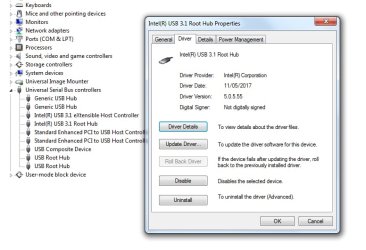
You could use these usb3 drivers View attachment 411785

Not signed for win7, so ok it if that message pops up.

Thanks for the quick reply!
How exactly can I go about installing these though? I tried updating the USB drivers in device manager, but they wouldn't overwrite the currently existing drivers.. (Windows has determined the driver software for your device is up-to-date)
 

My Computer My Computer

At a glance

Win 7 Ultimate X64
Computer type
PC/Desktop
Computer Manufacturer/Model Number
Custom build
OS
Win 7 Ultimate X64
First make sure your mouse is plugged in to ps2 or usb 2 port.

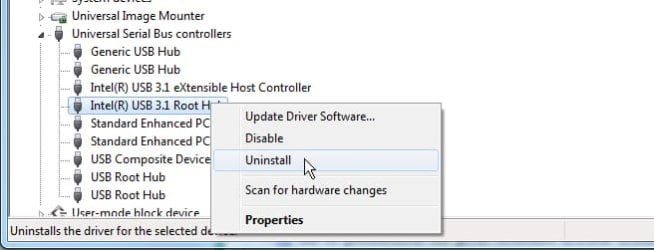
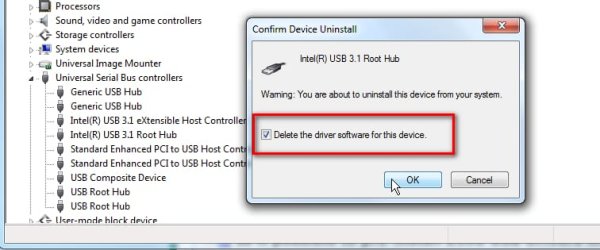
Then uninstall both the usb3 devices from device manager and delete the software.

usb-delete-1.jpg

usb-delete-2.jpg


Then install the 5.05.55 usb3 drivers using dism++.

View attachment Dism++10.1.1000.100.zip


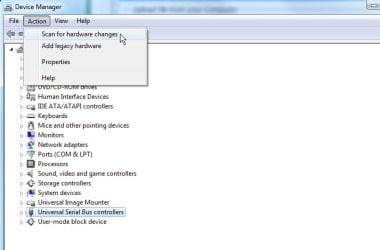
Then in device manager, click the usb tree to highlight it and scan for hardware changes.

usb-delete-3.jpg
 
Last edited:

My Computers My Computers

  • At a glance

    7 X64i5 84002x8gb 3200mhz
    Computer type
    PC/Desktop
    OS
    7 X64
    CPU
    i5 8400
    Motherboard
    gigabyte b365m ds3h
    Memory
    2x8gb 3200mhz
    Hard Drives
    various
    PSU
    pure power 11 400w cm
    Case
    Coolermaster
    Cooling
    cryorig m9i
  • At a glance

    7x64g54008gb ddr4 2400
    Computer type
    PC/Desktop
    OS
    7x64
    CPU
    g5400
    Motherboard
    ga b365m ds3h
    Memory
    8gb ddr4 2400
    PSU
    xfx pro 450w
Because you are temporarily deleting usb3 device drivers, you need to have your mouse in a ps2 or usb2 port at the time. Presumably you can do that on your current system.


For people unable to attach mouse to ps2 or usb2, another way is to use boot media , run dism++ from there. Point it at the windows installation and use it to uninstall any existing 3rd party usb3 drivers. Then use it to install the 5.05.55 drivers. When booting back into windows, they should be picked up by windows pnp.
 

My Computers My Computers

  • At a glance

    7 X64i5 84002x8gb 3200mhz
    Computer type
    PC/Desktop
    OS
    7 X64
    CPU
    i5 8400
    Motherboard
    gigabyte b365m ds3h
    Memory
    2x8gb 3200mhz
    Hard Drives
    various
    PSU
    pure power 11 400w cm
    Case
    Coolermaster
    Cooling
    cryorig m9i
  • At a glance

    7x64g54008gb ddr4 2400
    Computer type
    PC/Desktop
    OS
    7x64
    CPU
    g5400
    Motherboard
    ga b365m ds3h
    Memory
    8gb ddr4 2400
    PSU
    xfx pro 450w
Because you are temporarily deleting usb3 device drivers, you need to have your mouse in a ps2 or usb2 port at the time. Presumably you can do that on your current system.


For people unable to attach mouse to ps2 or usb2, another way is to use boot media , run dism++ from there. Point it at the windows installation and use it to uninstall any existing 3rd party usb3 drivers. Then use it to install the 5.05.55 drivers. When booting back into windows, they should be picked up by windows pnp.

Actually, I skipped uninstalling the old drivers (I never had USB 3 drivers on the previous board), and just installed the drivers you gave me via dism++.
Once I transferred the SSD with my Win7 to the new machine, it booted right into Windows and gave me mouse support. Took a minute (I presume windows was looking for the driver), and then the keyboard began working as well.

MANY, MANY THANKS!!!!!!!
 

My Computer My Computer

At a glance

Win 7 Ultimate X64
Computer type
PC/Desktop
Computer Manufacturer/Model Number
Custom build
OS
Win 7 Ultimate X64
:-)
 

My Computers My Computers

  • At a glance

    7 X64i5 84002x8gb 3200mhz
    Computer type
    PC/Desktop
    OS
    7 X64
    CPU
    i5 8400
    Motherboard
    gigabyte b365m ds3h
    Memory
    2x8gb 3200mhz
    Hard Drives
    various
    PSU
    pure power 11 400w cm
    Case
    Coolermaster
    Cooling
    cryorig m9i
  • At a glance

    7x64g54008gb ddr4 2400
    Computer type
    PC/Desktop
    OS
    7x64
    CPU
    g5400
    Motherboard
    ga b365m ds3h
    Memory
    8gb ddr4 2400
    PSU
    xfx pro 450w
The drive on a new MB, windows needs to be activated.
 

My Computers My Computers

  • At a glance

    Windows 7 HP 64i5 6600K - 800MHz to 4200MHz4+4G GSkill DDR4 3000IG - Intel 530
    Computer type
    PC/Desktop
    Computer Manufacturer/Model Number
    custom build
    OS
    Windows 7 HP 64
    CPU
    i5 6600K - 800MHz to 4200MHz
    Motherboard
    GA-Z170-HD3P
    Memory
    4+4G GSkill DDR4 3000
    Graphics Card(s)
    IG - Intel 530
    Monitor(s) Displays
    Samsung 226BW
    Screen Resolution
    1680x1050
    Hard Drives
    (1) -1 SM951 – 128GB M.2 AHCI PCIe SSD drive for Windows 7 and Lubuntu
    (2) -1 WD SATA 3 - 1T for Data
    (3) -1 WD SATA 3 - 1T for backup
    PSU
    Thermaltake 450W TR2 gold
    Keyboard
    Old and good Chicony mechanical keyboard
    Mouse
    Logitech mX performance - 9 buttons (had to disable some)
    Internet Speed
    500Mb/s
    Browser
    Firefox 64
    Other Info
    TinyWall firewall
  • At a glance

    Windows 7 Proi7-4500U 800MHz to 3.0GHz(4+4)G DDR3 1600IG intel 4400 + NVIDIA GeForce GT 745M
    Computer type
    Laptop
    System Manufacturer/Model Number
    Asus Q550LF
    OS
    Windows 7 Pro
    CPU
    i7-4500U 800MHz to 3.0GHz
    Motherboard
    Asus Q550LF
    Memory
    (4+4)G DDR3 1600
    Graphics Card(s)
    IG intel 4400 + NVIDIA GeForce GT 745M
    Sound Card
    Realtek
    Monitor(s) Displays
    LG Display LP156WF4-SPH1
    Screen Resolution
    1920 x 1080
    Hard Drives
    BX500 120G SSD for Windows and programs +
    1T HDD for data
    Internet Speed
    500 Mb/s
    Browser
    Firefox
    Other Info
    TinyWall firewall
Back
Top