
You are using an out of date browser. It may not display this or other websites correctly.
You should upgrade or use an alternative browser.
You should upgrade or use an alternative browser.
Is it possible to remove flopy disk icon
- Thread starter saf79
- Start date
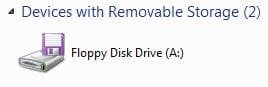

If you disable the floppy disk drive in the BIOS then Windows will not detect it. That should remove it.
My Computer
- Computer type
- PC/Desktop
- Computer Manufacturer/Model Number
- My Own Build
- OS
- Windows 10 64 bit
- CPU
- Intel i7 6700K
- Motherboard
- ASUS ROG Maximus VIII Hero
- Memory
- 16GB Corsair Dominator
- Graphics Card(s)
- Intel CPU Graphics
- Sound Card
- RealTek
- Monitor(s) Displays
- 27" Dell S2719dgf
- Screen Resolution
- 2560X1440
- Hard Drives
- 1 TB Samsung 850 EVO SSD for Win 10 Pro
500GB Samsung 850 EVO SSD for Win 10 Insider
2 TB drive for backup
- PSU
- EVGA Supernova 750G2
- Case
- BeQuiet Silent Base 600
- Cooling
- Deepcool Captain 120EX
- Keyboard
- Microsoft Wireless 2000
- Mouse
- Microsoft wireless
- Internet Speed
- 100 MB/sec (Cable)
- Antivirus
- Microsoft Defender and Malwarebytes
- Browser
- Edge/Firefox
- Other Info
- Cakewalk (Sonar) by BandLab and Studio One 4.1 Pro recording studio software. MOTU 896Mk3 Hybrid recording interface, Frontier Tranzport wireless control unit, Behringer X-Touch Control Surface.
Five USB connected optical drives for CD Audio production using Nero BurningROM
If you disable the floppy disk drive in the BIOS then Windows will not detect it. That should remove it.
How to do it any tutorial for this??
My Computer
- OS
- Windows 7 Ultimate 64bit
- CPU
- Core i5 750
- Memory
- 4GB DDR3

Sure.. just unplug the power cord from the back of the floppy drive.. problem solved.. 
My Computer
- Computer type
- PC/Desktop
- Computer Manufacturer/Model Number
- LENOVO K450 @3.0GHZ
- OS
- 64-bit Windows 8.1 Pro
- CPU
- Core(TM) i5 CPU 4330 Haswell @ 3.20GHz
- Motherboard
- LENOVO
- Memory
- 12.00 GB
- Graphics Card(s)
- Intel(R) HD Graphics
- Sound Card
- Intel HD integtrated
- Monitor(s) Displays
- HP 25' ISP Monitor
- Screen Resolution
- 1900/1020
- Hard Drives
- (1) ST1000DM003-1CH162 (2) Generic STORAGE DEVICE USB Device (3) Generic STORAGE DEVICE USB Device
- Internet Speed
- 100mb down/10mb up
Sure.. just unplug the power cord from the back of the floppy drive.. problem solved..
there is no floppy drive installed....how to unplug it
My Computer
- OS
- Windows 7 Ultimate 64bit
- CPU
- Core i5 750
- Memory
- 4GB DDR3

Sure.. just unplug the power cord from the back of the floppy drive.. problem solved..
there is no floppy drive installed....how to unplug it
What people are saying is your motherboard has floppy disk enabled and windows detects it even if you don't have a floppy disk drive installed it is there. Some people still use it and it must be supported so that is why its there
What motherboard do you have?
My Computer
- Computer type
- PC/Desktop
- Computer Manufacturer/Model Number
- GIGABYTE Rig (Custom)
- OS
- Windows 7 Professional (x64/SP1) /Linux Mint 16
- CPU
- Intel i5-3570k 3.40 GHz @ 4.6 GHz
- Motherboard
- GIGABYTE Z77X-D3H
- Memory
- 8GB (2133MHz) DDR3
- Graphics Card(s)
- Asus GTX560 Ti (Nvidia)
- Monitor(s) Displays
- HP 23", Acer 19" and a Dell 17"
- Screen Resolution
- 1080p, 1440x900 and 1280x1024
- Hard Drives
- Sandisk Extreme 120GB (SSD), WD 2TB green and 4 other HDDs
- PSU
- Antec 620w High Current Gamer
- Case
- Corsair Obsidian 600D
- Cooling
- CPU - Antec KÜHLER H₂O 920
- Keyboard
- Steelseries 6Gv2
- Mouse
- Roccat LUA
- Internet Speed
- 4 - 6mb/s
- Antivirus
- ESET NOD32
- Browser
- Chrome/Firefox
- Other Info
- Intel Gigabit CT (PCIE NIC) and Thinkpad T61p,
Sure.. just unplug the power cord from the back of the floppy drive.. problem solved..
there is no floppy drive installed....how to unplug it
What people are saying is your motherboard has floppy disk enabled and windows detects it even if you don't have a floppy disk drive installed it is there. Some people still use it and it must be supported so that is why its there
What motherboard do you have?
Gigabyte GA- H55M -USB3..is tis a good mobo?
My Computer
- OS
- Windows 7 Ultimate 64bit
- CPU
- Core i5 750
- Memory
- 4GB DDR3

Thats what you want disabled "floppy seek", go into the bios (should be delete and look for the boot options) Its different to my motherboard (the image is not my bios)
It is floppy seek, you don't want your computer to search for it.
And yes its is a good mb, better than mine, my mb is cheap.
My Computer
- Computer type
- PC/Desktop
- Computer Manufacturer/Model Number
- GIGABYTE Rig (Custom)
- OS
- Windows 7 Professional (x64/SP1) /Linux Mint 16
- CPU
- Intel i5-3570k 3.40 GHz @ 4.6 GHz
- Motherboard
- GIGABYTE Z77X-D3H
- Memory
- 8GB (2133MHz) DDR3
- Graphics Card(s)
- Asus GTX560 Ti (Nvidia)
- Monitor(s) Displays
- HP 23", Acer 19" and a Dell 17"
- Screen Resolution
- 1080p, 1440x900 and 1280x1024
- Hard Drives
- Sandisk Extreme 120GB (SSD), WD 2TB green and 4 other HDDs
- PSU
- Antec 620w High Current Gamer
- Case
- Corsair Obsidian 600D
- Cooling
- CPU - Antec KÜHLER H₂O 920
- Keyboard
- Steelseries 6Gv2
- Mouse
- Roccat LUA
- Internet Speed
- 4 - 6mb/s
- Antivirus
- ESET NOD32
- Browser
- Chrome/Firefox
- Other Info
- Intel Gigabit CT (PCIE NIC) and Thinkpad T61p,
Thats what you want disabled "floppy seek", go into the bios (should be delete and look for the boot options) Its different to my motherboard (the image is not my bios)
It is floppy seek, you don't want your computer to search for it.
And yes its is a good mb, better than mine, my mb is cheap.
thanks for the help appreciate it a lot

My Computer
- OS
- Windows 7 Ultimate 64bit
- CPU
- Core i5 750
- Memory
- 4GB DDR3
Thats what you want disabled "floppy seek", go into the bios (should be delete and look for the boot options) Its different to my motherboard (the image is not my bios)
It is floppy seek, you don't want your computer to search for it.
And yes its is a good mb, better than mine, my mb is cheap.
thanks for the help appreciate it a lot
So its fixed?
My Computer
- Computer type
- PC/Desktop
- Computer Manufacturer/Model Number
- GIGABYTE Rig (Custom)
- OS
- Windows 7 Professional (x64/SP1) /Linux Mint 16
- CPU
- Intel i5-3570k 3.40 GHz @ 4.6 GHz
- Motherboard
- GIGABYTE Z77X-D3H
- Memory
- 8GB (2133MHz) DDR3
- Graphics Card(s)
- Asus GTX560 Ti (Nvidia)
- Monitor(s) Displays
- HP 23", Acer 19" and a Dell 17"
- Screen Resolution
- 1080p, 1440x900 and 1280x1024
- Hard Drives
- Sandisk Extreme 120GB (SSD), WD 2TB green and 4 other HDDs
- PSU
- Antec 620w High Current Gamer
- Case
- Corsair Obsidian 600D
- Cooling
- CPU - Antec KÜHLER H₂O 920
- Keyboard
- Steelseries 6Gv2
- Mouse
- Roccat LUA
- Internet Speed
- 4 - 6mb/s
- Antivirus
- ESET NOD32
- Browser
- Chrome/Firefox
- Other Info
- Intel Gigabit CT (PCIE NIC) and Thinkpad T61p,