
Is it safe to disconnect the HDD cables? (h8-1360t)

r5h76jjk5

New member
Local time
6:41 PM
Messages
6
We have an HP Pavilion HPE h8-1360t computer with Windows 7 Home Premium on it.

Just asking, but is it safe to disconnect the HDD cables?

Here is an image of the hard drive and the cables:
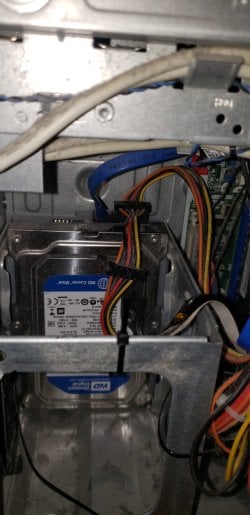
20240326_203106 edit.jpg

I want to take the drive out of the machine and use a USB to SATA cable so I can view the contents of the drive on my Windows 10 (custom built) machine. The hard drive of the HP machine is dated from 2012.

The reason why I want view the contents of the drive on another machine is because the HP computer once unexpectedly got the Blue Screen of Death while it was running. It then restarted, went to a disk checking screen (no errors), and booted into the OS normally. Fortunately, no contents of the drive were wiped.

I am leaving the HP machine turned off so it doesn't get the BSoD again and possibly cause actual damage to the contents of the hard drive.

Should I either disconnect the cables from the HDD so I can view the contents of the drive on the other machine, or would I have to turn on the HP machine and view some contents of the drive before the machine gets the BSoD?

Any help would be appreciated.
 

My Computers My Computers

  • At a glance

    Windows 7 Home Premium 64-bitIntel(R) Core(TM) i7-3770 CPU @ 3.40 GHz, 340...8.00 GBNVIDIA GeForce GTX 745
    Computer type
    PC/Desktop
    Computer Manufacturer/Model Number
    HP Pavilion HPE h8-1360t
    OS
    Windows 7 Home Premium 64-bit
    CPU
    Intel(R) Core(TM) i7-3770 CPU @ 3.40 GHz, 3401 Mhz, 4 Cores
    Memory
    8.00 GB
    Graphics Card(s)
    NVIDIA GeForce GTX 745
    Monitor(s) Displays
    One Samsung monitor
    Screen Resolution
    1920 x 1080 x 60 hertz
    Hard Drives
    Western Digital WD Blue WD10EZEX 1 TB HDD (911 GB) NTFS SATA 7200 RPM
  • Computer type
    PC/Desktop
Just asking, but is it safe to disconnect the HDD cables?

Of course you can.

Make sure the machine is off.
 

My Computers My Computers

  • At a glance

    7 X64i5 84002x8gb 3200mhz
    Computer type
    PC/Desktop
    OS
    7 X64
    CPU
    i5 8400
    Motherboard
    gigabyte b365m ds3h
    Memory
    2x8gb 3200mhz
    Hard Drives
    various
    PSU
    pure power 11 400w cm
    Case
    Coolermaster
    Cooling
    cryorig m9i
  • At a glance

    7x64g54008gb ddr4 2400
    Computer type
    PC/Desktop
    OS
    7x64
    CPU
    g5400
    Motherboard
    ga b365m ds3h
    Memory
    8gb ddr4 2400
    PSU
    xfx pro 450w
Thank you for the reply. I was just wondering if it was safe, because the data cable on the HDD seemed tough to unplug, as if was glued to the drive. I then found out that there was a push button on the connector end of the cable, so I got the cable unplugged now.

I'll let you know when I find an adapter cable for the drive and/or a right angle screwdriver and get the drive hooked up to my Windows 10 machine.

Edit: We might have to order either of those items from eBay and/or Amazon.

Edit 2: Sorry about that, the push button was on the power cable, not the data cable. My mistake.

- - - Updated - - -

Edit 3: I found the SATA to USB adapter, a right angle ratcheting screwdriver, and a screwdriver bit for the hard drive screws. No need to order anything from eBay and/or Amazon. I will begin taking out the hard drive from the HP computer and use the SATA to USB adapter to connect the drive to my Windows 10 computer.

- - - Updated - - -

Edit 4: Sorry about all of the edits, but here are the steps that I did:

1. Took the drive out of the HP PC (The cables were not plugged into it)
2. Connected the drive to the USB to SATA adapter (The USB port of the adapter was not connected to the Win 10 machine)
3. Drive did not spool up when it was connected to the adapter
4. Unplugged drive from adapter
6. Reconnect the drive to the cables of the HP PC
7. Powered on the PC
8. Started to use a flash drive to transfer the data from the HP PC to the Win 10 PC
9. Put the drive back in the PC

The drive did not work with the adapter, but it did work when I reconnected it the the HP machine. No data was lost.

I will just continue to transfer data from the HP PC to the Win 10 machine using the flash drive.

Moderators, could you delete this thread? It turned into a log of me unplugging the HDD, finding a screwdriver and taking the drive out of the PC. Thank you.
 
Last edited:

My Computers My Computers

  • At a glance

    Windows 7 Home Premium 64-bitIntel(R) Core(TM) i7-3770 CPU @ 3.40 GHz, 340...8.00 GBNVIDIA GeForce GTX 745
    Computer type
    PC/Desktop
    Computer Manufacturer/Model Number
    HP Pavilion HPE h8-1360t
    OS
    Windows 7 Home Premium 64-bit
    CPU
    Intel(R) Core(TM) i7-3770 CPU @ 3.40 GHz, 3401 Mhz, 4 Cores
    Memory
    8.00 GB
    Graphics Card(s)
    NVIDIA GeForce GTX 745
    Monitor(s) Displays
    One Samsung monitor
    Screen Resolution
    1920 x 1080 x 60 hertz
    Hard Drives
    Western Digital WD Blue WD10EZEX 1 TB HDD (911 GB) NTFS SATA 7200 RPM
  • Computer type
    PC/Desktop
Is it a powered adapter?
 

My Computers My Computers

  • At a glance

    7 X64i5 84002x8gb 3200mhz
    Computer type
    PC/Desktop
    OS
    7 X64
    CPU
    i5 8400
    Motherboard
    gigabyte b365m ds3h
    Memory
    2x8gb 3200mhz
    Hard Drives
    various
    PSU
    pure power 11 400w cm
    Case
    Coolermaster
    Cooling
    cryorig m9i
  • At a glance

    7x64g54008gb ddr4 2400
    Computer type
    PC/Desktop
    OS
    7x64
    CPU
    g5400
    Motherboard
    ga b365m ds3h
    Memory
    8gb ddr4 2400
    PSU
    xfx pro 450w
Yeah, it is a powered adapter.
 

My Computers My Computers

  • At a glance

    Windows 7 Home Premium 64-bitIntel(R) Core(TM) i7-3770 CPU @ 3.40 GHz, 340...8.00 GBNVIDIA GeForce GTX 745
    Computer type
    PC/Desktop
    Computer Manufacturer/Model Number
    HP Pavilion HPE h8-1360t
    OS
    Windows 7 Home Premium 64-bit
    CPU
    Intel(R) Core(TM) i7-3770 CPU @ 3.40 GHz, 3401 Mhz, 4 Cores
    Memory
    8.00 GB
    Graphics Card(s)
    NVIDIA GeForce GTX 745
    Monitor(s) Displays
    One Samsung monitor
    Screen Resolution
    1920 x 1080 x 60 hertz
    Hard Drives
    Western Digital WD Blue WD10EZEX 1 TB HDD (911 GB) NTFS SATA 7200 RPM
  • Computer type
    PC/Desktop
Back
Top