Is it the fact that your internet connection is accessed by adapter

jraju

New member
Member
VIP
Local time
4:50 PM
Messages
759
Hi, Is it correct to assume that, the internet connection will be established in the adapter settings , overriding any dns and ip settings in the router.
Is it better to configure thro ISP, rather than self configuration. Please say with reason.
Now some routers have no firewall settings, in the router. Windows firewall only blocks certain programs in computer access and not in router access.
How to configure windows firewall to work, but with not allowing any attacks from hackers.
How to know whether firewall is enabled in a router, if no such settings are visible.
If any further details are needed ,i will provide.
 

My Computer My Computer

At a glance

Microsoft Windows 7 Ultimate 64-bit 7601 Mult...Intel(R) Core(TM)2 Duo CPU E7200 @ 2.53GHz4.00 GBNVIDIA GeForce 210
Computer type
PC/Desktop
Computer Manufacturer/Model Number
custom build
OS
Microsoft Windows 7 Ultimate 64-bit 7601 Multiprocessor Free Service Pack 1
CPU
Intel(R) Core(TM)2 Duo CPU E7200 @ 2.53GHz
Motherboard
To be filled by O.E.M. To be filled by O.E.M.
Memory
4.00 GB
Graphics Card(s)
NVIDIA GeForce 210
Sound Card
(1) NVIDIA High Definition Audio (2) Realtek High Definiti
Screen Resolution
1920 x 1080 x 32 bits (4294967296 colors) @ 60 Hz
Hard Drives
ST3500312CS ATA Device
Gibson Research have a free port scanner.

https://www.grc.com/x/ne.dll?bh0bkyd2

If you click 'all service ports' it probes the 1st 1056 ports, and they will show as stealth if your firewall is working. If you repeat the test with the Windows firewall turned off and it still shows stealthed, then your router firewall is working.
 

My Computer My Computer

At a glance

W10 Pro x64, W7 Pro x64 in VMwarei7 2600K @ 4.4GHz8GB Mushkin @ 1600MHzNvidia GTX 750 Ti
Computer type
PC/Desktop
Computer Manufacturer/Model Number
self build
OS
W10 Pro x64, W7 Pro x64 in VMware
CPU
i7 2600K @ 4.4GHz
Motherboard
MSI Z68A-GD80
Memory
8GB Mushkin @ 1600MHz
Graphics Card(s)
Nvidia GTX 750 Ti
Monitor(s) Displays
27" Benq + 27" LG
Screen Resolution
1080p
Hard Drives
500GB 850 Evo SSD + 3 * 2TB Seagate
PSU
EVGA 650 GS modular
Case
Antec 300
Cooling
Seidon 120V v2
Internet Speed
62/18 Mbps
Antivirus
Defender (W10) + MSE (W7)
Browser
Firefox
Hi, Thank you for your answer to check the test in the absence of firewall. It shows that all the ports are stealthy with firewall enabled and disabled. There is no settings for firewall in the router dsl2730u, in my version.
but here is the concern. Avast scan says that it has vulnerability. Which result is correct. I will attach the main picture of scan results.
I addressed them regarding this dubious state, and the reply was , the avast scan scans from inside your computer, where as grc.com scans from outside. The logic seems to be incorrect as for as i am concerned.
They why avast shows this> is this a false positive? Or could i just ignore avast alerts.
It shows port 80 and 21 in the router scan. but not divulging any thing about those ports, These are http and ftp.
 

Attachments

  • DLINK4.png
    DLINK4.png
    57.5 KB · Views: 2

My Computer My Computer

At a glance

Microsoft Windows 7 Ultimate 64-bit 7601 Mult...Intel(R) Core(TM)2 Duo CPU E7200 @ 2.53GHz4.00 GBNVIDIA GeForce 210
Computer type
PC/Desktop
Computer Manufacturer/Model Number
custom build
OS
Microsoft Windows 7 Ultimate 64-bit 7601 Multiprocessor Free Service Pack 1
CPU
Intel(R) Core(TM)2 Duo CPU E7200 @ 2.53GHz
Motherboard
To be filled by O.E.M. To be filled by O.E.M.
Memory
4.00 GB
Graphics Card(s)
NVIDIA GeForce 210
Sound Card
(1) NVIDIA High Definition Audio (2) Realtek High Definiti
Screen Resolution
1920 x 1080 x 32 bits (4294967296 colors) @ 60 Hz
Hard Drives
ST3500312CS ATA Device
I don't know anything about Avast.

AFAIK, if your machine IP and DNS are set to auto, you get a local IP assigned by the router, and you use your ISP's DNS. I guess it's possible for the router data to get corrupted to force a different DNS. It's more likely some malware has changed your local settings - check in the panel.

If you set things up manually, you choose the DNS, and it over-rides the router. I use OpenDNS (208.67.222.222) and (208.67.220.220). You can also use Google (8.8.8.8) and (8.8.4.4). Make sure you know the gateway IP before you start changing things. See snip of my settings -

my_dns.jpg

Whilst this may be a temp solution, if your router is compromised you might need further action.
 

My Computer My Computer

At a glance

W10 Pro x64, W7 Pro x64 in VMwarei7 2600K @ 4.4GHz8GB Mushkin @ 1600MHzNvidia GTX 750 Ti
Computer type
PC/Desktop
Computer Manufacturer/Model Number
self build
OS
W10 Pro x64, W7 Pro x64 in VMware
CPU
i7 2600K @ 4.4GHz
Motherboard
MSI Z68A-GD80
Memory
8GB Mushkin @ 1600MHz
Graphics Card(s)
Nvidia GTX 750 Ti
Monitor(s) Displays
27" Benq + 27" LG
Screen Resolution
1080p
Hard Drives
500GB 850 Evo SSD + 3 * 2TB Seagate
PSU
EVGA 650 GS modular
Case
Antec 300
Cooling
Seidon 120V v2
Internet Speed
62/18 Mbps
Antivirus
Defender (W10) + MSE (W7)
Browser
Firefox
Hi, i wish to point out that i have enabled use the following ips and also selected the google dns. What other things i do? I used the grc.com with both firewall on and off and it gives both stealthy status in both the results.
I had the default settings wan in router, which allowed ping in ipv4, which was shown as ping test failed in grc.com . But after i deleted that, grc.com denotes that all the ports are stealthy both in common ports test and services test.
What is your idea on
, the avast scan scans from inside your computer, where as grc.com scans from outside. The logic seems to be incorrect as for as i am concerned.
Please.
So from your suggestion, it is known that router firewall is already enabled but not shown in the router page.
 

My Computer My Computer

At a glance

Microsoft Windows 7 Ultimate 64-bit 7601 Mult...Intel(R) Core(TM)2 Duo CPU E7200 @ 2.53GHz4.00 GBNVIDIA GeForce 210
Computer type
PC/Desktop
Computer Manufacturer/Model Number
custom build
OS
Microsoft Windows 7 Ultimate 64-bit 7601 Multiprocessor Free Service Pack 1
CPU
Intel(R) Core(TM)2 Duo CPU E7200 @ 2.53GHz
Motherboard
To be filled by O.E.M. To be filled by O.E.M.
Memory
4.00 GB
Graphics Card(s)
NVIDIA GeForce 210
Sound Card
(1) NVIDIA High Definition Audio (2) Realtek High Definiti
Screen Resolution
1920 x 1080 x 32 bits (4294967296 colors) @ 60 Hz
Hard Drives
ST3500312CS ATA Device
What's the symptoms of your router hijack - are you being re-directed to fake sites etc ? F-Secure have a 'check for router hijack' page, but it is under maintenance ATM - you could retry in a day or 2.

https://campaigns.f-secure.com/router-checker/

The Feds have a page on DNS hijack where you type your IP in, although this was setup a few years ago when they were taking down some botnet servers, so some links are out of date + don't work.

https://forms.fbi.gov/check-to-see-if-your-computer-is-using-rogue-DNS
 

My Computer My Computer

At a glance

W10 Pro x64, W7 Pro x64 in VMwarei7 2600K @ 4.4GHz8GB Mushkin @ 1600MHzNvidia GTX 750 Ti
Computer type
PC/Desktop
Computer Manufacturer/Model Number
self build
OS
W10 Pro x64, W7 Pro x64 in VMware
CPU
i7 2600K @ 4.4GHz
Motherboard
MSI Z68A-GD80
Memory
8GB Mushkin @ 1600MHz
Graphics Card(s)
Nvidia GTX 750 Ti
Monitor(s) Displays
27" Benq + 27" LG
Screen Resolution
1080p
Hard Drives
500GB 850 Evo SSD + 3 * 2TB Seagate
PSU
EVGA 650 GS modular
Case
Antec 300
Cooling
Seidon 120V v2
Internet Speed
62/18 Mbps
Antivirus
Defender (W10) + MSE (W7)
Browser
Firefox
Hi, I was once experienced with block of internet access for a few minutes.
The ipconfig shows 169.254.90.67,. which i know very well that does not belong to me.
i immediately changed the access points, by using the access points.
So, to be careful, i am asking for tips,.I also tried and found that fsecure is on maintenance.
By the by, avast hns, home network security scans, in its ARscan show many sites, like weebly.com, baidu.comtwitter.com, qq.com,webs.com.mail.ru, and so many ips, which pages i never visited. I saw that it in its log file.
 

My Computer My Computer

At a glance

Microsoft Windows 7 Ultimate 64-bit 7601 Mult...Intel(R) Core(TM)2 Duo CPU E7200 @ 2.53GHz4.00 GBNVIDIA GeForce 210
Computer type
PC/Desktop
Computer Manufacturer/Model Number
custom build
OS
Microsoft Windows 7 Ultimate 64-bit 7601 Multiprocessor Free Service Pack 1
CPU
Intel(R) Core(TM)2 Duo CPU E7200 @ 2.53GHz
Motherboard
To be filled by O.E.M. To be filled by O.E.M.
Memory
4.00 GB
Graphics Card(s)
NVIDIA GeForce 210
Sound Card
(1) NVIDIA High Definition Audio (2) Realtek High Definiti
Screen Resolution
1920 x 1080 x 32 bits (4294967296 colors) @ 60 Hz
Hard Drives
ST3500312CS ATA Device

My Computer My Computer

At a glance

W10 Pro x64, W7 Pro x64 in VMwarei7 2600K @ 4.4GHz8GB Mushkin @ 1600MHzNvidia GTX 750 Ti
Computer type
PC/Desktop
Computer Manufacturer/Model Number
self build
OS
W10 Pro x64, W7 Pro x64 in VMware
CPU
i7 2600K @ 4.4GHz
Motherboard
MSI Z68A-GD80
Memory
8GB Mushkin @ 1600MHz
Graphics Card(s)
Nvidia GTX 750 Ti
Monitor(s) Displays
27" Benq + 27" LG
Screen Resolution
1080p
Hard Drives
500GB 850 Evo SSD + 3 * 2TB Seagate
PSU
EVGA 650 GS modular
Case
Antec 300
Cooling
Seidon 120V v2
Internet Speed
62/18 Mbps
Antivirus
Defender (W10) + MSE (W7)
Browser
Firefox
hi, Wasnot,
I must really thank you for valuable information of self creating of ips , in the absence of DHCP.
Does that mean, that while i power on the DHCP, was not getting the required ip address, so that it generated itself the said ip address. In other words, does that mean, that the ISP server is having problem .
Now, i understand from your link.
will it cease to exist once, the computer is able to get ip from my ISP,
These are all new to me and so much users.
When this ip was , acquired, the problem i noticed is no internet access.
I changed to the use the following ip address and after given the ip address manually, i could get the internet access. Why this behaviour
, sir,
Moreover, something was being installed from s3amazonws.com, some version, i could not remember. Hence, i thought that my router had been hacked and replaced with new router.
In new router also, avast alerts, those things i mentioned in my post.
I value your suggestion, and would be more to receive advice on this.
What are those ips in avast scan i mentioned. i could not view any of the site, while this is going on. Are those sites are the programs in different pages/links of my browser access. are these normal behaviour.
 

My Computer My Computer

At a glance

Microsoft Windows 7 Ultimate 64-bit 7601 Mult...Intel(R) Core(TM)2 Duo CPU E7200 @ 2.53GHz4.00 GBNVIDIA GeForce 210
Computer type
PC/Desktop
Computer Manufacturer/Model Number
custom build
OS
Microsoft Windows 7 Ultimate 64-bit 7601 Multiprocessor Free Service Pack 1
CPU
Intel(R) Core(TM)2 Duo CPU E7200 @ 2.53GHz
Motherboard
To be filled by O.E.M. To be filled by O.E.M.
Memory
4.00 GB
Graphics Card(s)
NVIDIA GeForce 210
Sound Card
(1) NVIDIA High Definition Audio (2) Realtek High Definiti
Screen Resolution
1920 x 1080 x 32 bits (4294967296 colors) @ 60 Hz
Hard Drives
ST3500312CS ATA Device
I think you are getting the 2 types of IP mixed up.

When you connect to the internet your ISP gives you an external, public IP that the world sees, so to speak. This IP is usually dynamic in that it changes now and then. You can get an unchanging static IP, but this costs extra. If you go to any of the 'what is my IP' sites or type 'what is my IP' into Google it returns your external IP.

When you connect to your router, if it has DHCP switched on and your pc adapter is set to auto, the router assigns a local IP from a restricted range usually 192.168.x.x (there are others). These ranges cannot be used in www's. You need local IP's so the router can send data to the correct pc. You can see this IP by typing ipconfig in a cmd window (IPv4 address). The local IP is also dynamic, so if you plug several pc's into the router you may find you get a different local IP. I have several pc's, and set my local IP's manually, so I can identify each machine easily on my network.

The strange 169.254.90.67 you saw is a local IP assigned when either DHCP is not working, some setting is wrong or a device isn't working correctly.
 

My Computer My Computer

At a glance

W10 Pro x64, W7 Pro x64 in VMwarei7 2600K @ 4.4GHz8GB Mushkin @ 1600MHzNvidia GTX 750 Ti
Computer type
PC/Desktop
Computer Manufacturer/Model Number
self build
OS
W10 Pro x64, W7 Pro x64 in VMware
CPU
i7 2600K @ 4.4GHz
Motherboard
MSI Z68A-GD80
Memory
8GB Mushkin @ 1600MHz
Graphics Card(s)
Nvidia GTX 750 Ti
Monitor(s) Displays
27" Benq + 27" LG
Screen Resolution
1080p
Hard Drives
500GB 850 Evo SSD + 3 * 2TB Seagate
PSU
EVGA 650 GS modular
Case
Antec 300
Cooling
Seidon 120V v2
Internet Speed
62/18 Mbps
Antivirus
Defender (W10) + MSE (W7)
Browser
Firefox
Hi, As per your valuable advice, i went to the ISP and asked to configure the dlink modem, that i newly bought. The tech guy says that i should not configure the modem by cd wizard. He also says the av programs alarms are false and no one ever could access my computer except me. He reconfigured the same and i went to attend other things and after power resumed, i just connected this modem. I could not get internet access. I did not touch any settings.
The error was the dns server was not responding. The other time, the error shows, that windows cannot communicate with primary dns server. I know that there is no problem in their server.when i checked the connection status, every ip was ok, but dhcp disabled .
I will again visit to correct this modem configuration.
in the mean time, i have connected the old modem , teracom, which got me internet access. So, am writing this. What is the problem with the new configured modem?
 

My Computer My Computer

At a glance

Microsoft Windows 7 Ultimate 64-bit 7601 Mult...Intel(R) Core(TM)2 Duo CPU E7200 @ 2.53GHz4.00 GBNVIDIA GeForce 210
Computer type
PC/Desktop
Computer Manufacturer/Model Number
custom build
OS
Microsoft Windows 7 Ultimate 64-bit 7601 Multiprocessor Free Service Pack 1
CPU
Intel(R) Core(TM)2 Duo CPU E7200 @ 2.53GHz
Motherboard
To be filled by O.E.M. To be filled by O.E.M.
Memory
4.00 GB
Graphics Card(s)
NVIDIA GeForce 210
Sound Card
(1) NVIDIA High Definition Audio (2) Realtek High Definiti
Screen Resolution
1920 x 1080 x 32 bits (4294967296 colors) @ 60 Hz
Hard Drives
ST3500312CS ATA Device
The behaviour of the network is somewhat puzzling me.
i could get internet access in my old router, but on using the new router, configured by the ISP, the internet light is red.
Is there any command to fix this?
Because, if i go to the ISP, there the modem will work. will not?
moreover , my network has now become network 3. Please
 

My Computer My Computer

At a glance

Microsoft Windows 7 Ultimate 64-bit 7601 Mult...Intel(R) Core(TM)2 Duo CPU E7200 @ 2.53GHz4.00 GBNVIDIA GeForce 210
Computer type
PC/Desktop
Computer Manufacturer/Model Number
custom build
OS
Microsoft Windows 7 Ultimate 64-bit 7601 Multiprocessor Free Service Pack 1
CPU
Intel(R) Core(TM)2 Duo CPU E7200 @ 2.53GHz
Motherboard
To be filled by O.E.M. To be filled by O.E.M.
Memory
4.00 GB
Graphics Card(s)
NVIDIA GeForce 210
Sound Card
(1) NVIDIA High Definition Audio (2) Realtek High Definiti
Screen Resolution
1920 x 1080 x 32 bits (4294967296 colors) @ 60 Hz
Hard Drives
ST3500312CS ATA Device
If everything is set to auto in the IP panel, the DNS should come from the ISP. Have you tried the new router with manual settings for IP, Google DNS etc - the gateway (router) IP must be correct, and machine IP in same range. Also have you scanned for malware eg with your usual A/V and Malwarebytes.
 

My Computer My Computer

At a glance

W10 Pro x64, W7 Pro x64 in VMwarei7 2600K @ 4.4GHz8GB Mushkin @ 1600MHzNvidia GTX 750 Ti
Computer type
PC/Desktop
Computer Manufacturer/Model Number
self build
OS
W10 Pro x64, W7 Pro x64 in VMware
CPU
i7 2600K @ 4.4GHz
Motherboard
MSI Z68A-GD80
Memory
8GB Mushkin @ 1600MHz
Graphics Card(s)
Nvidia GTX 750 Ti
Monitor(s) Displays
27" Benq + 27" LG
Screen Resolution
1080p
Hard Drives
500GB 850 Evo SSD + 3 * 2TB Seagate
PSU
EVGA 650 GS modular
Case
Antec 300
Cooling
Seidon 120V v2
Internet Speed
62/18 Mbps
Antivirus
Defender (W10) + MSE (W7)
Browser
Firefox
Hi, I will try your suggestion. Yes, it was not set to auto detect. will try and report. But why this behavior of allowing one to have and another not to have.
I am learning network now. Normally nobody cares for router, if it works. But avast got these messages to probe further.
I am thankful to you for valuable tips.
Regarding APIPA address, why it needs to be assigned to itself if you have flawless adapter? There is one more thread on Apipa.
i only knew this from you. again thank you
 
Last edited:

My Computer My Computer

At a glance

Microsoft Windows 7 Ultimate 64-bit 7601 Mult...Intel(R) Core(TM)2 Duo CPU E7200 @ 2.53GHz4.00 GBNVIDIA GeForce 210
Computer type
PC/Desktop
Computer Manufacturer/Model Number
custom build
OS
Microsoft Windows 7 Ultimate 64-bit 7601 Multiprocessor Free Service Pack 1
CPU
Intel(R) Core(TM)2 Duo CPU E7200 @ 2.53GHz
Motherboard
To be filled by O.E.M. To be filled by O.E.M.
Memory
4.00 GB
Graphics Card(s)
NVIDIA GeForce 210
Sound Card
(1) NVIDIA High Definition Audio (2) Realtek High Definiti
Screen Resolution
1920 x 1080 x 32 bits (4294967296 colors) @ 60 Hz
Hard Drives
ST3500312CS ATA Device
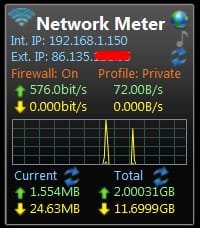
Since you are learning about networks, you might find this desktop network meter handy -

Windows Desktop Gadgets - Network Meter Gadgets Version 9.6

it can show a lot of info - local + wan IP addresses, MBs up/down, firewall status etc. You can configure it to show as much data as you like. I have mine set like this -

network_meter.jpg
 

My Computer My Computer

At a glance

W10 Pro x64, W7 Pro x64 in VMwarei7 2600K @ 4.4GHz8GB Mushkin @ 1600MHzNvidia GTX 750 Ti
Computer type
PC/Desktop
Computer Manufacturer/Model Number
self build
OS
W10 Pro x64, W7 Pro x64 in VMware
CPU
i7 2600K @ 4.4GHz
Motherboard
MSI Z68A-GD80
Memory
8GB Mushkin @ 1600MHz
Graphics Card(s)
Nvidia GTX 750 Ti
Monitor(s) Displays
27" Benq + 27" LG
Screen Resolution
1080p
Hard Drives
500GB 850 Evo SSD + 3 * 2TB Seagate
PSU
EVGA 650 GS modular
Case
Antec 300
Cooling
Seidon 120V v2
Internet Speed
62/18 Mbps
Antivirus
Defender (W10) + MSE (W7)
Browser
Firefox
Hi, I will definitely download this.
Sorry for late reply. My network was restored by ISP only now. I just viewed your reply.
Is there any simple way to know, that it is a general issue or individual issue in knowing the internet access.
I mean, if it is problem in ISP server or over head cable cut or in my computer.
I ask this question, as when i contacted the helpdesk, i was asked to trouble shoot and give them the error message. It gives, dns server is not responding. they asked me to change the dns server and access points . Probably the google dns and opn dns were told. I tried but could not get internet access.
Afterwards, i knew that it was not individual problem, but by overhead wire cut, which is common to the area. If i know this , i could have avoided his advice to know that it is general problem.
Lastly , was told by ISP, that each line is unique and no body could hack our computer. Is it true. He asked me to keep the wifi pw to myself, so that wifi could be protected. so, if the wifi pw is not known to others, your computer is safe. Is not it.?
 

My Computer My Computer

At a glance

Microsoft Windows 7 Ultimate 64-bit 7601 Mult...Intel(R) Core(TM)2 Duo CPU E7200 @ 2.53GHz4.00 GBNVIDIA GeForce 210
Computer type
PC/Desktop
Computer Manufacturer/Model Number
custom build
OS
Microsoft Windows 7 Ultimate 64-bit 7601 Multiprocessor Free Service Pack 1
CPU
Intel(R) Core(TM)2 Duo CPU E7200 @ 2.53GHz
Motherboard
To be filled by O.E.M. To be filled by O.E.M.
Memory
4.00 GB
Graphics Card(s)
NVIDIA GeForce 210
Sound Card
(1) NVIDIA High Definition Audio (2) Realtek High Definiti
Screen Resolution
1920 x 1080 x 32 bits (4294967296 colors) @ 60 Hz
Hard Drives
ST3500312CS ATA Device
I tried to download the network meter, but the link says server not found. pl wasnot.
I tried zip and it downloaded smoothly.
 

My Computer My Computer

At a glance

Microsoft Windows 7 Ultimate 64-bit 7601 Mult...Intel(R) Core(TM)2 Duo CPU E7200 @ 2.53GHz4.00 GBNVIDIA GeForce 210
Computer type
PC/Desktop
Computer Manufacturer/Model Number
custom build
OS
Microsoft Windows 7 Ultimate 64-bit 7601 Multiprocessor Free Service Pack 1
CPU
Intel(R) Core(TM)2 Duo CPU E7200 @ 2.53GHz
Motherboard
To be filled by O.E.M. To be filled by O.E.M.
Memory
4.00 GB
Graphics Card(s)
NVIDIA GeForce 210
Sound Card
(1) NVIDIA High Definition Audio (2) Realtek High Definiti
Screen Resolution
1920 x 1080 x 32 bits (4294967296 colors) @ 60 Hz
Hard Drives
ST3500312CS ATA Device
All my stuff is hardwired using CAT, so I have wireless on my router turned off. If you use wireless, make sure you are using the latest encryption your hardware allows and a strong alphanumeric password. My router is rather old, and uses wpa2 - previous versions can be hacked by 'sniffing packets'. IIRC newer versions are available.

I guess the security risk with wifi is twofold.

1 - If someone knows/guesses/hacks your wifi password their laptop would effectively be on your home network and any shares on your pc might be visible. When setting up a home network, the problem is often actually getting the pc's to see each other, and it's tempting to use blank passwords and set the pc's to allow login with blank p/w to fix this (or even turn off firewalls). This not advised - all my boxes have passwords, but I have them set to startup with no login. I use remote desktop to access the pc's, and a p/w is needed (can be stored). If you don't use a home network, you could double check all shares or RDP access are off.

2 - My main worry about wifi hacking (and why mine is turned off) is that someone could 'piggyback' my connection to download illegal content - torrent movies, or even worse kiddy pr0n. It would be on my IP and it would be me who got prosecuted.

As for hacking from the internet, in theory firewalls only accept traffic that has been requested, and any other attempt at penetration is blocked. So if your router and pc firewalls are on, you should be OK (in theory).

Windows firewall only blocks incoming and allows outward traffic by default. This is because the average user would never get online if he had to set the firewall rules ! If you use a 3rd party firewall eg ZoneAlarm, all outward stuff is blocked by default, so when you 1st fire up Firefox, Chrome etc you get asked for permission to connect. This keeps happening until all your apps are setup. Some folk find this too much hassle.

There are free 3rd party apps that give windows firewall this 'block everything at first' function eg SphinxSoft -

Windows 10 Firewall Control: Sphinx Software

this functionality can sometimes 'save the day' if you get malware that wants to 'call home' to download more malware - or you might just not want some legit software keep trying to update
 

My Computer My Computer

At a glance

W10 Pro x64, W7 Pro x64 in VMwarei7 2600K @ 4.4GHz8GB Mushkin @ 1600MHzNvidia GTX 750 Ti
Computer type
PC/Desktop
Computer Manufacturer/Model Number
self build
OS
W10 Pro x64, W7 Pro x64 in VMware
CPU
i7 2600K @ 4.4GHz
Motherboard
MSI Z68A-GD80
Memory
8GB Mushkin @ 1600MHz
Graphics Card(s)
Nvidia GTX 750 Ti
Monitor(s) Displays
27" Benq + 27" LG
Screen Resolution
1080p
Hard Drives
500GB 850 Evo SSD + 3 * 2TB Seagate
PSU
EVGA 650 GS modular
Case
Antec 300
Cooling
Seidon 120V v2
Internet Speed
62/18 Mbps
Antivirus
Defender (W10) + MSE (W7)
Browser
Firefox
Thanks for the explanation.
I could not see your message, as suddenly there was a pop up alerting that windows defender finds, monitoring tool/actualspy has crept in and the security risk is high and prompted to delete it. I deleted it by selecting the button, but it keeps me alerting again, at frequent interval of 1 minute. I tried all sorts of things. My computer mouse arrow, hangs , i could not close any window. I shut down forcefully. Then i tried system restore, it hanged at the middle of it, just has to force close it. Then again, i tried and at last could get safe mode with command prompt, and then i tried chkdsk /f/r. It only saved me from total failure.

The thought of wifi pass word could be stolen from system by using some trojans are really pointer. Could you suggest how to do about it. one solution of AES encryption and grc.com alphanumeric password. But if it could also be stolen, then i think that there is noting left , but to altogether block wifi in the router.
If grc.com says that all is ok, but some av is showing vulnerability, which is to be believed. The risk of wifi , is there, but seldom ISPs are worry about their customers side. they think that the ip is assigned thro, a firewall data process, and hence very safe. I have asked about portforwarding of open ports to unused device ip on my system. If you know the answer, kindly let me know.
The monitoring tool,win32/actualspy was real in its devastation. It made my system very slow and everything is hanging in balance. I do not know, how it went off, from my system after, chkdsk /f/r
 

My Computer My Computer

At a glance

Microsoft Windows 7 Ultimate 64-bit 7601 Mult...Intel(R) Core(TM)2 Duo CPU E7200 @ 2.53GHz4.00 GBNVIDIA GeForce 210
Computer type
PC/Desktop
Computer Manufacturer/Model Number
custom build
OS
Microsoft Windows 7 Ultimate 64-bit 7601 Multiprocessor Free Service Pack 1
CPU
Intel(R) Core(TM)2 Duo CPU E7200 @ 2.53GHz
Motherboard
To be filled by O.E.M. To be filled by O.E.M.
Memory
4.00 GB
Graphics Card(s)
NVIDIA GeForce 210
Sound Card
(1) NVIDIA High Definition Audio (2) Realtek High Definiti
Screen Resolution
1920 x 1080 x 32 bits (4294967296 colors) @ 60 Hz
Hard Drives
ST3500312CS ATA Device
Hi, wasnot,
I downloaded the sphinx firewall free version. But how to see its working. Please, will it pop up automatically for any alerts . When i clicked to run it , it splashed a cmd screen and vanished. How to monitor.
I have downloaded the agent and not control panel, which should i download
 

My Computer My Computer

At a glance

Microsoft Windows 7 Ultimate 64-bit 7601 Mult...Intel(R) Core(TM)2 Duo CPU E7200 @ 2.53GHz4.00 GBNVIDIA GeForce 210
Computer type
PC/Desktop
Computer Manufacturer/Model Number
custom build
OS
Microsoft Windows 7 Ultimate 64-bit 7601 Multiprocessor Free Service Pack 1
CPU
Intel(R) Core(TM)2 Duo CPU E7200 @ 2.53GHz
Motherboard
To be filled by O.E.M. To be filled by O.E.M.
Memory
4.00 GB
Graphics Card(s)
NVIDIA GeForce 210
Sound Card
(1) NVIDIA High Definition Audio (2) Realtek High Definiti
Screen Resolution
1920 x 1080 x 32 bits (4294967296 colors) @ 60 Hz
Hard Drives
ST3500312CS ATA Device
Back
Top