
Is it the fact that your internet connection is accessed by adapter

These screens taken in a VM -

get SphynxSoft from here
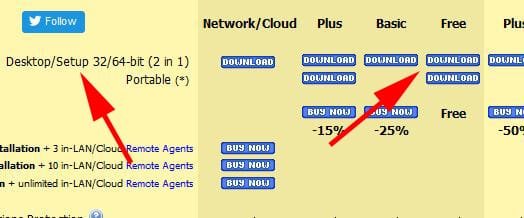
sphinx_free.jpg

when downloaded, looks like this

sphynx_download.JPG

when installed, there should be an icon in sys tray
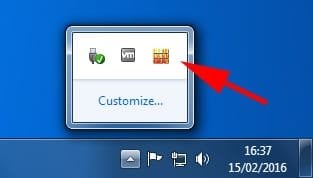
sphynx_tray.jpg

open Firefox > get prompt

sphinx_firefox.jpg

say yes/OK
 

My Computer My Computer

At a glance

W10 Pro x64, W7 Pro x64 in VMwarei7 2600K @ 4.4GHz8GB Mushkin @ 1600MHzNvidia GTX 750 Ti
Computer type
PC/Desktop
Computer Manufacturer/Model Number
self build
OS
W10 Pro x64, W7 Pro x64 in VMware
CPU
i7 2600K @ 4.4GHz
Motherboard
MSI Z68A-GD80
Memory
8GB Mushkin @ 1600MHz
Graphics Card(s)
Nvidia GTX 750 Ti
Monitor(s) Displays
27" Benq + 27" LG
Screen Resolution
1080p
Hard Drives
500GB 850 Evo SSD + 3 * 2TB Seagate
PSU
EVGA 650 GS modular
Case
Antec 300
Cooling
Seidon 120V v2
Internet Speed
62/18 Mbps
Antivirus
Defender (W10) + MSE (W7)
Browser
Firefox
Hi, Wasnot,
I tried the download what you mentioned. But it is for windows 10 and it has not shown any icon as you pointed out while downloading and installing.
Anyhow, i downloaded the windows 7 version posited down under and downloaded the application. Since i do not know how to configure, it blocked all the programs including gmail notifier pro, which i enabled in system tray. It popped up one application after another and there was a screen capture as in the last picture. But , i do not know how to go about after that.
I cancelled the first screen, the next application popped up.
Is there any help content of how to use it.
what is getting the firefox prompt. When i click open the first screen was firefox. But i do not know , how to go about after that.
I will also try to see the help file. Do we have to include each and every appllication to it , before it monitors?
 

My Computer My Computer

At a glance

Microsoft Windows 7 Ultimate 64-bit 7601 Mult...Intel(R) Core(TM)2 Duo CPU E7200 @ 2.53GHz4.00 GBNVIDIA GeForce 210
Computer type
PC/Desktop
Computer Manufacturer/Model Number
custom build
OS
Microsoft Windows 7 Ultimate 64-bit 7601 Multiprocessor Free Service Pack 1
CPU
Intel(R) Core(TM)2 Duo CPU E7200 @ 2.53GHz
Motherboard
To be filled by O.E.M. To be filled by O.E.M.
Memory
4.00 GB
Graphics Card(s)
NVIDIA GeForce 210
Sound Card
(1) NVIDIA High Definition Audio (2) Realtek High Definiti
Screen Resolution
1920 x 1080 x 32 bits (4294967296 colors) @ 60 Hz
Hard Drives
ST3500312CS ATA Device
This is how firewalls work, and why windows firewall is set to allow all outward by default - the initial popups are annoying. For apps you want to allow eg browsers, click enable all and you won't get asked again. There's also a lot of system stuff that needs to be allowed (although in the free version, I don't think you can allow/not allow some system items).

The screenshots were from a Win7 VM using W10 firewall app, so the Win10 SphynxSoft does work on 7. I use an earlier version of the firewall control on my regular Win7 pc, and that doesn't seem to get as many log warnings as the more recent one.

Firewalls settle down after a few days, then you only get prompts about new software.
 
Last edited:

My Computer My Computer

At a glance

W10 Pro x64, W7 Pro x64 in VMwarei7 2600K @ 4.4GHz8GB Mushkin @ 1600MHzNvidia GTX 750 Ti
Computer type
PC/Desktop
Computer Manufacturer/Model Number
self build
OS
W10 Pro x64, W7 Pro x64 in VMware
CPU
i7 2600K @ 4.4GHz
Motherboard
MSI Z68A-GD80
Memory
8GB Mushkin @ 1600MHz
Graphics Card(s)
Nvidia GTX 750 Ti
Monitor(s) Displays
27" Benq + 27" LG
Screen Resolution
1080p
Hard Drives
500GB 850 Evo SSD + 3 * 2TB Seagate
PSU
EVGA 650 GS modular
Case
Antec 300
Cooling
Seidon 120V v2
Internet Speed
62/18 Mbps
Antivirus
Defender (W10) + MSE (W7)
Browser
Firefox
Back
Top