JavaScript is disabled. For a better experience, please enable JavaScript in your browser before proceeding.
You are using an out of date browser. It may not display this or other websites correctly.
You should upgrade or use an
alternative browser .
Is it usual for C: Drive to have a section that is NTFS
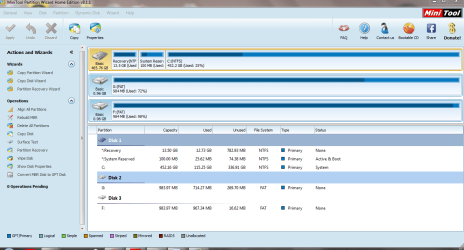
I recently noticed that part of my C: is NTFS and that when it crashes - it always seems to run a Check disk. I am unsure if this is usual.
C Drive 20-11-2014.PNG
49.9 KB
· Views: 10
Windows 7 Home Premium 64bit Windows 7 Service Pack 1 x86 NTFS 4 GB Laptop Sony VAIO / E Series VPCEB46FG Windows 7 Home Premium 64bit Windows 7 Service Pack 1 x86 NTFS AMD E-350 Processor 4 GB 500GB 1.6GHz
New member
Guru
Gold Member
VIP
NTFS is the standard file system
NTFS is the standard file system that Windows has used for many years.
NTFS supports enormous file sizes.
In the W8 series the maximum files size is ~256TB.
FAT is the system that preceded NTFS.
FAT32 only supports file sizes of up to ~4GB.
Last edited: Nov 20, 2014
W7 Ultimate SP1, LM19.2 MATE, W10 Home 1703, ... AMD Phenom II x6 1100T, 3.3 GHz 12GB DDR3 1333 G-Skill (4GB x 2), G-Skill (2G... NVIDIA GeForce GTX 660 PC/Desktop n/a W7 Ultimate SP1, LM19.2 MATE, W10 Home 1703, W10 Pro 1703 VM, #All 64 bit AMD Phenom II x6 1100T, 3.3 GHz ASUS M4A88T-M/USB3 (AM3) 12GB DDR3 1333 G-Skill (4GB x 2), G-Skill (2GB x 2) NVIDIA GeForce GTX 660 Realtek? Samsung S23B350 1920x1080 WD Green 2TB (SATA), WD Green 3TB (SATA), WD Blue 4TB (SATA), WD Blue 6TB (SATA) Cooler Master Antec GX300 Tower 3x Antec TRICOOL 120mm Fans Wired Optical DSL Avast Pale Moon (64 bit) 2018-12-27 Upgraded HDDs
New member
Guru
Gold Member
VIP
Windows 7 can only be installed on an NTFS partition.
Windows 7 Pro 64 bit Xeon W3520 8 GB Nvidia Geforce 210 PC/Desktop HP Windows 7 Pro 64 bit Xeon W3520 8 GB Nvidia Geforce 210
R.I.P.
Guru
Gold Member
VIP
Why couldn`t you just replace the video card ? Or was it the motherboard video that went bad, which is a little unusual ?
Windows 10 Pro x64 Intel Core i7 6700K GSkill TridentZ RGB 16GB 3600 16-16-16-36 EVGA GTX 980 Ti SC x2 PC/Desktop Skylake Special #666 Windows 10 Pro x64 Intel Core i7 6700K Asus Sabertooth Z170 Mark 1 GSkill TridentZ RGB 16GB 3600 16-16-16-36 EVGA GTX 980 Ti SC x2 Realtek High Definition AOC G2460PG 1920 x 1080 144Hz Samsung 860 Pro 256GB, Seagate Barracuda 4TB x2 EVGA 1000 P2, EVGA White Custom Braided Cables Corsair Vengeance C70 Gunmetal Black Corsair H100i v2, Corsair ML120 x2, Thermal Grizzly Kryonaut Logitech G910 Orion Spectrum Logitech G700s Verizon Fios Quantum Gateway 75/75 Windows Defender, Malwarebytes Free 3.8.3 Chrome Corsair SP120 x4, LG Blu-ray Drive, Durabrand HT-395 100 Watt Dolby Digital Amp, Corsair H2100 Wireless 7.1 Headset