Solved Is KB915597 Safe?

TDKMate

New member
Member
VIP
Local time
10:07 PM
Messages
335
Is KB915597 Safe? It’s labeled as ‘Definition Update for Windows Defender - KB915597 (Definition 1.225.2702.0)’ in the Windows Update window.

There are several reasons I ask. First, is this is the very first time Windows has notified me that an Update is available since they snuck in the Free Win 10 Update (3035583?); I’ve had to go into the Control Panel ever since to check for updates.

Second, when I clicked on More Info, I got a browser window talking about Win 10 and not Windows Defender.

And then I Googled KB915597 and found tons of folks having trouble with it, including not booting after installation. I also found a post calling it a ‘legacy’ update. But then I noticed all those I found were many years old.

I did find it on Microsoft’s Web site, but it says it hasn’t been updated since 2010!?

With all the sneaky updates MS has been installing lately, I’m very suspicious about this one.

Any thoughts on this?
.
 

My Computer

Computer type
PC/Desktop
Computer Manufacturer/Model Number
home built
OS
Win 7 Pro 64 SP1
CPU
i7 6700K SkyLake
Motherboard
MSI Gaming M7
Memory
32 GB
Graphics Card(s)
nVidia GTX 970
Sound Card
onboard
Monitor(s) Displays
DELL U2711
Screen Resolution
2560x1440
Hard Drives
1 SSD OS, 2 WD Black Caviar data harddrives
PSU
EVGA Super Nova 850W G2 'Gold'
Case
Thermaltake Soprano Snow Edition
Cooling
Cooler Master Hyper 212 evo
Keyboard
Logitech K350
Mouse
Mad Kats RATT
Antivirus
Avast
Browser
Firefox
Hi,
You use Avast or at least that is what is listed in your system spec's,
If so windows defender should be disabled and there by these defender updates would not appear as updates.
 

My Computer

Computer type
PC/Desktop
Computer Manufacturer/Model Number
Custom assembled by me :}
OS
Win-7-Pro64bit 7-H-Prem-64bit
CPU
i7-5930K 2nd i9-9940x both water blocked VRM's too
Motherboard
ASUS SABERTOOTH X99 2nd ASUS x299 Apex
Memory
Trident-z 3200C14 2nd Trident-z 3600C16
Graphics Card(s)
EVGA 1080ti ftw3 2nd Titan Xp both water blocked
Sound Card
Built-in Realtek
Monitor(s) Displays
1-AOC G2460PG 24"G-Sync 144Hz/ 2nd 1-ASUS VG248QE 24" 144Hz
Screen Resolution
1920 x 1080 144Hz
Hard Drives
2-Samsung M.2 Evo & Evo Plus
2-Samsung 850 EVO 500GB SSD's/ 3-2.5 W.D. Black 1tb-&3-1tb/3-3.5 WD Black 1tb hdd's
PSU
EVGA SuperNOVA 1000-P2 2nd 1200-P2
Case
2-Corsair Obsidian Series 450D Black ATX Mid Tower
Cooling
Custom water loops
Keyboard
Logitech G710+/ 2nd Logitech G910
Mouse
2-RedDragon M901 Perdition 16400 dpi Gaming mouse = wired
Internet Speed
Comcast Ping 19ms 89.31mbps download speed 6.12mbps upload
Antivirus
Malwarebytes Pro/ Superantispyware Pro
Browser
FireFox & Pale moon
Other Info
2nd ASUS X299 Apex/Intel i9-9940x with Custom water loop/7H-Prem-x64/Corsair 450D case/Ram Trident-z 3600C16 4x8gb / Samsung970Evo plus 500gb SSD/Dual ssd EZ swap evo/PSU EVGA SuperNova 1200w-P2 80+Platinum/GPU Titan Xp /8-ML-140 on push-pull on 2-280GTX rads
Advice: Go straight to Microsoft website to understand the meaning on this KB915597 and not other threads.

Do note that it is best not to read into other forum &or posts, as each user may differ.
In the end, you are now confused on this matter, which should not happened, do read below,fyi.


Go to Control Panel --> System & Security --> Windows Firewall.
As what #ThrashZone mentioned, that antivirus may conflict with Windows Defender.

To avoid this, read below fyi.


-------------------------------------------------------------
For your info.

Did you set the option on the Windows updates to "Download updates and let me choose whether to update them"

Try to use this option, instead "Install updates automatically (Recommended)"
In this way, Windows will updates important updates when necessary.
Hence you would not need to consider to update or not.

The reason is that what would happened that you go ahead and install an updates, which may not be necessary, and hence it may create certain issue.
I used that option "Download...choose..update", that created more problems as i am not sure it is useful to install the update or not.

By using the recommended option, i do not have any problem on to install updates or not.
Hence, the system is very stable than previously.
 

My Computer

Computer type
Laptop
Computer Manufacturer/Model Number
Toshiba L630 and L735
OS
Windows 7 x64
Hard Drives
240 GB SSD

My Computer

Computer type
Laptop
Computer Manufacturer/Model Number
ASUS
OS
Microsoft Windows 7 Home Premium 64-bit 7601 Multiprocessor Free Service Pack 1
CPU
AMD C-60 APU with Radeon(tm) HD Graphics
Motherboard
ASUSTeK COMPUTER INC. X501U
Memory
4.00 GB
Graphics Card(s)
AMD Radeon HD 6290 Graphics
Sound Card
(1) AMD High Definition Audio Device (2) Realtek High Defi
Screen Resolution
1366 x 768 x 32 bits (4294967296 colors) @ 60 Hz
Hard Drives
Hitachi HTS545050A7E380 SATA Disk Device
Antivirus
Comodo CIS & FW, SecureAplus App Whitelisting, Threatfire
Browser
Cyberfox 64bit, Opera 64bit, Airfox
Other Info
Spy-The-Spy, HitmanPro.Alert, Norton Connect Safe, MJRegWatcher, BitDefender TrafficLight, Voodoo Shield, Zemana AntiMalware
Hi,
You use Avast or at least that is what is listed in your system spec's,
If so windows defender should be disabled and there by these defender updates would not appear as updates.
Hi ThrashZone. Yes I've been using Avast for many years now, and also Windows Defender. I've never had a problem with them working together.
 

My Computer

Computer type
PC/Desktop
Computer Manufacturer/Model Number
home built
OS
Win 7 Pro 64 SP1
CPU
i7 6700K SkyLake
Motherboard
MSI Gaming M7
Memory
32 GB
Graphics Card(s)
nVidia GTX 970
Sound Card
onboard
Monitor(s) Displays
DELL U2711
Screen Resolution
2560x1440
Hard Drives
1 SSD OS, 2 WD Black Caviar data harddrives
PSU
EVGA Super Nova 850W G2 'Gold'
Case
Thermaltake Soprano Snow Edition
Cooling
Cooler Master Hyper 212 evo
Keyboard
Logitech K350
Mouse
Mad Kats RATT
Antivirus
Avast
Browser
Firefox
Advice: Go straight to Microsoft website to understand the meaning on this KB915597 and not other threads.
...
Hi Eric. I did find it on Microsoft’s Web site and that was part of my confusion: it says it hasn’t been updated since 2010. I guess they (MS) don't take the time to update the 'last update' info.
 

My Computer

Computer type
PC/Desktop
Computer Manufacturer/Model Number
home built
OS
Win 7 Pro 64 SP1
CPU
i7 6700K SkyLake
Motherboard
MSI Gaming M7
Memory
32 GB
Graphics Card(s)
nVidia GTX 970
Sound Card
onboard
Monitor(s) Displays
DELL U2711
Screen Resolution
2560x1440
Hard Drives
1 SSD OS, 2 WD Black Caviar data harddrives
PSU
EVGA Super Nova 850W G2 'Gold'
Case
Thermaltake Soprano Snow Edition
Cooling
Cooler Master Hyper 212 evo
Keyboard
Logitech K350
Mouse
Mad Kats RATT
Antivirus
Avast
Browser
Firefox

My Computer

Computer type
PC/Desktop
Computer Manufacturer/Model Number
home built
OS
Win 7 Pro 64 SP1
CPU
i7 6700K SkyLake
Motherboard
MSI Gaming M7
Memory
32 GB
Graphics Card(s)
nVidia GTX 970
Sound Card
onboard
Monitor(s) Displays
DELL U2711
Screen Resolution
2560x1440
Hard Drives
1 SSD OS, 2 WD Black Caviar data harddrives
PSU
EVGA Super Nova 850W G2 'Gold'
Case
Thermaltake Soprano Snow Edition
Cooling
Cooler Master Hyper 212 evo
Keyboard
Logitech K350
Mouse
Mad Kats RATT
Antivirus
Avast
Browser
Firefox
While I was clacking all this out, I opened Windows Defender to see what the definition set it had. I noticed there is a Check for Updates button, so I clicked it thinking it would check and notify me if updates were available.

Well, it automatically downloaded the latest Definitions without warning. All is good though, as everything went smoothly, including the Quick Scan. As an added benefit, the Windows Update notice also went away; it was smart enough to know WD was updated.

Thanks for all the help!! :)
 

My Computer

Computer type
PC/Desktop
Computer Manufacturer/Model Number
home built
OS
Win 7 Pro 64 SP1
CPU
i7 6700K SkyLake
Motherboard
MSI Gaming M7
Memory
32 GB
Graphics Card(s)
nVidia GTX 970
Sound Card
onboard
Monitor(s) Displays
DELL U2711
Screen Resolution
2560x1440
Hard Drives
1 SSD OS, 2 WD Black Caviar data harddrives
PSU
EVGA Super Nova 850W G2 'Gold'
Case
Thermaltake Soprano Snow Edition
Cooling
Cooler Master Hyper 212 evo
Keyboard
Logitech K350
Mouse
Mad Kats RATT
Antivirus
Avast
Browser
Firefox
Hi,
If you want to use the slowest scanner ever created feel free :)
Be aware WD often needs to do a full scan not quick.
 

My Computer

Computer type
PC/Desktop
Computer Manufacturer/Model Number
Custom assembled by me :}
OS
Win-7-Pro64bit 7-H-Prem-64bit
CPU
i7-5930K 2nd i9-9940x both water blocked VRM's too
Motherboard
ASUS SABERTOOTH X99 2nd ASUS x299 Apex
Memory
Trident-z 3200C14 2nd Trident-z 3600C16
Graphics Card(s)
EVGA 1080ti ftw3 2nd Titan Xp both water blocked
Sound Card
Built-in Realtek
Monitor(s) Displays
1-AOC G2460PG 24"G-Sync 144Hz/ 2nd 1-ASUS VG248QE 24" 144Hz
Screen Resolution
1920 x 1080 144Hz
Hard Drives
2-Samsung M.2 Evo & Evo Plus
2-Samsung 850 EVO 500GB SSD's/ 3-2.5 W.D. Black 1tb-&3-1tb/3-3.5 WD Black 1tb hdd's
PSU
EVGA SuperNOVA 1000-P2 2nd 1200-P2
Case
2-Corsair Obsidian Series 450D Black ATX Mid Tower
Cooling
Custom water loops
Keyboard
Logitech G710+/ 2nd Logitech G910
Mouse
2-RedDragon M901 Perdition 16400 dpi Gaming mouse = wired
Internet Speed
Comcast Ping 19ms 89.31mbps download speed 6.12mbps upload
Antivirus
Malwarebytes Pro/ Superantispyware Pro
Browser
FireFox & Pale moon
Other Info
2nd ASUS X299 Apex/Intel i9-9940x with Custom water loop/7H-Prem-x64/Corsair 450D case/Ram Trident-z 3600C16 4x8gb / Samsung970Evo plus 500gb SSD/Dual ssd EZ swap evo/PSU EVGA SuperNova 1200w-P2 80+Platinum/GPU Titan Xp /8-ML-140 on push-pull on 2-280GTX rads
Hi,
If you want to use the slowest scanner ever created feel free :)
Be aware WD often needs to do a full scan not quick.
I also use Malwarebytes free, and occasionally HiJack This. I've never ran a full scan with WD but I'd imagine that with approximately 4.8TB worth of files in this box it would take all day to run. I also never looked to see if I can exclude things like my photo and home movie drives, but I'd imagine there's a way.

Or should I run it on C: drive only...??


What scanners do you use/recommend?
.
 

My Computer

Computer type
PC/Desktop
Computer Manufacturer/Model Number
home built
OS
Win 7 Pro 64 SP1
CPU
i7 6700K SkyLake
Motherboard
MSI Gaming M7
Memory
32 GB
Graphics Card(s)
nVidia GTX 970
Sound Card
onboard
Monitor(s) Displays
DELL U2711
Screen Resolution
2560x1440
Hard Drives
1 SSD OS, 2 WD Black Caviar data harddrives
PSU
EVGA Super Nova 850W G2 'Gold'
Case
Thermaltake Soprano Snow Edition
Cooling
Cooler Master Hyper 212 evo
Keyboard
Logitech K350
Mouse
Mad Kats RATT
Antivirus
Avast
Browser
Firefox
Hi,
Try a week :p
WD is one of the most useless scanners there is.
Rely on your Real antivirus program which again is Avast to scan and find stuff and turn defender off.

I use Panda free and mbam premium and that's it
I do have superantispyware pro but hardly use it anymore.
 

My Computer

Computer type
PC/Desktop
Computer Manufacturer/Model Number
Custom assembled by me :}
OS
Win-7-Pro64bit 7-H-Prem-64bit
CPU
i7-5930K 2nd i9-9940x both water blocked VRM's too
Motherboard
ASUS SABERTOOTH X99 2nd ASUS x299 Apex
Memory
Trident-z 3200C14 2nd Trident-z 3600C16
Graphics Card(s)
EVGA 1080ti ftw3 2nd Titan Xp both water blocked
Sound Card
Built-in Realtek
Monitor(s) Displays
1-AOC G2460PG 24"G-Sync 144Hz/ 2nd 1-ASUS VG248QE 24" 144Hz
Screen Resolution
1920 x 1080 144Hz
Hard Drives
2-Samsung M.2 Evo & Evo Plus
2-Samsung 850 EVO 500GB SSD's/ 3-2.5 W.D. Black 1tb-&3-1tb/3-3.5 WD Black 1tb hdd's
PSU
EVGA SuperNOVA 1000-P2 2nd 1200-P2
Case
2-Corsair Obsidian Series 450D Black ATX Mid Tower
Cooling
Custom water loops
Keyboard
Logitech G710+/ 2nd Logitech G910
Mouse
2-RedDragon M901 Perdition 16400 dpi Gaming mouse = wired
Internet Speed
Comcast Ping 19ms 89.31mbps download speed 6.12mbps upload
Antivirus
Malwarebytes Pro/ Superantispyware Pro
Browser
FireFox & Pale moon
Other Info
2nd ASUS X299 Apex/Intel i9-9940x with Custom water loop/7H-Prem-x64/Corsair 450D case/Ram Trident-z 3600C16 4x8gb / Samsung970Evo plus 500gb SSD/Dual ssd EZ swap evo/PSU EVGA SuperNova 1200w-P2 80+Platinum/GPU Titan Xp /8-ML-140 on push-pull on 2-280GTX rads
I'm glad I don't claim to be too bright on all this... I *thought* (the nice was to say 'assumed') that WD was the same as Malwarebytes free in that you just ran it from time to time with the exception of WD would auto-run at times.

So I didn't understand your prompting to turn it 'off'; not knowing it was even 'on.' Heck, I've never seen it running under Processes in Task Manager. So for the first time, I checked out WD's Options this morning and found out what you already knew: it does things like scan downloads, programs that run, and more.

Thanks for the lesson. :)
 

My Computer

Computer type
PC/Desktop
Computer Manufacturer/Model Number
home built
OS
Win 7 Pro 64 SP1
CPU
i7 6700K SkyLake
Motherboard
MSI Gaming M7
Memory
32 GB
Graphics Card(s)
nVidia GTX 970
Sound Card
onboard
Monitor(s) Displays
DELL U2711
Screen Resolution
2560x1440
Hard Drives
1 SSD OS, 2 WD Black Caviar data harddrives
PSU
EVGA Super Nova 850W G2 'Gold'
Case
Thermaltake Soprano Snow Edition
Cooling
Cooler Master Hyper 212 evo
Keyboard
Logitech K350
Mouse
Mad Kats RATT
Antivirus
Avast
Browser
Firefox
Hi,
Even it says you shouldn't have 2 antivirus programs installed so yea WD not being turned off by default is weird it should be,
2 antivirus programs will slow your computer down and you would be less secure because these 2 antivirus programs will conflict with each other.
Avast is miles better stick with it.
 

My Computer

Computer type
PC/Desktop
Computer Manufacturer/Model Number
Custom assembled by me :}
OS
Win-7-Pro64bit 7-H-Prem-64bit
CPU
i7-5930K 2nd i9-9940x both water blocked VRM's too
Motherboard
ASUS SABERTOOTH X99 2nd ASUS x299 Apex
Memory
Trident-z 3200C14 2nd Trident-z 3600C16
Graphics Card(s)
EVGA 1080ti ftw3 2nd Titan Xp both water blocked
Sound Card
Built-in Realtek
Monitor(s) Displays
1-AOC G2460PG 24"G-Sync 144Hz/ 2nd 1-ASUS VG248QE 24" 144Hz
Screen Resolution
1920 x 1080 144Hz
Hard Drives
2-Samsung M.2 Evo & Evo Plus
2-Samsung 850 EVO 500GB SSD's/ 3-2.5 W.D. Black 1tb-&3-1tb/3-3.5 WD Black 1tb hdd's
PSU
EVGA SuperNOVA 1000-P2 2nd 1200-P2
Case
2-Corsair Obsidian Series 450D Black ATX Mid Tower
Cooling
Custom water loops
Keyboard
Logitech G710+/ 2nd Logitech G910
Mouse
2-RedDragon M901 Perdition 16400 dpi Gaming mouse = wired
Internet Speed
Comcast Ping 19ms 89.31mbps download speed 6.12mbps upload
Antivirus
Malwarebytes Pro/ Superantispyware Pro
Browser
FireFox & Pale moon
Other Info
2nd ASUS X299 Apex/Intel i9-9940x with Custom water loop/7H-Prem-x64/Corsair 450D case/Ram Trident-z 3600C16 4x8gb / Samsung970Evo plus 500gb SSD/Dual ssd EZ swap evo/PSU EVGA SuperNova 1200w-P2 80+Platinum/GPU Titan Xp /8-ML-140 on push-pull on 2-280GTX rads
Until this thread, I didn’t even know WD was an ‘antivirus’ program! …just a malware program, like for home page jacking and the like.

So, this is what I’ve done to turn it off. If there’s anything else I need to, please let me know:

In options:
- unchecked Automatically scan my computer
- nothing done under Default Actions
- unchecked Use real time protection
- nothing done under Excluded
- unchecked everything under Advanced
- and lastly, unchecked ‘Use this program’ under Administrator.

(it would have been nice if the Admin section was on top! LOL)

Since I did the above while clacking out this reply, I'm going to reboot and see what happens.

Hmmm... I guess I should do this to my 'Better Half's computer, too. :eek:
.
 

My Computer

Computer type
PC/Desktop
Computer Manufacturer/Model Number
home built
OS
Win 7 Pro 64 SP1
CPU
i7 6700K SkyLake
Motherboard
MSI Gaming M7
Memory
32 GB
Graphics Card(s)
nVidia GTX 970
Sound Card
onboard
Monitor(s) Displays
DELL U2711
Screen Resolution
2560x1440
Hard Drives
1 SSD OS, 2 WD Black Caviar data harddrives
PSU
EVGA Super Nova 850W G2 'Gold'
Case
Thermaltake Soprano Snow Edition
Cooling
Cooler Master Hyper 212 evo
Keyboard
Logitech K350
Mouse
Mad Kats RATT
Antivirus
Avast
Browser
Firefox
Hi,
What you state sounds about right settings wise :)
 

My Computer

Computer type
PC/Desktop
Computer Manufacturer/Model Number
Custom assembled by me :}
OS
Win-7-Pro64bit 7-H-Prem-64bit
CPU
i7-5930K 2nd i9-9940x both water blocked VRM's too
Motherboard
ASUS SABERTOOTH X99 2nd ASUS x299 Apex
Memory
Trident-z 3200C14 2nd Trident-z 3600C16
Graphics Card(s)
EVGA 1080ti ftw3 2nd Titan Xp both water blocked
Sound Card
Built-in Realtek
Monitor(s) Displays
1-AOC G2460PG 24"G-Sync 144Hz/ 2nd 1-ASUS VG248QE 24" 144Hz
Screen Resolution
1920 x 1080 144Hz
Hard Drives
2-Samsung M.2 Evo & Evo Plus
2-Samsung 850 EVO 500GB SSD's/ 3-2.5 W.D. Black 1tb-&3-1tb/3-3.5 WD Black 1tb hdd's
PSU
EVGA SuperNOVA 1000-P2 2nd 1200-P2
Case
2-Corsair Obsidian Series 450D Black ATX Mid Tower
Cooling
Custom water loops
Keyboard
Logitech G710+/ 2nd Logitech G910
Mouse
2-RedDragon M901 Perdition 16400 dpi Gaming mouse = wired
Internet Speed
Comcast Ping 19ms 89.31mbps download speed 6.12mbps upload
Antivirus
Malwarebytes Pro/ Superantispyware Pro
Browser
FireFox & Pale moon
Other Info
2nd ASUS X299 Apex/Intel i9-9940x with Custom water loop/7H-Prem-x64/Corsair 450D case/Ram Trident-z 3600C16 4x8gb / Samsung970Evo plus 500gb SSD/Dual ssd EZ swap evo/PSU EVGA SuperNova 1200w-P2 80+Platinum/GPU Titan Xp /8-ML-140 on push-pull on 2-280GTX rads
Great! Thanks for all the help and guidance, ThrashZone.
 

My Computer

Computer type
PC/Desktop
Computer Manufacturer/Model Number
home built
OS
Win 7 Pro 64 SP1
CPU
i7 6700K SkyLake
Motherboard
MSI Gaming M7
Memory
32 GB
Graphics Card(s)
nVidia GTX 970
Sound Card
onboard
Monitor(s) Displays
DELL U2711
Screen Resolution
2560x1440
Hard Drives
1 SSD OS, 2 WD Black Caviar data harddrives
PSU
EVGA Super Nova 850W G2 'Gold'
Case
Thermaltake Soprano Snow Edition
Cooling
Cooler Master Hyper 212 evo
Keyboard
Logitech K350
Mouse
Mad Kats RATT
Antivirus
Avast
Browser
Firefox
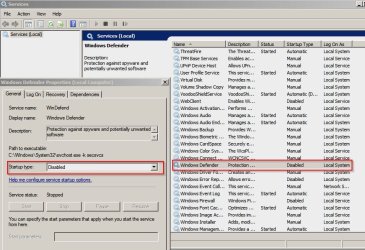
Disable Windows Defender Service. Disable Windows Defender scheduled task.


Disable Windows Defender Service:

Start> Run then type services.msc.

Scroll down to Windows Defender Service - right click then set startup type to disabled.

WD.jpg

Also in Task Scheduler set Windows Defender "MP Scheduled Scan" task to disabled.
 
Last edited:

My Computer

Computer type
Laptop
Computer Manufacturer/Model Number
ASUS
OS
Microsoft Windows 7 Home Premium 64-bit 7601 Multiprocessor Free Service Pack 1
CPU
AMD C-60 APU with Radeon(tm) HD Graphics
Motherboard
ASUSTeK COMPUTER INC. X501U
Memory
4.00 GB
Graphics Card(s)
AMD Radeon HD 6290 Graphics
Sound Card
(1) AMD High Definition Audio Device (2) Realtek High Defi
Screen Resolution
1366 x 768 x 32 bits (4294967296 colors) @ 60 Hz
Hard Drives
Hitachi HTS545050A7E380 SATA Disk Device
Antivirus
Comodo CIS & FW, SecureAplus App Whitelisting, Threatfire
Browser
Cyberfox 64bit, Opera 64bit, Airfox
Other Info
Spy-The-Spy, HitmanPro.Alert, Norton Connect Safe, MJRegWatcher, BitDefender TrafficLight, Voodoo Shield, Zemana AntiMalware
Hi,
The service should be okay at manual
I do not show any scheduled task for WD either :/
Probably good to double check though :)
 

My Computer

Computer type
PC/Desktop
Computer Manufacturer/Model Number
Custom assembled by me :}
OS
Win-7-Pro64bit 7-H-Prem-64bit
CPU
i7-5930K 2nd i9-9940x both water blocked VRM's too
Motherboard
ASUS SABERTOOTH X99 2nd ASUS x299 Apex
Memory
Trident-z 3200C14 2nd Trident-z 3600C16
Graphics Card(s)
EVGA 1080ti ftw3 2nd Titan Xp both water blocked
Sound Card
Built-in Realtek
Monitor(s) Displays
1-AOC G2460PG 24"G-Sync 144Hz/ 2nd 1-ASUS VG248QE 24" 144Hz
Screen Resolution
1920 x 1080 144Hz
Hard Drives
2-Samsung M.2 Evo & Evo Plus
2-Samsung 850 EVO 500GB SSD's/ 3-2.5 W.D. Black 1tb-&3-1tb/3-3.5 WD Black 1tb hdd's
PSU
EVGA SuperNOVA 1000-P2 2nd 1200-P2
Case
2-Corsair Obsidian Series 450D Black ATX Mid Tower
Cooling
Custom water loops
Keyboard
Logitech G710+/ 2nd Logitech G910
Mouse
2-RedDragon M901 Perdition 16400 dpi Gaming mouse = wired
Internet Speed
Comcast Ping 19ms 89.31mbps download speed 6.12mbps upload
Antivirus
Malwarebytes Pro/ Superantispyware Pro
Browser
FireFox & Pale moon
Other Info
2nd ASUS X299 Apex/Intel i9-9940x with Custom water loop/7H-Prem-x64/Corsair 450D case/Ram Trident-z 3600C16 4x8gb / Samsung970Evo plus 500gb SSD/Dual ssd EZ swap evo/PSU EVGA SuperNova 1200w-P2 80+Platinum/GPU Titan Xp /8-ML-140 on push-pull on 2-280GTX rads

My Computer

Computer type
PC/Desktop
Computer Manufacturer/Model Number
home built
OS
Win 7 Pro 64 SP1
CPU
i7 6700K SkyLake
Motherboard
MSI Gaming M7
Memory
32 GB
Graphics Card(s)
nVidia GTX 970
Sound Card
onboard
Monitor(s) Displays
DELL U2711
Screen Resolution
2560x1440
Hard Drives
1 SSD OS, 2 WD Black Caviar data harddrives
PSU
EVGA Super Nova 850W G2 'Gold'
Case
Thermaltake Soprano Snow Edition
Cooling
Cooler Master Hyper 212 evo
Keyboard
Logitech K350
Mouse
Mad Kats RATT
Antivirus
Avast
Browser
Firefox
Hi,
The service should be okay at manual
I do not show any scheduled task for WD either :/
Probably good to double check though :)
Hi ThrashZone. I don't know either way, but it couldn't hurt to have it disabled. It's what I call 'cheap insurance' :D
 

My Computer

Computer type
PC/Desktop
Computer Manufacturer/Model Number
home built
OS
Win 7 Pro 64 SP1
CPU
i7 6700K SkyLake
Motherboard
MSI Gaming M7
Memory
32 GB
Graphics Card(s)
nVidia GTX 970
Sound Card
onboard
Monitor(s) Displays
DELL U2711
Screen Resolution
2560x1440
Hard Drives
1 SSD OS, 2 WD Black Caviar data harddrives
PSU
EVGA Super Nova 850W G2 'Gold'
Case
Thermaltake Soprano Snow Edition
Cooling
Cooler Master Hyper 212 evo
Keyboard
Logitech K350
Mouse
Mad Kats RATT
Antivirus
Avast
Browser
Firefox
Back
Top