Is 'Metro' now a banned word at Microsoft?

BrightBlessings

New member
Guru
VIP
Local time
4:44 PM
Messages
1,400

My Computer My Computer

At a glance

Win7 Pro-64 Biti7-2600-3.4GHz8 GIG DDR3onboard
Computer Manufacturer/Model Number
Put together
OS
Win7 Pro-64 Bit
CPU
i7-2600-3.4GHz
Motherboard
ASRock Z68M
Memory
8 GIG DDR3
Graphics Card(s)
onboard
Sound Card
onboard
Hard Drives
Seagate 1TB 7200RPM
PSU
680 W
Case
black
Cooling
stock fans
Keyboard
Microsoft
Mouse
Microsoft optical
I can personally think of why, and it has more to do with current politics than anything.
 

My Computer My Computer

At a glance

Windows 7 x64Intel i7 2600kG.skill Ripjaw 16gigs @ 1866Nvidia gtx580 (evga)
Computer Manufacturer/Model Number
Insane hobo technologies. ;-)
OS
Windows 7 x64
CPU
Intel i7 2600k
Motherboard
Asrock z68 extreme 4 gen 3
Memory
G.skill Ripjaw 16gigs @ 1866
Graphics Card(s)
Nvidia gtx580 (evga)
Sound Card
Integrated HD audio + hdmi
Monitor(s) Displays
24" ASUS widescreen + 42" insignia
Screen Resolution
1080p (1920x1080)
Hard Drives
128 Samsung 830
256 Samsung 840
3 x 1tb storage drive (various)
1 western digital 1tb (eSATA)
1 Seagate 1tb (eSATA)
PSU
1 kilowatt SLI/Crossfire rated Silverstone modular
Case
NZXT Phantom + additional 220 fan
Cooling
Zalmann
Keyboard
Microsoft wireless 3000 (v2)
Mouse
MS - wireless 5000 (bluetrack)
Internet Speed
depends on if you ask me or my provider.
Other Info
The above information is provided as is, and the author assumes no responsibility for issues it may cause with your sanity or fanboyism.

My Computer My Computer

At a glance

W7 Ultimate SP1, LM19.2 MATE, W10 Home 1703, ...AMD Phenom II x6 1100T, 3.3 GHz12GB DDR3 1333 G-Skill (4GB x 2), G-Skill (2G...NVIDIA GeForce GTX 660
Computer type
PC/Desktop
Computer Manufacturer/Model Number
n/a
OS
W7 Ultimate SP1, LM19.2 MATE, W10 Home 1703, W10 Pro 1703 VM, #All 64 bit
CPU
AMD Phenom II x6 1100T, 3.3 GHz
Motherboard
ASUS M4A88T-M/USB3 (AM3)
Memory
12GB DDR3 1333 G-Skill (4GB x 2), G-Skill (2GB x 2)
Graphics Card(s)
NVIDIA GeForce GTX 660
Sound Card
Realtek?
Monitor(s) Displays
Samsung S23B350
Screen Resolution
1920x1080
Hard Drives
WD Green 2TB (SATA), WD Green 3TB (SATA), WD Blue 4TB (SATA), WD Blue 6TB (SATA)
PSU
Cooler Master
Case
Antec GX300 Tower
Cooling
3x Antec TRICOOL 120mm Fans
Mouse
Wired Optical
Internet Speed
DSL
Antivirus
Avast
Browser
Pale Moon (64 bit)
Other Info
2018-12-27 Upgraded HDDs
2015-12-10 Upgraded case, graphics card, storage
2015-08-15 Upgraded motherboard & RAM
2015-07-15 Upgraded LM17.1 to LM17.2
They are going to fail dramatically at getting win 8 to catch on solidly with the pc market.
I honestly believe that, based on my own experience with it.

I will be sticking with windows 7 for the foreseeable future regardless though.
Microsoft has a history of completely failing on every other OS attempt, and well this is that other one. Vista was the previous.

Considering the economy is about to take another massive hit as well, I honestly just don't see it doing well for a vast number of reasons even beyond my personal dislike of the interface.
 

My Computer My Computer

At a glance

Windows 7 x64Intel i7 2600kG.skill Ripjaw 16gigs @ 1866Nvidia gtx580 (evga)
Computer Manufacturer/Model Number
Insane hobo technologies. ;-)
OS
Windows 7 x64
CPU
Intel i7 2600k
Motherboard
Asrock z68 extreme 4 gen 3
Memory
G.skill Ripjaw 16gigs @ 1866
Graphics Card(s)
Nvidia gtx580 (evga)
Sound Card
Integrated HD audio + hdmi
Monitor(s) Displays
24" ASUS widescreen + 42" insignia
Screen Resolution
1080p (1920x1080)
Hard Drives
128 Samsung 830
256 Samsung 840
3 x 1tb storage drive (various)
1 western digital 1tb (eSATA)
1 Seagate 1tb (eSATA)
PSU
1 kilowatt SLI/Crossfire rated Silverstone modular
Case
NZXT Phantom + additional 220 fan
Cooling
Zalmann
Keyboard
Microsoft wireless 3000 (v2)
Mouse
MS - wireless 5000 (bluetrack)
Internet Speed
depends on if you ask me or my provider.
Other Info
The above information is provided as is, and the author assumes no responsibility for issues it may cause with your sanity or fanboyism.
They are going to fail dramatically at getting win 8 to catch on solidly with the pc market.
I honestly believe that, based on my own experience with it.

I will be sticking with windows 7 for the foreseeable future regardless though.
Microsoft has a history of completely failing on every other OS attempt, and well this is that other one. Vista was the previous.

I, and many others on here, will beg to differ.

I don't think Vista was a failed attempt at an OS. The main thing wrong with Vista was too many people bad mouthing Vista who had never tried it. I'm not saying it had a smooth, clean launch, but the people who had the problems at launch shouted from the hill tops about these problems, and people heard and carried on shouting despite never using Vista at all. This resonated and then Windows 7 came about, the XP users who didn't try Vista jumped on the 7 bandwagon during the beta leaks and then summed up a conclusion that Vista really was as bad as they heard. Look at the Mojave Experiment, for example. I'm not saying you're one of these people, just what I noticed. You may have well had bad experience with Vista.

XP had a far, far worse launch than Vista. That too required high system specs for its time, plagued with driver errors and what not. Vista came about, required high system specs for an OS again, but as the specs the majority of people were running ran XP perfectly fine compared to Vista, and as XP had been out for so long, 2 service packs, stable drivers etc etc, people stuck to XP and then suddenly XP was God's gift to the PC.

I wouldn't say Windows 8 will fail. It's just a whole new way of using Windows. I admit I've not taken to it as it is, and it required the Classic Shell addon for me to find it usable, but I don't think it'll go the same, unfortunate, way that Vista went.
 

My Computer My Computer

At a glance

Windows 8.1 Pro x64Intel Core i7 4790k8GB Corsair Dominator 1600MHzMSI TwinFrozr GeForce GTX770
Computer type
PC/Desktop
Computer Manufacturer/Model Number
Custom Built
OS
Windows 8.1 Pro x64
CPU
Intel Core i7 4790k
Motherboard
MSI Z97S Krait Edition
Memory
8GB Corsair Dominator 1600MHz
Graphics Card(s)
MSI TwinFrozr GeForce GTX770
Sound Card
ASUS Xonar DX/XD 7.1
Monitor(s) Displays
Dell 24" S2409W + Dell 20" E207WFP
Screen Resolution
1920x1080 + 1680x1050
Hard Drives
1x 120GB OCZ Agility 3, 1x 750GB Western Digital Caviar Black, 1x 1TB Western Digital Caviar Blue
PSU
Corsair HX850 modular
Case
Fractal Design Define R4
Cooling
Corsair H60 w/ twin Corsair SP120 fans
Keyboard
Logitech G510S Keyboard
Mouse
Logitech G500S Laser Mouse
Internet Speed
40Mbps
Antivirus
Microsoft Security Essentials
Browser
Google Chrome
Other Info
LG Blu-Ray player
When it takes nearly a year to get stuff working right, it's a failure....
When I first installed vista I couldn't even use my multiple graphics cards with it.
It was nearly 6 months before that problem alone was solved.
I think you guys look back fondly on it out of some sort of nostalgia. It really wasn't all that great, why do you think so many people stuck to xp for so long?
 

My Computer My Computer

At a glance

Windows 7 x64Intel i7 2600kG.skill Ripjaw 16gigs @ 1866Nvidia gtx580 (evga)
Computer Manufacturer/Model Number
Insane hobo technologies. ;-)
OS
Windows 7 x64
CPU
Intel i7 2600k
Motherboard
Asrock z68 extreme 4 gen 3
Memory
G.skill Ripjaw 16gigs @ 1866
Graphics Card(s)
Nvidia gtx580 (evga)
Sound Card
Integrated HD audio + hdmi
Monitor(s) Displays
24" ASUS widescreen + 42" insignia
Screen Resolution
1080p (1920x1080)
Hard Drives
128 Samsung 830
256 Samsung 840
3 x 1tb storage drive (various)
1 western digital 1tb (eSATA)
1 Seagate 1tb (eSATA)
PSU
1 kilowatt SLI/Crossfire rated Silverstone modular
Case
NZXT Phantom + additional 220 fan
Cooling
Zalmann
Keyboard
Microsoft wireless 3000 (v2)
Mouse
MS - wireless 5000 (bluetrack)
Internet Speed
depends on if you ask me or my provider.
Other Info
The above information is provided as is, and the author assumes no responsibility for issues it may cause with your sanity or fanboyism.
I think Everlong is right. I bought a Vista PC the day of the Vista launch (Febr.1, 2007) and 3 more Vista PCs thereafter. I never had any problems with it. The little nits were at the same level as the nits in Windows7.

The real problem were some drivers in the early days and the badmouthing by people who had never used it. The Mojave project proved those morons wrong and put egg into their face.

I am still running 2 Vista systems without any problems. It's going and going like the Energizer bunny.
 

My Computer My Computer

At a glance

Vista, Windows7, Mint Mate, Zorin, Windows 8from 1.6GHz Duo to i7
Computer Manufacturer/Model Number
HP, Dell, Gateway, Toshiba - 4 laptops and 2 desktops
OS
Vista, Windows7, Mint Mate, Zorin, Windows 8
CPU
from 1.6GHz Duo to i7
Monitor(s) Displays
2x HP w2207
Hard Drives
5x HDD, 7x SSD, 12x Externals
Keyboard
with trackball - no mices
Mouse
Trackball mice
Internet Speed
DSL 6000
...and I suppose one could say we are all right as at the end of the day it's all a matter of opinion.

I remember vista being so problematic for me I was forced to dual boot for nearly a year.
If that wasn't the case for you, that's great.
It would be willfully ignorant of me to ignore my own experience at the same time though.
...and that experience was one of frustration, lost time, and lost work.
It was the same for the majority of my RL friends.

Look I like windows, I'm not sitting here telling everyone they should go install linux.
I'm not going to change my view because it would be seen as politically correct either though.
 

My Computer My Computer

At a glance

Windows 7 x64Intel i7 2600kG.skill Ripjaw 16gigs @ 1866Nvidia gtx580 (evga)
Computer Manufacturer/Model Number
Insane hobo technologies. ;-)
OS
Windows 7 x64
CPU
Intel i7 2600k
Motherboard
Asrock z68 extreme 4 gen 3
Memory
G.skill Ripjaw 16gigs @ 1866
Graphics Card(s)
Nvidia gtx580 (evga)
Sound Card
Integrated HD audio + hdmi
Monitor(s) Displays
24" ASUS widescreen + 42" insignia
Screen Resolution
1080p (1920x1080)
Hard Drives
128 Samsung 830
256 Samsung 840
3 x 1tb storage drive (various)
1 western digital 1tb (eSATA)
1 Seagate 1tb (eSATA)
PSU
1 kilowatt SLI/Crossfire rated Silverstone modular
Case
NZXT Phantom + additional 220 fan
Cooling
Zalmann
Keyboard
Microsoft wireless 3000 (v2)
Mouse
MS - wireless 5000 (bluetrack)
Internet Speed
depends on if you ask me or my provider.
Other Info
The above information is provided as is, and the author assumes no responsibility for issues it may cause with your sanity or fanboyism.
I'm in Maguscreed's camp.
Vista was OK at best.

IMO, XP and W7 were much better (W7 > XP > Vista > W8).

My friend's Vista laptop was stupidly slow (>2 minutes to boot up).

On a different laptop (that I had to "clean") the UAC kept popping up, on just about every mouse click (just like the Apple ad suggested).
It was extremely annoying.
 

My Computer My Computer

At a glance

W7 Ultimate SP1, LM19.2 MATE, W10 Home 1703, ...AMD Phenom II x6 1100T, 3.3 GHz12GB DDR3 1333 G-Skill (4GB x 2), G-Skill (2G...NVIDIA GeForce GTX 660
Computer type
PC/Desktop
Computer Manufacturer/Model Number
n/a
OS
W7 Ultimate SP1, LM19.2 MATE, W10 Home 1703, W10 Pro 1703 VM, #All 64 bit
CPU
AMD Phenom II x6 1100T, 3.3 GHz
Motherboard
ASUS M4A88T-M/USB3 (AM3)
Memory
12GB DDR3 1333 G-Skill (4GB x 2), G-Skill (2GB x 2)
Graphics Card(s)
NVIDIA GeForce GTX 660
Sound Card
Realtek?
Monitor(s) Displays
Samsung S23B350
Screen Resolution
1920x1080
Hard Drives
WD Green 2TB (SATA), WD Green 3TB (SATA), WD Blue 4TB (SATA), WD Blue 6TB (SATA)
PSU
Cooler Master
Case
Antec GX300 Tower
Cooling
3x Antec TRICOOL 120mm Fans
Mouse
Wired Optical
Internet Speed
DSL
Antivirus
Avast
Browser
Pale Moon (64 bit)
Other Info
2018-12-27 Upgraded HDDs
2015-12-10 Upgraded case, graphics card, storage
2015-08-15 Upgraded motherboard & RAM
2015-07-15 Upgraded LM17.1 to LM17.2
When it takes nearly a year to get stuff working right, it's a failure....
When I first installed vista I couldn't even use my multiple graphics cards with it.
It was nearly 6 months before that problem alone was solved.
I think you guys look back fondly on it out of some sort of nostalgia. It really wasn't all that great, why do you think so many people stuck to xp for so long?

You forgot to mention the 4GB memory crashes which took them a good long time to patch.
 

My Computer My Computer

At a glance

Windows 7 Ult, Windows 8.1 Pro,Q9650-4.275GHz, E8600 4.5GHz, E6750-3.8GHzG.Skill PC2 9600 1200Mhz 5 5 5 15 2TGTX480
Computer type
PC/Desktop
Computer Manufacturer/Model Number
Home built
OS
Windows 7 Ult, Windows 8.1 Pro,
CPU
Q9650-4.275GHz, E8600 4.5GHz, E6750-3.8GHz
Motherboard
Evga 780i FTW
Memory
G.Skill PC2 9600 1200Mhz 5 5 5 15 2T
Graphics Card(s)
GTX480
Sound Card
Asus Xonar D2
Monitor(s) Displays
HannsG
Screen Resolution
1680X1050
Hard Drives
GSkill Phoenix Pro 120GB SSD
PSU
ThermalTake Toughpower 1000Watt modular
Case
ThermalTake XaserV
Cooling
Xigmatek S1283
Keyboard
Logitech G15
Mouse
Logitech G9
Internet Speed
T1
I can't take credit for this name (saw on another forum):

MS Bob 4.0

Yup - that's it!

  • I tried MS Bob (passed on it);
  • Tried and passed on Windows ME (i.e. Bob 2.0);
  • Had and wiped Windows Vista (i.e. Bob 3.0);
  • Trying Windows 8 Met* (i.e. Bob 4.0) - will delete the VBox next month.

Regards,
GEWB
 

My Computer My Computer

At a glance

Linux Mint / XP / Win7 Home, Pro, Ultimate / ...
Computer type
PC/Desktop
Computer Manufacturer/Model Number
(7 different computers booting up to 10 systems)
OS
Linux Mint / XP / Win7 Home, Pro, Ultimate / Win8.1 / Win10
Other Info
Four desktops, two laptops, one notebook and one tablet
I don't think Vista was a failed attempt at an OS. The main thing wrong with Vista was too many people bad mouthing Vista who had never tried it.
I tend to disagree. I bad mouthed vista at the launch, not from lack of trying it, but because of problems experienced with upgrading machines, driver support (or lack thereof) and woeful performance issues. Some machines were fine, others were a nightmare. Lots of people had similar issues, which caused techies and such to proclaim that the OS wasn't ready. In 6 months, after 3rd parties got drivers updated, windows patches came about and then SP1, most of the Vista issues were gone. Unfortunately, the first impressions were not great and the OS never really lived it down.

XP had a far, far worse launch than Vista.
Not from what I remember and what I personally experienced.

I wouldn't say Windows 8 will fail. It's just a whole new way of using Windows. I admit I've not taken to it as it is, and it required the Classic Shell addon for me to find it usable, but I don't think it'll go the same, unfortunate, way that Vista went.
Well, lots may feel like me saying that Windows 8 isn't that much better in 7 in many regards and with the hassles of dealing with metro and the lack of a start button, upgrading to it might not be advantageous. I certainly have no intention of spending $39.99 to upgrade my machine to it, to then have to find 3rd party utils to get back basic functionality such as the start button.
 

My Computer My Computer

At a glance

Windows 7 Ultimate x64Intel Q9550 2.83Ghz OC'd to 3.40Ghz8GB G.Skill PI DDR2-800, 4-4-4-12 timingsEVGA 1280MB Nvidia GeForce GTX570
Computer Manufacturer/Model Number
Self-Built in July 2009
OS
Windows 7 Ultimate x64
CPU
Intel Q9550 2.83Ghz OC'd to 3.40Ghz
Motherboard
Gigabyte GA-EP45-UD3R rev. 1.1, F12 BIOS
Memory
8GB G.Skill PI DDR2-800, 4-4-4-12 timings
Graphics Card(s)
EVGA 1280MB Nvidia GeForce GTX570
Sound Card
Realtek ALC899A 8 channel onboard audio
Monitor(s) Displays
23" Acer x233H
Screen Resolution
1920x1080
Hard Drives
Intel X25-M 80GB Gen 2 SSD
Western Digital 1TB Caviar Black, 32MB cache. WD1001FALS
PSU
Corsair 620HX modular
Case
Antec P182
Cooling
stock
Keyboard
ABS M1 Mechanical
Mouse
Logitech G9 Laser Mouse
Internet Speed
15/2 cable modem
Other Info
Windows and Linux enthusiast. Logitech G35 Headset.
Vista was released with most of the services still set to Automatic sucking up the available RAM and CPU cycles.

It was in the development of Win7 that MS learned the trick was to set all services not absolutely needed at Startup to Manual and developed "Fast Triggers" to launch them - I was raptly reading the developers blog at the time and hoping it would work.

Many of these changes were rushed into Vista SP1 at about the same time Win7 beta was released (if I have the timeline correct) so Vista is only known to many of its users as a tolerable OS.

Most tech enthusiasts in early Vista and XP used Black Viper's Service edits to claw back performance. MS observed this and as a result Win7 effectively became the Black Viper.
 
Well... about performance, I don't see that as a true argument, I have W8 RP on a virtual machine and it goes pretty well, is fast even with 1 GB of RAM (talking about x86 build)...

I guess the true fail is the interface, in Vista, Aero was just an eye candy, in 7 Aero has functions that really makes you productive (Aero peek, Aero snap...) and allows you to work with piles of windows at the same time and never get lost in that...

Windows 8 is several steps backwards from that, Metro is annoying as you got to do more steps to do the same, now you got to click on the desktop tile if you want to go there... even worse, if you use a metro app and want to do something in Desktop, you need to "entirely leave" metro enviornment in favor to do "real" stuff.
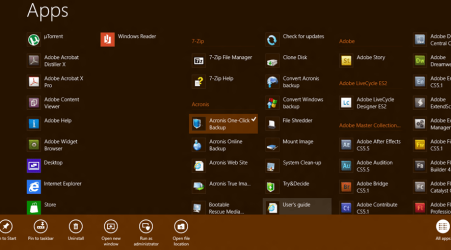
To go to all programs "screen", you need to do a right click... in start menu you only point that option and it opens by itself, everything listed and ordered properly in a non big list of programs... Start Page has only one advantage though, the way of ordeing items, now they are ordered hoizontally allowing to pin more used stuff in the main part, but at the cost of more wasted time clicking around the interface... and also another bad point (talking about customization) is that you can change your wallpaper in desktop and the images shown in the lock screen, but you cannot do that in the Metro Start Screen... ?????????

The most important thing here for me, is work load efficiency, Metro is improductive if you work with lots of windows, you got no close button on metro apps (C'mon MS... just a simple damn button, it won't cover the whole screen... can also be used by a finger!!!!! ¬¬) and now right click is the only way to do things (open new tabs in Metro IE10) if you want to avoid using a keyboard and the win + shortcuts... is just slow and sluggish if you are just used to just click a lil' icon and get instantly a new tab...

Maybe Tablet and SmartPhone users will be pleased with this, but thinking a while about the PC users, this will be a nightmare not only for people like us that, like it or not will be used to the interface (that's what we do), but for those who only use a PC for basic stuff and learned a more straightfoward way of doing things...

They need to separate interfaces, Metro (or whatever they want to call this goddamn thing now XD) and classic desktop with Aero (It already has this by fortune!!!!!) for PC users, this will solve the main concern of this OS, giving the impression that is a toy instead of a tool...

Just my two cents though :(
 

My Computer My Computer

At a glance

Microsoft Windows 7 Home Premium SP1 64-bit B...AMD Athlon 64 X2 5200+ Dual Core CPU @ 2.7 Gh...2x2 GB DDR2 PC-5300 (667 Mhz) Kingston ValueRAMXFX ATI Radeon HD 4350 GPU (512 MB + 512 MB HM)
Computer type
PC/Desktop
Computer Manufacturer/Model Number
Assembled Desktop PC
OS
Microsoft Windows 7 Home Premium SP1 64-bit Build 7600
CPU
AMD Athlon 64 X2 5200+ Dual Core CPU @ 2.7 Ghz (Brisbane)
Motherboard
PCChips A13G+ v3.0
Memory
2x2 GB DDR2 PC-5300 (667 Mhz) Kingston ValueRAM
Graphics Card(s)
XFX ATI Radeon HD 4350 GPU (512 MB + 512 MB HM)
Sound Card
Realtek High Definition Audio Driver ALC660 @ MCP61S
Monitor(s) Displays
HP S2031 20" LED HD Widescreen Display Monitor
Screen Resolution
1600 x 900 px
Hard Drives
Maxtor Diamond Max 10 (160 GB, 7200 RPM, SATA-II Hard Disk)
Western Digital Scorpion Blue (250 GB, 5400 RPM, SATA-II External Hard Disk - Personal Data)
Toshiba MQ01ABD050 (500 GB, 5400 RPM, SATA-II External Hard Disk - Software & ISOs)
PSU
Pixxo Transformer 850W 80+ Certification PSU
Case
Compaq 5BW353 Case
Cooling
Many solutions, see other info...
Keyboard
Green Leaf (Mitzu) Standard Keyboard
Mouse
Microsoft USB Lasser Pointing Device
Internet Speed
10 MB
Antivirus
Avast Antivirus Free
Browser
Firefox, Chrome, Internet Explorer
Other Info
Windows Experience Index Result: 3.8 of 7.9.

Cooling solutions:
- AVC @ 2000/5000 RPM Copper Heatpipes (For Athlon 64 X2 6000+ CPU used in an Athlon 64 X2 5200+)
- Rear Fan 80 mm @ 2700 RPM for heat extraction
- Manhatan Chipset Cooler @ 4700/7200 RPM (For nVidia Chipset in MoBo)
- Foxconn @ 2500 RPM (Old Pentium III heatsink fan) in XFX ATI Radeon HD 4350
The biggest problem I have with Windows 8 is that I can't get to where I going without an extra step or two.
That may be acceptable or quicker on a tablet, but on a desktop, it's unacceptable.
The mistake Microsoft made....was not creating a desktop version and a tablet version of Windows 8.
They combined the two = Windows 8.
 

My Computer My Computer

At a glance

Windows 7 Home Premium 64 bitIntel Core i7-4790G.SKILL 8GB (2 x 4GB) DDR3 F3-10666CL9D-8GBNTAMD Radeon R7 250
Computer type
PC/Desktop
Computer Manufacturer/Model Number
Custom Build
OS
Windows 7 Home Premium 64 bit
CPU
Intel Core i7-4790
Motherboard
GA-Z87X-D3H
Memory
G.SKILL 8GB (2 x 4GB) DDR3 F3-10666CL9D-8GBNT
Graphics Card(s)
AMD Radeon R7 250
Sound Card
Realtek ALC892
Monitor(s) Displays
Samsung UN32EH5000, Dell 1703FPT
Screen Resolution
1920 x 1080, 1280 x 1024
Hard Drives
WD5003AZEX
WD10EZEX
Samsung HD103SJ
Samsung 128 GB 840 PRO
PSU
SeaSonic M12II SS-500GM
Case
Fractal Design Define R4
Cooling
Zalman CNPS9900ALED
Keyboard
Logitech K800
Mouse
Logitech M705
Internet Speed
16 Mbps
Antivirus
Avast
Browser
Firefox
Other Info
Bose Companion 2 Multimedia Speakers

My Computer My Computer

At a glance

Desk Top with Win 7 Home Premium 64 bit and L...8Gig
Computer type
Laptop
Computer Manufacturer/Model Number
HP Pavilion g7-1260us Notebook
OS
Desk Top with Win 7 Home Premium 64 bit and Lap Top with Windows 8.1 Pro 64 bit
Memory
8Gig
Screen Resolution
1600x900
Well... about performance, I don't see that as a true argument, I have W8 RP on a virtual machine and it goes pretty well, is fast even with 1 GB of RAM (talking about x86 build)...

I guess the true fail is the interface, in Vista, Aero was just an eye candy, in 7 Aero has functions that really makes you productive (Aero peek, Aero snap...) and allows you to work with piles of windows at the same time and never get lost in that...

Windows 8 is several steps backwards from that, Metro is annoying as you got to do more steps to do the same, now you got to click on the desktop tile if you want to go there... even worse, if you use a metro app and want to do something in Desktop, you need to "entirely leave" metro enviornment in favor to do "real" stuff.
To go to all programs "screen", you need to do a right click... in start menu you only point that option and it opens by itself, everything listed and ordered properly in a non big list of programs... Start Page has only one advantage though, the way of ordeing items, now they are ordered hoizontally allowing to pin more used stuff in the main part, but at the cost of more wasted time clicking around the interface... and also another bad point (talking about customization) is that you can change your wallpaper in desktop and the images shown in the lock screen, but you cannot do that in the Metro Start Screen... ?????????

The most important thing here for me, is work load efficiency, Metro is improductive if you work with lots of windows, you got no close button on metro apps (C'mon MS... just a simple damn button, it won't cover the whole screen... can also be used by a finger!!!!! ¬¬) and now right click is the only way to do things (open new tabs in Metro IE10) if you want to avoid using a keyboard and the win + shortcuts... is just slow and sluggish if you are just used to just click a lil' icon and get instantly a new tab...

Maybe Tablet and SmartPhone users will be pleased with this, but thinking a while about the PC users, this will be a nightmare not only for people like us that, like it or not will be used to the interface (that's what we do), but for those who only use a PC for basic stuff and learned a more straightfoward way of doing things...

They need to separate interfaces, Metro (or whatever they want to call this goddamn thing now XD) and classic desktop with Aero (It already has this by fortune!!!!!) for PC users, this will solve the main concern of this OS, giving the impression that is a toy instead of a tool...

Just my two cents though :(

I agree that performance is not a problem. The problem, at least for me, it to figure out what to do in order to get what you want.
 

My Computer My Computer

At a glance

Desk Top with Win 7 Home Premium 64 bit and L...8Gig
Computer type
Laptop
Computer Manufacturer/Model Number
HP Pavilion g7-1260us Notebook
OS
Desk Top with Win 7 Home Premium 64 bit and Lap Top with Windows 8.1 Pro 64 bit
Memory
8Gig
Screen Resolution
1600x900
They are going to fail dramatically at getting win 8 to catch on solidly with the pc market.
I honestly believe that, based on my own experience with it.

I will be sticking with windows 7 for the foreseeable future regardless though.
Microsoft has a history of completely failing on every other OS attempt, and well this is that other one. Vista was the previous.

I, and many others on here, will beg to differ.

I don't think Vista was a failed attempt at an OS. The main thing wrong with Vista was too many people bad mouthing Vista who had never tried it. I'm not saying it had a smooth, clean launch, but the people who had the problems at launch shouted from the hill tops about these problems, and people heard and carried on shouting despite never using Vista at all. This resonated and then Windows 7 came about, the XP users who didn't try Vista jumped on the 7 bandwagon during the beta leaks and then summed up a conclusion that Vista really was as bad as they heard. Look at the Mojave Experiment, for example. I'm not saying you're one of these people, just what I noticed. You may have well had bad experience with Vista.

XP had a far, far worse launch than Vista. That too required high system specs for its time, plagued with driver errors and what not. Vista came about, required high system specs for an OS again, but as the specs the majority of people were running ran XP perfectly fine compared to Vista, and as XP had been out for so long, 2 service packs, stable drivers etc etc, people stuck to XP and then suddenly XP was God's gift to the PC.

I wouldn't say Windows 8 will fail. It's just a whole new way of using Windows. I admit I've not taken to it as it is, and it required the Classic Shell addon for me to find it usable, but I don't think it'll go the same, unfortunate, way that Vista went.

Hi there

the REAL problem with VISTA was at the time it was released the appropriate hardware wasn't available so it ran like a One legged dog on a perfectly smooth ice pond or about as fast as an ant swimming in a lake of molasses.

Run VISTA now on any decent piece of hardware say with an I5 or I7 processor and its performance is perfectly OK especially if you are using SSD's.

(I didn't much care for the "Glass Aero" look myself --but that's another issue).

Remember when VISTA also first appeared people had got used to streamling their XP systems -- running things like vLITE you could remove large chunks of the OS that you don't use and XP could really perform great. VISTA wasn't so customisable.

W7 is largely based on VISTA anyway (although any connection is deeply hidden by Ms and others). Of course being a newer OS it can be optimised for more modern hardware - and the same is true of W8 -- whatever the detractors of W8 say it CAN (and I say CAN -- because if you start messing around with Metro while attempting to do traditional desktop like work your productivity will nose dive) perform FAR better than W7 and it has HUGELY improved the whole security of the OS -- while adding a few useful features too.

Now I HATE the Metro or whatever they call it GUI -- but it's relatively simple to avoid using it by installing a small FREE 3rd party app.

People often say they shouldn't have to use 3rd party apps for this sort of stuff -- but people ALWAYS use 3rd party apps -- nobody complains for example when installing some rubbish 3rd party AV software (shouldn't SECURITY itself be a priority to be handled WITHIN THE OS itself anyway) or buying a sensible backup and restore program - and just about everybody I know uses VLC for playing DVD movies and Winamp or equivalent for music needs.

I tend to agree that the user should at install time be given the option of Full desktop including metro, Metro only (if on a phone / tablet or other mobile device that might be developed in the future) or Desktop only without metro for people wanting to use laptops etc in the classic manner.

I suspect that the "Classic Shell" 3rd party app will be exceedingly popular if W8 really does hit the masses.

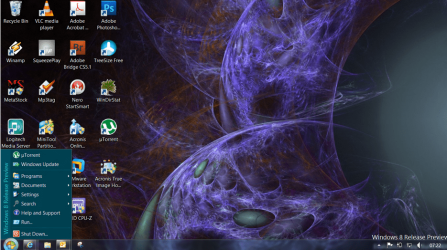
Anyway here's a screenshot of my "Windows 7'ized " version of W8 with start orb and classic start menu. (Metro nowhere in sight !!!!). The Charms bars still work too and once you get used to these it's not so bad either as the search facility is better than the "W7 / XP etc" standard search too and flipping between screens on multiple monitors is also easy via the Charms bar too.


Tips also to get Apps to desktop so you can use classic Icons etc like W7 and earlier os's

two methods : 1) in the Start (Metro) screen RIGHT mouse click on the tile containing the application you want to send to desktop. then chose open file location and here you'll be taken to the executable file. Now just right mouse click again and choose send to desktop.

2) If like me you've already deleted almost ALL of the metro tiles then go into the SEARCH via the charms bar -- select the application you want to send to the desktop (don't open it yet) now with the selected app you'll see a little arrow in the right hand corner. At the bottom of the screen choose open file location after entering you'll be taken to the executable file --now right mouse click and send to desktop.

You can also pin your most used apps to the taskbar too.

Bye Bye Metro. !!!

Cheers
jimbo
 

Attachments

  • w8a.png
    w8a.png
    292.3 KB · Views: 49
  • begin.png
    begin.png
    67.9 KB · Views: 36
Last edited:

My Computer My Computer

At a glance

Linux CENTOS 7 / various Windows OS'es and se...Intel i7 Intel i58GB, 16GBOn Motherboard
Computer type
PC/Desktop
Computer Manufacturer/Model Number
Custom built, several laptops HP/ASUS
OS
Linux CENTOS 7 / various Windows OS'es and servers
CPU
Intel i7 Intel i5
Memory
8GB, 16GB
Graphics Card(s)
On Motherboard
Sound Card
Realtek HD audio
Monitor(s) Displays
Apple Cinema display, Samsung LCD
Screen Resolution
1920 X 1080
Hard Drives
4 X 1TB SATA
Mouse
Toshiba wireless laser
Internet Speed
> 20MB up
I will reinstall it with Classic Shell. Can you customize the Start menu to be like Win7?
 
Hi there
@ gregrocker -- I've edited my previous post in this thread to add some extra information -- but yes classic shell gives you choice of menu style -- I prefer the XP system as I don't need a menu covering a large chunck of screen -- also I've shown the easy way to get apps to the desktop.

You don't need to re-install windows just install Classic Shell from here

You can choose the skin you like too screenshot enc.

Welcome to Classic Shell

Cheers
jimbo
 

Attachments

  • menu.png
    menu.png
    29.2 KB · Views: 20

My Computer My Computer

At a glance

Linux CENTOS 7 / various Windows OS'es and se...Intel i7 Intel i58GB, 16GBOn Motherboard
Computer type
PC/Desktop
Computer Manufacturer/Model Number
Custom built, several laptops HP/ASUS
OS
Linux CENTOS 7 / various Windows OS'es and servers
CPU
Intel i7 Intel i5
Memory
8GB, 16GB
Graphics Card(s)
On Motherboard
Sound Card
Realtek HD audio
Monitor(s) Displays
Apple Cinema display, Samsung LCD
Screen Resolution
1920 X 1080
Hard Drives
4 X 1TB SATA
Mouse
Toshiba wireless laser
Internet Speed
> 20MB up
Back
Top