Solved Is my cpu dead

nfsworldrace

New member
Member
VIP
Local time
9:39 AM
Messages
139
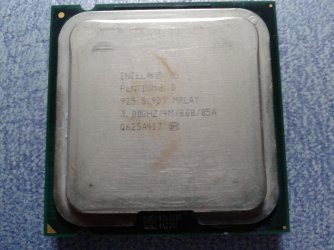
i checked my processor and it has a burnt mark. the issue is that when i turn on my pc the screen shows black screen but cpu has power and led lights are on but i see on my reset led is not blinking just steady light on.
what could be my problem is it a mobo, psu or processor

ps: before it didnt work i smell a smoke from my system
and i dont have a gpu
 

My Computer

OS
windows 7 ultimate 32-bit
this is the picture of my processor burn mark would it be fine and still working?
 

Attachments

  • pentium D 925.jpg
    pentium D 925.jpg
    385.9 KB · Views: 3

My Computer

OS
windows 7 ultimate 32-bit
If your not getting a picture and you said you have dedicated graphics something went very wrong then. Burn marks aren't normal.
 

My Computer

OS
Windows 7 Home Premium 64 bit
Well as stated above, Burn marks are 100% a sign of something not quite right, the fact that it's a pentium D, single core and is probably older than me i'd take a guess and say that it's probably dead given the factors you've given.
 

My Computer

Computer type
Laptop
Computer Manufacturer/Model Number
Packard Bell
OS
Windows 7 Home Premium 64Bit
CPU
AMD A6-3420M 1.5GHZ OC - 2.0GHZ
Memory
4GB DDR3 1600MHZ
Graphics Card(s)
AMD RADEON 6520G+AMD RADEON HD7470M 1GB DDR3
Screen Resolution
1366x768
Hard Drives
500GB SATA
Internet Speed
18Mb Unlimited
Antivirus
AVAST!
Browser
MOZILLA FIREFOX
Some said its just hsf oxidation and normal. O think the beat solution is to try to a new mobo but dont want to waste money for no use at all
 

My Computer

OS
windows 7 ultimate 32-bit
Actually it looks very strange for a burn mark as the core is around a sixth of the total area size of the heatsink above and it looks to me to be "W" shaped which makes me think yes it has got hot but the compound has left burnt on debris on it.
If it were the core one would expect more of a blue overheated mark/s around the peripheries of the silicon chip I cannot get a pic to attach so just go here and see https://www.google.com.au/search?q=...view%2F9794%2Fcore-duo-on-the-desktop;600;594
 

My Computer

Computer type
PC/Desktop
Computer Manufacturer/Model Number
Own build (new) Desk1 / Asus ROG Win 7 / Desk2 1st build
OS
Desk1 7 Home Prem / Desk2 10 Pro / Main lap Asus ROG 10 Pro 2 laptop Toshiba 7 Pro Asus P2520 7 & 10
CPU
Desk1 i5 3750K / Laptop i7 GTX 860M / Desk2 i5 2500
Motherboard
Desk1 Asus P877-V / Desk2 Gigabyte H67 UD3H / Laptop ?
Memory
Desk1 8GB (1866) / Desk2 16GB (1333) / Laptop 8Gb DDR3
Graphics Card(s)
Desk 1& 2NVidia GTX 650 & Laptops on board Intel
Sound Card
Desk 1 & 2 -XONAR DG Realtek High Def audio Laptop
Monitor(s) Displays
Desk 1 Benq HD 2450 / Desk2 Philips 24" / Laptop 17.5"
Screen Resolution
1920x1080 D1 & D2 & Laptop 1
Hard Drives
Desk1 Samsung 120GB 830 SSD
Asus ROG 256GB 850 Pro SSD
Desk2 Samsung 840 256 SSD
Toshiba 120GB EVO
PSU
Desk 1 Corsair HX 1050/ Laptop ? / Desk 2 Corsair HX 650
Case
Desk 1 Cooler HAF XM ? Toshiba laptop / Desk2 Coolermaster
Cooling
Fans on all Desk1 -2 Desk2 - all Coolermasters 5 Laptop ?
Keyboard
Desk 1 MS Sidewinder X6 Desk 2 MS Sidewinder X 4
Mouse
Desk 1&2 - Gigabyte MS 900 gamer - laptop - Logitec wireless
Internet Speed
ADSL2+
Other Info
One other Desktop (tester) and spare Toshba laptop both with SSD's
Running Kaspersky 2016 ISS on all machines config'd identically
Logitec audio stereo systems on each machine (x3)
Canon MG5250MFC
Router/modem TP-Link running WPA2SK
So do you think it will still work and runs fine? I cant tell it because my psu or mobo broke down
 

My Computer

OS
windows 7 ultimate 32-bit
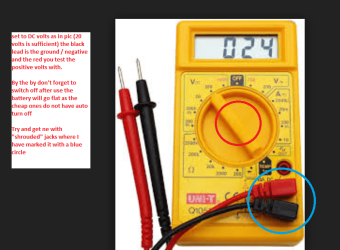
Now you can test the PSU quite easily with a digital multimeter in your case (no pun) because if the machine would run then there is an excellent piece of software called HW Info that is brilliant at diagnosing the rail voltages.

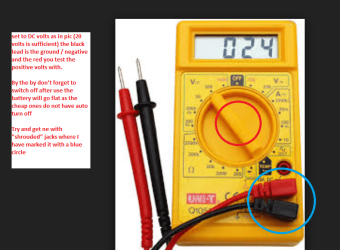
So if you are careful use the meter to read the volts on the 24 pin plug on the board use any black cable as ground (negative) and the red lead goes to each of the coloured cables to see what they are - see this for what the volts should be. Now anything that is +/- 5% of the stated voltage is bad.
Power supply unit (computer - Wikipedia, the free encyclopedia)
Here there is a great reference Voltage Rails - Power Supply 101: A Reference Of Specifications
The meters can be bought for just a few dollars and come in very handy anyway.

Your CPU well I would suggest trying a CPU that will be compatible with the board but that is up to you really and they can be got for very little these days but you take the chance of course of getting a dud .
 

Attachments

  • DIGITAL METER.PNG
    DIGITAL METER.PNG
    355.5 KB · Views: 2

My Computer

Computer type
PC/Desktop
Computer Manufacturer/Model Number
Own build (new) Desk1 / Asus ROG Win 7 / Desk2 1st build
OS
Desk1 7 Home Prem / Desk2 10 Pro / Main lap Asus ROG 10 Pro 2 laptop Toshiba 7 Pro Asus P2520 7 & 10
CPU
Desk1 i5 3750K / Laptop i7 GTX 860M / Desk2 i5 2500
Motherboard
Desk1 Asus P877-V / Desk2 Gigabyte H67 UD3H / Laptop ?
Memory
Desk1 8GB (1866) / Desk2 16GB (1333) / Laptop 8Gb DDR3
Graphics Card(s)
Desk 1& 2NVidia GTX 650 & Laptops on board Intel
Sound Card
Desk 1 & 2 -XONAR DG Realtek High Def audio Laptop
Monitor(s) Displays
Desk 1 Benq HD 2450 / Desk2 Philips 24" / Laptop 17.5"
Screen Resolution
1920x1080 D1 & D2 & Laptop 1
Hard Drives
Desk1 Samsung 120GB 830 SSD
Asus ROG 256GB 850 Pro SSD
Desk2 Samsung 840 256 SSD
Toshiba 120GB EVO
PSU
Desk 1 Corsair HX 1050/ Laptop ? / Desk 2 Corsair HX 650
Case
Desk 1 Cooler HAF XM ? Toshiba laptop / Desk2 Coolermaster
Cooling
Fans on all Desk1 -2 Desk2 - all Coolermasters 5 Laptop ?
Keyboard
Desk 1 MS Sidewinder X6 Desk 2 MS Sidewinder X 4
Mouse
Desk 1&2 - Gigabyte MS 900 gamer - laptop - Logitec wireless
Internet Speed
ADSL2+
Other Info
One other Desktop (tester) and spare Toshba laptop both with SSD's
Running Kaspersky 2016 ISS on all machines config'd identically
Logitec audio stereo systems on each machine (x3)
Canon MG5250MFC
Router/modem TP-Link running WPA2SK
Now you can test the PSU quite easily with a digital multimeter in your case (no pun) because if the machine would run then there is an excellent piece of software called HW Info that is brilliant at diagnosing the rail voltages.

So if you are careful use the meter to read the volts on the 24 pin plug on the board use any black cable as ground (negative) and the red lead goes to each of the coloured cables to see what they are - see this for what the volts should be. Now anything that is +/- 5% of the stated voltage is bad.
http://en.wikipedia.org/wiki/Power_supply_unit_(computer)
Here there is a great reference http://www.tomshardware.com/reviews/power-supply-specifications-atx-reference,3061-2.html
The meters can be bought for just a few dollars and come in very handy anyway.

Your CPU well I would suggest trying a CPU that will be compatible with the board but that is up to you really and they can be got for very little these days but you take the chance of course of getting a dud .
 

Attachments

  • DIGITAL METER.PNG
    DIGITAL METER.PNG
    355.5 KB · Views: 2

My Computer

Computer type
PC/Desktop
Computer Manufacturer/Model Number
Own build (new) Desk1 / Asus ROG Win 7 / Desk2 1st build
OS
Desk1 7 Home Prem / Desk2 10 Pro / Main lap Asus ROG 10 Pro 2 laptop Toshiba 7 Pro Asus P2520 7 & 10
CPU
Desk1 i5 3750K / Laptop i7 GTX 860M / Desk2 i5 2500
Motherboard
Desk1 Asus P877-V / Desk2 Gigabyte H67 UD3H / Laptop ?
Memory
Desk1 8GB (1866) / Desk2 16GB (1333) / Laptop 8Gb DDR3
Graphics Card(s)
Desk 1& 2NVidia GTX 650 & Laptops on board Intel
Sound Card
Desk 1 & 2 -XONAR DG Realtek High Def audio Laptop
Monitor(s) Displays
Desk 1 Benq HD 2450 / Desk2 Philips 24" / Laptop 17.5"
Screen Resolution
1920x1080 D1 & D2 & Laptop 1
Hard Drives
Desk1 Samsung 120GB 830 SSD
Asus ROG 256GB 850 Pro SSD
Desk2 Samsung 840 256 SSD
Toshiba 120GB EVO
PSU
Desk 1 Corsair HX 1050/ Laptop ? / Desk 2 Corsair HX 650
Case
Desk 1 Cooler HAF XM ? Toshiba laptop / Desk2 Coolermaster
Cooling
Fans on all Desk1 -2 Desk2 - all Coolermasters 5 Laptop ?
Keyboard
Desk 1 MS Sidewinder X6 Desk 2 MS Sidewinder X 4
Mouse
Desk 1&2 - Gigabyte MS 900 gamer - laptop - Logitec wireless
Internet Speed
ADSL2+
Other Info
One other Desktop (tester) and spare Toshba laptop both with SSD's
Running Kaspersky 2016 ISS on all machines config'd identically
Logitec audio stereo systems on each machine (x3)
Canon MG5250MFC
Router/modem TP-Link running WPA2SK

My Computer

Computer type
PC/Desktop
Computer Manufacturer/Model Number
Golden Mk. I.4
OS
Windows 10 Pro x64 ; Xubuntu x64
CPU
Intel i7 860 @ 2.80 GHz O/C'ed to 4.0GHz
Motherboard
Gigabyte P55A-UD3R Rev.1. Award BIOS F13
Memory
16GB Corsair Vengance DDR3 @ 661 MHz Dual Channel (9-9-9-24)
Graphics Card(s)
EVGA NVidia GTX 560 1024MB
Sound Card
Realtek Integrated
Monitor(s) Displays
Dual Samsung SyncMaster 2494HS
Screen Resolution
1920*1080 and 1920*1080
Hard Drives
1*Samsung 840 EVO 120GB SSD;
1*OCZ Vertex 2 60GB SSD;
2*Samsung F3 SpinPoint 1TB in RAID0;
1*Samsung F1 SpinPoint 1TB;
2*Western Digital 1TB External USB 3.0
1*Western Digital 500GB External USB 3.0
1*Seagate 500GB External USB 2.0
PSU
Thermaltake ToughPower QFan 750W
Case
Thermaltake Element S VK60001W2Z
Cooling
Corsair H60 Water Cooling, 2*230mm and 2*80mm case fans
Keyboard
Logitech G110
Mouse
Logitech MX518
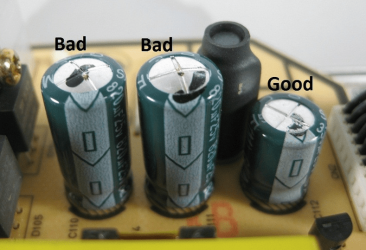
No i dont see any bulging capacitors. Anyway can this happen to solid capacitors?
 

My Computer

OS
windows 7 ultimate 32-bit
Devlin, a Pentium D is a dual core.

nfsworldrace, you can get another Pentium D for $1 if you look.

Chances are if you hurt the cpu, you hurt the motherboard too :(
 

My Computer

Computer type
PC/Desktop
Computer Manufacturer/Model Number
Skylake Special #666
OS
Windows 10 Pro x64
CPU
Intel Core i7 6700K
Motherboard
Asus Sabertooth Z170 Mark 1
Memory
GSkill TridentZ RGB 16GB 3600 16-16-16-36
Graphics Card(s)
EVGA GTX 980 Ti SC x2
Sound Card
Realtek High Definition
Monitor(s) Displays
AOC G2460PG
Screen Resolution
1920 x 1080 144Hz
Hard Drives
Samsung 860 Pro 256GB, Seagate Barracuda 4TB x2
PSU
EVGA 1000 P2, EVGA White Custom Braided Cables
Case
Corsair Vengeance C70 Gunmetal Black
Cooling
Corsair H100i v2, Corsair ML120 x2, Thermal Grizzly Kryonaut
Keyboard
Logitech G910 Orion Spectrum
Mouse
Logitech G700s
Internet Speed
Verizon Fios Quantum Gateway 75/75
Antivirus
Windows Defender, Malwarebytes Free 3.8.3
Browser
Chrome
Other Info
Corsair SP120 x4, LG Blu-ray Drive, Durabrand HT-395 100 Watt Dolby Digital Amp, Corsair H2100 Wireless 7.1 Headset
Now you can test the PSU quite easily with a digital multimeter in your case (no pun) because if the machine would run then there is an excellent piece of software called HW Info that is brilliant at diagnosing the rail voltages.

So if you are careful use the meter to read the volts on the 24 pin plug on the board use any black cable as ground (negative) and the red lead goes to each of the coloured cables to see what they are - see this for what the volts should be. Now anything that is +/- 5% of the stated voltage is bad.
http://en.wikipedia.org/wiki/Power_supply_unit_(computer)
Here there is a great reference http://www.tomshardware.com/reviews/power-supply-specifications-atx-reference,3061-2.html
The meters can be bought for just a few dollars and come in very handy anyway.

Your CPU well I would suggest trying a CPU that will be compatible with the board but that is up to you really and they can be got for very little these days but you take the chance of course of getting a dud .
note - this psu voltage measurement won't work if the ATX 24 pin is pulled off the mobo for testing. In that situation, you have to short the green PS-ON to ground to soft switch the psu. I wouldn't recommend this procedure to the inexperienced (too easy to short the wrong pin).
 

My Computer

Computer type
PC/Desktop
Computer Manufacturer/Model Number
self build
OS
Windows 7 Pro x64 sp1
CPU
i7 4770K
Motherboard
MSI B85M-E45
Memory
8GB Corsair Vengeance 1600MHz
Graphics Card(s)
onboard
Monitor(s) Displays
LG 27MP35
Screen Resolution
1920-1080
Hard Drives
Seagate 2TB
PSU
Cooler Master GX 750
Case
Antec 300
Cooling
Seidon 120V
Internet Speed
60/18
Antivirus
MSE
Browser
Firefox
No i dont see any bulging capacitors. Anyway can this happen to solid capacitors?
Capacitors are usually layers of foil and paper with an electrolyte solution in them. There were manufacturing problems in the plant/s making them some years ago that cause the bulging and/or leakage but haven't seen the problem in computers of the last few years, maybe the supplies have finally been refreshed and the issue no longer exists. It could also happen in power supplies. I haven't had to junk a computer because of the problem in the couple of years. Replacing a motherboard may be less cost-effective than getting a new computer if a board that will accept your CPU and Memory may not be available.
 

My Computer

Computer type
PC/Desktop
Computer Manufacturer/Model Number
Customs, Dell, Gateway, HP, Toshiba, Acer, ASUS
OS
Windows 7 Ultimate 64-bit, Windows 8.1 64-bit, Mac OS X 10.10, Linux Mint 17, Windows 10 Pro TP
Keyboard
Microsoft
Mouse
Microsoft
Back
Top