Is my graphics card going bad?

jhansen965

New member
Member
VIP
Local time
4:36 PM
Messages
117
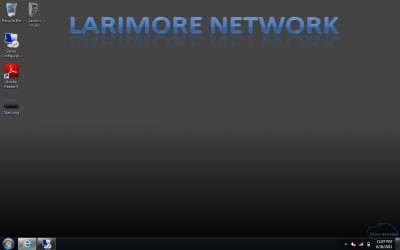
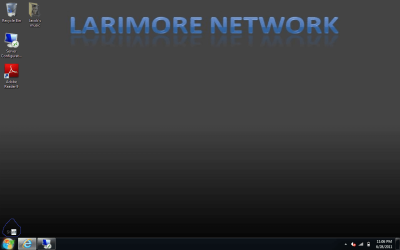
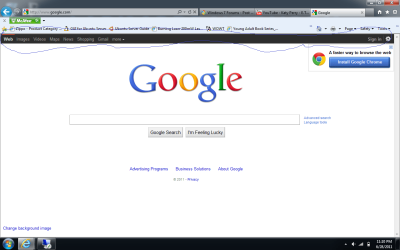
Hi all, I have a Windows 7 Pro HP machine. And I want to know if my graphics card is going bad. I've only had the laptop for a few years and I don't know what's wrong with it. Every time I hover over certain things the alternative text is black. Also it is on some webpages. Here's some screen shots.
 

Attachments
  • google.png
    google.png
    37.9 KB · Views: 107
  • Show Desktop.png
    Show Desktop.png
    39.8 KB · Views: 69
  • Start.png
    Start.png
    39.8 KB · Views: 61

My Computer My Computer

Computer Manufacturer/Model Number
HP
OS
Windows 7 profesional
Memory
4 Gigs
Monitor(s) Displays
Built in display
Hard Drives
1 280 gig
Case
N/A
Keyboard
Built in
Mouse
Built in
Internet Speed
100 mbps
Hello there.

Have you updated the graphics card driver recently? i really don't think it's the card going bad, when a card goes bad, you'll see artifacts on the screen, dots, lines (horizontal and vertical) that appear randomly.. bad colors and stuff.. try to go back to Windows 7 default theme and see if this happens again.. and check if you have the latest drivers for your Laptop.

Cheers.

EDIT: the google black bar is a test from Google, it also happens on youtube, i guess they're trying out some black theme for their websites. That was what i read somewhere, i can't remember right now. but the bar is not part of your problem... so i'd discard that :)
 

My Computer My Computer

Computer type
PC/Desktop
OS
Windows
Yeah I tried updating the driver and I already have the current driver. I tried going back to the
Windows 7 theme and it still did the same thing. As long as I know my graphics card isn't going bad then i'm fine. I'd like to know what this is though.
 

My Computer My Computer

Computer Manufacturer/Model Number
HP
OS
Windows 7 profesional
Memory
4 Gigs
Monitor(s) Displays
Built in display
Hard Drives
1 280 gig
Case
N/A
Keyboard
Built in
Mouse
Built in
Internet Speed
100 mbps
Hi all, I have a Windows 7 Pro HP machine. And I want to know if my graphics card is going bad. I've only had the laptop for a few years and I don't know what's wrong with it. Every time I hover over certain things the alternative text is black. Also it is on some webpages. Here's some screen shots.
This is perfectly normal, Google overhauled most of its online services.
The visual glitch may be due to the 'power saving features' of your laptop. The best you can do it to update your graphic driver
 

My Computer My Computer

Computer type
PC/Desktop
Computer Manufacturer/Model Number
Custom Build
OS
Windows 10 Pro x64, Arch Linux
CPU
Intel Core 2 Quad Q8200 OC'd 3.08GHz
Motherboard
Asus Rampage formula LGA775
Memory
8GB DDR2 900Mhz
Graphics Card(s)
MSI GT730 2GB GDDR5 (Kepler)
Sound Card
Supreme FX2
Monitor(s) Displays
Samsung LS22F350 LED
Screen Resolution
1080P
Hard Drives
Kingston SSDNow UV400 120GB, 500GB Hitachi, 2TB Samsung, 500GB Seagate FreeAgent, 640GB Samsung, 160GB Toshiba (Arch)
PSU
AeroCool 500W Bronze
Cooling
Cooler Master V6 + 3X fans
Keyboard
Prolink keyboard
Mouse
Logitech M705
Internet Speed
1MiB/s
Browser
Chrome Beta
Another suggestion: Switch browser.

Internet Explorer has problems -- use Firefox or Google Chrome instead.
 

My Computer My Computer

Computer Manufacturer/Model Number
Me
OS
Windows Seven Home Premium AMD64
CPU
AMD Athlon II x6 1055T
Motherboard
Black Series A890GXM-A
Memory
4GB DDR3 1333
Graphics Card(s)
AMD Radeon HD 6870 1GB GDDR5
Sound Card
None
Monitor(s) Displays
2x 1680 x 1050 One HP w2007 One acer P201w
Screen Resolution
3360 x 1050
Hard Drives
1x 500GB 7200RPM Barracuda
PSU
Cooler Master 850Watt
Case
No idea
Cooling
Standard
Keyboard
Logitech S 510
Mouse
Logitech MX 518
Internet Speed
15MB/s down 1MB/s up
Other Info
Sweet system.
Back
Top