Is my HD in the right place and configured/being read correctly?

pintree3

Mich
Member
VIP
Local time
2:16 PM
Messages
394
Location
Canada
Not sure about my title.
Recently I replaced my older normal hard drive for an SSD (Samsung EVO840). Because I could not place it directly on my motherboard I is hooked via a PCIe card.
2 things came about:
-1- On my Windows taskbar bottom right corner I have it listed as a drive I can actually remove/eject
and
-2- While my original drive holding my OS on the C:drive was listed (I think) in Computer Management-->
Disk Management as 'Disk 0' my SSD is 'Disk 2'
Are these things OK?
Is it normal for my SSD to be ejectable and if not what should I do about it?
and
Is it OK for the SSD to be listed as 'Disk 2' instead of '0' and if not what (and how) should I do about it?
Thank you
 

My Computer My Computer

At a glance

Windows 7 Home Premium 64Intel Core i5 760 @ 2800MHz12288MBAMD Radeon HD 7800 Series
Computer type
PC/Desktop
Computer Manufacturer/Model Number
OEM Designed by me :-)
OS
Windows 7 Home Premium 64
CPU
Intel Core i5 760 @ 2800MHz
Motherboard
Asus P7P55D-E LX
Memory
12288MB
Graphics Card(s)
AMD Radeon HD 7800 Series
Sound Card
ASUS Xonar DG
Monitor(s) Displays
ViewSonic VX2453 Series, HDMI 1080p Full HD
Screen Resolution
1920X1080
Hard Drives
Samsung SSD 840 EVO 250GB& two others
PSU
Tagan BZ Series, TG800-BZ 800W
Keyboard
Logitech MK250
Mouse
Logitech M310
Internet Speed
toppest, mostest :-) <-- bad, but fun English
Browser
Firefox, Crrome, IE
Disk 0 simply means the primary drive holding copy of OS. You should seek for better way of connecting your SSD i.e. Use SATA/USB cable. Instead, you can leave the SSD as it is. It'll do no harm to you.
 

My Computer My Computer

At a glance

Windows 7 Home X86ThunderStormDDR 2 4 GBIntel
Computer type
PC/Desktop
Computer Manufacturer/Model Number
Dell
OS
Windows 7 Home X86
CPU
ThunderStorm
Motherboard
Gigabyte
Memory
DDR 2 4 GB
Graphics Card(s)
Intel
Hard Drives
Seagate 4 TB
I don't understand. You say you can't hook the new ssd to your motherboard. What does that mean.

Your mother board has this.

Intel® P55 chipset :
6 x SATA 3Gb/s port(s), blue
Support Raid 0, 1, 5, 10

Are all these ports occupied.

Do you have the motherboard manual?
If not get one. It's a must have.
 

My Computer My Computer

At a glance

Windows 10 Pro. 64/ version 1709 Windows 7 Pr...Intel i7-6800K @ 4.3Corsair Platinum 16 gig @2400EVGA GTX 1070 OC
Computer type
PC/Desktop
Computer Manufacturer/Model Number
Home made Desktop
OS
Windows 10 Pro. 64/ version 1709 Windows 7 Pro/64
CPU
Intel i7-6800K @ 4.3
Motherboard
ASUS X-99 Deluxe II
Memory
Corsair Platinum 16 gig @2400
Graphics Card(s)
EVGA GTX 1070 OC
Monitor(s) Displays
Asus 27" LED LCD/VE278Q
Screen Resolution
1920-1080 or 1280-720 HDMI
Hard Drives
INTEL SSD 730-240 Gb Sata 3.0/
PSU
EVGA Platium 1200W
Case
Phanteks Luxe Tempered Glass 8 fans/ one radiator
Cooling
XSPC/ Water Cooled CPU
Keyboard
Das 4 Professional
Mouse
Logitech M705/MX Anywhere 2-S
Internet Speed
100 mbits
Antivirus
Microsoft Security Essentials/ Malwarebytes Premium 3.0/ SAS
Browser
I.E. 11 default/Firefox/ ISP Time Warner Cable/Spectrum
Other Info
LG BluRay Burner/
Sound system-KLipsch-THX/
Icy Dock ssd Hot Swap bays.
I don't understand. You say you can't hook the new ssd to your motherboard. What does that mean.
Your mother board has this.
Intel® P55 chipset :
6 x SATA 3Gb/s port(s), blue
Support Raid 0, 1, 5, 10
Are all these ports occupied.
Do you have the motherboard manual?
If not get one. It's a must have.
The motherboard is an: ASUSTeK P7P55D-E LX and on the MB is an 'Marvell PCIe SATA 6GB/s Controller' which is where the SSD normally would be placed BUT according to Asus one should not use it for an SSD because it is plagued with problems (and after 4years they haven't fixed it nor seem to care considering its age). Hence why I had to buy a separate, mid-quality PCIe card.
 

My Computer My Computer

At a glance

Windows 7 Home Premium 64Intel Core i5 760 @ 2800MHz12288MBAMD Radeon HD 7800 Series
Computer type
PC/Desktop
Computer Manufacturer/Model Number
OEM Designed by me :-)
OS
Windows 7 Home Premium 64
CPU
Intel Core i5 760 @ 2800MHz
Motherboard
Asus P7P55D-E LX
Memory
12288MB
Graphics Card(s)
AMD Radeon HD 7800 Series
Sound Card
ASUS Xonar DG
Monitor(s) Displays
ViewSonic VX2453 Series, HDMI 1080p Full HD
Screen Resolution
1920X1080
Hard Drives
Samsung SSD 840 EVO 250GB& two others
PSU
Tagan BZ Series, TG800-BZ 800W
Keyboard
Logitech MK250
Mouse
Logitech M310
Internet Speed
toppest, mostest :-) <-- bad, but fun English
Browser
Firefox, Crrome, IE
Disk 0 simply means the primary drive holding copy of OS. You should seek for better way of connecting your SSD i.e. Use SATA/USB cable. Instead, you can leave the SSD as it is. It'll do no harm to you.

Exactly, as you said, "Disk 0 simply means the primary drive holding copy of OS" and according to my present configuration the drive holding the OS is not 'Disk 0' but rather now sitting on 'Disk 2'
And I would assume it would be a good idea changing this so 'Disk 0' is where my OS sits (which is also my SSD) and if so how do I change it? Is it risky or what?
 

My Computer My Computer

At a glance

Windows 7 Home Premium 64Intel Core i5 760 @ 2800MHz12288MBAMD Radeon HD 7800 Series
Computer type
PC/Desktop
Computer Manufacturer/Model Number
OEM Designed by me :-)
OS
Windows 7 Home Premium 64
CPU
Intel Core i5 760 @ 2800MHz
Motherboard
Asus P7P55D-E LX
Memory
12288MB
Graphics Card(s)
AMD Radeon HD 7800 Series
Sound Card
ASUS Xonar DG
Monitor(s) Displays
ViewSonic VX2453 Series, HDMI 1080p Full HD
Screen Resolution
1920X1080
Hard Drives
Samsung SSD 840 EVO 250GB& two others
PSU
Tagan BZ Series, TG800-BZ 800W
Keyboard
Logitech MK250
Mouse
Logitech M310
Internet Speed
toppest, mostest :-) <-- bad, but fun English
Browser
Firefox, Crrome, IE
Disc 0 refers to a port on the motherboard. According to you, all motherboard ports are associated with a Marvel controller.

I'll take your word for that. I didn't look at your manual.

Your old "normal" hard drive was presumably connected to one of those Marvel ports--quite possibly port 0.

I don't know why a Marvel port would be OK for a normal hard drive, but bad for an SSD. Marvel is not necessarily the best choice in controllers, so maybe Asus knows what they are talking about and you had little choice but to buy that PCI card. If that's true, you'll have to live with the SSD as disc 2 rather than disc 0. I had my hard drive as disc 1 for several years with no problems. There are rare circumstances when that can matter, but my memory fails me as to the details. You can't make the SSD become disc 0 without using a motherboard port as far as I know.
 

My Computer My Computer

At a glance

Windows 7 Home Premium SP1, 64-bitIntel Skylake i5-6600K, not overclocked8 GB HyperX DDR4-2666 (2 x 4 GB)none; graphics are integrated on CPU
Computer type
PC/Desktop
Computer Manufacturer/Model Number
Ignatz Special; 4 speed manual gearbox; factory air conditioning; one of one
OS
Windows 7 Home Premium SP1, 64-bit
CPU
Intel Skylake i5-6600K, not overclocked
Motherboard
AsRock Z170M Extreme 4, micro ATX
Memory
8 GB HyperX DDR4-2666 (2 x 4 GB)
Graphics Card(s)
none; graphics are integrated on CPU
Sound Card
onboard: Realtek ALC1150; external: USB Behringer UF0-202
Monitor(s) Displays
Dell S2340M 23 inch IPS
Screen Resolution
1600 x 900
Hard Drives
System: Crucial MX100 series SSD, 128 GB;
Data: Samsung Spinpoint 103SJ, 1 TB;
Backup: WD Caviar Green WD30EZRX-00D8PB0, 3 TB
PSU
Rosewill SilentNight 500 watt fanless, semi-modular
Case
Antec Solo II
Cooling
Noctua NH-U12S; Noctua F12 intake, Noctua S12A exhaust
Keyboard
Microsoft 200 6JH-00001 USB
Mouse
Dell or Microsoft optical wired; USB
Antivirus
Microsoft Security Essentials and Malwarebytes Premium
Browser
Pale Moon
Other Info
All fans PWM; speeds at idle: CPU circa 500 rpm; intake circa 600 rpm; exhaust circa 600 rpm; CPU temps 27 idle and 47 C load in a warm room (27 C/81 F) when running Intel Extreme Tuning Utility stress test.
Thanks ignatzatsonic
Besides helping you're also teaching me stuff and I truly am glad of this.
I was temped to try the Marvell regardless but since I am dealing with my MB and my main OS-holding hard drive I thought it best not too.
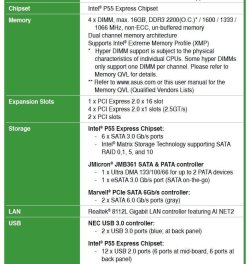
Attached are the specs (most) of my MB.
P.S. I was wondering what kind of stuff one can attach to the Marvell (since an SSD is not suggested)
I'm looking for an excuse to spend more money :-) not that I have much at this point.
 

Attachments

  • AsusMBSpecs.jpg
    AsusMBSpecs.jpg
    89.7 KB · Views: 1
Last edited:

My Computer My Computer

At a glance

Windows 7 Home Premium 64Intel Core i5 760 @ 2800MHz12288MBAMD Radeon HD 7800 Series
Computer type
PC/Desktop
Computer Manufacturer/Model Number
OEM Designed by me :-)
OS
Windows 7 Home Premium 64
CPU
Intel Core i5 760 @ 2800MHz
Motherboard
Asus P7P55D-E LX
Memory
12288MB
Graphics Card(s)
AMD Radeon HD 7800 Series
Sound Card
ASUS Xonar DG
Monitor(s) Displays
ViewSonic VX2453 Series, HDMI 1080p Full HD
Screen Resolution
1920X1080
Hard Drives
Samsung SSD 840 EVO 250GB& two others
PSU
Tagan BZ Series, TG800-BZ 800W
Keyboard
Logitech MK250
Mouse
Logitech M310
Internet Speed
toppest, mostest :-) <-- bad, but fun English
Browser
Firefox, Crrome, IE
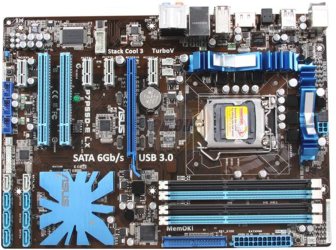
Below is a picture of your motherboard. Look at the lower left. You see 8 ports--2 columns of 4 ports. 6 blue and 2 white.

The white ones are Marvel SATA 6.0.

The blue ones are Intel SATA 3.0

Taking Asus at their word, don't connect the SSD to the white ports.

I don't see why you can't connect the SSD to the blue ports and bypass that PCI card you bought entirely. Intel makes good controllers. As far as I know, you would not suffer any speed penalty by going with a SATA 3.0 port rather than SATA 6.0.

My guess would be that port 0 is one of the Marvel ports, so you'd probably still end up with the SSD not being "Disc 0", but at least you'd be on a native Intel port rather than relying on an add-on card. You can confirm SSD performance on the Intel port versus the add-on card port and make your choice.

Did you talk to Asus? Not sure why they would not tell you to try the Intel ports.

Others may have other comments.
 

Attachments

  • 13-131-634-04.jpg
    13-131-634-04.jpg
    168.2 KB · Views: 0

My Computer My Computer

At a glance

Windows 7 Home Premium SP1, 64-bitIntel Skylake i5-6600K, not overclocked8 GB HyperX DDR4-2666 (2 x 4 GB)none; graphics are integrated on CPU
Computer type
PC/Desktop
Computer Manufacturer/Model Number
Ignatz Special; 4 speed manual gearbox; factory air conditioning; one of one
OS
Windows 7 Home Premium SP1, 64-bit
CPU
Intel Skylake i5-6600K, not overclocked
Motherboard
AsRock Z170M Extreme 4, micro ATX
Memory
8 GB HyperX DDR4-2666 (2 x 4 GB)
Graphics Card(s)
none; graphics are integrated on CPU
Sound Card
onboard: Realtek ALC1150; external: USB Behringer UF0-202
Monitor(s) Displays
Dell S2340M 23 inch IPS
Screen Resolution
1600 x 900
Hard Drives
System: Crucial MX100 series SSD, 128 GB;
Data: Samsung Spinpoint 103SJ, 1 TB;
Backup: WD Caviar Green WD30EZRX-00D8PB0, 3 TB
PSU
Rosewill SilentNight 500 watt fanless, semi-modular
Case
Antec Solo II
Cooling
Noctua NH-U12S; Noctua F12 intake, Noctua S12A exhaust
Keyboard
Microsoft 200 6JH-00001 USB
Mouse
Dell or Microsoft optical wired; USB
Antivirus
Microsoft Security Essentials and Malwarebytes Premium
Browser
Pale Moon
Other Info
All fans PWM; speeds at idle: CPU circa 500 rpm; intake circa 600 rpm; exhaust circa 600 rpm; CPU temps 27 idle and 47 C load in a warm room (27 C/81 F) when running Intel Extreme Tuning Utility stress test.
Thanks again ignatzatsonic
Unlike your photo, my board, isn't empty and actually has stuff on it --just kidding :-)
I do wonder if you are correct--by this I do not mean you are wrong. I bought the PCIe card so it can have SATA 6.0 speeds. I read many reputable sites suggesting that if I do buy an SSD that I should strongly consider getting a PCIe 6.0 to give it its speed (and I would note the difference). Seeing a good price on a card one day (about $20 I think) I decided to go for it. What I read regarding SATA 3. vs 6. is that it wouldn't have made much of a difference with an SSD, 3--4 years ago but it may now.
Yes, there are recommendations that it isn't worth getting a new CPU or a new MB in order to get the proper 6.0 speed of a SATA 6.0 but a cheap card like mine may have been worth it. Or not. I am not hardware proficient enough to really say. On the other hand if I wouldn't really notice the difference and it could save me other headaches (which I'd like to know) in the long run then perhaps I would consider putting it back directly on the 3.0 port of my MB.
[Which still leaves me with the unrelated question: what can one add to the Marvell besides an SSD or on my PCIe card for that matter should I remove the SSD from it? a card with USB 3.0 connectors/ports perhaps?]
 

My Computer My Computer

At a glance

Windows 7 Home Premium 64Intel Core i5 760 @ 2800MHz12288MBAMD Radeon HD 7800 Series
Computer type
PC/Desktop
Computer Manufacturer/Model Number
OEM Designed by me :-)
OS
Windows 7 Home Premium 64
CPU
Intel Core i5 760 @ 2800MHz
Motherboard
Asus P7P55D-E LX
Memory
12288MB
Graphics Card(s)
AMD Radeon HD 7800 Series
Sound Card
ASUS Xonar DG
Monitor(s) Displays
ViewSonic VX2453 Series, HDMI 1080p Full HD
Screen Resolution
1920X1080
Hard Drives
Samsung SSD 840 EVO 250GB& two others
PSU
Tagan BZ Series, TG800-BZ 800W
Keyboard
Logitech MK250
Mouse
Logitech M310
Internet Speed
toppest, mostest :-) <-- bad, but fun English
Browser
Firefox, Crrome, IE
I have a Asus motherboard with Marvell and I found that using the Intel ports work better.
I have had nothing but trouble with Marvell. In everyday use you will never notice the difference in speed.
Talking to my Intel Dealer behind closed doors Intel wishes they would of never chose Marvell because of the problems it causes.
The difference between Marvell 6.0 and Intel 3.0 will show when doing speed test with various programs but in everyday use I notice no difference. I'm also using Intel SSD's.
 

My Computer My Computer

At a glance

Windows 10 Pro. 64/ version 1709 Windows 7 Pr...Intel i7-6800K @ 4.3Corsair Platinum 16 gig @2400EVGA GTX 1070 OC
Computer type
PC/Desktop
Computer Manufacturer/Model Number
Home made Desktop
OS
Windows 10 Pro. 64/ version 1709 Windows 7 Pro/64
CPU
Intel i7-6800K @ 4.3
Motherboard
ASUS X-99 Deluxe II
Memory
Corsair Platinum 16 gig @2400
Graphics Card(s)
EVGA GTX 1070 OC
Monitor(s) Displays
Asus 27" LED LCD/VE278Q
Screen Resolution
1920-1080 or 1280-720 HDMI
Hard Drives
INTEL SSD 730-240 Gb Sata 3.0/
PSU
EVGA Platium 1200W
Case
Phanteks Luxe Tempered Glass 8 fans/ one radiator
Cooling
XSPC/ Water Cooled CPU
Keyboard
Das 4 Professional
Mouse
Logitech M705/MX Anywhere 2-S
Internet Speed
100 mbits
Antivirus
Microsoft Security Essentials/ Malwarebytes Premium 3.0/ SAS
Browser
I.E. 11 default/Firefox/ ISP Time Warner Cable/Spectrum
Other Info
LG BluRay Burner/
Sound system-KLipsch-THX/
Icy Dock ssd Hot Swap bays.
You'd have to saturate the SATA 3.0 bus to notice an improvement going to SATA 6.0 and I doubt if you would do that in normal operations very often. You'd need to be doing a lot of sustained read/writes.

You can certainly conceive of such a situation--I just am not sure how often it occurs for the typical home user.

You'd have to consider the speed, the possible flakiness of the add on card versus native ports, and the expense. You've already paid for the card, so it's not a factor any more.

Test it. You may see a benchmark difference, but what would you see in actual usage?

Personally--I'd avoid Marvel controllers generally if I had a choice, unless the 6.0 speed made a clearcut difference. I'd have to fill the 6 Intels before I went to a Marvel in ordinary circumstances.

At least you aren't in JMicron Hell. Been there. Not pleasant. I see you have a JMicron port. Good luck with it.
 

My Computer My Computer

At a glance

Windows 7 Home Premium SP1, 64-bitIntel Skylake i5-6600K, not overclocked8 GB HyperX DDR4-2666 (2 x 4 GB)none; graphics are integrated on CPU
Computer type
PC/Desktop
Computer Manufacturer/Model Number
Ignatz Special; 4 speed manual gearbox; factory air conditioning; one of one
OS
Windows 7 Home Premium SP1, 64-bit
CPU
Intel Skylake i5-6600K, not overclocked
Motherboard
AsRock Z170M Extreme 4, micro ATX
Memory
8 GB HyperX DDR4-2666 (2 x 4 GB)
Graphics Card(s)
none; graphics are integrated on CPU
Sound Card
onboard: Realtek ALC1150; external: USB Behringer UF0-202
Monitor(s) Displays
Dell S2340M 23 inch IPS
Screen Resolution
1600 x 900
Hard Drives
System: Crucial MX100 series SSD, 128 GB;
Data: Samsung Spinpoint 103SJ, 1 TB;
Backup: WD Caviar Green WD30EZRX-00D8PB0, 3 TB
PSU
Rosewill SilentNight 500 watt fanless, semi-modular
Case
Antec Solo II
Cooling
Noctua NH-U12S; Noctua F12 intake, Noctua S12A exhaust
Keyboard
Microsoft 200 6JH-00001 USB
Mouse
Dell or Microsoft optical wired; USB
Antivirus
Microsoft Security Essentials and Malwarebytes Premium
Browser
Pale Moon
Other Info
All fans PWM; speeds at idle: CPU circa 500 rpm; intake circa 600 rpm; exhaust circa 600 rpm; CPU temps 27 idle and 47 C load in a warm room (27 C/81 F) when running Intel Extreme Tuning Utility stress test.
Back
Top