Solved Is my PSU too close to my GPU fan?

Twario

New member
Member
Local time
2:27 AM
Messages
45
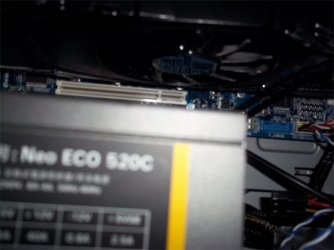
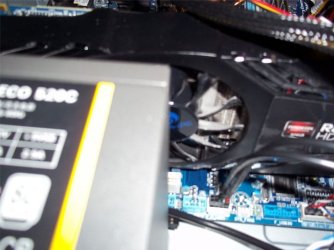
I'm getting a new sound card so I had to move the GPU to the other PCI slot so the sound card wouldn't be right in front of the GPU intake fan. Now I'm worried becuase the PSU is possibly half obstructing the intake fan and preventing it from getting enough air. I know it's not that close but I'm paranoid and I'm not an expert on this kind of thing. So tell me, is my PSU blocking the fan a considerable amount or should I not worry?
 

Attachments

  • 100_4898.JPG
    100_4898.JPG
    98.9 KB · Views: 7
  • 100_4903.JPG
    100_4903.JPG
    58.6 KB · Views: 4
  • 100_4906.JPG
    100_4906.JPG
    76 KB · Views: 5

My Computer My Computer

At a glance

Windows 7 Professional 64-bit SP1Intel Core i5 4690K 3.5GHz8GB Dual-Channel DDR3ATI AMD Radeon R9 390 Series (MSI)
Computer type
PC/Desktop
Computer Manufacturer/Model Number
Custom built
OS
Windows 7 Professional 64-bit SP1
CPU
Intel Core i5 4690K 3.5GHz
Motherboard
ASRock Fatal1ty Z97X Killer
Memory
8GB Dual-Channel DDR3
Graphics Card(s)
ATI AMD Radeon R9 390 Series (MSI)
Monitor(s) Displays
HP 2009 (1600x900@60Hz)
Screen Resolution
1600x900
Hard Drives
(HDD) 931GB Seagate ST1000DM
(SSD) 232GB Samsung SSD 850 EVO
PSU
EVGA 80 PLUS GOLD 650W
Case
Fractal Design Arc Midi R2
Cooling
Cooler Master Hyper 212 EVO - CPU Cooler with 120mm PWM Fan
Antivirus
Microsoft Security Essentials
Browser
Firefox
The PSU is not even close to blocking any air from the GPU fan. Unlike light, air can move around objects.
 

My Computer My Computer

At a glance

Windows 10 Pro (x64)Intel Core i7-3930K (3.2GHz - 4.5GHz)4x Samsung 4GB PC3-12800 DDR3 (16GB 1600MHz)Nvidia Geforce GTX 690
Computer type
PC/Desktop
Computer Manufacturer/Model Number
Alienware Aurora ALX R4
OS
Windows 10 Pro (x64)
CPU
Intel Core i7-3930K (3.2GHz - 4.5GHz)
Motherboard
Alienware Aurora-R4 x79
Memory
4x Samsung 4GB PC3-12800 DDR3 (16GB 1600MHz)
Graphics Card(s)
Nvidia Geforce GTX 690
Sound Card
SteelSeries Siberia Elite
Monitor(s) Displays
Dell UltraSharp U3011
Screen Resolution
2560x1600
Hard Drives
Samsung 850 Pro 256 GB, Seagate 1TB Desktop Hybrid HDD, 2x Western Digital 4TB Green HDD
PSU
875W Some Dell PSU <.<
Case
Alienware Aurora ALX
Cooling
Custom Liquid Cooling (EK CPU & GPU blocks) dual EK 480RAD
Keyboard
Logitech G710+ Mechanical
Mouse
Logitech G700s
Internet Speed
Verizon Fios (50 mbps average)
Other Info
Server: Intel NUC D54250WYK: i5-4250U, 16GB, 256 GB mSATA, Windows Server 2012 R2
You should be fine pal, but if you want peace of mind you can always monitor your GPU temperatures through the AMD VISION control centre ;)

AMDVisionEngineGraphicsOverdrive600_5F00_thumb_5F00_0D072191.jpg
 

My Computer My Computer

At a glance

Windows 7 Ultimate 64bitAMD Phenom Quad core 9950 black edition16Gb2x XFX Radeon 5850
Computer type
PC/Desktop
Computer Manufacturer/Model Number
Self Built
OS
Windows 7 Ultimate 64bit
CPU
AMD Phenom Quad core 9950 black edition
Motherboard
Gigabyte
Memory
16Gb
Graphics Card(s)
2x XFX Radeon 5850
Sound Card
PCI Express X-Fi Titanium / Logitech G35
Monitor(s) Displays
2x HP 2410i
Screen Resolution
1920x1080
Hard Drives
2x 500Gb Seagate
1x 300Gb Seagate
1x 1Tb Seagate
2x 1Tb Hitatchi
PSU
Jean Tech Storm 700W
Case
Cooler Master COSMOS S
Cooling
Akasa Evo Blue Pro
Keyboard
Logitech G15
Mouse
Mad Catz M.M.O. 7
Internet Speed
12mb
Whoa, pretty fast replies! Anyways, that's good to hear that it's fine. One more question though, I read that putting the GPU in the bottom PCI slot instead of the top will cause the GPU to run slower is, that true?
 

My Computer My Computer

At a glance

Windows 7 Professional 64-bit SP1Intel Core i5 4690K 3.5GHz8GB Dual-Channel DDR3ATI AMD Radeon R9 390 Series (MSI)
Computer type
PC/Desktop
Computer Manufacturer/Model Number
Custom built
OS
Windows 7 Professional 64-bit SP1
CPU
Intel Core i5 4690K 3.5GHz
Motherboard
ASRock Fatal1ty Z97X Killer
Memory
8GB Dual-Channel DDR3
Graphics Card(s)
ATI AMD Radeon R9 390 Series (MSI)
Monitor(s) Displays
HP 2009 (1600x900@60Hz)
Screen Resolution
1600x900
Hard Drives
(HDD) 931GB Seagate ST1000DM
(SSD) 232GB Samsung SSD 850 EVO
PSU
EVGA 80 PLUS GOLD 650W
Case
Fractal Design Arc Midi R2
Cooling
Cooler Master Hyper 212 EVO - CPU Cooler with 120mm PWM Fan
Antivirus
Microsoft Security Essentials
Browser
Firefox
It may run on a slower PCI Express slot 8x instead of 16x but in real world reality this makes no difference. Current graphics card do not fully take advantage of PCI Express. On your motherboard the bottom slot runs at 4x.

There is another option. You could put the graphics card back in previous slot and put the sound card into the slot now occupied by your graphics card. You do not need to use a 1x slot for a 1x card you can use any PCI Express slot. This will remove and concern of airflow blockage and speed issues.
 

My Computer My Computer

At a glance

Windows 10 Pro (x64)Intel Core i7-3930K (3.2GHz - 4.5GHz)4x Samsung 4GB PC3-12800 DDR3 (16GB 1600MHz)Nvidia Geforce GTX 690
Computer type
PC/Desktop
Computer Manufacturer/Model Number
Alienware Aurora ALX R4
OS
Windows 10 Pro (x64)
CPU
Intel Core i7-3930K (3.2GHz - 4.5GHz)
Motherboard
Alienware Aurora-R4 x79
Memory
4x Samsung 4GB PC3-12800 DDR3 (16GB 1600MHz)
Graphics Card(s)
Nvidia Geforce GTX 690
Sound Card
SteelSeries Siberia Elite
Monitor(s) Displays
Dell UltraSharp U3011
Screen Resolution
2560x1600
Hard Drives
Samsung 850 Pro 256 GB, Seagate 1TB Desktop Hybrid HDD, 2x Western Digital 4TB Green HDD
PSU
875W Some Dell PSU <.<
Case
Alienware Aurora ALX
Cooling
Custom Liquid Cooling (EK CPU & GPU blocks) dual EK 480RAD
Keyboard
Logitech G710+ Mechanical
Mouse
Logitech G700s
Internet Speed
Verizon Fios (50 mbps average)
Other Info
Server: Intel NUC D54250WYK: i5-4250U, 16GB, 256 GB mSATA, Windows Server 2012 R2
It may run on a slower PCI Express slot 8x instead of 16x but in real world reality this makes no difference. Current graphics card do not fully take advantage of PCI Express. On your motherboard the bottom slot runs at 4x.

There is another option. You could put the graphics card back in previous slot and put the sound card into the slot now occupied by your graphics card. You do not need to use a 1x slot for a 1x card you can use any PCI Express slot. This will remove and concern of airflow blockage and speed issues.
Actually the GPU was originally in the blue PCI express slot on the right, and it was in the left one when I took those pictures in the OP. After I noticed somewhat poor performance in Far Cry 3, I moved it to where it was before to see if there was a difference, so the GPU is currently in the blue PCI express slot on the right. Now if I put the sound card in the left one that would block the intake fan. Do you mean I should put the sound card in one of the white PCI slots?
ipmdq9.jpg


Because the sound card I'm getting is this ASUS XONAR_DG Xonar DG Sound Card - Newegg.com and judging from the images it can only fit in on of the blue PCI express slots.
 

My Computer My Computer

At a glance

Windows 7 Professional 64-bit SP1Intel Core i5 4690K 3.5GHz8GB Dual-Channel DDR3ATI AMD Radeon R9 390 Series (MSI)
Computer type
PC/Desktop
Computer Manufacturer/Model Number
Custom built
OS
Windows 7 Professional 64-bit SP1
CPU
Intel Core i5 4690K 3.5GHz
Motherboard
ASRock Fatal1ty Z97X Killer
Memory
8GB Dual-Channel DDR3
Graphics Card(s)
ATI AMD Radeon R9 390 Series (MSI)
Monitor(s) Displays
HP 2009 (1600x900@60Hz)
Screen Resolution
1600x900
Hard Drives
(HDD) 931GB Seagate ST1000DM
(SSD) 232GB Samsung SSD 850 EVO
PSU
EVGA 80 PLUS GOLD 650W
Case
Fractal Design Arc Midi R2
Cooling
Cooler Master Hyper 212 EVO - CPU Cooler with 120mm PWM Fan
Antivirus
Microsoft Security Essentials
Browser
Firefox
Actually the GPU was originally in the blue PCI express slot on the right, and it was in the left one when I took those pictures in the OP. Currently right now it is in the blue PCI express slot on the right, and if I put the sound card in the left one that would block the intake fan. Do you mean I should put the sound card in one of the white PCI slots?


Because the sound card I'm getting is this ASUS XONAR_DG Xonar DG Sound Card - Newegg.com and judging from the images it can only fit in on of the blue PCI express slots.

The card that you supply the link for is PCI, and it must go in one of the long white PCI slots.

The names are similar, but PCI and PCI-E(xpress) are completely incompatible physically. I'd recommend getting a PCI-E X1 soundcard over a PCI one, because PCI slots are becoming rarer.
 

My Computer My Computer

At a glance

Windows 7 Pro X64 SP1Intel Core I7-3930k16 GB Gskill DDR3-2133eVGA GTX680
Computer Manufacturer/Model Number
homegrown
OS
Windows 7 Pro X64 SP1
CPU
Intel Core I7-3930k
Motherboard
Asus P9X79 Pro
Memory
16 GB Gskill DDR3-2133
Graphics Card(s)
eVGA GTX680
Sound Card
Creative X-Fi Titanium
Monitor(s) Displays
As PA246Q
Screen Resolution
1920 X 1200
Hard Drives
Corsair Force GT, 120 GB
WDC 1.5TB Caviar Black
PSU
PCP&C Silencer 750 Crossfire
Case
Silverstone FT02
Cooling
Noctua NH-D14
Keyboard
cheap Logitech USB
Mouse
Microsoft Intellimouse Explorer (old optical) USB
Internet Speed
6Mb cable
Other Info
Pioneer BDR-205
Samsung SH-203B
Monsoon 5.1 speakers
Well I know I'm getting off topic, but I tested to see if the GPU is faster in the PCI express it was in originally before I took the picture, and the answer is yes. When the GPU was in the other PCI express slot there was some slowdown in Far Cry 3 and the slowdown is not present when the card is in the slot it was in originally. So I guess I'm leaving the card where it is now, so it won't be where it is in the pictures. I also guess the sound card won't block the intake fan if it's in one of the white PCI slots (at least I hope), so I guess I'm good then! Thanks for all the help!
 

My Computer My Computer

At a glance

Windows 7 Professional 64-bit SP1Intel Core i5 4690K 3.5GHz8GB Dual-Channel DDR3ATI AMD Radeon R9 390 Series (MSI)
Computer type
PC/Desktop
Computer Manufacturer/Model Number
Custom built
OS
Windows 7 Professional 64-bit SP1
CPU
Intel Core i5 4690K 3.5GHz
Motherboard
ASRock Fatal1ty Z97X Killer
Memory
8GB Dual-Channel DDR3
Graphics Card(s)
ATI AMD Radeon R9 390 Series (MSI)
Monitor(s) Displays
HP 2009 (1600x900@60Hz)
Screen Resolution
1600x900
Hard Drives
(HDD) 931GB Seagate ST1000DM
(SSD) 232GB Samsung SSD 850 EVO
PSU
EVGA 80 PLUS GOLD 650W
Case
Fractal Design Arc Midi R2
Cooling
Cooler Master Hyper 212 EVO - CPU Cooler with 120mm PWM Fan
Antivirus
Microsoft Security Essentials
Browser
Firefox

My Computer My Computer

At a glance

Windows 10 Pro x64Intel Core i7 6700KGSkill TridentZ RGB 16GB 3600 16-16-16-36EVGA GTX 980 Ti SC x2
Computer type
PC/Desktop
Computer Manufacturer/Model Number
Skylake Special #666
OS
Windows 10 Pro x64
CPU
Intel Core i7 6700K
Motherboard
Asus Sabertooth Z170 Mark 1
Memory
GSkill TridentZ RGB 16GB 3600 16-16-16-36
Graphics Card(s)
EVGA GTX 980 Ti SC x2
Sound Card
Realtek High Definition
Monitor(s) Displays
AOC G2460PG
Screen Resolution
1920 x 1080 144Hz
Hard Drives
Samsung 860 Pro 256GB, Seagate Barracuda 4TB x2
PSU
EVGA 1000 P2, EVGA White Custom Braided Cables
Case
Corsair Vengeance C70 Gunmetal Black
Cooling
Corsair H100i v2, Corsair ML120 x2, Thermal Grizzly Kryonaut
Keyboard
Logitech G910 Orion Spectrum
Mouse
Logitech G700s
Internet Speed
Verizon Fios Quantum Gateway 75/75
Antivirus
Windows Defender, Malwarebytes Free 3.8.3
Browser
Chrome
Other Info
Corsair SP120 x4, LG Blu-ray Drive, Durabrand HT-395 100 Watt Dolby Digital Amp, Corsair H2100 Wireless 7.1 Headset
As Bob mentioned, sound cards do not go in PCI-E x16 slots. Only in a x1 slot or a pci slot. They are both white on your board. If you only have 1 graphics card you want it in the slot closet to the cpu.

A PCI Express card can go in any slot 16x 8x 4x 1x. It doesn't matter. As long as it gets the bandwidth it needs. Also putting an 8x card into a 1x card will still work but at reduced bandwidth. A few motherboard have opened back PCI-E 1x slots to allow larger card to be inserted into them.
 

My Computer My Computer

At a glance

Windows 10 Pro (x64)Intel Core i7-3930K (3.2GHz - 4.5GHz)4x Samsung 4GB PC3-12800 DDR3 (16GB 1600MHz)Nvidia Geforce GTX 690
Computer type
PC/Desktop
Computer Manufacturer/Model Number
Alienware Aurora ALX R4
OS
Windows 10 Pro (x64)
CPU
Intel Core i7-3930K (3.2GHz - 4.5GHz)
Motherboard
Alienware Aurora-R4 x79
Memory
4x Samsung 4GB PC3-12800 DDR3 (16GB 1600MHz)
Graphics Card(s)
Nvidia Geforce GTX 690
Sound Card
SteelSeries Siberia Elite
Monitor(s) Displays
Dell UltraSharp U3011
Screen Resolution
2560x1600
Hard Drives
Samsung 850 Pro 256 GB, Seagate 1TB Desktop Hybrid HDD, 2x Western Digital 4TB Green HDD
PSU
875W Some Dell PSU <.<
Case
Alienware Aurora ALX
Cooling
Custom Liquid Cooling (EK CPU & GPU blocks) dual EK 480RAD
Keyboard
Logitech G710+ Mechanical
Mouse
Logitech G700s
Internet Speed
Verizon Fios (50 mbps average)
Other Info
Server: Intel NUC D54250WYK: i5-4250U, 16GB, 256 GB mSATA, Windows Server 2012 R2
Install and leave the graphics card in the top BLUE slot. Order this sound card, or one similar: Asus Xonar .........................Problems solved
 

My Computer My Computer

At a glance

Windows 7 Professional 64bit SP1Intel Core i5-3570K @ 4.5GHzCorsair Vengeance 16GB (4x4) @1866MHz CL 9-9-...EVGA GTX 750 Ti FTW
Computer type
PC/Desktop
Computer Manufacturer/Model Number
Custom Built
OS
Windows 7 Professional 64bit SP1
CPU
Intel Core i5-3570K @ 4.5GHz
Motherboard
Asus Sabertooth Z77
Memory
Corsair Vengeance 16GB (4x4) @1866MHz CL 9-9-9-24 1T
Graphics Card(s)
EVGA GTX 750 Ti FTW
Sound Card
Onboard Audio
Monitor(s) Displays
Dell S2309W
Screen Resolution
1920x1080
Hard Drives
Samsung 830 128GB SSD - OS
(4) Seagate 5TB HDD
(1) Seagate 2TB HDD
PSU
Seasonic X750 80+ Gold Full Modular
Case
Antec Eleven Hundred Super Mid Tower
Cooling
Intel Liquid Cooler
Keyboard
Max Nighthawk X8 Mechanical keyboard
Mouse
Mionix Naos 7000
Internet Speed
50 Mbps Down / 10 Mbps Up
Antivirus
Microsoft Security Essentials/Malwarebytes Anti-Malware
Browser
Chrome/Firefox
Other Info
Klipsch ProMedia 2.1's
Asus RT-N66R Wireless Router
I use a different method. I install the cards as per the motherboards instruction manual. It works for me.
 

My Computer My Computer

At a glance

Windows 10 Pro. 64/ version 1709 Windows 7 Pr...Intel i7-6800K @ 4.3Corsair Platinum 16 gig @2400EVGA GTX 1070 OC
Computer type
PC/Desktop
Computer Manufacturer/Model Number
Home made Desktop
OS
Windows 10 Pro. 64/ version 1709 Windows 7 Pro/64
CPU
Intel i7-6800K @ 4.3
Motherboard
ASUS X-99 Deluxe II
Memory
Corsair Platinum 16 gig @2400
Graphics Card(s)
EVGA GTX 1070 OC
Monitor(s) Displays
Asus 27" LED LCD/VE278Q
Screen Resolution
1920-1080 or 1280-720 HDMI
Hard Drives
INTEL SSD 730-240 Gb Sata 3.0/
PSU
EVGA Platium 1200W
Case
Phanteks Luxe Tempered Glass 8 fans/ one radiator
Cooling
XSPC/ Water Cooled CPU
Keyboard
Das 4 Professional
Mouse
Logitech M705/MX Anywhere 2-S
Internet Speed
100 mbits
Antivirus
Microsoft Security Essentials/ Malwarebytes Premium 3.0/ SAS
Browser
I.E. 11 default/Firefox/ ISP Time Warner Cable/Spectrum
Other Info
LG BluRay Burner/
Sound system-KLipsch-THX/
Icy Dock ssd Hot Swap bays.
I use a different method. I install the cards as per the motherboards instruction manual. It works for me.

Lol yeah, that's probably the best way. His manual will probably tell him to install a single GPU in the top PCI Express x16 slot.....which is the top blue slot. As for the sound card, install it in the first slot that is meant for it.
 

My Computer My Computer

At a glance

Windows 7 Professional 64bit SP1Intel Core i5-3570K @ 4.5GHzCorsair Vengeance 16GB (4x4) @1866MHz CL 9-9-...EVGA GTX 750 Ti FTW
Computer type
PC/Desktop
Computer Manufacturer/Model Number
Custom Built
OS
Windows 7 Professional 64bit SP1
CPU
Intel Core i5-3570K @ 4.5GHz
Motherboard
Asus Sabertooth Z77
Memory
Corsair Vengeance 16GB (4x4) @1866MHz CL 9-9-9-24 1T
Graphics Card(s)
EVGA GTX 750 Ti FTW
Sound Card
Onboard Audio
Monitor(s) Displays
Dell S2309W
Screen Resolution
1920x1080
Hard Drives
Samsung 830 128GB SSD - OS
(4) Seagate 5TB HDD
(1) Seagate 2TB HDD
PSU
Seasonic X750 80+ Gold Full Modular
Case
Antec Eleven Hundred Super Mid Tower
Cooling
Intel Liquid Cooler
Keyboard
Max Nighthawk X8 Mechanical keyboard
Mouse
Mionix Naos 7000
Internet Speed
50 Mbps Down / 10 Mbps Up
Antivirus
Microsoft Security Essentials/Malwarebytes Anti-Malware
Browser
Chrome/Firefox
Other Info
Klipsch ProMedia 2.1's
Asus RT-N66R Wireless Router
Back
Top