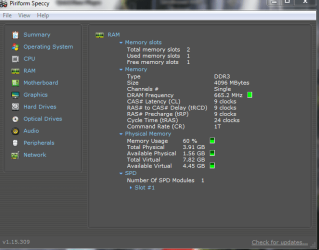
is my ram running at the right speed?

holy crap dude! thanks for that article! i had no idea about the memory controllers. i've been running these 1600 ram sticks since i built the system 3 years ago. although, i did have 2 x 2gb sticks of 1066 in with the 2x4gb sticks of 1600 up until about 1 month ago. thats when my buddy showed me why the ram was running slower than it could and so i took the 2 slower sticks out. but since around that time my computer seems to have been acting up. i'm actually in the middle of posting a BSOD crash thread right now. had the first actual blue screen only moments ago.

thanks! great article.
 

My Computer My Computer

At a glance

windows 7 64bit on bothAMD FX-8350 @4.6GHz/Intel Core i7-3610QM @2.3GHz16GB G.Skill 1866MHz/8GB dual channel 1600MHztwo Sapphire HD7970 OC 3Gb in crossfire/GTX66...
Computer type
PC/Desktop
Computer Manufacturer/Model Number
Custom Build and MSI GE60 0ND laptop
OS
windows 7 64bit on both
CPU
AMD FX-8350 @4.6GHz/Intel Core i7-3610QM @2.3GHz
Motherboard
ASUS M5A99X EVO R2.0/MS-16GA
Memory
16GB G.Skill 1866MHz/8GB dual channel 1600MHz
Graphics Card(s)
two Sapphire HD7970 OC 3Gb in crossfire/GTX660M 2Gb
Sound Card
Realtek HD Audio/Realtek HD Audio with THX TruStudio Pro
Monitor(s) Displays
Hanns-G 27" 1080p /Generic PnP Monitor
Screen Resolution
both 1920x1080p 60Hz
Hard Drives
250GB Samsung 840 EVO SSD,
1TB WD Blue
3x2TB WD Greens
/Samsung 840 EVO mSATA
PSU
Corsair HX750/laptop psu
Case
NZXT Source 530
Cooling
CoolerMaster Hyper 212 Evo
Keyboard
Logitech G710+/laptop keyboard by steelseries
Mouse
Logitec G500s/Logitec G500
Internet Speed
50Mbps down/1-3 Mbps up
Other Info
Scythe Kaze Master Pro 5.25 fan controller; APC Back-UPS XS 1500
First of all on an AMD system the really doesn't have anything to do with the max speed of supported ram as the memory controller (also known as an IMC) is built into the CPU and not on the motherboard (same applies to recent Intel CPU's). The motherboard's memory support pretty much ends at which type it supports (most are DDR3 now), and what settings the motherboard manufacturer includes in the bios. That is how they say that it supports all those speeds over 1333 MHz.

Seeing as you do happen to have an AMD based system, might want to give this a read,

VERY IMPORTANT INFORMATION REGARDING AMD AM3 CPU's and RAM SPEEDS

before worrying too much about getting faster ram. The motherboard manufacturers can say whatever they want with regards to supported ram speeds, as long as it supports up to 1333 MHz AMD spec. If the IMC on the CPU won't run it at those speeds (above 1333 MHz), then it doesn't matter what the motherboards makers say.
Good info!
Another reason for making AMD processors good dumpster candidates. :zip:
 

My Computer My Computer

At a glance

Windows 7 Pro-x64i7-2600 3.4GHz - 3.8GHz Turbo8Gb - 2x4GB, Muskin 991770 PC3-1333Integrated Intel HD 2000
Computer type
PC/Desktop
Computer Manufacturer/Model Number
Built 2/11/2011
OS
Windows 7 Pro-x64
CPU
i7-2600 3.4GHz - 3.8GHz Turbo
Motherboard
Intel DH67BL-B3
Memory
8Gb - 2x4GB, Muskin 991770 PC3-1333
Graphics Card(s)
Integrated Intel HD 2000
Sound Card
Integrated Intel 10.1 HD, RealTek ALC892
Monitor(s) Displays
Asus LCD VH222H, Haier HL24XSL2a
Screen Resolution
1920x1080, 1920x1080
Hard Drives
Crucial SSD C300-128Gb,
Western Digital WD5002AALX - 500Gb,
Western Digital WD7501AALS - 750Gb
PSU
Seasonic 650W 80+ Gold Modular
Case
Rosewill Defender
Cooling
Stock CPU, Four 120mm case fans, PCH fan added
Keyboard
Logitech EX100 Y-RBH94 Wireless
Mouse
Logitech EX100 M-RCE95 Wireless
Internet Speed
3.0/1.5 Mbs
Antivirus
Microsoft Security Essentials
Browser
Microsoft Internet Explorer 11
Other Info
Antec Veris Premier-Multimedia IR Station,
Cyber Accoustics-3602 Speakers,
AFT XM-5U Card Reader,
Hauppauge TV-HVR-2250,
Sony LX300 USB Turntable
ok so i went into the bios and dropped the dram freq to 1333, i also stepped up the timings from 10-10-10-28 to 9-9-9-24 and it seems to be running fine. u think running at 1600 could have damaged my processor in the past month?
 

My Computer My Computer

At a glance

windows 7 64bit on bothAMD FX-8350 @4.6GHz/Intel Core i7-3610QM @2.3GHz16GB G.Skill 1866MHz/8GB dual channel 1600MHztwo Sapphire HD7970 OC 3Gb in crossfire/GTX66...
Computer type
PC/Desktop
Computer Manufacturer/Model Number
Custom Build and MSI GE60 0ND laptop
OS
windows 7 64bit on both
CPU
AMD FX-8350 @4.6GHz/Intel Core i7-3610QM @2.3GHz
Motherboard
ASUS M5A99X EVO R2.0/MS-16GA
Memory
16GB G.Skill 1866MHz/8GB dual channel 1600MHz
Graphics Card(s)
two Sapphire HD7970 OC 3Gb in crossfire/GTX660M 2Gb
Sound Card
Realtek HD Audio/Realtek HD Audio with THX TruStudio Pro
Monitor(s) Displays
Hanns-G 27" 1080p /Generic PnP Monitor
Screen Resolution
both 1920x1080p 60Hz
Hard Drives
250GB Samsung 840 EVO SSD,
1TB WD Blue
3x2TB WD Greens
/Samsung 840 EVO mSATA
PSU
Corsair HX750/laptop psu
Case
NZXT Source 530
Cooling
CoolerMaster Hyper 212 Evo
Keyboard
Logitech G710+/laptop keyboard by steelseries
Mouse
Logitec G500s/Logitec G500
Internet Speed
50Mbps down/1-3 Mbps up
Other Info
Scythe Kaze Master Pro 5.25 fan controller; APC Back-UPS XS 1500
I've been running four 2GB sticks of Kingston HyperX at 1600MHz with 8-8-8-26 timings on my Phenom II X4 975 machine since last April, and haven't had any problems. The IMC on my chip can cope with speeds up to around 1866 MHz, so I've left plenty of headroom with my current setting.

You're only running two sticks instead of my four, and I seriously doubt you've hurt your IMC.

Edit: I forgot to mention that only some Phenom IIs are capable of running 1600MHz and higher, and those are the newer C3 steppings. Both CPU-Z and Aida report Phenom II stepping information.
 

Attachments

  • Capture.JPG
    Capture.JPG
    114.7 KB · Views: 18
  • Stepping.JPG
    Stepping.JPG
    116.7 KB · Views: 13
Last edited:

My Computer My Computer

At a glance

Windows 7 Home 64bitIntel Core i7-2600K16GB CORSAIR Vengeance DDR3 RAMMSI Twin Frozr II Radeon HD 6870
OS
Windows 7 Home 64bit
CPU
Intel Core i7-2600K
Motherboard
ASUS P8Z68-V PRO
Memory
16GB CORSAIR Vengeance DDR3 RAM
Graphics Card(s)
MSI Twin Frozr II Radeon HD 6870
Sound Card
Creative X-Fi XtremeMusic
Monitor(s) Displays
ASUS VE276Q
Hard Drives
Crucial M4 CT128M4SSD2 SSD /
Western Digital Caviar Black WD2002FAEX
PSU
CORSAIR HX850 PSU
Case
LIAN LI PC-K9B
Cooling
ZALMAN CNPS9900MAX
yea i think when i bought my 965 BE it was before the new C3 steppings came out.

edit: of course i could be wrong. i downloaded that program you were using in your pics...AIDA64 extreme edition and maybe i do have the new C3 stepping.
 

Attachments

  • Capture2.JPG
    Capture2.JPG
    45 KB · Views: 11
  • Capture3.JPG
    Capture3.JPG
    115.1 KB · Views: 16
  • Capture4.JPG
    Capture4.JPG
    98.4 KB · Views: 11

My Computer My Computer

At a glance

windows 7 64bit on bothAMD FX-8350 @4.6GHz/Intel Core i7-3610QM @2.3GHz16GB G.Skill 1866MHz/8GB dual channel 1600MHztwo Sapphire HD7970 OC 3Gb in crossfire/GTX66...
Computer type
PC/Desktop
Computer Manufacturer/Model Number
Custom Build and MSI GE60 0ND laptop
OS
windows 7 64bit on both
CPU
AMD FX-8350 @4.6GHz/Intel Core i7-3610QM @2.3GHz
Motherboard
ASUS M5A99X EVO R2.0/MS-16GA
Memory
16GB G.Skill 1866MHz/8GB dual channel 1600MHz
Graphics Card(s)
two Sapphire HD7970 OC 3Gb in crossfire/GTX660M 2Gb
Sound Card
Realtek HD Audio/Realtek HD Audio with THX TruStudio Pro
Monitor(s) Displays
Hanns-G 27" 1080p /Generic PnP Monitor
Screen Resolution
both 1920x1080p 60Hz
Hard Drives
250GB Samsung 840 EVO SSD,
1TB WD Blue
3x2TB WD Greens
/Samsung 840 EVO mSATA
PSU
Corsair HX750/laptop psu
Case
NZXT Source 530
Cooling
CoolerMaster Hyper 212 Evo
Keyboard
Logitech G710+/laptop keyboard by steelseries
Mouse
Logitec G500s/Logitec G500
Internet Speed
50Mbps down/1-3 Mbps up
Other Info
Scythe Kaze Master Pro 5.25 fan controller; APC Back-UPS XS 1500
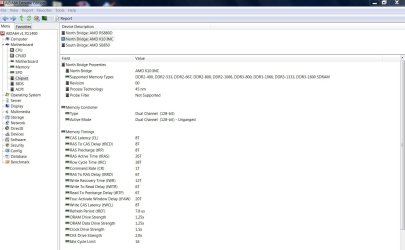
yea i think when i bought my 965 BE it was before the new C3 steppings came out.

edit: of course i could be wrong. i downloaded that program you were using in your pics...AIDA64 extreme edition and maybe i do have the new C3 stepping.

Yes, you do. Both programs show you've got a Revision RB-C3 stepping.
 

My Computer My Computer

At a glance

Windows 7 Home 64bitIntel Core i7-2600K16GB CORSAIR Vengeance DDR3 RAMMSI Twin Frozr II Radeon HD 6870
OS
Windows 7 Home 64bit
CPU
Intel Core i7-2600K
Motherboard
ASUS P8Z68-V PRO
Memory
16GB CORSAIR Vengeance DDR3 RAM
Graphics Card(s)
MSI Twin Frozr II Radeon HD 6870
Sound Card
Creative X-Fi XtremeMusic
Monitor(s) Displays
ASUS VE276Q
Hard Drives
Crucial M4 CT128M4SSD2 SSD /
Western Digital Caviar Black WD2002FAEX
PSU
CORSAIR HX850 PSU
Case
LIAN LI PC-K9B
Cooling
ZALMAN CNPS9900MAX
hmm, so my cpu should be fine with the ram @ 1600 like yours is?
 

My Computer My Computer

At a glance

windows 7 64bit on bothAMD FX-8350 @4.6GHz/Intel Core i7-3610QM @2.3GHz16GB G.Skill 1866MHz/8GB dual channel 1600MHztwo Sapphire HD7970 OC 3Gb in crossfire/GTX66...
Computer type
PC/Desktop
Computer Manufacturer/Model Number
Custom Build and MSI GE60 0ND laptop
OS
windows 7 64bit on both
CPU
AMD FX-8350 @4.6GHz/Intel Core i7-3610QM @2.3GHz
Motherboard
ASUS M5A99X EVO R2.0/MS-16GA
Memory
16GB G.Skill 1866MHz/8GB dual channel 1600MHz
Graphics Card(s)
two Sapphire HD7970 OC 3Gb in crossfire/GTX660M 2Gb
Sound Card
Realtek HD Audio/Realtek HD Audio with THX TruStudio Pro
Monitor(s) Displays
Hanns-G 27" 1080p /Generic PnP Monitor
Screen Resolution
both 1920x1080p 60Hz
Hard Drives
250GB Samsung 840 EVO SSD,
1TB WD Blue
3x2TB WD Greens
/Samsung 840 EVO mSATA
PSU
Corsair HX750/laptop psu
Case
NZXT Source 530
Cooling
CoolerMaster Hyper 212 Evo
Keyboard
Logitech G710+/laptop keyboard by steelseries
Mouse
Logitec G500s/Logitec G500
Internet Speed
50Mbps down/1-3 Mbps up
Other Info
Scythe Kaze Master Pro 5.25 fan controller; APC Back-UPS XS 1500
Everything you ever wanted to know about that particular motherboard (941 pages so far),

[Official] MSI 790FX-GD70 Owners Club

One reason that it isn't running stable with the memory is that you likely have the CPU-NB Voltage set to auto, which is the voltage for the memory controller. Right in the first post is what you are looking for,

Q: "Why wont my RAM work at its rated specs?"
A: Each set is different, but anything over 1333 is an overclock for the IMC. Also most RAM manufactures give a range of voltages(ex. 1.5-1.7) make sure to try manually setting your voltage to the higher of the two. Another thing, you may have to bump the CPU-NB volts to 1.3 or so depending on your exact setup. (let us know what is going on and we will try to help!)

Instead of auto set it manually to 1.3V, and then try the ram at 1600 MHz again. If it still isn't stable then bump it up by .25 and try again.
 

My Computer My Computer

At a glance

Win 7 Ultimate x64FX-8350 @ 4.6 GHz so farADATA XPG V1 Series Black 8GB DDR3 1600Sapphire R9 270x Dual-X
Computer type
PC/Desktop
Computer Manufacturer/Model Number
Me
OS
Win 7 Ultimate x64
CPU
FX-8350 @ 4.6 GHz so far
Motherboard
Asus M5A97 EVO
Memory
ADATA XPG V1 Series Black 8GB DDR3 1600
Graphics Card(s)
Sapphire R9 270x Dual-X
Sound Card
Xonar DGX w/ Corsair Vengence 1300
Monitor(s) Displays
Acer S232HL Abid
Screen Resolution
1920x1080
Hard Drives
120 GB OCZ Vertex 3
500 GB Seagate 7200.12
PSU
Antec Earthwatts 650W Green
Case
Antec Three Hundred
Cooling
Cooler Master 212 EVO
Keyboard
Logitech G510
Mouse
Logitech G500s
Internet Speed
35000/3000
I feel I have to reiterate what essenbe said some time back.

"You won't notice a difference"

Really, you won't. Absolutely nothing will may any noticeable difference in any way between 1033 or 1600 or 2000. NOTHING AT ALL.

Having more ram rather than less ram will make potentially huge differences regardless of ram speed. An SSD will make your entire machine /feel/ 10x faster (though of course game frame rates will remain unchanged, but then your memory speed wont help with that either). A new video card can double frame rates, Overclocking your CPU can att a few % if you want to live on the edge. But memory bus speed? Keep it synced with processor and running at stock speeds for lowest wait states and cool and reliable performance. You DON'T want to mess with flaky memory settings or your entire system will dump and there is nothing at all to be gained from it.

Just get your system STABLE and stop worrying about memory speed. It's 100% all advertising gimmick. Get good ram, vetted for your motherboard, run it at stock speeds/Voltage and multiplier for the motherboard and compute happy. :)
 

My Computer My Computer

At a glance

Windows 7 x64 Ultimatei7 96012 Gig Corsair DominatorNvidia 480
Computer Manufacturer/Model Number
Scratch built
OS
Windows 7 x64 Ultimate
CPU
i7 960
Motherboard
Asus P6X58D
Memory
12 Gig Corsair Dominator
Graphics Card(s)
Nvidia 480
Sound Card
Maudio Delta 44 + breakout box
Monitor(s) Displays
Dell UltraSharp U2410 24in and Samsung 21 dual monitors
Screen Resolution
1920x1200 and 1280x1024
Hard Drives
Primary: Intel X-25M G2 160G SSD
Secondary: Segate baracuda 1.0 TB
HDs in AHCI mode.
PSU
Corasair TX850
Case
Cooler Master HAF
Cooling
Corsair H50
Keyboard
Logitech G15 + N52 game pad
Mouse
Logitech MX518
Internet Speed
15kbs down 4.5kbps up
Other Info
WEI 7.6
CPU & RAM 7.6
Graphics 7.9
Hard disk 7.7
To reiterate what fseal said, I have run this computer with 1600, 1866 and 2133 ram. I can not tell a difference in any of them. If you were to sneak in and change the ram, I would never know unless I ran a benchmark, which is the only way you will be able to tell.
 

My Computers My Computers

  • At a glance

    Windows 11 ProRyzen 9 5900X32GB G Skill DDR4-3600EVGA RTX 3080 FTW 3 Ultra
    Computer type
    PC/Desktop
    Computer Manufacturer/Model Number
    ALWAYS UNDER CONSTRUCTION
    OS
    Windows 11 Pro
    CPU
    Ryzen 9 5900X
    Motherboard
    Asus X570 Crosshair Viii Hero
    Memory
    32GB G Skill DDR4-3600
    Graphics Card(s)
    EVGA RTX 3080 FTW 3 Ultra
    Sound Card
    On Board/Sennheiser PC37X Headset
    Monitor(s) Displays
    3 X Asus 27"
    Screen Resolution
    2560x1440
    Hard Drives
    2 X 1 TB NVME drives
    PSU
    EVGA 850
    Case
    Phanteks Eclipse P400A
    Cooling
    EVGA 280 AIO
    Keyboard
    Logitech G510s/ Logitech G13
    Mouse
    Logitech G502
    Internet Speed
    24/1
    Antivirus
    ESET/MBAM Pro/SAS Pro
    Browser
    Chrome/ Firefox/ Edge
  • At a glance

    Windows 11 ProIntel Ultra 9 288V32 GB LPDDR5X 8533
    Computer type
    Laptop
    System Manufacturer/Model Number
    Dell 16 Plus
    OS
    Windows 11 Pro
    CPU
    Intel Ultra 9 288V
    Memory
    32 GB LPDDR5X 8533
    Monitor(s) Displays
    16" Mini-LED HDR600 Touch 90 Hz
    Screen Resolution
    2560X1600
    Hard Drives
    1 TB NVME
I agree with the other posters on whether running DDR3 RAM at higher frequencies makes that much of a difference. It doesn't, and this has been demonstrated by reviewers on several reputable websites. I think you'll get a lot more bang for your overclocking buck by raising your CPU multilplier on that Black Edition chip than focusing on the RAM.

Having said that, I'm running my four 2GB sticks @ 1600MHz with CPU/NB voltage set at 1.22v and RAM voltage at 1.65v. Hard to say whether those setting will let you run two 4GB sticks stably on your board using your chip. You'll have to experiment to find out.
 

My Computer My Computer

At a glance

Windows 7 Home 64bitIntel Core i7-2600K16GB CORSAIR Vengeance DDR3 RAMMSI Twin Frozr II Radeon HD 6870
OS
Windows 7 Home 64bit
CPU
Intel Core i7-2600K
Motherboard
ASUS P8Z68-V PRO
Memory
16GB CORSAIR Vengeance DDR3 RAM
Graphics Card(s)
MSI Twin Frozr II Radeon HD 6870
Sound Card
Creative X-Fi XtremeMusic
Monitor(s) Displays
ASUS VE276Q
Hard Drives
Crucial M4 CT128M4SSD2 SSD /
Western Digital Caviar Black WD2002FAEX
PSU
CORSAIR HX850 PSU
Case
LIAN LI PC-K9B
Cooling
ZALMAN CNPS9900MAX
hmm, i guess i thought there would be a noticeable difference. guess ill just set it and leave it. thanks to all for all the info!
 

My Computer My Computer

At a glance

windows 7 64bit on bothAMD FX-8350 @4.6GHz/Intel Core i7-3610QM @2.3GHz16GB G.Skill 1866MHz/8GB dual channel 1600MHztwo Sapphire HD7970 OC 3Gb in crossfire/GTX66...
Computer type
PC/Desktop
Computer Manufacturer/Model Number
Custom Build and MSI GE60 0ND laptop
OS
windows 7 64bit on both
CPU
AMD FX-8350 @4.6GHz/Intel Core i7-3610QM @2.3GHz
Motherboard
ASUS M5A99X EVO R2.0/MS-16GA
Memory
16GB G.Skill 1866MHz/8GB dual channel 1600MHz
Graphics Card(s)
two Sapphire HD7970 OC 3Gb in crossfire/GTX660M 2Gb
Sound Card
Realtek HD Audio/Realtek HD Audio with THX TruStudio Pro
Monitor(s) Displays
Hanns-G 27" 1080p /Generic PnP Monitor
Screen Resolution
both 1920x1080p 60Hz
Hard Drives
250GB Samsung 840 EVO SSD,
1TB WD Blue
3x2TB WD Greens
/Samsung 840 EVO mSATA
PSU
Corsair HX750/laptop psu
Case
NZXT Source 530
Cooling
CoolerMaster Hyper 212 Evo
Keyboard
Logitech G710+/laptop keyboard by steelseries
Mouse
Logitec G500s/Logitec G500
Internet Speed
50Mbps down/1-3 Mbps up
Other Info
Scythe Kaze Master Pro 5.25 fan controller; APC Back-UPS XS 1500
If you were to install 2 sticks of DDR3-1333 they would run at 667, 2 stciks of DDR3- 2133 would run at 1066, 2 sticks of DDR3-1866 would run at 933. Again, DDR is Double data rate and the sticks are in dual chanel mode as they should be. Yes, you could probably overclock them, But, I would strongly advise against trying it unless you understand exactly what you are doing. One slight mistake and your computer will BSOD and cause all kind of trouble. It would also depend on the quality of the ram as Profdlp said.

Dear essenbe,
I am quoting a relevant part of your's here "Again, DDR is Double data rate and the sticks are in dual chanel mode as they should be." Unquote.

The Threadstarter's first post shows in his Speccy thumbnail : Channel#: Dual

Now, kindly view and comment on my Speccy thumbnail which shows Channel#: Single. Please see my specs. if needed.

regards and thank you,
sreedhav
 

Attachments

  • Piriform Speccy_2012-02-22_09-50-46.png
    Piriform Speccy_2012-02-22_09-50-46.png
    22.5 KB · Views: 17

My Computer My Computer

At a glance

MS Windows 7 Home Premium 64-bit SP1IntelCore [email protected]; Sandy Bridge 32nm Tech.4096Mb RAM; Single ChannelDDR3@665MHz; DRAM F...AMD Radeon HD 6630M; GPU:Whistler;BIOS Core&m...
Computer Manufacturer/Model Number
Sony Vaio C series VPCCB35FN laptop
OS
MS Windows 7 Home Premium 64-bit SP1
CPU
IntelCore [email protected]; Sandy Bridge 32nm Tech.
Motherboard
Sony Vaio Version:C609NJYJ
Memory
4096Mb RAM; Single ChannelDDR3@665MHz; DRAM Freq:662MHz
Graphics Card(s)
AMD Radeon HD 6630M; GPU:Whistler;BIOS Core&mem Clock:123.36
Sound Card
REALTEK High Definition Audio Device; INTEL Display Card
Monitor(s) Displays
Generic PnP Intel HD;Resolution:1920*1040 Pixels; BPP:32bits
Screen Resolution
Current Resolution:1920*1080 Pixels; Monitor Frequency:60Hz
Hard Drives
Internal HD:TOSHIBA MK5061GSY; Real Size:488 GB;NTFS; 3 Partitions; SATA; HEADS:16

External HDD: WD Elements 1023 PORTABLE; Estimated Size: 1TB; NTFS; 3 Partitions
Cooling
Lateral Exhaust with a Cooling Pad Placed Beneath.
Keyboard
Logitech Bluetooth+ Generic Integrated K-B
Mouse
Logitech Bluetooth
Internet Speed
2MBPS
Other Info
1)Trend Micro Titanium Maximum Security Suite Version:3
2)SAS-PRO

3)MBAM--PRO


4)WATERFOX+IE9 +WOT+LINKEXTEND+ DRWEBCUREIT LINK CHECKER

5)SPYWAREBLASTER

6) WINPATROL PLUS

7) SANDBOXIE and
8) A BIT OF COMMON SENSE.
Dual-Channel is not the same as Double Data Rate. The one stick of RAM you have is running at 1333 (665 X 2 = ~1333). If you added a matching stick you would have Dual-Channel.

You can read about Dual-Channel here: Multi-channel memory architecture
 

My Computer My Computer

At a glance

Main - Windows 7 Pro SP1 64-Bit; 2nd - Window...Main - Core i7 2600K; 2nd - Core i7 920Main - 16GB Corsair Vengeance; 2nd - 12GB Cor...Main - XFX Radeon 6870 1GB; 2nd - XFX Radeon ...
Computer Manufacturer/Model Number
Self
OS
Main - Windows 7 Pro SP1 64-Bit; 2nd - Windows Server 2008 R2
CPU
Main - Core i7 2600K; 2nd - Core i7 920
Motherboard
Main - Asus P8Z68-V Pro/Gen3; 2nd - Gigabyte GA-EX58-UDR3
Memory
Main - 16GB Corsair Vengeance; 2nd - 12GB Corsair Vengeance
Graphics Card(s)
Main - XFX Radeon 6870 1GB; 2nd - XFX Radeon 4870 1GB
Sound Card
Both: Onboard Realtek Azalia
Monitor(s) Displays
Main - Hann 25" + I-INC 25" + Acer 23"; 2nd - Upgrading Soon
Screen Resolution
Main - 1920x1080 (All Three Monitors); 2nd - Upgrading Soon
Hard Drives
Main - (1) Crucial M4 128GB (Boot)
Main - (1) Seagate 2TB 64MB Cache (Data)
Main - (1) Seagate 2TB 64MB Cache (Data Backup)
2nd - (1) Intel X25-M SSD 80GB (Boot)
2nd - (3) Seagate 1TB 32MB Cache (Data Backup)
2nd - (1) Seagate 320GB (Because)
PSU
Main - OCZ 600W Modular; 2nd - OCZ 600W
Case
Main - Thermaltake Element G; 2nd - NZXT something or other
Cooling
Main - Corsair H80; 2nd - Prolimatech Megahalems
Keyboard
Main - Razer Reclusa; 2nd - Old MS Keyboard
Mouse
Main - Logitech MX Revolution; 2nd - Old MS Mouse
Internet Speed
20Mbps Time-Warner Cable
Dual-Channel is not the same as Double Data Rate. The one stick of RAM you have is running at 1333 (665 X 2 = ~1333). If you added a matching stick you would have Dual-Channel.

You can read about Dual-Channel here: Multi-channel memory architecture

Thanks for the reply! A rep is winging your way!:)

regards,
sreedhav
 

My Computer My Computer

At a glance

MS Windows 7 Home Premium 64-bit SP1IntelCore [email protected]; Sandy Bridge 32nm Tech.4096Mb RAM; Single ChannelDDR3@665MHz; DRAM F...AMD Radeon HD 6630M; GPU:Whistler;BIOS Core&m...
Computer Manufacturer/Model Number
Sony Vaio C series VPCCB35FN laptop
OS
MS Windows 7 Home Premium 64-bit SP1
CPU
IntelCore [email protected]; Sandy Bridge 32nm Tech.
Motherboard
Sony Vaio Version:C609NJYJ
Memory
4096Mb RAM; Single ChannelDDR3@665MHz; DRAM Freq:662MHz
Graphics Card(s)
AMD Radeon HD 6630M; GPU:Whistler;BIOS Core&mem Clock:123.36
Sound Card
REALTEK High Definition Audio Device; INTEL Display Card
Monitor(s) Displays
Generic PnP Intel HD;Resolution:1920*1040 Pixels; BPP:32bits
Screen Resolution
Current Resolution:1920*1080 Pixels; Monitor Frequency:60Hz
Hard Drives
Internal HD:TOSHIBA MK5061GSY; Real Size:488 GB;NTFS; 3 Partitions; SATA; HEADS:16

External HDD: WD Elements 1023 PORTABLE; Estimated Size: 1TB; NTFS; 3 Partitions
Cooling
Lateral Exhaust with a Cooling Pad Placed Beneath.
Keyboard
Logitech Bluetooth+ Generic Integrated K-B
Mouse
Logitech Bluetooth
Internet Speed
2MBPS
Other Info
1)Trend Micro Titanium Maximum Security Suite Version:3
2)SAS-PRO

3)MBAM--PRO


4)WATERFOX+IE9 +WOT+LINKEXTEND+ DRWEBCUREIT LINK CHECKER

5)SPYWAREBLASTER

6) WINPATROL PLUS

7) SANDBOXIE and
8) A BIT OF COMMON SENSE.
Dual-Channel is not the same as Double Data Rate. The one stick of RAM you have is running at 1333 (665 X 2 = ~1333). If you added a matching stick you would have Dual-Channel.

You can read about Dual-Channel here: Multi-channel memory architecture

Thanks Prof, You're just faster than me.
 

My Computers My Computers

  • At a glance

    Windows 11 ProRyzen 9 5900X32GB G Skill DDR4-3600EVGA RTX 3080 FTW 3 Ultra
    Computer type
    PC/Desktop
    Computer Manufacturer/Model Number
    ALWAYS UNDER CONSTRUCTION
    OS
    Windows 11 Pro
    CPU
    Ryzen 9 5900X
    Motherboard
    Asus X570 Crosshair Viii Hero
    Memory
    32GB G Skill DDR4-3600
    Graphics Card(s)
    EVGA RTX 3080 FTW 3 Ultra
    Sound Card
    On Board/Sennheiser PC37X Headset
    Monitor(s) Displays
    3 X Asus 27"
    Screen Resolution
    2560x1440
    Hard Drives
    2 X 1 TB NVME drives
    PSU
    EVGA 850
    Case
    Phanteks Eclipse P400A
    Cooling
    EVGA 280 AIO
    Keyboard
    Logitech G510s/ Logitech G13
    Mouse
    Logitech G502
    Internet Speed
    24/1
    Antivirus
    ESET/MBAM Pro/SAS Pro
    Browser
    Chrome/ Firefox/ Edge
  • At a glance

    Windows 11 ProIntel Ultra 9 288V32 GB LPDDR5X 8533
    Computer type
    Laptop
    System Manufacturer/Model Number
    Dell 16 Plus
    OS
    Windows 11 Pro
    CPU
    Intel Ultra 9 288V
    Memory
    32 GB LPDDR5X 8533
    Monitor(s) Displays
    16" Mini-LED HDR600 Touch 90 Hz
    Screen Resolution
    2560X1600
    Hard Drives
    1 TB NVME
i found this while browsing/researching: AMD Phenom II X4 965 Black Edition - HDZ965FBK4DGM (HDZ965FBGMBOX)

check out the supported memory down towards the bottom...
"Notes on AMD HDZ965FBK4DGM
The processor has unlocked clock multiplier
The fastest supported memory is DDR2-1066 and DDR3-1333"

any ideas? i guess a better thread title now would be "what should my ram speed be?"
 

My Computer My Computer

At a glance

windows 7 64bit on bothAMD FX-8350 @4.6GHz/Intel Core i7-3610QM @2.3GHz16GB G.Skill 1866MHz/8GB dual channel 1600MHztwo Sapphire HD7970 OC 3Gb in crossfire/GTX66...
Computer type
PC/Desktop
Computer Manufacturer/Model Number
Custom Build and MSI GE60 0ND laptop
OS
windows 7 64bit on both
CPU
AMD FX-8350 @4.6GHz/Intel Core i7-3610QM @2.3GHz
Motherboard
ASUS M5A99X EVO R2.0/MS-16GA
Memory
16GB G.Skill 1866MHz/8GB dual channel 1600MHz
Graphics Card(s)
two Sapphire HD7970 OC 3Gb in crossfire/GTX660M 2Gb
Sound Card
Realtek HD Audio/Realtek HD Audio with THX TruStudio Pro
Monitor(s) Displays
Hanns-G 27" 1080p /Generic PnP Monitor
Screen Resolution
both 1920x1080p 60Hz
Hard Drives
250GB Samsung 840 EVO SSD,
1TB WD Blue
3x2TB WD Greens
/Samsung 840 EVO mSATA
PSU
Corsair HX750/laptop psu
Case
NZXT Source 530
Cooling
CoolerMaster Hyper 212 Evo
Keyboard
Logitech G710+/laptop keyboard by steelseries
Mouse
Logitec G500s/Logitec G500
Internet Speed
50Mbps down/1-3 Mbps up
Other Info
Scythe Kaze Master Pro 5.25 fan controller; APC Back-UPS XS 1500
Read post #13. All AMD boards without the Bulldozer chips and chipsets on the motherboard have a memory standard of DDR3-1333. If you run it faster than that, you are overclocking the memory. The memory controller is in the chip and the only way to run it at a higher speed is to overclock it.
 

My Computers My Computers

  • At a glance

    Windows 11 ProRyzen 9 5900X32GB G Skill DDR4-3600EVGA RTX 3080 FTW 3 Ultra
    Computer type
    PC/Desktop
    Computer Manufacturer/Model Number
    ALWAYS UNDER CONSTRUCTION
    OS
    Windows 11 Pro
    CPU
    Ryzen 9 5900X
    Motherboard
    Asus X570 Crosshair Viii Hero
    Memory
    32GB G Skill DDR4-3600
    Graphics Card(s)
    EVGA RTX 3080 FTW 3 Ultra
    Sound Card
    On Board/Sennheiser PC37X Headset
    Monitor(s) Displays
    3 X Asus 27"
    Screen Resolution
    2560x1440
    Hard Drives
    2 X 1 TB NVME drives
    PSU
    EVGA 850
    Case
    Phanteks Eclipse P400A
    Cooling
    EVGA 280 AIO
    Keyboard
    Logitech G510s/ Logitech G13
    Mouse
    Logitech G502
    Internet Speed
    24/1
    Antivirus
    ESET/MBAM Pro/SAS Pro
    Browser
    Chrome/ Firefox/ Edge
  • At a glance

    Windows 11 ProIntel Ultra 9 288V32 GB LPDDR5X 8533
    Computer type
    Laptop
    System Manufacturer/Model Number
    Dell 16 Plus
    OS
    Windows 11 Pro
    CPU
    Intel Ultra 9 288V
    Memory
    32 GB LPDDR5X 8533
    Monitor(s) Displays
    16" Mini-LED HDR600 Touch 90 Hz
    Screen Resolution
    2560X1600
    Hard Drives
    1 TB NVME
I've been running four 2GB sticks of Kingston HyperX at 1600MHz with 8-8-8-26 timings on my Phenom II X4 975 machine since last April, and haven't had any problems. The IMC on my chip can cope with speeds up to around 1866 MHz, so I've left plenty of headroom with my current setting.

You're only running two sticks instead of my four, and I seriously doubt you've hurt your IMC.

Edit: I forgot to mention that only some Phenom IIs are capable of running 1600MHz and higher, and those are the newer C3 steppings. Both CPU-Z and Aida report Phenom II stepping information.

here is what i was referencing. raillex mentions that some phenom IIs can handle higher memory speeds. i found this link: AMD Phenom II X4 965 Black Edition - HDZ965FBK4DGM (HDZ965FBGMBOX)

what does it matter if my processor's "fastest supported memory" is DDR3-1333 as opposed to the motherboard? basically, if i run it faster because the motherboard can, what does that mean for the processor that supports a slower speed?

or is the info in the link i found wrong? can the cpu handle faster? and/or where's the documenting proof that it can?
 
Last edited:

My Computer My Computer

At a glance

windows 7 64bit on bothAMD FX-8350 @4.6GHz/Intel Core i7-3610QM @2.3GHz16GB G.Skill 1866MHz/8GB dual channel 1600MHztwo Sapphire HD7970 OC 3Gb in crossfire/GTX66...
Computer type
PC/Desktop
Computer Manufacturer/Model Number
Custom Build and MSI GE60 0ND laptop
OS
windows 7 64bit on both
CPU
AMD FX-8350 @4.6GHz/Intel Core i7-3610QM @2.3GHz
Motherboard
ASUS M5A99X EVO R2.0/MS-16GA
Memory
16GB G.Skill 1866MHz/8GB dual channel 1600MHz
Graphics Card(s)
two Sapphire HD7970 OC 3Gb in crossfire/GTX660M 2Gb
Sound Card
Realtek HD Audio/Realtek HD Audio with THX TruStudio Pro
Monitor(s) Displays
Hanns-G 27" 1080p /Generic PnP Monitor
Screen Resolution
both 1920x1080p 60Hz
Hard Drives
250GB Samsung 840 EVO SSD,
1TB WD Blue
3x2TB WD Greens
/Samsung 840 EVO mSATA
PSU
Corsair HX750/laptop psu
Case
NZXT Source 530
Cooling
CoolerMaster Hyper 212 Evo
Keyboard
Logitech G710+/laptop keyboard by steelseries
Mouse
Logitec G500s/Logitec G500
Internet Speed
50Mbps down/1-3 Mbps up
Other Info
Scythe Kaze Master Pro 5.25 fan controller; APC Back-UPS XS 1500
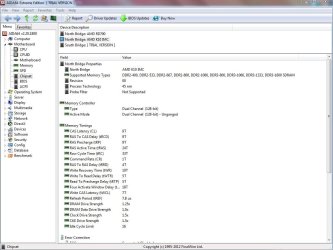
...what does it matter if my processor's "fastest supported memory" is DDR3-1333 as opposed to the motherboard? basically, if i run it faster because the motherboard can, what does that mean for the processor that supports a slower speed?
If the memory controller is built into the motherboard then the motherboard is the limiting factor. If the memory controller is built into the CPU then the CPU is the limiting factor.

Think of it like the difference between driving an automatic transmission car and driving a stick. For two cars with similar engines your top speed down a drag strip is still dependent on switching gears fast enough - it's just a question of who or what is doing it.

or is the info in the link i found wrong? can the cpu handle faster? and/or where's the documenting proof that it can?
The word "can" in that sentence is where the real question lies. By definition, overclocking is the process of making a computer run faster than it's rated speed. "Can" a computer do that? Sure. But it depends on the individual components involved. AMD is telling you that the memory controller built into the CPU is rated at a max of 1333. What it's rated at and what it can actually do may be two different things. There seems to be a good body of evidence to suggest that a lot of people are squeezing more out of CPU-based memory controller such as yours. Whether you can do it or not is unknown and can only really be answered by trying it. :)
 

My Computer My Computer

At a glance

Main - Windows 7 Pro SP1 64-Bit; 2nd - Window...Main - Core i7 2600K; 2nd - Core i7 920Main - 16GB Corsair Vengeance; 2nd - 12GB Cor...Main - XFX Radeon 6870 1GB; 2nd - XFX Radeon ...
Computer Manufacturer/Model Number
Self
OS
Main - Windows 7 Pro SP1 64-Bit; 2nd - Windows Server 2008 R2
CPU
Main - Core i7 2600K; 2nd - Core i7 920
Motherboard
Main - Asus P8Z68-V Pro/Gen3; 2nd - Gigabyte GA-EX58-UDR3
Memory
Main - 16GB Corsair Vengeance; 2nd - 12GB Corsair Vengeance
Graphics Card(s)
Main - XFX Radeon 6870 1GB; 2nd - XFX Radeon 4870 1GB
Sound Card
Both: Onboard Realtek Azalia
Monitor(s) Displays
Main - Hann 25" + I-INC 25" + Acer 23"; 2nd - Upgrading Soon
Screen Resolution
Main - 1920x1080 (All Three Monitors); 2nd - Upgrading Soon
Hard Drives
Main - (1) Crucial M4 128GB (Boot)
Main - (1) Seagate 2TB 64MB Cache (Data)
Main - (1) Seagate 2TB 64MB Cache (Data Backup)
2nd - (1) Intel X25-M SSD 80GB (Boot)
2nd - (3) Seagate 1TB 32MB Cache (Data Backup)
2nd - (1) Seagate 320GB (Because)
PSU
Main - OCZ 600W Modular; 2nd - OCZ 600W
Case
Main - Thermaltake Element G; 2nd - NZXT something or other
Cooling
Main - Corsair H80; 2nd - Prolimatech Megahalems
Keyboard
Main - Razer Reclusa; 2nd - Old MS Keyboard
Mouse
Main - Logitech MX Revolution; 2nd - Old MS Mouse
Internet Speed
20Mbps Time-Warner Cable
Back
Top