Solved Is my SSD drive driven by Sata3 or Sata2: How to know

arjfca

New member
Member
VIP
Local time
11:29 PM
Messages
363
Hello

I suspect that my SSD drive , Intel SSD 320 120GB, does not operate at is full potential. It is plugged in the Sata3 device on my mainboard.

Looking at my Bios, I see that it is set to IDE. I did try to set it to the AHCI mode, but PC would not boot up

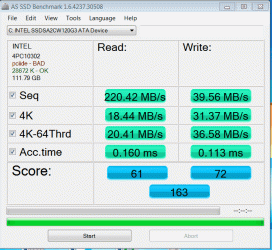
I did try the AS SSD Benchmark tool and I gorr a result of 163
It mention PCiIde BAD

Now, How do I know if my SSD drive is driven with Sata3. If not, how do I set it without re-installing Win 7

Any help appreciated

Martin :)
 

Attachments

  • IDE_Bad.gif
    IDE_Bad.gif
    37.7 KB · Views: 24

My Computer My Computer

At a glance

windows 7 Pro x64Intel I5 34508 GB DDR3 dual chanelAsus Radeon 4870 Nevedi Gforce GTX 500Ti
Computer Manufacturer/Model Number
Home made
OS
windows 7 Pro x64
CPU
Intel I5 3450
Motherboard
Gefabye B75M-D3H
Memory
8 GB DDR3 dual chanel
Graphics Card(s)
Asus Radeon 4870 Nevedi Gforce GTX 500Ti
Sound Card
None
Monitor(s) Displays
4 L206W, Synckmaster, Acer X203W, X223W
Screen Resolution
1680 X 1050
Hard Drives
SSD 120G from Intel

640 GB
PSU
Cooler Master 600W
Case
Antec
Cooling
Regular fan
Keyboard
Microsoft Multimedia Bilingual
Mouse
Microsoft Optical 3000

My Computer My Computer

At a glance

Vista, Windows7, Mint Mate, Zorin, Windows 8from 1.6GHz Duo to i7
Computer Manufacturer/Model Number
HP, Dell, Gateway, Toshiba - 4 laptops and 2 desktops
OS
Vista, Windows7, Mint Mate, Zorin, Windows 8
CPU
from 1.6GHz Duo to i7
Monitor(s) Displays
2x HP w2207
Hard Drives
5x HDD, 7x SSD, 12x Externals
Keyboard
with trackball - no mices
Mouse
Trackball mice
Internet Speed
DSL 6000
The 320 is a Sata2. If you want to go AHCI, you have to set the OS also to AHCI. http://www.sevenforums.com/tutorials/61869-ahci-enable-windows-7-vista.html

Hello

I don't have my original box, but looking in Intel site, I found:

Intel® SSD 320 Series
(120GB, 2.5in SATA 3Gb/s, 25nm, MLC)

How do I set the OS to be AHCI?.

I should say that I had a better result before installing an old hard drive that had an OS intalled. The system took this new (old) drive as the main and it changed the loading drive. Since I did not regain thew same setup.

Have a good day

Martin
 

My Computer My Computer

At a glance

windows 7 Pro x64Intel I5 34508 GB DDR3 dual chanelAsus Radeon 4870 Nevedi Gforce GTX 500Ti
Computer Manufacturer/Model Number
Home made
OS
windows 7 Pro x64
CPU
Intel I5 3450
Motherboard
Gefabye B75M-D3H
Memory
8 GB DDR3 dual chanel
Graphics Card(s)
Asus Radeon 4870 Nevedi Gforce GTX 500Ti
Sound Card
None
Monitor(s) Displays
4 L206W, Synckmaster, Acer X203W, X223W
Screen Resolution
1680 X 1050
Hard Drives
SSD 120G from Intel

640 GB
PSU
Cooler Master 600W
Case
Antec
Cooling
Regular fan
Keyboard
Microsoft Multimedia Bilingual
Mouse
Microsoft Optical 3000
If you do a clean install, go into your BIOS before hand and set the SATA ports to AHCI. That way, when you get everything up and running, everything will be set right. And, like WHS said, the Intel 320 series is a SATA II drive, not SATA III. I think WHS linked you to a guide that will allow you to change it to AHCI within the OS, if that is something you want to try then give it a whirl. A clean install will also work.

Whatever you decide to do, good luck with it and we will try to help as best we can!
 

My Computer My Computer

At a glance

Windows 7 Professional 64bit SP1Intel Core i5-3570K @ 4.5GHzCorsair Vengeance 16GB (4x4) @1866MHz CL 9-9-...EVGA GTX 750 Ti FTW
Computer type
PC/Desktop
Computer Manufacturer/Model Number
Custom Built
OS
Windows 7 Professional 64bit SP1
CPU
Intel Core i5-3570K @ 4.5GHz
Motherboard
Asus Sabertooth Z77
Memory
Corsair Vengeance 16GB (4x4) @1866MHz CL 9-9-9-24 1T
Graphics Card(s)
EVGA GTX 750 Ti FTW
Sound Card
Onboard Audio
Monitor(s) Displays
Dell S2309W
Screen Resolution
1920x1080
Hard Drives
Samsung 830 128GB SSD - OS
(4) Seagate 5TB HDD
(1) Seagate 2TB HDD
PSU
Seasonic X750 80+ Gold Full Modular
Case
Antec Eleven Hundred Super Mid Tower
Cooling
Intel Liquid Cooler
Keyboard
Max Nighthawk X8 Mechanical keyboard
Mouse
Mionix Naos 7000
Internet Speed
50 Mbps Down / 10 Mbps Up
Antivirus
Microsoft Security Essentials/Malwarebytes Anti-Malware
Browser
Chrome/Firefox
Other Info
Klipsch ProMedia 2.1's
Asus RT-N66R Wireless Router
The SATA speeds can be a bit confusing...........SATA II = 3Gb/s speed, while SATA III = 6Gb/s speeds. You also have to know if you have SATA II or SATA III ports on your motherboard. A SATA III drive is backwards compatible to SATA II and SATA I, but a SATA II drive will never be any faster than the physical limits of SATA II standards.

As far as how to change to AHCI from IDE, either use the guide that WHS posted to change it while in Windows, or get ready to do a clean install.
 

My Computer My Computer

At a glance

Windows 7 Professional 64bit SP1Intel Core i5-3570K @ 4.5GHzCorsair Vengeance 16GB (4x4) @1866MHz CL 9-9-...EVGA GTX 750 Ti FTW
Computer type
PC/Desktop
Computer Manufacturer/Model Number
Custom Built
OS
Windows 7 Professional 64bit SP1
CPU
Intel Core i5-3570K @ 4.5GHz
Motherboard
Asus Sabertooth Z77
Memory
Corsair Vengeance 16GB (4x4) @1866MHz CL 9-9-9-24 1T
Graphics Card(s)
EVGA GTX 750 Ti FTW
Sound Card
Onboard Audio
Monitor(s) Displays
Dell S2309W
Screen Resolution
1920x1080
Hard Drives
Samsung 830 128GB SSD - OS
(4) Seagate 5TB HDD
(1) Seagate 2TB HDD
PSU
Seasonic X750 80+ Gold Full Modular
Case
Antec Eleven Hundred Super Mid Tower
Cooling
Intel Liquid Cooler
Keyboard
Max Nighthawk X8 Mechanical keyboard
Mouse
Mionix Naos 7000
Internet Speed
50 Mbps Down / 10 Mbps Up
Antivirus
Microsoft Security Essentials/Malwarebytes Anti-Malware
Browser
Chrome/Firefox
Other Info
Klipsch ProMedia 2.1's
Asus RT-N66R Wireless Router
The SATA speeds can be a bit confusing...........SATA II = 3Gb/s speed, while SATA III = 6Gb/s speeds. You also have to know if you have SATA II or SATA III ports on your motherboard. A SATA III drive is backwards compatible to SATA II and SATA I, but a SATA II drive will never be any faster than the physical limits of SATA II standards.

As far as how to change to AHCI from IDE, either use the guide that WHS posted to change it while in Windows, or get ready to do a clean install.

OK, Thank you both for your help. I won't do another install and leave as it it. I got a Sata3 on my new main board, but If my SSD is not using it.

I'm quite lost in both AHCI or IDE so...... If it is not broken... don't touch it....

It work, but maybe not as fast as it should be Ok for me

Martin
 

My Computer My Computer

At a glance

windows 7 Pro x64Intel I5 34508 GB DDR3 dual chanelAsus Radeon 4870 Nevedi Gforce GTX 500Ti
Computer Manufacturer/Model Number
Home made
OS
windows 7 Pro x64
CPU
Intel I5 3450
Motherboard
Gefabye B75M-D3H
Memory
8 GB DDR3 dual chanel
Graphics Card(s)
Asus Radeon 4870 Nevedi Gforce GTX 500Ti
Sound Card
None
Monitor(s) Displays
4 L206W, Synckmaster, Acer X203W, X223W
Screen Resolution
1680 X 1050
Hard Drives
SSD 120G from Intel

640 GB
PSU
Cooler Master 600W
Case
Antec
Cooling
Regular fan
Keyboard
Microsoft Multimedia Bilingual
Mouse
Microsoft Optical 3000
The SATA speeds can be a bit confusing...........SATA II = 3Gb/s speed, while SATA III = 6Gb/s speeds. You also have to know if you have SATA II or SATA III ports on your motherboard. A SATA III drive is backwards compatible to SATA II and SATA I, but a SATA II drive will never be any faster than the physical limits of SATA II standards.

As far as how to change to AHCI from IDE, either use the guide that WHS posted to change it while in Windows, or get ready to do a clean install.

OK, Thank you both for your help. I won't do another install and leave as it it. I got a Sata3 on my new main board, but If my SSD is not using it.

I'm quite lost in both AHCI or IDE so...... If it is not broken... don't touch it....

It work, but maybe not as fast as it should be Ok for me

Martin

Your motherboard does not support SATA 3 (6 Gb/s), it supports SATA 2 (3 Gb/s). You have confused the link speed with the SATA revision. So your Motherboard and SSD are both SATA 2.

It will run better with AHCI.
 

My Computer My Computer

At a glance

Windows 10 Pro. EFI boot partition, full EFI ...i7 4770k 4.4GHz (44-44-43-43 turbo) @ 1.248V16GB (8GBx2) @2200 MHz G.skill Sniper 10-11-1...MSI GTX 970 Gaming 4G
Computer type
PC/Desktop
Computer Manufacturer/Model Number
Home built (GeneO industries)/Model 4
OS
Windows 10 Pro. EFI boot partition, full EFI boot
CPU
i7 4770k 4.4GHz (44-44-43-43 turbo) @ 1.248V
Motherboard
ASUS Maximus VI Hero
Memory
16GB (8GBx2) @2200 MHz G.skill Sniper 10-11-10-30-1, 1.6V
Graphics Card(s)
MSI GTX 970 Gaming 4G
Sound Card
Onboard SupremeFX Audio
Monitor(s) Displays
NEC Spectraview 2490WUXi-SV
Screen Resolution
1920 x 1200
Hard Drives
Samsung 850 Pro 256GB (OS), Samsung 2x 128GB 840 Pro SSD in RAID0, 3x WD Blue 6Gb/s 1TB RAID0, WD 2TB Black external USB 3.0, 2TB WD20EARS Green external USB 3.0, 2x 500GB Seagate and 1 750 GB external USB, 1x 350GB external USB3
PSU
Seasonic X-850 (2012 KM3 model)
Case
Fractal Design Define R4
Cooling
NH-D14, NF-F12, NF-A15; NF-P14, NF-P12,NF-A14, S12A PWM
Keyboard
Cooler Master Storm Quickfire Rapid - Brown
Mouse
Logitech G602
Internet Speed
126.4 Mb/s down, 24.3 Mb/s up
Other Info
USB 3.0 x8 , SATA III x8, eSATA, USB 2.0 x6. Samsung DVD R/W drive.

WEI: CPU 7.8, Memory 7.9, Graphics 7.9, Disk 7.9
The SATA speeds can be a bit confusing...........SATA II = 3Gb/s speed, while SATA III = 6Gb/s speeds. You also have to know if you have SATA II or SATA III ports on your motherboard. A SATA III drive is backwards compatible to SATA II and SATA I, but a SATA II drive will never be any faster than the physical limits of SATA II standards.

As far as how to change to AHCI from IDE, either use the guide that WHS posted to change it while in Windows, or get ready to do a clean install.

OK, Thank you both for your help. I won't do another install and leave as it it. I got a Sata3 on my new main board, but If my SSD is not using it.

I'm quite lost in both AHCI or IDE so...... If it is not broken... don't touch it....

It work, but maybe not as fast as it should be Ok for me

Martin

Your motherboard does not support SATA 3 (6 Gb/s), it supports SATA 2 (3 Gb/s). You have confused the link speed with the SATA revision. So your Motherboard and SSD are both SATA 2.

It will run better with AHCI.

I did change my motherboard three days ago. I will change my system info later

New motherboard: Gygabyte B75M-D3H. This one do have a SATA3 port

Martin
 

My Computer My Computer

At a glance

windows 7 Pro x64Intel I5 34508 GB DDR3 dual chanelAsus Radeon 4870 Nevedi Gforce GTX 500Ti
Computer Manufacturer/Model Number
Home made
OS
windows 7 Pro x64
CPU
Intel I5 3450
Motherboard
Gefabye B75M-D3H
Memory
8 GB DDR3 dual chanel
Graphics Card(s)
Asus Radeon 4870 Nevedi Gforce GTX 500Ti
Sound Card
None
Monitor(s) Displays
4 L206W, Synckmaster, Acer X203W, X223W
Screen Resolution
1680 X 1050
Hard Drives
SSD 120G from Intel

640 GB
PSU
Cooler Master 600W
Case
Antec
Cooling
Regular fan
Keyboard
Microsoft Multimedia Bilingual
Mouse
Microsoft Optical 3000
It is no big deal to set the OS to AHCI if you follow the link I posted earlier. If you can set it in the BIOS, you can do that too - piece of cake.
 

My Computer My Computer

At a glance

Vista, Windows7, Mint Mate, Zorin, Windows 8from 1.6GHz Duo to i7
Computer Manufacturer/Model Number
HP, Dell, Gateway, Toshiba - 4 laptops and 2 desktops
OS
Vista, Windows7, Mint Mate, Zorin, Windows 8
CPU
from 1.6GHz Duo to i7
Monitor(s) Displays
2x HP w2207
Hard Drives
5x HDD, 7x SSD, 12x Externals
Keyboard
with trackball - no mices
Mouse
Trackball mice
Internet Speed
DSL 6000
It is no big deal to set the OS to AHCI if you follow the link I posted earlier. If you can set it in the BIOS, you can do that too - piece of cake.

Thank you WHS

I done it and it work just fine. Without your mention : It is no big deal to set the OS to AHCI I would not had replay with it

Have a good day

Martin ;)
 

My Computer My Computer

At a glance

windows 7 Pro x64Intel I5 34508 GB DDR3 dual chanelAsus Radeon 4870 Nevedi Gforce GTX 500Ti
Computer Manufacturer/Model Number
Home made
OS
windows 7 Pro x64
CPU
Intel I5 3450
Motherboard
Gefabye B75M-D3H
Memory
8 GB DDR3 dual chanel
Graphics Card(s)
Asus Radeon 4870 Nevedi Gforce GTX 500Ti
Sound Card
None
Monitor(s) Displays
4 L206W, Synckmaster, Acer X203W, X223W
Screen Resolution
1680 X 1050
Hard Drives
SSD 120G from Intel

640 GB
PSU
Cooler Master 600W
Case
Antec
Cooling
Regular fan
Keyboard
Microsoft Multimedia Bilingual
Mouse
Microsoft Optical 3000
You are welcome. Hope you will like your SSD.
 

My Computer My Computer

At a glance

Vista, Windows7, Mint Mate, Zorin, Windows 8from 1.6GHz Duo to i7
Computer Manufacturer/Model Number
HP, Dell, Gateway, Toshiba - 4 laptops and 2 desktops
OS
Vista, Windows7, Mint Mate, Zorin, Windows 8
CPU
from 1.6GHz Duo to i7
Monitor(s) Displays
2x HP w2207
Hard Drives
5x HDD, 7x SSD, 12x Externals
Keyboard
with trackball - no mices
Mouse
Trackball mice
Internet Speed
DSL 6000
Back
Top