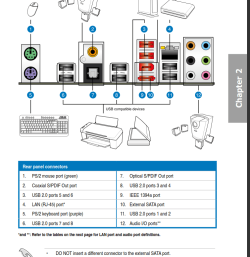
Is my USB Controller displaying usb 3.0?

Still confused about the USB thing though. Why would the ports be different color? The ports I thought were USB 3.0 are red, all the other ports are regular black.

Also, why would I get 1mb/s in the regular black ports, and 28mb/s in the red ports? Even though those are both slow, why would they be different?
 

My Computer My Computer

Computer type
PC/Desktop
Computer Manufacturer/Model Number
Custom Build
OS
Windows 7 Pro 64bit
CPU
Intel i5 750 @ 2.67GHz OC - 3.2GHz
Motherboard
Asus P7P55D Pro
Memory
16gb (4x4gb) Crucial Ballistix Sport
Graphics Card(s)
NIVIDIA GeForce GT 730 4gb
Monitor(s) Displays
Dual 21"
Hard Drives
OS - Samsung 850 EVO 250 gb SSD
Data - Seagate Barracuda 3 TB
Live Work - WD Caviar 250 x2 RAID
External - Seagate Expansion 5 TB x2
PSU
Corsair CX430
Case
NZXT Source 210 ATX Mid Tower
Cooling
CoolerMaster Hyper 212 Evo
What ports are we talking about? The ones on the motherboard or the ones on your case?
 

My Computer My Computer

Computer type
PC/Desktop
Computer Manufacturer/Model Number
Home Built - Jan 2013
OS
Windows 7 64 Bit Home Premium SP1
CPU
i7-3820
Motherboard
Asus P9X79-PRO - Bios 4608
Memory
GSkill F3-14900CL9Q - 16GB
Graphics Card(s)
EVGA GeForce GTX660 - Driver 352.86
Sound Card
On board Realtek ALC898
Monitor(s) Displays
Acer S271HL
Screen Resolution
1920 x 1080
Hard Drives
#1- Samsung 840 Pro Series
#2- Western Digital WD1002FAEX Sata3 Black
#3- Western Digital WD1002FAEX Sata3 Black
PSU
Corsair CMPSU-850TX-V2 - 850 watt (by Seasonic)
Case
Corsair Obsidian 550D
Cooling
Standard 3 120mm case fans, Cooler Master Hyper 212 EVO
Keyboard
MS KC-0405
Mouse
Intellimouse 5-button
Internet Speed
56 Mbits/Sec (on a good day)
Antivirus
Avast & Malwarebytes
Browser
Firefox
Other Info
Asus DVD - DRW-24B1ST 24X
I can see why it is confusing. But those are USB2 ports for sure. Because that board was manufactured pre- USB3 I think they were not following any convention. They made them red because they look cool?

The convention is that USB3 ports are blue, and USB1-2 ports are black. The red is just stupid.
 

Attachments

  • Capture.PNG
    Capture.PNG
    50.2 KB · Views: 1

My Computer My Computer

Computer type
PC/Desktop
Computer Manufacturer/Model Number
Home Built - Jan 2013
OS
Windows 7 64 Bit Home Premium SP1
CPU
i7-3820
Motherboard
Asus P9X79-PRO - Bios 4608
Memory
GSkill F3-14900CL9Q - 16GB
Graphics Card(s)
EVGA GeForce GTX660 - Driver 352.86
Sound Card
On board Realtek ALC898
Monitor(s) Displays
Acer S271HL
Screen Resolution
1920 x 1080
Hard Drives
#1- Samsung 840 Pro Series
#2- Western Digital WD1002FAEX Sata3 Black
#3- Western Digital WD1002FAEX Sata3 Black
PSU
Corsair CMPSU-850TX-V2 - 850 watt (by Seasonic)
Case
Corsair Obsidian 550D
Cooling
Standard 3 120mm case fans, Cooler Master Hyper 212 EVO
Keyboard
MS KC-0405
Mouse
Intellimouse 5-button
Internet Speed
56 Mbits/Sec (on a good day)
Antivirus
Avast & Malwarebytes
Browser
Firefox
Other Info
Asus DVD - DRW-24B1ST 24X
Oh, ha. Yeah. Didn't think of that.

The ones on the case.

Ok, never mind.
 

My Computer My Computer

Computer type
PC/Desktop
Computer Manufacturer/Model Number
Custom Build
OS
Windows 7 Pro 64bit
CPU
Intel i5 750 @ 2.67GHz OC - 3.2GHz
Motherboard
Asus P7P55D Pro
Memory
16gb (4x4gb) Crucial Ballistix Sport
Graphics Card(s)
NIVIDIA GeForce GT 730 4gb
Monitor(s) Displays
Dual 21"
Hard Drives
OS - Samsung 850 EVO 250 gb SSD
Data - Seagate Barracuda 3 TB
Live Work - WD Caviar 250 x2 RAID
External - Seagate Expansion 5 TB x2
PSU
Corsair CX430
Case
NZXT Source 210 ATX Mid Tower
Cooling
CoolerMaster Hyper 212 Evo
Ok, I think I'm returning this computer and building one on my own.

The motherboard is not what I thought it was, and neither is the CPU. I thought I had a 3rd Generation i5 3350, but this is the 1156 socket i5 750. I originally decided to pay a little extra for help because I felt like I didn't know enough about everything to do it on my own, but I ended up not getting the computer I wanted.

Can you help me check all the compatibility and everything for the parts in my Newegg shopping cart? I've attached a PDF.

This machine will be for Photo Editing running Lightroom and Photoshop. Any suggestions?

Newegg Shopping Cart Here

I already have hard drives out of the current machine. They were mine before I bought the new stuff from this guy.
 

My Computer My Computer

Computer type
PC/Desktop
Computer Manufacturer/Model Number
Custom Build
OS
Windows 7 Pro 64bit
CPU
Intel i5 750 @ 2.67GHz OC - 3.2GHz
Motherboard
Asus P7P55D Pro
Memory
16gb (4x4gb) Crucial Ballistix Sport
Graphics Card(s)
NIVIDIA GeForce GT 730 4gb
Monitor(s) Displays
Dual 21"
Hard Drives
OS - Samsung 850 EVO 250 gb SSD
Data - Seagate Barracuda 3 TB
Live Work - WD Caviar 250 x2 RAID
External - Seagate Expansion 5 TB x2
PSU
Corsair CX430
Case
NZXT Source 210 ATX Mid Tower
Cooling
CoolerMaster Hyper 212 Evo
I suggest you start a new thread with the title "New Build - Are My Components Compatible?". That way you will get lots of eyes on the subject and get more help.

Right off I think that power supply is too small. Others may disagree (this is a common argument among builders). But I personally would start out at 650 watts for an Ivy Bridge system with more that one drive. Unless you are planning on never using a dedicated video card.

But the process is this (for me):

  • I choose the processor that I will build the system around.
  • I then shop for and drill down to find a motherboard that supports that processor out of the box, plus all the motherboard features I want.
  • Then I check the motherboard's QVL (Qualified Vendors List) for system RAM. I choose a brand and model of RAM that has been tested by the manufacturer for that board.
  • I then shop for a chassis (case) that will fit my preferred video card, processor fan (these can be quite tall) and have the ports (USB3 for instance I want).
If you start your new thread you will get lots more feedback. A lot of folks here love to help with new build's
 

My Computer My Computer

Computer type
PC/Desktop
Computer Manufacturer/Model Number
Home Built - Jan 2013
OS
Windows 7 64 Bit Home Premium SP1
CPU
i7-3820
Motherboard
Asus P9X79-PRO - Bios 4608
Memory
GSkill F3-14900CL9Q - 16GB
Graphics Card(s)
EVGA GeForce GTX660 - Driver 352.86
Sound Card
On board Realtek ALC898
Monitor(s) Displays
Acer S271HL
Screen Resolution
1920 x 1080
Hard Drives
#1- Samsung 840 Pro Series
#2- Western Digital WD1002FAEX Sata3 Black
#3- Western Digital WD1002FAEX Sata3 Black
PSU
Corsair CMPSU-850TX-V2 - 850 watt (by Seasonic)
Case
Corsair Obsidian 550D
Cooling
Standard 3 120mm case fans, Cooler Master Hyper 212 EVO
Keyboard
MS KC-0405
Mouse
Intellimouse 5-button
Internet Speed
56 Mbits/Sec (on a good day)
Antivirus
Avast & Malwarebytes
Browser
Firefox
Other Info
Asus DVD - DRW-24B1ST 24X
Followed the instructions for the AHCI mode enabling. The computer loaded the drivers and rebooted. However, still not much of a change.

In fact, my Segate Barracuda 7200 RPM 1tb drive is running a little faster, 156mb/s

The Sandisk Extreme 120 SSD is running slower at 102mb/s

A pair of WD Blues 250bg 7200 RPM in a software RAID 1 config are running at 164 mb/s

This seems super weird? Whats up?

What type of real world speed should I be expecting here?

I think I'll start a new thread about this internal drive problem.
 

My Computer My Computer

Computer type
PC/Desktop
Computer Manufacturer/Model Number
Custom Build
OS
Windows 7 Pro 64bit
CPU
Intel i5 750 @ 2.67GHz OC - 3.2GHz
Motherboard
Asus P7P55D Pro
Memory
16gb (4x4gb) Crucial Ballistix Sport
Graphics Card(s)
NIVIDIA GeForce GT 730 4gb
Monitor(s) Displays
Dual 21"
Hard Drives
OS - Samsung 850 EVO 250 gb SSD
Data - Seagate Barracuda 3 TB
Live Work - WD Caviar 250 x2 RAID
External - Seagate Expansion 5 TB x2
PSU
Corsair CX430
Case
NZXT Source 210 ATX Mid Tower
Cooling
CoolerMaster Hyper 212 Evo

My Computer My Computer

Computer type
PC/Desktop
Computer Manufacturer/Model Number
Home Built - Jan 2013
OS
Windows 7 64 Bit Home Premium SP1
CPU
i7-3820
Motherboard
Asus P9X79-PRO - Bios 4608
Memory
GSkill F3-14900CL9Q - 16GB
Graphics Card(s)
EVGA GeForce GTX660 - Driver 352.86
Sound Card
On board Realtek ALC898
Monitor(s) Displays
Acer S271HL
Screen Resolution
1920 x 1080
Hard Drives
#1- Samsung 840 Pro Series
#2- Western Digital WD1002FAEX Sata3 Black
#3- Western Digital WD1002FAEX Sata3 Black
PSU
Corsair CMPSU-850TX-V2 - 850 watt (by Seasonic)
Case
Corsair Obsidian 550D
Cooling
Standard 3 120mm case fans, Cooler Master Hyper 212 EVO
Keyboard
MS KC-0405
Mouse
Intellimouse 5-button
Internet Speed
56 Mbits/Sec (on a good day)
Antivirus
Avast & Malwarebytes
Browser
Firefox
Other Info
Asus DVD - DRW-24B1ST 24X
I found out that the problem might be with the benchmark program I was using.

On the SanDisk website someone posted a similar problem and the SanDisk rep told them to use ATTO Disk Benchmark to do the test.

I did that, and here are the results:

p1427518164-4.jpg


According to this I'm seeing about 275mb/s read speeds and 225mb/s write speeds.

Now, the 120bg Sandisk Extreme SSD advertises over 500mb/s for each.

p1427528380-3.jpg


Why am I still short? I did the SanDisk firmware update. Also, I originally installed Windows on this disk, so according to the link you sent me, alignment shouldn't be a problem.

Could it be that I'm running this drive on a MoBo that only has SATA 3gb/s and the drive is rated for SATA 6gb/s, but it is backwards compatible? If that is the case, then I guess there isn't anything more for me to do. It is running about twice as fast as my spinning disk according to these new tests.
 

My Computer My Computer

Computer type
PC/Desktop
Computer Manufacturer/Model Number
Custom Build
OS
Windows 7 Pro 64bit
CPU
Intel i5 750 @ 2.67GHz OC - 3.2GHz
Motherboard
Asus P7P55D Pro
Memory
16gb (4x4gb) Crucial Ballistix Sport
Graphics Card(s)
NIVIDIA GeForce GT 730 4gb
Monitor(s) Displays
Dual 21"
Hard Drives
OS - Samsung 850 EVO 250 gb SSD
Data - Seagate Barracuda 3 TB
Live Work - WD Caviar 250 x2 RAID
External - Seagate Expansion 5 TB x2
PSU
Corsair CX430
Case
NZXT Source 210 ATX Mid Tower
Cooling
CoolerMaster Hyper 212 Evo
That could very well be the case. I don't get the advertised speed of my ssd either. It was suggested/recommended to me to use an intel sata port to get better speeds.
 

My Computer My Computer

Computer type
Laptop
Computer Manufacturer/Model Number
MSI GE72VR Apache Pro-416
OS
Windows 10x64 Build 1709
CPU
Intel i7 7700HQ Kaby Lake
Motherboard
Micro-Star Intl. MS-179B (U3C1)
Memory
16 GB DDR4 @2400
Graphics Card(s)
Nvidia Geforce GTX 1060
Screen Resolution
1920x1080 120Hz
Hard Drives
256 GB Nvme M.2 SSD

1TB HDD@7200
Cooling
Cooler Blast 4
Keyboard
Steel Series
Antivirus
Bit Defender Free
Browser
Edge
You could only get those speeds if you had a SATA3 controller, which you don't. You are getting decent speed for a SATA2 controller.
 

My Computer My Computer

Computer type
PC/Desktop
Computer Manufacturer/Model Number
Home Built - Jan 2013
OS
Windows 7 64 Bit Home Premium SP1
CPU
i7-3820
Motherboard
Asus P9X79-PRO - Bios 4608
Memory
GSkill F3-14900CL9Q - 16GB
Graphics Card(s)
EVGA GeForce GTX660 - Driver 352.86
Sound Card
On board Realtek ALC898
Monitor(s) Displays
Acer S271HL
Screen Resolution
1920 x 1080
Hard Drives
#1- Samsung 840 Pro Series
#2- Western Digital WD1002FAEX Sata3 Black
#3- Western Digital WD1002FAEX Sata3 Black
PSU
Corsair CMPSU-850TX-V2 - 850 watt (by Seasonic)
Case
Corsair Obsidian 550D
Cooling
Standard 3 120mm case fans, Cooler Master Hyper 212 EVO
Keyboard
MS KC-0405
Mouse
Intellimouse 5-button
Internet Speed
56 Mbits/Sec (on a good day)
Antivirus
Avast & Malwarebytes
Browser
Firefox
Other Info
Asus DVD - DRW-24B1ST 24X
OK I'm back.

SUB 3.0 card plugged into PCI-Express slot. Device manager showing usb 3.0 is working. Updated firmware on the WD Passport USB 3.0 external drive.

ATTO Disk Benchmark says write speed to the External HD is only about 35mb/s

USB 2.0 was giving me 20mb/s

Shouldn't it be faster?
 

My Computer My Computer

Computer type
PC/Desktop
Computer Manufacturer/Model Number
Custom Build
OS
Windows 7 Pro 64bit
CPU
Intel i5 750 @ 2.67GHz OC - 3.2GHz
Motherboard
Asus P7P55D Pro
Memory
16gb (4x4gb) Crucial Ballistix Sport
Graphics Card(s)
NIVIDIA GeForce GT 730 4gb
Monitor(s) Displays
Dual 21"
Hard Drives
OS - Samsung 850 EVO 250 gb SSD
Data - Seagate Barracuda 3 TB
Live Work - WD Caviar 250 x2 RAID
External - Seagate Expansion 5 TB x2
PSU
Corsair CX430
Case
NZXT Source 210 ATX Mid Tower
Cooling
CoolerMaster Hyper 212 Evo
It depends. There is more to the real-world transfer rate than just the USB protocol.

For one, you are reading from one device and writing to another. Writing is usually much slower than reading, so reading from a fast drive, or over a fast connection, and writing to a slower drive is going to have a much lower actual transfer rate than the other way around.

The transfer rate can also be affected by the file(s) you are transferring. If they are highly fragmented they will take much longer to transfer.
 

My Computer My Computer

Computer type
PC/Desktop
Computer Manufacturer/Model Number
Home Built - Jan 2013
OS
Windows 7 64 Bit Home Premium SP1
CPU
i7-3820
Motherboard
Asus P9X79-PRO - Bios 4608
Memory
GSkill F3-14900CL9Q - 16GB
Graphics Card(s)
EVGA GeForce GTX660 - Driver 352.86
Sound Card
On board Realtek ALC898
Monitor(s) Displays
Acer S271HL
Screen Resolution
1920 x 1080
Hard Drives
#1- Samsung 840 Pro Series
#2- Western Digital WD1002FAEX Sata3 Black
#3- Western Digital WD1002FAEX Sata3 Black
PSU
Corsair CMPSU-850TX-V2 - 850 watt (by Seasonic)
Case
Corsair Obsidian 550D
Cooling
Standard 3 120mm case fans, Cooler Master Hyper 212 EVO
Keyboard
MS KC-0405
Mouse
Intellimouse 5-button
Internet Speed
56 Mbits/Sec (on a good day)
Antivirus
Avast & Malwarebytes
Browser
Firefox
Other Info
Asus DVD - DRW-24B1ST 24X
Back
Top