Is my WIn7 UEFI, or not? I have conflicting results.

CaptSpot

New member
Local time
3:57 PM
Messages
15
My Win7 is installed on an Asus M5A97 UEFI board with latest BIOS from 10/12. Win7 was cleanly installed this week (after a disk failure BTW). I could tell, when entering BIOS and selecting to boot from CD, that the DVD was listed as a UEFI boot disc. So, I assumed that the installation would install itself as UEFI.... but is that what really happened?

I followed the instructions for using MSINFO32, looked for the line BIOS MODE... it was not listed at all. Weird. I ran the same MSINFO32 with admin privileges, same results.

What do you think?

BIOS Boot order displays a UEFI Windows Boot Loader. Drive C:\ consists of three system partitions on a GPT disk. However, based on the LACK of information from MSINFO32 I am not sure if Win7 is UEFI, or Legacy.

I am looking into this because I want to set up a dual boot with LinuxMint 15. I understand that If Windows is UEFI, then the LInux install MUST be UEFI as well...

Thanks for your input.

Robert
 

My Computer My Computer

At a glance

Windows 7
OS
Windows 7

My Computer My Computer

At a glance

ME/XP/Vista/Win7
OS
ME/XP/Vista/Win7
Disk Manager (In Reply)

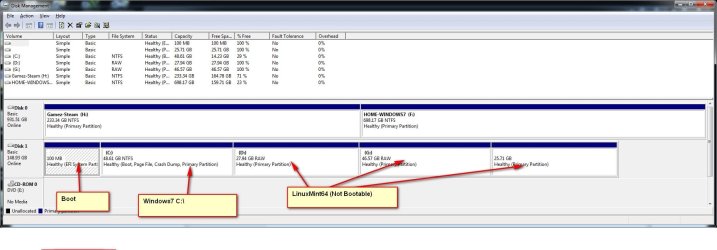
Here it is. I've included descriptions)
 

Attachments

  • Disks.jpg
    Disks.jpg
    113.3 KB · Views: 24

My Computer My Computer

At a glance

Windows 7
OS
Windows 7
Windows 7 is installed in UEFI mode.
 

My Computer My Computer

At a glance

ME/XP/Vista/Win7
OS
ME/XP/Vista/Win7
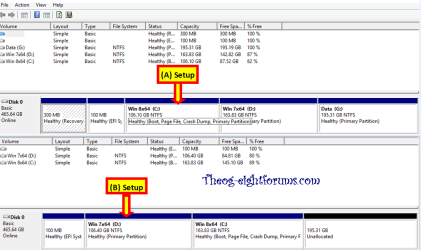
Do you have two w7 installs? The connectors for disks should be swapped so the primary w7 in in the Disk 0 position.
 

My Computer My Computer

At a glance

Windows 7 Ultimate X64 SP1Intel i5-2550K, Differing ~4.4-4.8GHz No buil...16GB G.Skill Sniper 1866MHz @ 2133MHz 2x8GBASUS GTX650TIB-DC2OC-2GD5, (650TI Boost)
Computer type
PC/Desktop
Computer Manufacturer/Model Number
Home Built Desktop By DataTech
OS
Windows 7 Ultimate X64 SP1
CPU
Intel i5-2550K, Differing ~4.4-4.8GHz No built in GPU
Motherboard
ASUS P8Z68-V PRO/GEN3
Memory
16GB G.Skill Sniper 1866MHz @ 2133MHz 2x8GB
Graphics Card(s)
ASUS GTX650TIB-DC2OC-2GD5, (650TI Boost)
Sound Card
Onboard Realtek 5-1
Monitor(s) Displays
Samsung P2570HD
Screen Resolution
1920x1080
Hard Drives
Samsung 840 Pro 256GB SSD for OS, 500GB Seagate Constellation (Enterprise drive) for Data
PSU
Corsair HX650W
Case
Inwin Dragon Rider
Cooling
Hyper 212 EVO w/two Noctua fans, push-pull, @1300 RPM
Keyboard
E-Z Eyes, bright yellow keys with large characters
Mouse
steelseries SENSEI Laser Pro Gaming
Internet Speed
48-51Mbs Mbs down, 11 Mbs up Xfinity Cable
Antivirus
Norton Internet Security 2013
Browser
IE 10, Opera, Pale Moon if needed
Other Info
4 case fans, LG BluRay-RE, ASUS DVD-RW, Mr. Fusion power supply, 1.21 gigawatts.
Why switch hard drive cables?

Okay... bare with me.

No.... I have only one Win7 installation. Why is it recommended to switch cables so that the OS disk is Hard Disk 0?

I know... what a dumb question. Will disk position have anything do do with my Linux partition not booting up?

I'm learning.

Thanks

Robert
 

My Computer My Computer

At a glance

Windows 7
OS
Windows 7
I can't remember why the OS should be Disk 0, but I've asked for help with it and for Linux, which I don't use. This in itself shouldn't keep Mint from booting but two of the three partitions you labeled as Mint say they are RAW which should be empty, unallocated space yet you have a drive letter on them.

Your F partition says HOME-WINDOWS7 plus you labeled C as w7 too hinting you have w7 on two partitions.
 

My Computer My Computer

At a glance

Windows 7 Ultimate X64 SP1Intel i5-2550K, Differing ~4.4-4.8GHz No buil...16GB G.Skill Sniper 1866MHz @ 2133MHz 2x8GBASUS GTX650TIB-DC2OC-2GD5, (650TI Boost)
Computer type
PC/Desktop
Computer Manufacturer/Model Number
Home Built Desktop By DataTech
OS
Windows 7 Ultimate X64 SP1
CPU
Intel i5-2550K, Differing ~4.4-4.8GHz No built in GPU
Motherboard
ASUS P8Z68-V PRO/GEN3
Memory
16GB G.Skill Sniper 1866MHz @ 2133MHz 2x8GB
Graphics Card(s)
ASUS GTX650TIB-DC2OC-2GD5, (650TI Boost)
Sound Card
Onboard Realtek 5-1
Monitor(s) Displays
Samsung P2570HD
Screen Resolution
1920x1080
Hard Drives
Samsung 840 Pro 256GB SSD for OS, 500GB Seagate Constellation (Enterprise drive) for Data
PSU
Corsair HX650W
Case
Inwin Dragon Rider
Cooling
Hyper 212 EVO w/two Noctua fans, push-pull, @1300 RPM
Keyboard
E-Z Eyes, bright yellow keys with large characters
Mouse
steelseries SENSEI Laser Pro Gaming
Internet Speed
48-51Mbs Mbs down, 11 Mbs up Xfinity Cable
Antivirus
Norton Internet Security 2013
Browser
IE 10, Opera, Pale Moon if needed
Other Info
4 case fans, LG BluRay-RE, ASUS DVD-RW, Mr. Fusion power supply, 1.21 gigawatts.
This is our thread about disk 0, linking to the article with the actual explanation.

As for linux not booting, UEFI support in Linux isn't as smooth as it should be. You can find plenty of people having similar issues. But it's usually solved with some terminal wizardry.
This post should help you.
The stuff written on the same line after the # is a comment to explain what he is doing, it's not code.
Mint is an Ubuntu restyle so do the Ubuntu instructions.

Also this thread contains info about a tool that does it automatically if you can get it after install.
 

My Computer My Computer

At a glance

Win 7 Pro 64-bit 7601AMD Phenom 9650 QuadCore, revision DR-B35 GB yes I run 2x 2GB and 1x 1GB, different b...NVIDIA GeForce 9800 GT 512 Mb, unknown manufa...
Computer type
PC/Desktop
Computer Manufacturer/Model Number
custom built
OS
Win 7 Pro 64-bit 7601
CPU
AMD Phenom 9650 QuadCore, revision DR-B3
Motherboard
ASUS M4A78
Memory
5 GB yes I run 2x 2GB and 1x 1GB, different brand, spank me.
Graphics Card(s)
NVIDIA GeForce 9800 GT 512 Mb, unknown manufacturer.
Sound Card
Crappy Realtek Integrated Audio
Monitor(s) Displays
Fujitsu Siemens P19-3P
Screen Resolution
1280 x 1024 x 32 bits @ 60 Hz Oh yeah, 4:3 rocks!
Hard Drives
(1) MAXTOR S TM3320613AS SATA Disk Device (2) STM35004 18AS SATA Disk Device (3) TOSHIBA USB 2.5"-HDD
PSU
whatever, around 450w
Case
Scavenged from old company PC, 10+ years old
Cooling
CPU fan, GPU fan, case fan, nothing fancy
Keyboard
Microsoft, PS/2, white.
Mouse
Optical, logitec.
Internet Speed
effective max speeds: 70-ish kB/s down 30-ish kB/s up
Antivirus
Avira, free edition.
Browser
Firefox with FXChrome to make it look like Google Chrome :P
Other Info
Was discarded by previous owner due to "horrible performance".
Was running Win Xp from a IDE drive. Yeah. Was a pain.
SATA II drive and Win7 and it zips away! Yay!
Britton30.. a reply

I learned the Linux trick of installing the OS to one partition, keeping documents on another. I labeled my Windows documents folder Home-Wimndows so I could tell, at a glance, which Home folder I was l looking at, Windows, or Linux.
 

My Computer My Computer

At a glance

Windows 7
OS
Windows 7
C is your Win7 partition currently booted as signified by Boot flag in the screenshot.

If you're unsure whether F which you've (mis?)labeled Win7 contains an old OS I'd browse into it from C to see if it has a Windows and Users folder. If so then I'd move the data off to correctly delete the partition for an unwanted OS, then repartition in Disk Mgmt and move the data back.

If you need to keep the current HD as DISK0 then I would have Logical partitions which cannot accept the System boot files, or risk having the boot files derailed to DISK0 during future Repairs or Reinstalls. This is why it is best to have the OS on Disk0, with it or its boot partition in the first partition.
 
Back
Top