Is there a method for turning off dual core processing ?

bethy1234

New member
Member
Local time
11:22 PM
Messages
74
Hello all,

I may have been misinformed, but i have heard that it might be advantageous in disabling multiple core processing when running intensive 32 bit apps such as 32-bit Cubase 5. Can anyone shed any light on this, and also on the matter how to do this?

Thanks in advance

Andy
 

My Computer

OS
windows 7
No. It is not advantageous in the slightest.
Cubase 5 takes advantage of dual-core processors.
 

My Computer

Computer type
PC/Desktop
Computer Manufacturer/Model Number
Alienware Aurora ALX R4
OS
Windows 10 Pro (x64)
CPU
Intel Core i7-3930K (3.2GHz - 4.5GHz)
Motherboard
Alienware Aurora-R4 x79
Memory
4x Samsung 4GB PC3-12800 DDR3 (16GB 1600MHz)
Graphics Card(s)
Nvidia Geforce GTX 690
Sound Card
SteelSeries Siberia Elite
Monitor(s) Displays
Dell UltraSharp U3011
Screen Resolution
2560x1600
Hard Drives
Samsung 850 Pro 256 GB, Seagate 1TB Desktop Hybrid HDD, 2x Western Digital 4TB Green HDD
PSU
875W Some Dell PSU <.<
Case
Alienware Aurora ALX
Cooling
Custom Liquid Cooling (EK CPU & GPU blocks) dual EK 480RAD
Keyboard
Logitech G710+ Mechanical
Mouse
Logitech G700s
Internet Speed
Verizon Fios (50 mbps average)
Other Info
Server: Intel NUC D54250WYK: i5-4250U, 16GB, 256 GB mSATA, Windows Server 2012 R2
I myself have never heard of this.
However, it might be possible due to the fact that the application is not multi-core aware I suppose.
And I do not know if that application is or not.

The best solution I can think of is to start the app, then open Task Manager / Processes
Find the Process and right click it and then click Set Affinity.

I do not know if it will hold that setting across application restarts.
 

My Computer

Computer Manufacturer/Model Number
Self Built
OS
Win 7 Ultimate 32bit
CPU
C2D E6600 2.4Ghz
Motherboard
Intel D965WH
Memory
4G Kingston KHX5400D2
Graphics Card(s)
EVGA GTX 570 HD SC (012-P3-1573-KR)
Sound Card
On-Board
Monitor(s) Displays
Samsung 226BW
Screen Resolution
1680 x 1050
Hard Drives
2 x 250 Seagate Barracuda
2 x 500 Seagate Barracuda (Raid1)
PSU
Corsair TX750W
Case
In-Win C589
Cooling
Stock Intel Cooling
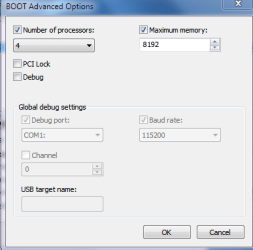
if you type msconfig in to the run window then click on the boot tab. click advanced options, then select 1 processor
 

Attachments

  • boot.PNG
    boot.PNG
    13.2 KB · Views: 9
  • boot 2.PNG
    boot 2.PNG
    9.2 KB · Views: 12

My Computer

Computer type
PC/Desktop
Computer Manufacturer/Model Number
Custom Build
OS
Windows 7 Professional x64 Sp1
CPU
Intel Core i5 650 @ 3.2Ghz
Motherboard
Dell 33FF6 Motherboard
Memory
10GB
Graphics Card(s)
ASUS GTX 650Ti
Sound Card
Nvidia
Monitor(s) Displays
2 Monitors
Screen Resolution
1920 x 1080
Hard Drives
2 1TB 7200RPM
PSU
Thermaltake 600w
Keyboard
Logitech G110
Internet Speed
75Mbs
if you type msconfig in to the run window then click on the boot tab. click advanced options, then select 1 processor

That method basically shows how to select one processor for bootup, which could increase bootup speed. However, it doesn't disable any processors. Depending upon the motherboard, other cores can be disabled in the BIOS.
 

My Computer

Computer type
PC/Desktop
Computer Manufacturer/Model Number
Custom Build
OS
Windows 7 Home Premium 64 bit
CPU
Intel Core i7-4790
Motherboard
GA-Z87X-D3H
Memory
G.SKILL 8GB (2 x 4GB) DDR3 F3-10666CL9D-8GBNT
Graphics Card(s)
AMD Radeon R7 250
Sound Card
Realtek ALC892
Monitor(s) Displays
Samsung UN32EH5000, Dell 1703FPT
Screen Resolution
1920 x 1080, 1280 x 1024
Hard Drives
WD5003AZEX
WD10EZEX
Samsung HD103SJ
Samsung 128 GB 840 PRO
PSU
SeaSonic M12II SS-500GM
Case
Fractal Design Define R4
Cooling
Zalman CNPS9900ALED
Keyboard
Logitech K800
Mouse
Logitech M705
Internet Speed
16 Mbps
Antivirus
Avast
Browser
Firefox
Other Info
Bose Companion 2 Multimedia Speakers
That method basically shows how to select one processor for bootup, which could increase bootup speed. However, it doesn't disable any processors. Depending upon the motherboard, other cores can be disabled in the BIOS.

No, no no It never speeds up the boot process. Those settings DISABLE HARDWARE, for testing and debugging. It can be used to turn off multiple processors or cores. Or reduce the amount of memory Windows uses. Most information about those settings and their effects on boot up performance is WRONG.

The purpose for those settings are for testing and debugging by disabling portion of the hardware. They do not improve performance of anything, they only have the ability to make performance worse.
 

My Computer

Computer type
PC/Desktop
Computer Manufacturer/Model Number
Alienware Aurora ALX R4
OS
Windows 10 Pro (x64)
CPU
Intel Core i7-3930K (3.2GHz - 4.5GHz)
Motherboard
Alienware Aurora-R4 x79
Memory
4x Samsung 4GB PC3-12800 DDR3 (16GB 1600MHz)
Graphics Card(s)
Nvidia Geforce GTX 690
Sound Card
SteelSeries Siberia Elite
Monitor(s) Displays
Dell UltraSharp U3011
Screen Resolution
2560x1600
Hard Drives
Samsung 850 Pro 256 GB, Seagate 1TB Desktop Hybrid HDD, 2x Western Digital 4TB Green HDD
PSU
875W Some Dell PSU <.<
Case
Alienware Aurora ALX
Cooling
Custom Liquid Cooling (EK CPU & GPU blocks) dual EK 480RAD
Keyboard
Logitech G710+ Mechanical
Mouse
Logitech G700s
Internet Speed
Verizon Fios (50 mbps average)
Other Info
Server: Intel NUC D54250WYK: i5-4250U, 16GB, 256 GB mSATA, Windows Server 2012 R2

My Computer

Computer type
PC/Desktop
Computer Manufacturer/Model Number
Custom Build
OS
Windows 7 Home Premium 64 bit
CPU
Intel Core i7-4790
Motherboard
GA-Z87X-D3H
Memory
G.SKILL 8GB (2 x 4GB) DDR3 F3-10666CL9D-8GBNT
Graphics Card(s)
AMD Radeon R7 250
Sound Card
Realtek ALC892
Monitor(s) Displays
Samsung UN32EH5000, Dell 1703FPT
Screen Resolution
1920 x 1080, 1280 x 1024
Hard Drives
WD5003AZEX
WD10EZEX
Samsung HD103SJ
Samsung 128 GB 840 PRO
PSU
SeaSonic M12II SS-500GM
Case
Fractal Design Define R4
Cooling
Zalman CNPS9900ALED
Keyboard
Logitech K800
Mouse
Logitech M705
Internet Speed
16 Mbps
Antivirus
Avast
Browser
Firefox
Other Info
Bose Companion 2 Multimedia Speakers
I myself have never heard of this.
However, it might be possible due to the fact that the application is not multi-core aware I suppose.
And I do not know if that application is or not.

The best solution I can think of is to start the app, then open Task Manager / Processes
Find the Process and right click it and then click Set Affinity.

I do not know if it will hold that setting across application restarts.

if you want to have the affinity permanently 'remembered', you could start the application with a batch file saved in the same folder as the program, with the contents:

Code:
start /affinity 1 programname.exe

name this file, programname.cmd, and make a shortcut to point to it.

this'll make the program only utilise core 1 - that is the second core, as the count starts from 0
 

My Computer

Computer Manufacturer/Model Number
mickey megabyte 1234
OS
ultimate 64 sp1
CPU
i5 2500K [email protected]
Motherboard
MSI P67A-GD53
Memory
8 gigs GSkill Ripjaws 1600
Graphics Card(s)
amd hd6950
Sound Card
creative x-fi gamer
Monitor(s) Displays
samsung 24"
Screen Resolution
1920x1080
Hard Drives
ocz vertex 2e 60 gig, samsung f3 1tb, buffalo 2tb ext
PSU
antec 550
Case
antec three hundred
Cooling
i'm a cooling fan
Keyboard
saitek eclipse ii
Mouse
logitech g3
Internet Speed
about 4 Mbps
Other Info
i love win7

My Computer

Computer Manufacturer/Model Number
AOpen MP45
OS
Windows 7 Pro x86
CPU
T6600 @ 0.975V
Motherboard
i45GMx-I
Memory
4GB DDRII-800
Graphics Card(s)
Onboard Intel 4500mhd
Sound Card
Onboard Realtek + SteelSeries USB
Monitor(s) Displays
Asus ProArt 246
Screen Resolution
1920x1200
Hard Drives
Seagate Momentus XT 750
Keyboard
Cherry G230
Mouse
MS Wireless 3500
Wow,

What a load of great ideas! I'd like to thank each and everyone of you, not only for your suggestions, but for your examples and further info links. I shall try these suggestions over the W/E and report back on my success.

Thanks one and all.

Andy
 

My Computer

OS
windows 7
Wow,

What a load of great ideas! I'd like to thank each and everyone of you, not only for your suggestions, but for your examples and further info links. I shall try these suggestions over the W/E and report back on my success.

Thanks one and all.

Andy

Cubase 5 supports dual-core processors...Why would you try and disable it from taken advantage of that?
I just don't understand...
 

My Computer

Computer type
PC/Desktop
Computer Manufacturer/Model Number
Alienware Aurora ALX R4
OS
Windows 10 Pro (x64)
CPU
Intel Core i7-3930K (3.2GHz - 4.5GHz)
Motherboard
Alienware Aurora-R4 x79
Memory
4x Samsung 4GB PC3-12800 DDR3 (16GB 1600MHz)
Graphics Card(s)
Nvidia Geforce GTX 690
Sound Card
SteelSeries Siberia Elite
Monitor(s) Displays
Dell UltraSharp U3011
Screen Resolution
2560x1600
Hard Drives
Samsung 850 Pro 256 GB, Seagate 1TB Desktop Hybrid HDD, 2x Western Digital 4TB Green HDD
PSU
875W Some Dell PSU <.<
Case
Alienware Aurora ALX
Cooling
Custom Liquid Cooling (EK CPU & GPU blocks) dual EK 480RAD
Keyboard
Logitech G710+ Mechanical
Mouse
Logitech G700s
Internet Speed
Verizon Fios (50 mbps average)
Other Info
Server: Intel NUC D54250WYK: i5-4250U, 16GB, 256 GB mSATA, Windows Server 2012 R2
Cubase 5 does support multicore prossessing

Hi logicearth,

I stand corrected, You are absolutely correct, on re-reading my documentation more carefully, it does indeed state Cubase 5 does support multicore prossessing.


Cheers

Andy
 

My Computer

OS
windows 7
Back
Top