Is there a Partition Wizard guru in the house?

RogerR

New member
Pro User
Local time
9:29 PM
Messages
607
Location
Upstate, AZ
I had been reallocating space amongst my 3 hard drives using Partition Wizard 4.2. I noticed on reboot that only 2 disks were showing up in Windows.

Booted into PW and saw that the 3rd drive was apparently alive and well - its a WD500 and was split into 2 logical drives; 360 to: Programs and the balance to a logical drive: data.

I reallocated the space slightly and hit Apply. It seemed to run its routine OK, then lo and behold, Merry Gosh-darned Christmas ... Bad Disk, Status= None and all the options are grayed out. WTF?

I ran the partition Recovery Wizard, and it simply shows the status as lost/deleted, and gives me no options. Now what?:huh:
 

My Computer My Computer

At a glance

7 x64 UltimateAMD Ryzen 516GB DDR4Radeon R7 360
Computer type
PC/Desktop
Computer Manufacturer/Model Number
Custom
OS
7 x64 Ultimate
CPU
AMD Ryzen 5
Motherboard
Gigabyte GA-AB350-Gaming
Memory
16GB DDR4
Graphics Card(s)
Radeon R7 360
Monitor(s) Displays
2 x Dell U2518D
Screen Resolution
2560x1440 2560x1440
Hard Drives
WD 500GB x2
Samsung SSD 128MB (OS)
XPG SX8200 Pro M.2 2280 1TB
PSU
Antec 500
Cooling
Hyper 212 EVO
Keyboard
Logitech cordless K800
Mouse
Logitech M510
Antivirus
Avira
dose it show up in disk management ?
if so can you upload a snapshot?

scrooge
 

My Computer My Computer

At a glance

win 7 ( 64 bit)Intel Core i7-870 Lynnfield 2.93GHz 8MB L3 Ca...G.SKILL Sniper Series 16GB (4 x 4GB) 240-Pin ...ATI Radeon HD6800 Series
Computer Manufacturer/Model Number
home build
OS
win 7 ( 64 bit)
CPU
Intel Core i7-870 Lynnfield 2.93GHz 8MB L3 Cache LGA 1156 95
Motherboard
ASUS P7P55 LX LGA 1156
Memory
G.SKILL Sniper Series 16GB (4 x 4GB) 240-Pin DDR3 SDRAM
Graphics Card(s)
ATI Radeon HD6800 Series
Sound Card
hdmi
Monitor(s) Displays
42" lg 3d tv
Screen Resolution
1920 x 1080
Hard Drives
1 ssd pci-e revodrive
4 seagate 1.5 tb
PSU
Rosewill BRONZE Series RBR1000-M 1000W Continuous@40°C, 80Pl
Case
CoolMaster 922
Cooling
CORSAIR CWCH60 Hydro Series H60 High Performance Liquid CPU
Keyboard
logtech
Mouse
logitect
Internet Speed
5 mbit
No - its does not appear under Windows disk management. That is why I booted into PW,
 

My Computer My Computer

At a glance

7 x64 UltimateAMD Ryzen 516GB DDR4Radeon R7 360
Computer type
PC/Desktop
Computer Manufacturer/Model Number
Custom
OS
7 x64 Ultimate
CPU
AMD Ryzen 5
Motherboard
Gigabyte GA-AB350-Gaming
Memory
16GB DDR4
Graphics Card(s)
Radeon R7 360
Monitor(s) Displays
2 x Dell U2518D
Screen Resolution
2560x1440 2560x1440
Hard Drives
WD 500GB x2
Samsung SSD 128MB (OS)
XPG SX8200 Pro M.2 2280 1TB
PSU
Antec 500
Cooling
Hyper 212 EVO
Keyboard
Logitech cordless K800
Mouse
Logitech M510
Antivirus
Avira
Hello there, I have contacted one member, maybe he can help you. :)
 

My Computer My Computer

At a glance

Windows 10 Pro x64Intel Core i5 4440 @Stock4 x 4GB HyperX Fury DDR3Gigabyte GTX 1050Ti O4G
Computer type
PC/Desktop
Computer Manufacturer/Model Number
Custom Build
OS
Windows 10 Pro x64
CPU
Intel Core i5 4440 @Stock
Motherboard
Gigabyte Z97 D3H
Memory
4 x 4GB HyperX Fury DDR3
Graphics Card(s)
Gigabyte GTX 1050Ti O4G
Sound Card
Integrated
Monitor(s) Displays
Dell P2417H
Screen Resolution
1920 x 1080
Hard Drives
Samsung EVO 850 120GB / Toshiba DT01ACA050 1TB 7200prm 32MB
PSU
Riotoro Onyx 750W
Case
NZXT H500 Black-Red
Cooling
Stock CPU + NZXT 120mm + 2x120mm red fans
Keyboard
Modecom Volcano Lanparty
Mouse
Asus ROG Gladius / DeepCool E-Pad Plus
Internet Speed
DOCSIS 50/3 Mbit
Browser
Google Chrome
Other Info
Asus K55VJ(i5 3210M, GT635M / 2GB, 8GB DDR3, 500GB HDD)
Use latest Partition Wizard boot disk. Does the HD still show up? What are it's listings? Post back a camera snap if you can.

See if you can run PW File System checker on the HD, but it will need a partition to run it on. In the past when Disk Mgmt could not see a HD, I was able to get PW Windows version to see and repair it with System File Checker until it an autostart box popped up. You can try this first with the PW boot disk, but to run File Checker it may want a lettered partition which only appears in Windows version.

PW disk also has a HD Surface scan on it you can run to try to repair surface errrors. However the WD Data Lifeguard HD Diagnostic DOS version written to CD then booted to run an Extended Scan, will give a better chance at repairing the HD so that it can be returned to service or at least have data rescued.
 
Thanks, Greg.

Definite;y some weirdness going on ... the disk appears under My Computer as 88% unused, but is not available in Disk Manager. I'm going to run the WD diagnostics and will report back.

TIA for the help.
 

My Computer My Computer

At a glance

7 x64 UltimateAMD Ryzen 516GB DDR4Radeon R7 360
Computer type
PC/Desktop
Computer Manufacturer/Model Number
Custom
OS
7 x64 Ultimate
CPU
AMD Ryzen 5
Motherboard
Gigabyte GA-AB350-Gaming
Memory
16GB DDR4
Graphics Card(s)
Radeon R7 360
Monitor(s) Displays
2 x Dell U2518D
Screen Resolution
2560x1440 2560x1440
Hard Drives
WD 500GB x2
Samsung SSD 128MB (OS)
XPG SX8200 Pro M.2 2280 1TB
PSU
Antec 500
Cooling
Hyper 212 EVO
Keyboard
Logitech cordless K800
Mouse
Logitech M510
Antivirus
Avira
using Partition Wizard 4.2.
Not that it's necessarily related to your current problem, but as has already been mentioned you should upgrade to the latest installed version 7.0 of PW.

And of course also download the ISO for standalone boot PW and burn to CD, for when running under Windows for a specific is not allowed.

For sure, at the very least v4.2 had some user-interface issues that have been addressed in later versions 5, 6 and now 7 that I think you'll appreciate.
 

My Computer My Computer

At a glance

Windows 7 Pro x64 (1), Win7 Pro X64 (2)i5-3350p 3.1Ghz/6MB-cache (1); E8400 3.0Ghz/6...8GB PC3-12800 DDR3 (1); 4GB PC3-10600 DDR3 (2)ATI HD7750 (1), (see TV cards); ATI R7 250 (2)
Computer type
PC/Desktop
Computer Manufacturer/Model Number
Home-built, two systems (1) and (2)
OS
Windows 7 Pro x64 (1), Win7 Pro X64 (2)
CPU
i5-3350p 3.1Ghz/6MB-cache (1); E8400 3.0Ghz/6MB-cache (2)
Motherboard
ASUS P8Z77-V Pro (1); ASUS P5Q3 (2)
Memory
8GB PC3-12800 DDR3 (1); 4GB PC3-10600 DDR3 (2)
Graphics Card(s)
ATI HD7750 (1), (see TV cards); ATI R7 250 (2)
Sound Card
Realtek ALC892 HD Audio (1); Realtek ALC1200 HD Audio (2)
Monitor(s) Displays
Eizo HD2441W LCD, Eizo S2433W (1); Eizo 24" S2433W (2)
Screen Resolution
1920x1200, 1920x1200 (1); 1920x1200 (2)
Hard Drives
(1) 1TB SATA-II (7200RPM), 2x2TB SATA-III (7200RPM), 250GB SATA-III (10000RPM) for OS; 2x2TB external USB 3.0

(2) 320GB SATA-II (7200RPM), 750GB SATA-II (7200RPM), 150GB SATA-II (10000RPM) for OS; 2TB external USB 3.0
PSU
Nesteq ECS-6001 600W (1); Nesteq ECS-5001 500W (2)
Case
Acousti-Case 360 (1) and (2)
Cooling
Noctua NH-U12P SE2 for CPU, 2x120mm case fans (1) and (2)
Keyboard
IBM PS/2 (1) and (2)
Mouse
Logitech MX Revolution wireless (1); Microsoft wired (2)
Internet Speed
100mbps down / 10mbps up
Antivirus
Microsoft Security Essentials; Malwarebyte Anti-Malware Pro
Browser
Firefox
Other Info
Ceton InfiniTV 4-tuner cablecard-enabled TV card as well as Hauppauge HVR-2250 OTA/ATSC 2-tuner TV card in (1), running under Win7 WMC
OK, so the disk passes the WD tests, and now appears under My Computer, with both its partitions. Its appearing in Disk Manager as Disk 0 ... it was Disk 3 ... and none of the programs work from the shortcuts, but at least I'm moving forward and don't appear to have lost data. Yay!
 

My Computer My Computer

At a glance

7 x64 UltimateAMD Ryzen 516GB DDR4Radeon R7 360
Computer type
PC/Desktop
Computer Manufacturer/Model Number
Custom
OS
7 x64 Ultimate
CPU
AMD Ryzen 5
Motherboard
Gigabyte GA-AB350-Gaming
Memory
16GB DDR4
Graphics Card(s)
Radeon R7 360
Monitor(s) Displays
2 x Dell U2518D
Screen Resolution
2560x1440 2560x1440
Hard Drives
WD 500GB x2
Samsung SSD 128MB (OS)
XPG SX8200 Pro M.2 2280 1TB
PSU
Antec 500
Cooling
Hyper 212 EVO
Keyboard
Logitech cordless K800
Mouse
Logitech M510
Antivirus
Avira
What about PW Check File System?

If you can run it from Windows, Disk Check with both repair boxes checked is preferable.
 
well - it was OK until I had an explorer hang, and then the sytem would not restart without a hard reset .. and now I'm back to no third drive again!

I installed PW7, but it does not see the drive either.

One possible clue is that when it was up, the drives had letters that were all well up the alphabet ... G: H: P: and now they C: D: H: F:
 

My Computer My Computer

At a glance

7 x64 UltimateAMD Ryzen 516GB DDR4Radeon R7 360
Computer type
PC/Desktop
Computer Manufacturer/Model Number
Custom
OS
7 x64 Ultimate
CPU
AMD Ryzen 5
Motherboard
Gigabyte GA-AB350-Gaming
Memory
16GB DDR4
Graphics Card(s)
Radeon R7 360
Monitor(s) Displays
2 x Dell U2518D
Screen Resolution
2560x1440 2560x1440
Hard Drives
WD 500GB x2
Samsung SSD 128MB (OS)
XPG SX8200 Pro M.2 2280 1TB
PSU
Antec 500
Cooling
Hyper 212 EVO
Keyboard
Logitech cordless K800
Mouse
Logitech M510
Antivirus
Avira
Does the latest PW boot disk see it? Try running it's HD Surface Scan and File Checker if it will run from boot.

Scan with Partition Recovery Wizard to see if it finds anything missing.

Finally, if the drive shows up long enough I'd wipe it from PW CD Disk Tab to see if clearing the boot sector makes it readable. This is the only thing I can think of that could keep it from being read or booting if it tests out good with WD Lifeguard.
 
One possible clue is that when it was up, the drives had letters that were all well up the alphabet ... G: H: P: and now they C: D: H: F:
The originally assigned drive letters were your own invention (unless they were purely sequentially assigned at first-sight by Windows).

Then they disappeared, and now they've reappeared... if i understand your story correctly. The drive "signature" itself may also appear different, which is why Windows would simply assign new first-time letters to the partitions it sees, having no relation to what it used to have with the original drive signature.

You can simply re-letter your partitions again as you see fit, and those customized new assignments will stick... as long as the physical drive is still recognized by its signature and you don't change cabling or BIOS hard drive sequence assignment.

Of course if the drive has now once again vanished from view... this is moot.

Cabling? Is your power cable inserted firmly? Disappearing drives can certainly be tied to flaky cables or "adapters" joining segments of cables.
 

My Computer My Computer

At a glance

Windows 7 Pro x64 (1), Win7 Pro X64 (2)i5-3350p 3.1Ghz/6MB-cache (1); E8400 3.0Ghz/6...8GB PC3-12800 DDR3 (1); 4GB PC3-10600 DDR3 (2)ATI HD7750 (1), (see TV cards); ATI R7 250 (2)
Computer type
PC/Desktop
Computer Manufacturer/Model Number
Home-built, two systems (1) and (2)
OS
Windows 7 Pro x64 (1), Win7 Pro X64 (2)
CPU
i5-3350p 3.1Ghz/6MB-cache (1); E8400 3.0Ghz/6MB-cache (2)
Motherboard
ASUS P8Z77-V Pro (1); ASUS P5Q3 (2)
Memory
8GB PC3-12800 DDR3 (1); 4GB PC3-10600 DDR3 (2)
Graphics Card(s)
ATI HD7750 (1), (see TV cards); ATI R7 250 (2)
Sound Card
Realtek ALC892 HD Audio (1); Realtek ALC1200 HD Audio (2)
Monitor(s) Displays
Eizo HD2441W LCD, Eizo S2433W (1); Eizo 24" S2433W (2)
Screen Resolution
1920x1200, 1920x1200 (1); 1920x1200 (2)
Hard Drives
(1) 1TB SATA-II (7200RPM), 2x2TB SATA-III (7200RPM), 250GB SATA-III (10000RPM) for OS; 2x2TB external USB 3.0

(2) 320GB SATA-II (7200RPM), 750GB SATA-II (7200RPM), 150GB SATA-II (10000RPM) for OS; 2TB external USB 3.0
PSU
Nesteq ECS-6001 600W (1); Nesteq ECS-5001 500W (2)
Case
Acousti-Case 360 (1) and (2)
Cooling
Noctua NH-U12P SE2 for CPU, 2x120mm case fans (1) and (2)
Keyboard
IBM PS/2 (1) and (2)
Mouse
Logitech MX Revolution wireless (1); Microsoft wired (2)
Internet Speed
100mbps down / 10mbps up
Antivirus
Microsoft Security Essentials; Malwarebyte Anti-Malware Pro
Browser
Firefox
Other Info
Ceton InfiniTV 4-tuner cablecard-enabled TV card as well as Hauppauge HVR-2250 OTA/ATSC 2-tuner TV card in (1), running under Win7 WMC
Crikey ... I feel like I'm repeating Step A here. I am apparently not bright enough to burn a new PW boot CD on my laptop. I rebooted the desktop with the PW4 boot disk and once again rebuilt the MBRs for all disks.
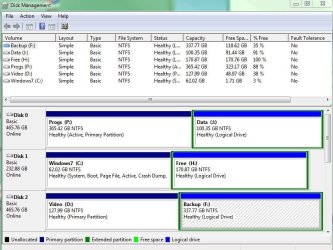
It promptly booted back with all disks aboard - snapshot attached.
 

Attachments

  • Capture.JPG
    Capture.JPG
    85.8 KB · Views: 13

My Computer My Computer

At a glance

7 x64 UltimateAMD Ryzen 516GB DDR4Radeon R7 360
Computer type
PC/Desktop
Computer Manufacturer/Model Number
Custom
OS
7 x64 Ultimate
CPU
AMD Ryzen 5
Motherboard
Gigabyte GA-AB350-Gaming
Memory
16GB DDR4
Graphics Card(s)
Radeon R7 360
Monitor(s) Displays
2 x Dell U2518D
Screen Resolution
2560x1440 2560x1440
Hard Drives
WD 500GB x2
Samsung SSD 128MB (OS)
XPG SX8200 Pro M.2 2280 1TB
PSU
Antec 500
Cooling
Hyper 212 EVO
Keyboard
Logitech cordless K800
Mouse
Logitech M510
Antivirus
Avira
Is the data visible on Disk0 now? It doesn't appear to have much on it.

I would reinstall Programs to C as they should be to keep them together with the OS for imaging purposes, since they become part of the OS when integrated into Registry.

Also no other but an OS drive should be marked Active as it can derail the Win7 boot files to itself when you run Repairs. For this reason I would also have the OS drive in Disk0 slot since Repairs/Installer writes/repairs boot files to the first Active partition it finds.
 
I take your suggestions under advisement. I have historically kept my prgrams on a separate drive, so that a windows issue doesnt have to wipe out the whole system.

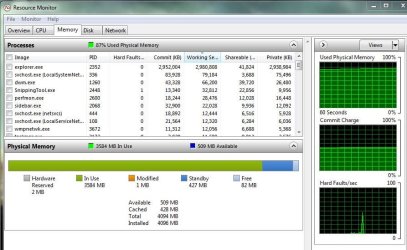
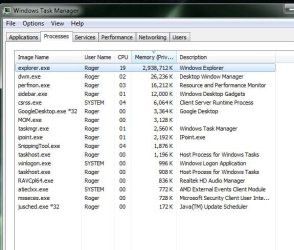
That said, I think I have other issues that may be contributing. Explorer is hogging memory over time and eventually this causes a crash and that messes the MBR ... leading to drive recognition issues. Does that sound plausible?
 

Attachments

  • Capture3.JPG
    Capture3.JPG
    84.2 KB · Views: 4
  • Capture2.JPG
    Capture2.JPG
    56.8 KB · Views: 4

My Computer My Computer

At a glance

7 x64 UltimateAMD Ryzen 516GB DDR4Radeon R7 360
Computer type
PC/Desktop
Computer Manufacturer/Model Number
Custom
OS
7 x64 Ultimate
CPU
AMD Ryzen 5
Motherboard
Gigabyte GA-AB350-Gaming
Memory
16GB DDR4
Graphics Card(s)
Radeon R7 360
Monitor(s) Displays
2 x Dell U2518D
Screen Resolution
2560x1440 2560x1440
Hard Drives
WD 500GB x2
Samsung SSD 128MB (OS)
XPG SX8200 Pro M.2 2280 1TB
PSU
Antec 500
Cooling
Hyper 212 EVO
Keyboard
Logitech cordless K800
Mouse
Logitech M510
Antivirus
Avira
There is no use for separated Programs if Win7 becomes irreparable because they must be reinstalled anyway.

Not so for User files which can be protected in their own separate data partiUser Folders - Change Default Location tion linked thusly:

What I would do is clean reinstall to get a perfect reinstall with Programs onboard, then we can troubleshoot the issues which may have to do with other install irregularities that will be shaken out: Reinstalling Windows 7

Be sure to unplug all other HD's during reinstall, then wipe the target HD first using PW CD to clear the boot sector.http://www.sevenforums.com/tutorials/91339-ssd-hdd-optimize-windows-reinstallation.html
 
What I would do is clean reinstall to get a perfect reinstall with Programs onboard, then we can troubleshoot the issues which may have to do with other install irregularities that will be shaken out: Reinstalling Windows 7

No offense, but there are 42 GB of programs on that drive! :party:

Assuming I undertook that task, I don't see how I'm any further ahead. You seem to be saying that whenever something screws up I should meticulously reinstall windows and all my programs. Why is it any easier to troubleshoot what is perhaps a windows problem, just because my programs are on the same drive?
 

My Computer My Computer

At a glance

7 x64 UltimateAMD Ryzen 516GB DDR4Radeon R7 360
Computer type
PC/Desktop
Computer Manufacturer/Model Number
Custom
OS
7 x64 Ultimate
CPU
AMD Ryzen 5
Motherboard
Gigabyte GA-AB350-Gaming
Memory
16GB DDR4
Graphics Card(s)
Radeon R7 360
Monitor(s) Displays
2 x Dell U2518D
Screen Resolution
2560x1440 2560x1440
Hard Drives
WD 500GB x2
Samsung SSD 128MB (OS)
XPG SX8200 Pro M.2 2280 1TB
PSU
Antec 500
Cooling
Hyper 212 EVO
Keyboard
Logitech cordless K800
Mouse
Logitech M510
Antivirus
Avira
You seem to be saying that whenever something screws up I should meticulously reinstall windows and all my programs.
If you don't have a "system image" that you can instantly restore from, then in worst case where a Windows reinstall is required then yes... you WOULD also have to then reinstall all of your application programs.

You can't just always RUN programs from a \Program Files directory unless they're written and packaged to be "portable". But most programs create registry entries, desktop and start menu shortcuts, etc., that are the direct result of running their INSTALLer. Simply having the resulting \Program Files folder for that program is just one of many things making up its usability.

So simply putting the \Program Files parent folder on a second drive is no different than putting it on your main C-drive. It cannot just be used to run programs following a new fresh Windows install which when installed originally created all of those other Windows objects as well as the program folder itself.

You can of course include any drives you want in a "system image", over and above the bare minimum boot-related drives which are grayed-out and which you can't de-select. But you can add more, if you want. So if you really had placed your \Program Files folder on a second drive you SHOULD include that second drive in the "system image". It is this "system image" which is how you instantly recover, which in your case could have included both C as well as the other partition containing \Program Files if it was on a second partition.

But it is not having your \Program Files on a second physical hard drive from the disk containing your Windows partition that is going to provide "instant usability" for all 42GB of your programs. You HAVE TO reinstall them all into the newly installed Win7. That's just the truth, in the absence of a "system image" restore.
 

My Computer My Computer

At a glance

Windows 7 Pro x64 (1), Win7 Pro X64 (2)i5-3350p 3.1Ghz/6MB-cache (1); E8400 3.0Ghz/6...8GB PC3-12800 DDR3 (1); 4GB PC3-10600 DDR3 (2)ATI HD7750 (1), (see TV cards); ATI R7 250 (2)
Computer type
PC/Desktop
Computer Manufacturer/Model Number
Home-built, two systems (1) and (2)
OS
Windows 7 Pro x64 (1), Win7 Pro X64 (2)
CPU
i5-3350p 3.1Ghz/6MB-cache (1); E8400 3.0Ghz/6MB-cache (2)
Motherboard
ASUS P8Z77-V Pro (1); ASUS P5Q3 (2)
Memory
8GB PC3-12800 DDR3 (1); 4GB PC3-10600 DDR3 (2)
Graphics Card(s)
ATI HD7750 (1), (see TV cards); ATI R7 250 (2)
Sound Card
Realtek ALC892 HD Audio (1); Realtek ALC1200 HD Audio (2)
Monitor(s) Displays
Eizo HD2441W LCD, Eizo S2433W (1); Eizo 24" S2433W (2)
Screen Resolution
1920x1200, 1920x1200 (1); 1920x1200 (2)
Hard Drives
(1) 1TB SATA-II (7200RPM), 2x2TB SATA-III (7200RPM), 250GB SATA-III (10000RPM) for OS; 2x2TB external USB 3.0

(2) 320GB SATA-II (7200RPM), 750GB SATA-II (7200RPM), 150GB SATA-II (10000RPM) for OS; 2TB external USB 3.0
PSU
Nesteq ECS-6001 600W (1); Nesteq ECS-5001 500W (2)
Case
Acousti-Case 360 (1) and (2)
Cooling
Noctua NH-U12P SE2 for CPU, 2x120mm case fans (1) and (2)
Keyboard
IBM PS/2 (1) and (2)
Mouse
Logitech MX Revolution wireless (1); Microsoft wired (2)
Internet Speed
100mbps down / 10mbps up
Antivirus
Microsoft Security Essentials; Malwarebyte Anti-Malware Pro
Browser
Firefox
Other Info
Ceton InfiniTV 4-tuner cablecard-enabled TV card as well as Hauppauge HVR-2250 OTA/ATSC 2-tuner TV card in (1), running under Win7 WMC
I only said that is what I would do, as a clean reinstall specialist who insists on getting it perfect from the start then relies on an image in place of any further reinstalls.

So what are the problems you need to work out now, if the drive is showing up?

Ii would work through the logs to resolve repeat errors, use the System Resources, retest the HD regularly with both Disk Check and HD Diagnostics: troubleshooting steps
 
Back
Top