Solved Is there a place to discuss Microsoft Internet Explorer?

thricipio

New member
Member
Local time
5:19 PM
Messages
65
I've been using MSIE more or less exclusively for quite some time now, but since I've been using IE9 on Windows 7, I've been plagued by glitches that I've grown tired of dealing with. I'd like to keep using IE, since I like its functionality and find it the most aesthetically pleasing browser I've seen. But the glitches are getting me down. Seems like these problems should be fixable. I just need to know where to go to get help.

Thanks...

...and apologies if it's bad form to ask this question here. I just don't know where else to look, and the Seven crowd seems to know a lot about all kinds of things related to Windows.

—Thri
 

My Computer My Computer

At a glance

Windows 7 Professional x64Intel® Core™ i7-2860QM20GBNVIDIA Quadro 1000M
Computer type
PC/Desktop
Computer Manufacturer/Model Number
Lenovo Thinkpad W520 (4270-CTO)
OS
Windows 7 Professional x64
CPU
Intel® Core™ i7-2860QM
Memory
20GB
Graphics Card(s)
NVIDIA Quadro 1000M
Screen Resolution
1920 × 1080
Browser
Mozilla Firefox
Hellp Thri,

What type of glitches are you having? :)
 

My Computer My Computer

At a glance

64-bit Windows 11 Pro for WorkstationsIntel i7-8700K OC'd to 5 GHz64 GB (4x16GB) G.SKILL TridentZ RGB DDR4 3600...ASUS ROG-STRIX-GTX1080TI-O11G-GAMING
Computer type
PC/Desktop
Computer Manufacturer/Model Number
Self built custom
OS
64-bit Windows 11 Pro for Workstations
CPU
Intel i7-8700K OC'd to 5 GHz
Motherboard
ASUS ROG Maximus XI Formula Z390
Memory
64 GB (4x16GB) G.SKILL TridentZ RGB DDR4 3600 MHz
Graphics Card(s)
ASUS ROG-STRIX-GTX1080TI-O11G-GAMING
Sound Card
Integrated
Monitor(s) Displays
2 x Samsung Odyssey G7 27"
Screen Resolution
2560x1440
Hard Drives
1TB Samsung 990 PRO M.2,
4TB Samsung 990 PRO PRO M.2,
TerraMaster F8 SSD Plus NAS
PSU
Seasonic Prime Titanium 850W
Case
Thermaltake Core P3
Cooling
Corsair Hydro H115i
Keyboard
Logitech wireless K800
Mouse
Logitech MX Master 4
Internet Speed
2 Gb/s Download and 100 Mb/s Upload
Antivirus
Malwarebyte Anti-Malware Premium
Browser
Google Chrome
Other Info
Logitech Z625 speaker system,
Logitech BRIO 4K Pro webcam,
HP Color LaserJet Pro MFP M477fdn,
APC SMART-UPS RT 1000 XL - SURT1000XLI,
Galaxy S23 Plus phone
Wow! That was quick: not only did I find out where to get help, my post got moved to show me *where* to get the help... and someone is already responding!

Thank you Brink!

Now, to my problems . . . there are probably just two (or three) . . .

Video streaming: I think Flash-based. When streaming a (Flash?) video, the top of the "screen" is overlayed with a green color. I think I can see through the green, but it's not fun to look at!

• that's one problem with video streaming, and it's the nicer of the two. The other is that the browser session crashes. IE recovers itself and re-presents the page, but if one tries to play the video again, one gets the same result: CRASH!

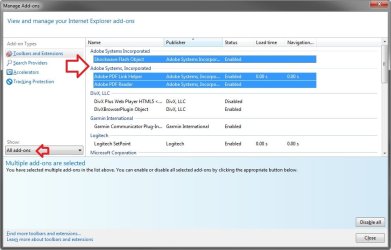
PDF Viewing within the browser - most of the time, PDF's won't come up within the browser as they're supposed to. Rather, they come up within Acrobat Reader, outside of the browser. When I return to the browser window, it's blank. At that point, of course, I can return to the page that had the PDF link in the first place.

On this last (PDF) problem, I asked about this some time ago, somewhere within the Seven Forums world, and was advised to perform the correct set-up with Acrobat (to tell it to open PDF's within a browser when applicable). I did that, but it made no difference.

This condition seems to come and go with no clearly discernable cause either way, particularly, the going. Most of the time the condition exists. However, it does seem that if I access the page containing the PDF link within another browser, say, Mozilla Firefox, then the next time I open an IE session, and repeat the scenario, the PDF will open within IE as it's supposed to. But the cure is always transient.

These are only two real problems, but I have frequent cause to encounter both these glitches, and I'm really getting tired of it... so... if there's help out there to be had, I'm all ears... and eyes.

Before closing, I should emphasize that neither of these problems occur ever, within Firefox.

Thanks for taking the time to read this and for any help you can provide.

—Thri

PS - If these issues with IE9 aren't (somewhat) readily resolvable, is MSIE v10 available? And if so, does it run on Windows 7?
 

My Computer My Computer

At a glance

Windows 7 Professional x64Intel® Core™ i7-2860QM20GBNVIDIA Quadro 1000M
Computer type
PC/Desktop
Computer Manufacturer/Model Number
Lenovo Thinkpad W520 (4270-CTO)
OS
Windows 7 Professional x64
CPU
Intel® Core™ i7-2860QM
Memory
20GB
Graphics Card(s)
NVIDIA Quadro 1000M
Screen Resolution
1920 × 1080
Browser
Mozilla Firefox

My Computer My Computer

At a glance

64-bit Windows 11 Pro for WorkstationsIntel i7-8700K OC'd to 5 GHz64 GB (4x16GB) G.SKILL TridentZ RGB DDR4 3600...ASUS ROG-STRIX-GTX1080TI-O11G-GAMING
Computer type
PC/Desktop
Computer Manufacturer/Model Number
Self built custom
OS
64-bit Windows 11 Pro for Workstations
CPU
Intel i7-8700K OC'd to 5 GHz
Motherboard
ASUS ROG Maximus XI Formula Z390
Memory
64 GB (4x16GB) G.SKILL TridentZ RGB DDR4 3600 MHz
Graphics Card(s)
ASUS ROG-STRIX-GTX1080TI-O11G-GAMING
Sound Card
Integrated
Monitor(s) Displays
2 x Samsung Odyssey G7 27"
Screen Resolution
2560x1440
Hard Drives
1TB Samsung 990 PRO M.2,
4TB Samsung 990 PRO PRO M.2,
TerraMaster F8 SSD Plus NAS
PSU
Seasonic Prime Titanium 850W
Case
Thermaltake Core P3
Cooling
Corsair Hydro H115i
Keyboard
Logitech wireless K800
Mouse
Logitech MX Master 4
Internet Speed
2 Gb/s Download and 100 Mb/s Upload
Antivirus
Malwarebyte Anti-Malware Premium
Browser
Google Chrome
Other Info
Logitech Z625 speaker system,
Logitech BRIO 4K Pro webcam,
HP Color LaserJet Pro MFP M477fdn,
APC SMART-UPS RT 1000 XL - SURT1000XLI,
Galaxy S23 Plus phone
Well, Brink, obviously it's been some time since you posted your suggestion. I guess I'd gotten a little too used to using Firefox which is nice enough... but I thought I should finally get IE working again ... if possible. And maybe it's not!?

So, I took your suggestions and did a total reset. That didn't work.

Then I thought (then being this morning), "What the heck, I'll try installing IE-10 and hope for the best. And guess what: it worked!

Here's the weird part — it worked at first. Then it stopped working.

I should clarify: I think PDF's are coming up inside the browser okay... so that works. However, the video (Shockwave, Flash) isn't working. Like I said, that worked at first... but no more.

I'm bummed and completely stumped. :confused:

I still don't want to walk away from IE, but I'm gonna need some help from some heavy hitters if I'm gonna get this working. So if anyone has any suggestions, I'm all eyes.

Thanks,
—Thri
 

My Computer My Computer

At a glance

Windows 7 Professional x64Intel® Core™ i7-2860QM20GBNVIDIA Quadro 1000M
Computer type
PC/Desktop
Computer Manufacturer/Model Number
Lenovo Thinkpad W520 (4270-CTO)
OS
Windows 7 Professional x64
CPU
Intel® Core™ i7-2860QM
Memory
20GB
Graphics Card(s)
NVIDIA Quadro 1000M
Screen Resolution
1920 × 1080
Browser
Mozilla Firefox
I can think of a couple of things.

If you are using the 64bit version of IE try the 32bit version, Correspondingly, if you are using the 32bit try the 64bit.

and,

Check Internet Options, under Advance Tab right at the top, see if "Use software rendering instead of GPU rendering" is checked, if it is uncheck it.

http://www.sevenforums.com/tutorial...lorer-gpu-hardware-acceleration-turn-off.html

Again, correspondingly if it is unchecked, then check it. Restart IE and see if that helps.
 
Last edited by a moderator:

My Computer My Computer

At a glance

Originally Win 7 Hm Prem x64 Ver 6.1.7600 Bui...Intel i3 530 2.93GHz, 2933MHz 2 Cores 4 Logic...6GB of 1,333MHz DDR3 SDRAM32MB Intel Graphics Media Accelerator HD IGChip
Computer type
PC/Desktop
Computer Manufacturer/Model Number
Gateway DX4831-01e (Mid-Tower Desktop)
OS
Originally Win 7 Hm Prem x64 Ver 6.1.7600 Build 7601-SP1 | Upgraded to Windows 10 December 14, 2019
CPU
Intel i3 530 2.93GHz, 2933MHz 2 Cores 4 Logical Processors
Motherboard
Gateway H57M01 133 megahertz
Memory
6GB of 1,333MHz DDR3 SDRAM
Graphics Card(s)
32MB Intel Graphics Media Accelerator HD IGChip
Sound Card
Realtek High Definition Audio
Monitor(s) Displays
Gateway HX2000 20inch TFT active matrix TN
Screen Resolution
1600 x 900 x 59 hertz
Hard Drives
WDC WD10EADS-00M2B0 [HDD] (1000.20 GB) -- drive 0,
HL-DT-ST DVDRAM GH41N [CD-ROM dr]
Four card readers, and Four USB 2.0
PSU
300watts.
Case
Mid-Tower Desktop
Cooling
Stock from Gateway
Keyboard
Natural Ergonomic Keyboard 4000, see Other Info
Mouse
Orig. Gateway wore out now using Insignia USB wired optical
Internet Speed
Vz FIOS 10ms png 57.64Mbps down 65.53Mbps up Speedtest.org
Antivirus
Zamana Anti-logger with Anti-malware, MSE, Windows Firewall,
Browser
IE11.0.9600.19399-Upd ver11.0.135, Firefox 68.0.1 x64
Other Info
System Specs by Belarc.

BIOS: American Megatrends Inc. P01-A0 11/17/2009

Replaced the MS 'Natural' Standard PS/2 Enhanced 101-102 Keyboard with a new Natural Ergonomic Keyboard 4000 on August 1st 2014.

Canon Pixma MG3222 Printer.

Updated to IE11 on 12102015 | Fios Quantum Router g1100

Additional AV: SpywareBlaster, manual Mbam, SAS
Anak–

Thanks for the suggestion. I've turned off GPU Acceleration by checking the Use software rendering... checkbox. With limited testing — I'm in a Panera and my WiFi connection's not so great — it seems that the immediate browser-session-crash problem has abated. However, I now (once again) have the problem of the green banding along the top of Youtube videos. Interestingly, this was the initial symptom I had for quite some time before it escalated into the instant crash problem.

Regarding the IE-32 vs. IE-64, I'd like to try that too. How do I find the different versions, assuming they're both on my computer? Seems to me I noticed a 64-bit version shortly after I did the initial Win7 install, but have lost track of where it is.

Any hints?

Anyway, thanks for the help thus far. :)

—Thri
 
Last edited:

My Computer My Computer

At a glance

Windows 7 Professional x64Intel® Core™ i7-2860QM20GBNVIDIA Quadro 1000M
Computer type
PC/Desktop
Computer Manufacturer/Model Number
Lenovo Thinkpad W520 (4270-CTO)
OS
Windows 7 Professional x64
CPU
Intel® Core™ i7-2860QM
Memory
20GB
Graphics Card(s)
NVIDIA Quadro 1000M
Screen Resolution
1920 × 1080
Browser
Mozilla Firefox
Thri,

In 64-bit Windows, the 32-bit IE is located here:

"C:\Program Files (x86)\Internet Explorer\iexplore.exe"

...and 64-bit IE here:

"C:\Program Files\Internet Explorer\iexplore.exe"
 

My Computer My Computer

At a glance

64-bit Windows 11 Pro for WorkstationsIntel i7-8700K OC'd to 5 GHz64 GB (4x16GB) G.SKILL TridentZ RGB DDR4 3600...ASUS ROG-STRIX-GTX1080TI-O11G-GAMING
Computer type
PC/Desktop
Computer Manufacturer/Model Number
Self built custom
OS
64-bit Windows 11 Pro for Workstations
CPU
Intel i7-8700K OC'd to 5 GHz
Motherboard
ASUS ROG Maximus XI Formula Z390
Memory
64 GB (4x16GB) G.SKILL TridentZ RGB DDR4 3600 MHz
Graphics Card(s)
ASUS ROG-STRIX-GTX1080TI-O11G-GAMING
Sound Card
Integrated
Monitor(s) Displays
2 x Samsung Odyssey G7 27"
Screen Resolution
2560x1440
Hard Drives
1TB Samsung 990 PRO M.2,
4TB Samsung 990 PRO PRO M.2,
TerraMaster F8 SSD Plus NAS
PSU
Seasonic Prime Titanium 850W
Case
Thermaltake Core P3
Cooling
Corsair Hydro H115i
Keyboard
Logitech wireless K800
Mouse
Logitech MX Master 4
Internet Speed
2 Gb/s Download and 100 Mb/s Upload
Antivirus
Malwarebyte Anti-Malware Premium
Browser
Google Chrome
Other Info
Logitech Z625 speaker system,
Logitech BRIO 4K Pro webcam,
HP Color LaserJet Pro MFP M477fdn,
APC SMART-UPS RT 1000 XL - SURT1000XLI,
Galaxy S23 Plus phone
…the 32-bit IE is located here:

"C:\Program Files (x86)\Internet Explorer\iexplore.exe"

...and 64-bit IE here:

"C:\Program Files\Internet Explorer\iexplore.exe"
Thanks, Brink. —Thri
 

My Computer My Computer

At a glance

Windows 7 Professional x64Intel® Core™ i7-2860QM20GBNVIDIA Quadro 1000M
Computer type
PC/Desktop
Computer Manufacturer/Model Number
Lenovo Thinkpad W520 (4270-CTO)
OS
Windows 7 Professional x64
CPU
Intel® Core™ i7-2860QM
Memory
20GB
Graphics Card(s)
NVIDIA Quadro 1000M
Screen Resolution
1920 × 1080
Browser
Mozilla Firefox
If I may expand on Brink's reply.
Since you have the x64 version of the Windows 7 OS, you should also be able to find both IE's in Start Orb >All Programs, look at the top of the list you should see both of them there.

If the change in browser settings to turn off GPU/hardware acceleration is helping, there is one more place to check.


  • Go to any Flash video, it doesn't matter if it is playing or not.
  • Right click anywhere on the playing area, you will see a context menu appear.
  • Third from the bottom you will see Settings, click on that, a small box will appear.
  • You should, but if you do not see the Display tab open, click on the small monitor at the bottom, it is the first icon on the left.
  • If Enable Hardware Acceleration is checked, uncheck it.
  • You may see the green bar disappear immediately, if you don't, stop, and then restart the video. It should be gone.
  • If it still isn't, try a new browser tab with a new video, it can be the same video.
  • What you are trying to accomplish is a new instance of playback.
  • You may have to go so far as restarting your machine.

Go back to the Context menu, you can look in Global Settings, but do not change any settings in there.
And, make sure you have the latest version of Flash, click on About, and it will take you to Adobe's version checker page.
There, it will tell you what version you have, and you can check yours against the list below, if your version is lower/older, update it.

You do have a pretty powerful machine, but changing these settings could indicate that you may need to update your video drivers, ergo, the cause of your crashes.

See: Lenovo Support - Drivers & Software ThinkPad W520 (4270) (US)

You may have to change the location (US), it depends on where you are, and thank you for posting your system specs, they could be expanded upon, but what was there allowed me to find the lenovo support page for you.
 

My Computer My Computer

At a glance

Originally Win 7 Hm Prem x64 Ver 6.1.7600 Bui...Intel i3 530 2.93GHz, 2933MHz 2 Cores 4 Logic...6GB of 1,333MHz DDR3 SDRAM32MB Intel Graphics Media Accelerator HD IGChip
Computer type
PC/Desktop
Computer Manufacturer/Model Number
Gateway DX4831-01e (Mid-Tower Desktop)
OS
Originally Win 7 Hm Prem x64 Ver 6.1.7600 Build 7601-SP1 | Upgraded to Windows 10 December 14, 2019
CPU
Intel i3 530 2.93GHz, 2933MHz 2 Cores 4 Logical Processors
Motherboard
Gateway H57M01 133 megahertz
Memory
6GB of 1,333MHz DDR3 SDRAM
Graphics Card(s)
32MB Intel Graphics Media Accelerator HD IGChip
Sound Card
Realtek High Definition Audio
Monitor(s) Displays
Gateway HX2000 20inch TFT active matrix TN
Screen Resolution
1600 x 900 x 59 hertz
Hard Drives
WDC WD10EADS-00M2B0 [HDD] (1000.20 GB) -- drive 0,
HL-DT-ST DVDRAM GH41N [CD-ROM dr]
Four card readers, and Four USB 2.0
PSU
300watts.
Case
Mid-Tower Desktop
Cooling
Stock from Gateway
Keyboard
Natural Ergonomic Keyboard 4000, see Other Info
Mouse
Orig. Gateway wore out now using Insignia USB wired optical
Internet Speed
Vz FIOS 10ms png 57.64Mbps down 65.53Mbps up Speedtest.org
Antivirus
Zamana Anti-logger with Anti-malware, MSE, Windows Firewall,
Browser
IE11.0.9600.19399-Upd ver11.0.135, Firefox 68.0.1 x64
Other Info
System Specs by Belarc.

BIOS: American Megatrends Inc. P01-A0 11/17/2009

Replaced the MS 'Natural' Standard PS/2 Enhanced 101-102 Keyboard with a new Natural Ergonomic Keyboard 4000 on August 1st 2014.

Canon Pixma MG3222 Printer.

Updated to IE11 on 12102015 | Fios Quantum Router g1100

Additional AV: SpywareBlaster, manual Mbam, SAS
If I may expand on Brink's reply.
Since you have the x64 version of the Windows 7 OS, you should also be able to find both IE's in Start Orb > All Programs, look at the top of the list you should see both of them there.
·
· [snip]
·
Thanks again, Anak. Looks like you've given me some good stuff to try and I very much appreciate it. I won't have time to look at this until I return from work... this evening, but I'll dig in when I can and get back to you.

I can tell you that I've already found and renamed the 32/64-bit IE shortcuts and tested them both relative to GPU Acceleration on/off. RESULT: GPU-on crashed the session in both 32/64-bit versions. Turning it off still leaves the green banding at the top under bother versions.

Got to run now. More later... 'Til later, thanks again.

—Thri
 
Last edited:

My Computer My Computer

At a glance

Windows 7 Professional x64Intel® Core™ i7-2860QM20GBNVIDIA Quadro 1000M
Computer type
PC/Desktop
Computer Manufacturer/Model Number
Lenovo Thinkpad W520 (4270-CTO)
OS
Windows 7 Professional x64
CPU
Intel® Core™ i7-2860QM
Memory
20GB
Graphics Card(s)
NVIDIA Quadro 1000M
Screen Resolution
1920 × 1080
Browser
Mozilla Firefox
Came across this today: HTG Explains: What You Need to Know About NVIDIA Optimus, I'm not sure if it will apply to you or not.

More:
Using the NVIDIA Optimus Graphics feature

Some ThinkPad notebooks support NVIDIA Optimus Graphics.
NVIDIA Optimus Graphics enables a dynamic switch, that is, a switch with no need to restart your computer between High Performance and Energy Saving Graphics.

Note: To use the DisplayPort feature or DVI monitor on the docking station, you need to switch to High Performance Graphics.

Switching the Graphics Processing Unit
If your computer supports NVIDIA Optimus Graphics, the Graphics Processing Unit is switched automatically depending on the settings of the power plan you use.

Note: If your computer is running Windows XP, you cannot switch the GPU.

Source: Page 84; User Guide ThinkPad T520, T520i, and W520.pdf
Here are some specs I found for the 520/4270:

Graphic Controller Video chipsets:
  • Intel HD Graphics 3000
  • NVIDIA® Quadro® 1000M
  • NVIDIA® Quadro® 2000M
 

My Computer My Computer

At a glance

Originally Win 7 Hm Prem x64 Ver 6.1.7600 Bui...Intel i3 530 2.93GHz, 2933MHz 2 Cores 4 Logic...6GB of 1,333MHz DDR3 SDRAM32MB Intel Graphics Media Accelerator HD IGChip
Computer type
PC/Desktop
Computer Manufacturer/Model Number
Gateway DX4831-01e (Mid-Tower Desktop)
OS
Originally Win 7 Hm Prem x64 Ver 6.1.7600 Build 7601-SP1 | Upgraded to Windows 10 December 14, 2019
CPU
Intel i3 530 2.93GHz, 2933MHz 2 Cores 4 Logical Processors
Motherboard
Gateway H57M01 133 megahertz
Memory
6GB of 1,333MHz DDR3 SDRAM
Graphics Card(s)
32MB Intel Graphics Media Accelerator HD IGChip
Sound Card
Realtek High Definition Audio
Monitor(s) Displays
Gateway HX2000 20inch TFT active matrix TN
Screen Resolution
1600 x 900 x 59 hertz
Hard Drives
WDC WD10EADS-00M2B0 [HDD] (1000.20 GB) -- drive 0,
HL-DT-ST DVDRAM GH41N [CD-ROM dr]
Four card readers, and Four USB 2.0
PSU
300watts.
Case
Mid-Tower Desktop
Cooling
Stock from Gateway
Keyboard
Natural Ergonomic Keyboard 4000, see Other Info
Mouse
Orig. Gateway wore out now using Insignia USB wired optical
Internet Speed
Vz FIOS 10ms png 57.64Mbps down 65.53Mbps up Speedtest.org
Antivirus
Zamana Anti-logger with Anti-malware, MSE, Windows Firewall,
Browser
IE11.0.9600.19399-Upd ver11.0.135, Firefox 68.0.1 x64
Other Info
System Specs by Belarc.

BIOS: American Megatrends Inc. P01-A0 11/17/2009

Replaced the MS 'Natural' Standard PS/2 Enhanced 101-102 Keyboard with a new Natural Ergonomic Keyboard 4000 on August 1st 2014.

Canon Pixma MG3222 Printer.

Updated to IE11 on 12102015 | Fios Quantum Router g1100

Additional AV: SpywareBlaster, manual Mbam, SAS
·
· [snip]
·
• Third from the bottom you will see Settings, click on that, a small box will appear.
• …if you do not see the Display tab open, click on the small monitor at the bottom, it is the first icon on the left.
• If Enable Hardware Acceleration is checked, uncheck it.
·
· [snip]
·
Anak–
You're my new SevenForums hero: I performed the steps you suggested and . . . Voila! . . . no more green band!

I just noticed that you've posted a new message (i.e., subsequent to the one containing the above quote) and it looks like you've found some references I'd do well to explore. And I will.

I think the general upshot of the help both you and Brink have provided, if I'm interpreting things correctly here, is that my problems may very well stem from less-than-current drivers for my NVIDIA GPU; or perhaps some NVIDIA parameter settings that need to be tweaked; or some combination of both.

Put another way: it might be a good idea to use IE's GPU Acceleration feature, as well as Flash's Hardware Acceleration, rather than disabling these features to correct problems that really stem from GPU/NVIDIA-related issues.

So, it looks like more homework for me.

In the meantime, you and Brink have given me some great relief. Now I can resume using IE without having to switch over to Firefox whenever I want to view a video, etc.

Also, you've helped me get PDF's coming up within IE, and that's great too.

So, thank you both.

I'll keep you apprised on how I make out with my GPU/NVIDIA investigations.

Thanks, guys.

The people who participate and help out in SevenForums are the best I've seen anywhere on the 'Net.

Thanks again.
—Thri
 

My Computer My Computer

At a glance

Windows 7 Professional x64Intel® Core™ i7-2860QM20GBNVIDIA Quadro 1000M
Computer type
PC/Desktop
Computer Manufacturer/Model Number
Lenovo Thinkpad W520 (4270-CTO)
OS
Windows 7 Professional x64
CPU
Intel® Core™ i7-2860QM
Memory
20GB
Graphics Card(s)
NVIDIA Quadro 1000M
Screen Resolution
1920 × 1080
Browser
Mozilla Firefox
Your welcome, and thank you for those kind words.

if I'm interpreting things correctly here, is that my problems may very well stem from less-than-current drivers for my NVIDIA GPU; or perhaps some NVIDIA parameter settings that need to be tweaked; or some combination of both.

Put another way: it might be a good idea to use IE's GPU Acceleration feature, as well as Flash's Hardware Acceleration, rather than disabling these features to correct problems that really stem from GPU/NVIDIA-related issues.

So, it looks like more homework for me.
Spot on.

You would have to check the driver version to make sure you need the update and if you do update make sure you create a restore point, and have a plan of action before you update. Sometimes a driver update can make things worse.
Do a search to see if anyone else has run into quadro/optimus problems.

But I would start with the parameter settings first, go with your changes for a few days to see if the display gets better or worse.

All things being equal, it would be the best of both worlds if the browser, and flash settings were returned to their defaults and your nvidia card was running optimus prime (couldn't help myself on the pun).
 

My Computer My Computer

At a glance

Originally Win 7 Hm Prem x64 Ver 6.1.7600 Bui...Intel i3 530 2.93GHz, 2933MHz 2 Cores 4 Logic...6GB of 1,333MHz DDR3 SDRAM32MB Intel Graphics Media Accelerator HD IGChip
Computer type
PC/Desktop
Computer Manufacturer/Model Number
Gateway DX4831-01e (Mid-Tower Desktop)
OS
Originally Win 7 Hm Prem x64 Ver 6.1.7600 Build 7601-SP1 | Upgraded to Windows 10 December 14, 2019
CPU
Intel i3 530 2.93GHz, 2933MHz 2 Cores 4 Logical Processors
Motherboard
Gateway H57M01 133 megahertz
Memory
6GB of 1,333MHz DDR3 SDRAM
Graphics Card(s)
32MB Intel Graphics Media Accelerator HD IGChip
Sound Card
Realtek High Definition Audio
Monitor(s) Displays
Gateway HX2000 20inch TFT active matrix TN
Screen Resolution
1600 x 900 x 59 hertz
Hard Drives
WDC WD10EADS-00M2B0 [HDD] (1000.20 GB) -- drive 0,
HL-DT-ST DVDRAM GH41N [CD-ROM dr]
Four card readers, and Four USB 2.0
PSU
300watts.
Case
Mid-Tower Desktop
Cooling
Stock from Gateway
Keyboard
Natural Ergonomic Keyboard 4000, see Other Info
Mouse
Orig. Gateway wore out now using Insignia USB wired optical
Internet Speed
Vz FIOS 10ms png 57.64Mbps down 65.53Mbps up Speedtest.org
Antivirus
Zamana Anti-logger with Anti-malware, MSE, Windows Firewall,
Browser
IE11.0.9600.19399-Upd ver11.0.135, Firefox 68.0.1 x64
Other Info
System Specs by Belarc.

BIOS: American Megatrends Inc. P01-A0 11/17/2009

Replaced the MS 'Natural' Standard PS/2 Enhanced 101-102 Keyboard with a new Natural Ergonomic Keyboard 4000 on August 1st 2014.

Canon Pixma MG3222 Printer.

Updated to IE11 on 12102015 | Fios Quantum Router g1100

Additional AV: SpywareBlaster, manual Mbam, SAS
·
· [snip]
·
Spot on.
·
· [snip]
·
All things being equal, it would be the best of both worlds if the browser, and flash settings were returned to their defaults and your nvidia card was running optimus prime (couldn't help myself on the pun).
Thanks for confirming my general interpretation of what would be the ideal, longer term result to achieve, as well as the more specific guidance on how to proceed.

So much appreciated. :thumbsup:

—Thri
 

My Computer My Computer

At a glance

Windows 7 Professional x64Intel® Core™ i7-2860QM20GBNVIDIA Quadro 1000M
Computer type
PC/Desktop
Computer Manufacturer/Model Number
Lenovo Thinkpad W520 (4270-CTO)
OS
Windows 7 Professional x64
CPU
Intel® Core™ i7-2860QM
Memory
20GB
Graphics Card(s)
NVIDIA Quadro 1000M
Screen Resolution
1920 × 1080
Browser
Mozilla Firefox

My Computer My Computer

At a glance

Originally Win 7 Hm Prem x64 Ver 6.1.7600 Bui...Intel i3 530 2.93GHz, 2933MHz 2 Cores 4 Logic...6GB of 1,333MHz DDR3 SDRAM32MB Intel Graphics Media Accelerator HD IGChip
Computer type
PC/Desktop
Computer Manufacturer/Model Number
Gateway DX4831-01e (Mid-Tower Desktop)
OS
Originally Win 7 Hm Prem x64 Ver 6.1.7600 Build 7601-SP1 | Upgraded to Windows 10 December 14, 2019
CPU
Intel i3 530 2.93GHz, 2933MHz 2 Cores 4 Logical Processors
Motherboard
Gateway H57M01 133 megahertz
Memory
6GB of 1,333MHz DDR3 SDRAM
Graphics Card(s)
32MB Intel Graphics Media Accelerator HD IGChip
Sound Card
Realtek High Definition Audio
Monitor(s) Displays
Gateway HX2000 20inch TFT active matrix TN
Screen Resolution
1600 x 900 x 59 hertz
Hard Drives
WDC WD10EADS-00M2B0 [HDD] (1000.20 GB) -- drive 0,
HL-DT-ST DVDRAM GH41N [CD-ROM dr]
Four card readers, and Four USB 2.0
PSU
300watts.
Case
Mid-Tower Desktop
Cooling
Stock from Gateway
Keyboard
Natural Ergonomic Keyboard 4000, see Other Info
Mouse
Orig. Gateway wore out now using Insignia USB wired optical
Internet Speed
Vz FIOS 10ms png 57.64Mbps down 65.53Mbps up Speedtest.org
Antivirus
Zamana Anti-logger with Anti-malware, MSE, Windows Firewall,
Browser
IE11.0.9600.19399-Upd ver11.0.135, Firefox 68.0.1 x64
Other Info
System Specs by Belarc.

BIOS: American Megatrends Inc. P01-A0 11/17/2009

Replaced the MS 'Natural' Standard PS/2 Enhanced 101-102 Keyboard with a new Natural Ergonomic Keyboard 4000 on August 1st 2014.

Canon Pixma MG3222 Printer.

Updated to IE11 on 12102015 | Fios Quantum Router g1100

Additional AV: SpywareBlaster, manual Mbam, SAS
Your welcome,

If you do decide to update the nvidia drivers, read as much as you can before doing it. I have been seeing problems like this thread:
Nvidia Drivers + Optimus =something stinks here...... - Lenovo Community
Anak-

Thanks for the extra heads-up. I've read the Lenovo thread you posted a link to and I have to confess to a first reaction of, "Yikes!" And a second reaction of, "If it ain't broke, maybe I shouldn't try to fix it." But I realize, after all, it is broke already, which is why I experienced the problems you and Brink have helped me find a workaround for.

So, when I can get myself into more of a general upgrade and maintenance frame of mind, I'll gear myself up (by revisiting this thread and reading others like it) to do what needs to be done. I may put it off for awhile — until I can put together the money for a DRAM upgrade. I currently have 4GB but plan to max out the capacity on my W520 by bringing it up to 32GB.

Anyway, thanks again for the advisory, without which, I could've gotten myself into a real bind, I think.

Gratefully,
—Thri

PS - I just looked at "My System Specs" and noticed that I list for my Graphics Card, NVIDIA Quadro 1000M. I'm thinking this is not the same thing as an Optimus, in which case, the thread you reference may not be relevant (although others may well be).
·—–-·-–—·
I do remember that when I bought this Thinkpad last spring, I blew through my budget, getting everything I wanted except the most powerful graphics chip. I think that might have been a Quadro 2000M, and I remember it was another $250. Since I'm not a gamer, I figured it would've been overkill. Shortly after I made the purchase, I sort of regretted not getting the better GPU, realizing that I hope to do some video editing at some point down the road, and the extra horsepower might come in handy.
·—–-·-–—·
Anyway, maybe there was a whole other class of GPU's (i.e., the Optimus) that I didn't even bother looking at based on it being way out of my price range and so I've just forgotten about it. Or... maybe the Optimus is another name for the Quadro. I guess I should do some investigating.
·—–-·-–—·
All for now... thanks again. —Thri
 
Last edited:

My Computer My Computer

At a glance

Windows 7 Professional x64Intel® Core™ i7-2860QM20GBNVIDIA Quadro 1000M
Computer type
PC/Desktop
Computer Manufacturer/Model Number
Lenovo Thinkpad W520 (4270-CTO)
OS
Windows 7 Professional x64
CPU
Intel® Core™ i7-2860QM
Memory
20GB
Graphics Card(s)
NVIDIA Quadro 1000M
Screen Resolution
1920 × 1080
Browser
Mozilla Firefox
Back
Top