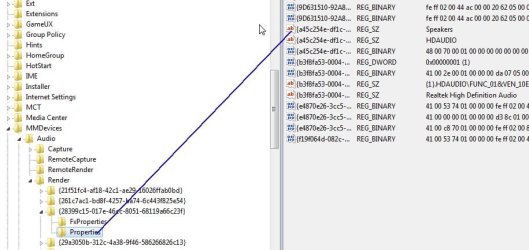
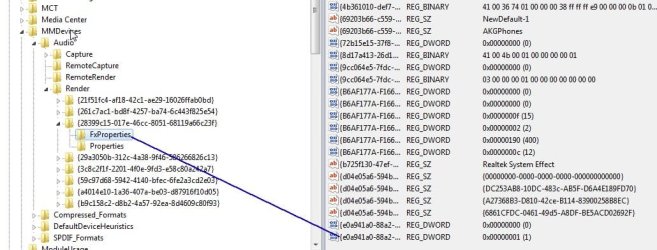
I use my PC for mostly games, but also watching movies and series (I don't see the point in buying a TV and DVD player when I'll only ever use it for DVDs), as a result I like having the 'Loudness Equalization' feature enabled for watching media, and disabled for playing games and listening to music...
Is there a quick way to toggle this on and off? It's a bit irritaing having to right-click the volume control, select properties, etc etc. Would've made more sense to have a "Audio Enhancements" sub-menu when right-clicking the audio icon in the system tray, but apparently MS didn't think of that.
Does anybody have an idea of where this setting is stored? Perhaps in the registry or a settings file somewhere? Any more details would help quite a bit, I can't seem to find much technical information on this feature with a Google search.
Is there a quick way to toggle this on and off? It's a bit irritaing having to right-click the volume control, select properties, etc etc. Would've made more sense to have a "Audio Enhancements" sub-menu when right-clicking the audio icon in the system tray, but apparently MS didn't think of that.
Does anybody have an idea of where this setting is stored? Perhaps in the registry or a settings file somewhere? Any more details would help quite a bit, I can't seem to find much technical information on this feature with a Google search.
My Computer
- Computer type
- PC/Desktop
- OS
- Win 10 x64 Pro x64 / Ubuntu 15.10 x64
- CPU
- Intel i7-4960X
- Motherboard
- Asus Rampage IV Black Edition
- Memory
- 4x8GB Corsair Dominator Platinum @2400MHz 10-12-12-31
- Graphics Card(s)
- 2x MSI GTX780Ti 3GB (SLI)
- Sound Card
- Onboard SupremeFX (Cirrus Logic CS4398)
- Monitor(s) Displays
- 3x LG Cinema 27" IPS LED (27MP65)
- Screen Resolution
- [1920x1080]x3
- Hard Drives
- Crucial M500 120GB, Crucial M500 480GB, Toshiba DT01ACA200 2TB
- PSU
- CoolerMaster V1000
- Case
- Corsair Obsidian 750D
- Cooling
- ThermalTake Water 3.0 Extreme, 4xSP120, 3xAF120
- Keyboard
- Moshi Luna
- Mouse
- Logitech G700s / Roccat Tyon
- Internet Speed
- 4Mb uncapped ADSL (Afrihost)
- Antivirus
- MS Security Essentials
- Browser
- Chrome... Duh. (: