Is there a setting I can activate so that when I label a picture it do

Aaron McKinney

New member
Local time
6:47 PM
Messages
6
Is there a setting I can activate so that when I label a picture it does not move into alphabetical order?
Thank you.
 

My Computer My Computer

At a glance

windows 7
OS
windows 7

My Computer My Computer

At a glance

Win7U 64 RTMQ95508GB GskillASUS|EAH4850/HTDI/1GD3/A
OS
Win7U 64 RTM
CPU
Q9550
Motherboard
GA-EP45-UD3R
Memory
8GB Gskill
Graphics Card(s)
ASUS|EAH4850/HTDI/1GD3/A
Sound Card
xfi Plat
Monitor(s) Displays
Dell 2405fpw
Screen Resolution
1920x1200
Hard Drives
Seagate & WD sata Drives
PSU
Antec
Case
Antec
Keyboard
MS Natural Ergonomic 4000
Mouse
Logitech MX610 USB Cordless
Thank you, but I tried downloading it twice and it is not working.
 

My Computer My Computer

At a glance

windows 7
OS
windows 7
Thank you, but I tried downloading it twice and it is not working.

The download or the reg file? If the reg file, what happens when you try to merge it?
Some suggestions:

1) are you following the exact instructions in the tut?
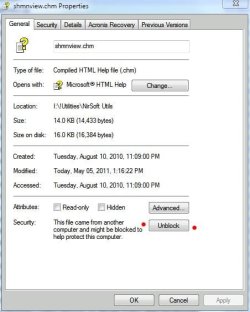
2) Try right clicking on the file. Choose properties. Do you see an 'Unblock' option, as in the screenshot?

Blocked File.JPG
 

My Computer My Computer

At a glance

Win7U 64 RTMQ95508GB GskillASUS|EAH4850/HTDI/1GD3/A
OS
Win7U 64 RTM
CPU
Q9550
Motherboard
GA-EP45-UD3R
Memory
8GB Gskill
Graphics Card(s)
ASUS|EAH4850/HTDI/1GD3/A
Sound Card
xfi Plat
Monitor(s) Displays
Dell 2405fpw
Screen Resolution
1920x1200
Hard Drives
Seagate & WD sata Drives
PSU
Antec
Case
Antec
Keyboard
MS Natural Ergonomic 4000
Mouse
Logitech MX610 USB Cordless
I think so.
I did not see an unlock option on the screen shot when I opened its properties.
 

My Computer My Computer

At a glance

windows 7
OS
windows 7
If you correctly & successfully merged the file, you would get a dialog stating so. Have you tried restarting the machine? Logging off and back on might work, but restarting certainly would with a successful merge.

James
 

My Computer My Computer

At a glance

Win7U 64 RTMQ95508GB GskillASUS|EAH4850/HTDI/1GD3/A
OS
Win7U 64 RTM
CPU
Q9550
Motherboard
GA-EP45-UD3R
Memory
8GB Gskill
Graphics Card(s)
ASUS|EAH4850/HTDI/1GD3/A
Sound Card
xfi Plat
Monitor(s) Displays
Dell 2405fpw
Screen Resolution
1920x1200
Hard Drives
Seagate & WD sata Drives
PSU
Antec
Case
Antec
Keyboard
MS Natural Ergonomic 4000
Mouse
Logitech MX610 USB Cordless
Yes, I did all of that.
The only thing different was when I downloaded the file, it did not give me the option to save the file, but to run it.
 

My Computer My Computer

At a glance

windows 7
OS
windows 7
Try going back to the link, right click on the file(s) and choose 'save target as' ('save link as' if using FireFox). Then try running it from your HD. Make sure that you are merging Disable_Windows_Explorer_Auto_Arrange.reg as opposed to the Reset reg file. Also, take note of any dialogs that appear after the merge and post them back here.
 

My Computer My Computer

At a glance

Win7U 64 RTMQ95508GB GskillASUS|EAH4850/HTDI/1GD3/A
OS
Win7U 64 RTM
CPU
Q9550
Motherboard
GA-EP45-UD3R
Memory
8GB Gskill
Graphics Card(s)
ASUS|EAH4850/HTDI/1GD3/A
Sound Card
xfi Plat
Monitor(s) Displays
Dell 2405fpw
Screen Resolution
1920x1200
Hard Drives
Seagate & WD sata Drives
PSU
Antec
Case
Antec
Keyboard
MS Natural Ergonomic 4000
Mouse
Logitech MX610 USB Cordless
How do I run it from my HD?
This is what I am getting.

[Window Title]
Registry Editor

Contents

The keys and values contained in C:\Users\Aaron\Desktop\Disable_Windows_Explorer_Auto_Arrange (1).reg have been successfully added to the registry.

[OK]
 

My Computer My Computer

At a glance

windows 7
OS
windows 7
Are you in a 'qualified' view, as per the tut?:

"The free sorting is only possible in the Extra Large Icons, Large Icons, Medium Icons, Small Icons, and Details folder views, and not in the List, Extended Tiles, and Content folder views."

and also, this:

"This tutorial will not be able to disable Auto Arrange in any of the Libraries or library folders locations."
 

My Computer My Computer

At a glance

Win7U 64 RTMQ95508GB GskillASUS|EAH4850/HTDI/1GD3/A
OS
Win7U 64 RTM
CPU
Q9550
Motherboard
GA-EP45-UD3R
Memory
8GB Gskill
Graphics Card(s)
ASUS|EAH4850/HTDI/1GD3/A
Sound Card
xfi Plat
Monitor(s) Displays
Dell 2405fpw
Screen Resolution
1920x1200
Hard Drives
Seagate & WD sata Drives
PSU
Antec
Case
Antec
Keyboard
MS Natural Ergonomic 4000
Mouse
Logitech MX610 USB Cordless
Also, in reading through the steps, it appears that the Reset reg must be run first, the machine restarted, then the disable reg. Did you exactly follow steps 1-9?
 

My Computer My Computer

At a glance

Win7U 64 RTMQ95508GB GskillASUS|EAH4850/HTDI/1GD3/A
OS
Win7U 64 RTM
CPU
Q9550
Motherboard
GA-EP45-UD3R
Memory
8GB Gskill
Graphics Card(s)
ASUS|EAH4850/HTDI/1GD3/A
Sound Card
xfi Plat
Monitor(s) Displays
Dell 2405fpw
Screen Resolution
1920x1200
Hard Drives
Seagate & WD sata Drives
PSU
Antec
Case
Antec
Keyboard
MS Natural Ergonomic 4000
Mouse
Logitech MX610 USB Cordless
I just tried it with Extra large icons and it did not work.
How do I know if it is in a library?
 

My Computer My Computer

At a glance

windows 7
OS
windows 7
Are the images saved to your user Pictures folder? If your unsure, try creating a new folder on any drive. If you use C:\, be sure you are not creating it inside the Users folders.

Libraries.JPG
 

My Computer My Computer

At a glance

Win7U 64 RTMQ95508GB GskillASUS|EAH4850/HTDI/1GD3/A
OS
Win7U 64 RTM
CPU
Q9550
Motherboard
GA-EP45-UD3R
Memory
8GB Gskill
Graphics Card(s)
ASUS|EAH4850/HTDI/1GD3/A
Sound Card
xfi Plat
Monitor(s) Displays
Dell 2405fpw
Screen Resolution
1920x1200
Hard Drives
Seagate & WD sata Drives
PSU
Antec
Case
Antec
Keyboard
MS Natural Ergonomic 4000
Mouse
Logitech MX610 USB Cordless
Another, perhaps simpler option (although more limiting than the Auto-Arrange Disable) is to simply change the sort order in explorer, i.e., instead of sorting on name, you could sort on date or any other column setting you choose (and you can add any of the many column choilces by right clicking on on of the column headings and choosing from the list). This method will work in Libraries. In conjunction with the Arrange By options, you may find something to suit you.

James
 

My Computer My Computer

At a glance

Win7U 64 RTMQ95508GB GskillASUS|EAH4850/HTDI/1GD3/A
OS
Win7U 64 RTM
CPU
Q9550
Motherboard
GA-EP45-UD3R
Memory
8GB Gskill
Graphics Card(s)
ASUS|EAH4850/HTDI/1GD3/A
Sound Card
xfi Plat
Monitor(s) Displays
Dell 2405fpw
Screen Resolution
1920x1200
Hard Drives
Seagate & WD sata Drives
PSU
Antec
Case
Antec
Keyboard
MS Natural Ergonomic 4000
Mouse
Logitech MX610 USB Cordless
Back
Top
