Is there a software like RocketDock that launches in a corner?

Sakla

New member
Local time
11:24 AM
Messages
5
Hi.

I was wondering is there a software like RocketDock (or some of it's alternatives) that launches when you hover in a corner (for example top right one).
I'm looking for something like this:
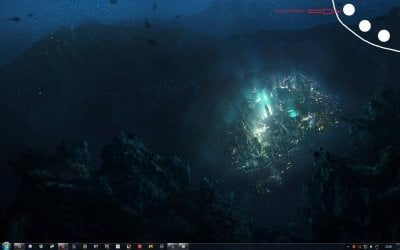
1.jpg

so that when i click on an icon or folder it opens another "quarter circle" with more folder or apps to be launched like this:

2.jpg
 

My Computer My Computer

At a glance

Windows 7 Ultimate 32bit
OS
Windows 7 Ultimate 32bit
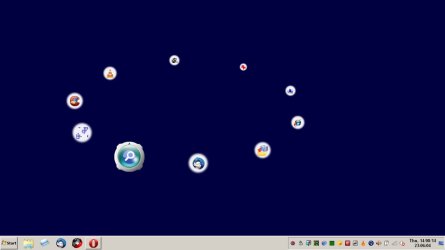
SliderDock

Nearest that I can come up with is SliderDock. Unfortunately the quarter circle option isn't an option that's included.

SliderDock.jpg
 

My Computer My Computer

At a glance

Microsoft Windows 7 Home Premium 64-bit 7601 ...AMD C-60 APU with Radeon(tm) HD Graphics4.00 GBAMD Radeon HD 6290 Graphics
Computer type
Laptop
Computer Manufacturer/Model Number
ASUS
OS
Microsoft Windows 7 Home Premium 64-bit 7601 Multiprocessor Free Service Pack 1
CPU
AMD C-60 APU with Radeon(tm) HD Graphics
Motherboard
ASUSTeK COMPUTER INC. X501U
Memory
4.00 GB
Graphics Card(s)
AMD Radeon HD 6290 Graphics
Sound Card
(1) AMD High Definition Audio Device (2) Realtek High Defi
Screen Resolution
1366 x 768 x 32 bits (4294967296 colors) @ 60 Hz
Hard Drives
Hitachi HTS545050A7E380 SATA Disk Device
Antivirus
Comodo CIS & FW, SecureAplus App Whitelisting, Threatfire
Browser
Cyberfox 64bit, Opera 64bit, Airfox
Other Info
Spy-The-Spy, HitmanPro.Alert, Norton Connect Safe, MJRegWatcher, BitDefender TrafficLight, Voodoo Shield, Zemana AntiMalware
Yeah, I found that one also but I dont quite like it :S
 

My Computer My Computer

At a glance

Windows 7 Ultimate 32bit
OS
Windows 7 Ultimate 32bit
Slider Dock

I don't like it much either. Actually I prefer Quick Cliq for application and file launching but there's no "circles" and no hover feature. It just remains hidden from view until you launch it via Winkey+Z. It launches on your desktop in whatever position you choose by clicking on a blank part of your desktop before launching it.

This is what it looks like on my machine:

Quick Cliq1.jpg

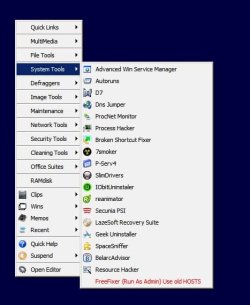
Here's the menu editor:

Quick Cliq Menu Editor.jpg

It's portable so to run it on startup it needs an elevated shortcut in your startup folder:

Startup.jpg

The advantage is that you can keep your desktop clear of shortcuts and icons.

If interested here's a link to the manufacturer's website:

Quick Cliq - portable application launcher and clipboard manager
 

My Computer My Computer

At a glance

Microsoft Windows 7 Home Premium 64-bit 7601 ...AMD C-60 APU with Radeon(tm) HD Graphics4.00 GBAMD Radeon HD 6290 Graphics
Computer type
Laptop
Computer Manufacturer/Model Number
ASUS
OS
Microsoft Windows 7 Home Premium 64-bit 7601 Multiprocessor Free Service Pack 1
CPU
AMD C-60 APU with Radeon(tm) HD Graphics
Motherboard
ASUSTeK COMPUTER INC. X501U
Memory
4.00 GB
Graphics Card(s)
AMD Radeon HD 6290 Graphics
Sound Card
(1) AMD High Definition Audio Device (2) Realtek High Defi
Screen Resolution
1366 x 768 x 32 bits (4294967296 colors) @ 60 Hz
Hard Drives
Hitachi HTS545050A7E380 SATA Disk Device
Antivirus
Comodo CIS & FW, SecureAplus App Whitelisting, Threatfire
Browser
Cyberfox 64bit, Opera 64bit, Airfox
Other Info
Spy-The-Spy, HitmanPro.Alert, Norton Connect Safe, MJRegWatcher, BitDefender TrafficLight, Voodoo Shield, Zemana AntiMalware
Back
Top