
Is there a tool to check the HDD usage?

valrogue

New member
Local time
9:57 PM
Messages
32
Is there a tool to check what is using the HDD?

Hello, since yesterday, my hdd makes a little more noises that usual on idle and i can't seem to know why :( I tried using the ressrouce monitor ( in ctrl+alt+suppr) to check what are the things that make the hdd writes and read and the strange things is that there is some activity that doesn't appear in it. like sometimes i see the E/S disk going from 0 to 120k but if i list everything that appears on the window it amounts to way less than that...basically, there is some disk activity that doesn't appear there :(. Is there some tool to check what makes the hdd work? thank you
 
Last edited:

My Computer My Computer

At a glance

windows 7 64 bits sp1i5 7608gb pc 10600 DDR3gtx 960
Computer type
PC/Desktop
Computer Manufacturer/Model Number
custom build
OS
windows 7 64 bits sp1
CPU
i5 760
Motherboard
p7p55d
Memory
8gb pc 10600 DDR3
Graphics Card(s)
gtx 960
Hard Drives
Hitachi Deskstar 7K1000.C - 1000 Go
Antivirus
Microsoft security essentials
Browser
firefox
I've used the free versions of both these softwares:

Hard Disk Sentinel - better for Health reports
HD Tune Pro - better for Benchmarking
 
Last edited:

My Computer My Computer

At a glance

Windows 7 x64, Vista x64, 8.1 smartphoneIntel E8400 65W 64-bitDDR2 2 x 2GB, 1GB x 2XFX Radeon HD5750
Computer type
PC/Desktop
OS
Windows 7 x64, Vista x64, 8.1 smartphone
CPU
Intel E8400 65W 64-bit
Motherboard
Gigabyte EP45-UD3LR
Memory
DDR2 2 x 2GB, 1GB x 2
Graphics Card(s)
XFX Radeon HD5750
Sound Card
AMD High Definition Audio; Realtek High Definition Audio
Monitor(s) Displays
iiyama prolite X2377HDS
Screen Resolution
1920 x 1080
Hard Drives
500GB 7200 rpm Seagate ST3500413AS 16MB, 500GB 5400 rpm Toshiba MQ02ABF050H 32MB, 200GB 7200 rpm Seagate ST3200820AS 8MB, 2TB 7200 rpm Western Digital WD20EZRX 64MB
PSU
Enermax Liberty Modular
Case
Antec P193 Midi Tower
Keyboard
Mionix ZIBAL 60
Mouse
Razer USB 2.0 Diamondback Mouse or Huion Graphics Tablet
Browser
Internet Explorer, Lunascape, Firefox, Opera, Avast Safezone
Thank you for your answer:) can they be usefull to see precisely what "processus" are making the HDD work?
 

My Computer My Computer

At a glance

windows 7 64 bits sp1i5 7608gb pc 10600 DDR3gtx 960
Computer type
PC/Desktop
Computer Manufacturer/Model Number
custom build
OS
windows 7 64 bits sp1
CPU
i5 760
Motherboard
p7p55d
Memory
8gb pc 10600 DDR3
Graphics Card(s)
gtx 960
Hard Drives
Hitachi Deskstar 7K1000.C - 1000 Go
Antivirus
Microsoft security essentials
Browser
firefox
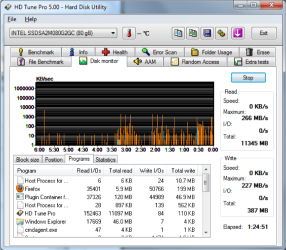
Well, you can use the Disk Monitor tab of HD Tune Pro a bit like this:

HD Tune Pro Disk Monitor.PNG

You can see the Programs that perform Read I/Os and Write I/Os, if that is what you intend?
 

My Computer My Computer

At a glance

Windows 7 x64, Vista x64, 8.1 smartphoneIntel E8400 65W 64-bitDDR2 2 x 2GB, 1GB x 2XFX Radeon HD5750
Computer type
PC/Desktop
OS
Windows 7 x64, Vista x64, 8.1 smartphone
CPU
Intel E8400 65W 64-bit
Motherboard
Gigabyte EP45-UD3LR
Memory
DDR2 2 x 2GB, 1GB x 2
Graphics Card(s)
XFX Radeon HD5750
Sound Card
AMD High Definition Audio; Realtek High Definition Audio
Monitor(s) Displays
iiyama prolite X2377HDS
Screen Resolution
1920 x 1080
Hard Drives
500GB 7200 rpm Seagate ST3500413AS 16MB, 500GB 5400 rpm Toshiba MQ02ABF050H 32MB, 200GB 7200 rpm Seagate ST3200820AS 8MB, 2TB 7200 rpm Western Digital WD20EZRX 64MB
PSU
Enermax Liberty Modular
Case
Antec P193 Midi Tower
Keyboard
Mionix ZIBAL 60
Mouse
Razer USB 2.0 Diamondback Mouse or Huion Graphics Tablet
Browser
Internet Explorer, Lunascape, Firefox, Opera, Avast Safezone
yes thank you i'm gonna test it but is it better that the windows ressource monitor? because even with that, there are brief 100/200k spike every 10 seconds of hdd activity that he misses; aka i can see on the graph the spikes but when i read the services/programm, nothing changes during those spikes,i cannot find some programmes that correlates to the spikes, as if the spikes were to brief to show what programm cause it.... i don't know if it is very understandable^^ can i download it from the website HD TUNE WEBSITE? it is just a .exe so i'm a bit worried :(
 

My Computer My Computer

At a glance

windows 7 64 bits sp1i5 7608gb pc 10600 DDR3gtx 960
Computer type
PC/Desktop
Computer Manufacturer/Model Number
custom build
OS
windows 7 64 bits sp1
CPU
i5 760
Motherboard
p7p55d
Memory
8gb pc 10600 DDR3
Graphics Card(s)
gtx 960
Hard Drives
Hitachi Deskstar 7K1000.C - 1000 Go
Antivirus
Microsoft security essentials
Browser
firefox
You wish to know what is causing the spikes in disk activity, on your computer?

This indeed is very difficult. As you know, microprocessor instructions work much faster than the human eye can see!

HD Tune Pro has many features. The feature you want to use is only as good as Resource Monitor.

You can download a 15-day trial version of the HD Tune Pro program from here HD Tune website . It is a safe program to use. Only the free version is limited to 15-days!
 

My Computer My Computer

At a glance

Windows 7 x64, Vista x64, 8.1 smartphoneIntel E8400 65W 64-bitDDR2 2 x 2GB, 1GB x 2XFX Radeon HD5750
Computer type
PC/Desktop
OS
Windows 7 x64, Vista x64, 8.1 smartphone
CPU
Intel E8400 65W 64-bit
Motherboard
Gigabyte EP45-UD3LR
Memory
DDR2 2 x 2GB, 1GB x 2
Graphics Card(s)
XFX Radeon HD5750
Sound Card
AMD High Definition Audio; Realtek High Definition Audio
Monitor(s) Displays
iiyama prolite X2377HDS
Screen Resolution
1920 x 1080
Hard Drives
500GB 7200 rpm Seagate ST3500413AS 16MB, 500GB 5400 rpm Toshiba MQ02ABF050H 32MB, 200GB 7200 rpm Seagate ST3200820AS 8MB, 2TB 7200 rpm Western Digital WD20EZRX 64MB
PSU
Enermax Liberty Modular
Case
Antec P193 Midi Tower
Keyboard
Mionix ZIBAL 60
Mouse
Razer USB 2.0 Diamondback Mouse or Huion Graphics Tablet
Browser
Internet Explorer, Lunascape, Firefox, Opera, Avast Safezone
yes exactly, with great precision! resource monitor seems to be pretty good but there is just the fact that those big spikes appear only in the graph, not in the data zone with the numbers. if i look at the numbers and activity column, nothing really changes during those spikes, as if the computer didn't have enough time to show it or something :( but the graph recorded it^^ thank you for the link:) i'm still a bit scared to install it all those warning lol^^
 

My Computer My Computer

At a glance

windows 7 64 bits sp1i5 7608gb pc 10600 DDR3gtx 960
Computer type
PC/Desktop
Computer Manufacturer/Model Number
custom build
OS
windows 7 64 bits sp1
CPU
i5 760
Motherboard
p7p55d
Memory
8gb pc 10600 DDR3
Graphics Card(s)
gtx 960
Hard Drives
Hitachi Deskstar 7K1000.C - 1000 Go
Antivirus
Microsoft security essentials
Browser
firefox

My Computer My Computer

At a glance

Windows 7 x64, Vista x64, 8.1 smartphoneIntel E8400 65W 64-bitDDR2 2 x 2GB, 1GB x 2XFX Radeon HD5750
Computer type
PC/Desktop
OS
Windows 7 x64, Vista x64, 8.1 smartphone
CPU
Intel E8400 65W 64-bit
Motherboard
Gigabyte EP45-UD3LR
Memory
DDR2 2 x 2GB, 1GB x 2
Graphics Card(s)
XFX Radeon HD5750
Sound Card
AMD High Definition Audio; Realtek High Definition Audio
Monitor(s) Displays
iiyama prolite X2377HDS
Screen Resolution
1920 x 1080
Hard Drives
500GB 7200 rpm Seagate ST3500413AS 16MB, 500GB 5400 rpm Toshiba MQ02ABF050H 32MB, 200GB 7200 rpm Seagate ST3200820AS 8MB, 2TB 7200 rpm Western Digital WD20EZRX 64MB
PSU
Enermax Liberty Modular
Case
Antec P193 Midi Tower
Keyboard
Mionix ZIBAL 60
Mouse
Razer USB 2.0 Diamondback Mouse or Huion Graphics Tablet
Browser
Internet Explorer, Lunascape, Firefox, Opera, Avast Safezone
thank you! i will try it (oddly enough i already had it but didn't use it^^^^) EDIT: damn there is a lot of stuff so it is very hard to know... i also don't really know when to look ( abit after i heard the noise frome the hdd, or at the same time or before?).. one thing i tested is the spikes disappear if i turn off my wifi. i can see a lot of things like : svchost: seaport; wifi etc... i will try to test more tomorow :(
 

My Computer My Computer

At a glance

windows 7 64 bits sp1i5 7608gb pc 10600 DDR3gtx 960
Computer type
PC/Desktop
Computer Manufacturer/Model Number
custom build
OS
windows 7 64 bits sp1
CPU
i5 760
Motherboard
p7p55d
Memory
8gb pc 10600 DDR3
Graphics Card(s)
gtx 960
Hard Drives
Hitachi Deskstar 7K1000.C - 1000 Go
Antivirus
Microsoft security essentials
Browser
firefox
i tried looking at some services and after disabling seaport, those little spikes that happened every 30 seconds seem to have disappear is seaport importrant? i think i also disabled some user experience tracking service too
 

My Computer My Computer

At a glance

windows 7 64 bits sp1i5 7608gb pc 10600 DDR3gtx 960
Computer type
PC/Desktop
Computer Manufacturer/Model Number
custom build
OS
windows 7 64 bits sp1
CPU
i5 760
Motherboard
p7p55d
Memory
8gb pc 10600 DDR3
Graphics Card(s)
gtx 960
Hard Drives
Hitachi Deskstar 7K1000.C - 1000 Go
Antivirus
Microsoft security essentials
Browser
firefox
Seaport.exe is a Microsoft program associated with the Bing Bar in Internet Explorer. Try disable Add-ons in Internet Explorer. Even if you do not use Internet Explorer, Seaport.exe process still works in the background.
 

My Computer My Computer

At a glance

Windows 7 x64, Vista x64, 8.1 smartphoneIntel E8400 65W 64-bitDDR2 2 x 2GB, 1GB x 2XFX Radeon HD5750
Computer type
PC/Desktop
OS
Windows 7 x64, Vista x64, 8.1 smartphone
CPU
Intel E8400 65W 64-bit
Motherboard
Gigabyte EP45-UD3LR
Memory
DDR2 2 x 2GB, 1GB x 2
Graphics Card(s)
XFX Radeon HD5750
Sound Card
AMD High Definition Audio; Realtek High Definition Audio
Monitor(s) Displays
iiyama prolite X2377HDS
Screen Resolution
1920 x 1080
Hard Drives
500GB 7200 rpm Seagate ST3500413AS 16MB, 500GB 5400 rpm Toshiba MQ02ABF050H 32MB, 200GB 7200 rpm Seagate ST3200820AS 8MB, 2TB 7200 rpm Western Digital WD20EZRX 64MB
PSU
Enermax Liberty Modular
Case
Antec P193 Midi Tower
Keyboard
Mionix ZIBAL 60
Mouse
Razer USB 2.0 Diamondback Mouse or Huion Graphics Tablet
Browser
Internet Explorer, Lunascape, Firefox, Opera, Avast Safezone
i don't use internet explorer. i'm not 100% sure that it was seaport (since i also disabled some user experience or something service too) but there is less activity on the hdd now and finally those cyclik spikes are gone.
 

My Computer My Computer

At a glance

windows 7 64 bits sp1i5 7608gb pc 10600 DDR3gtx 960
Computer type
PC/Desktop
Computer Manufacturer/Model Number
custom build
OS
windows 7 64 bits sp1
CPU
i5 760
Motherboard
p7p55d
Memory
8gb pc 10600 DDR3
Graphics Card(s)
gtx 960
Hard Drives
Hitachi Deskstar 7K1000.C - 1000 Go
Antivirus
Microsoft security essentials
Browser
firefox
Back
Top