Solved Is there a way I can set a key to choose which OS I want to run?

TheBlindMan12v

New member
Local time
6:05 PM
Messages
23
Location
Southern California
Hello friends, I recently did a dual boot configuration with Win 7 and Win 8. I was wondering if there was a way to set a key to choose a OS to run. I have Win 7 to boot by default, it would be nice to keep tapping a key to boot from Win 8. If there isn't a way, I'm going to have to have a timer go off when the "choose a operating system windows loads. I did extend the time to 60 seconds, but... a key would be nice. :) Thanks
 

My Computer My Computer

At a glance

Dual boot config with Windows 7 Home premium ...FactoryFactoryFactory
Computer type
PC/Desktop
Computer Manufacturer/Model Number
EMachines ET1331G-03W
OS
Dual boot config with Windows 7 Home premium 64bit & Windows 8.1 64bit
CPU
Factory
Motherboard
Factory
Memory
Factory
Graphics Card(s)
Factory
Hard Drives
Factory
Antivirus
Microsoft security essentials
Browser
Internet explore 10
I don't understand what you want to do. As it is now, you use the cursor key to select the operating system you want to boot and press enter.

What do you want to do/happen?
 

My Computer My Computer

At a glance

Windows 10 Pro X64Intel Quad Core i7-4770 @ 3.4Ghz16.0GB PC3-12800 DDR3 SDRAM 1600 MHzIntel Integrated HD Graphics
Computer type
PC/Desktop
Computer Manufacturer/Model Number
Lenovo IdeaCenter 450
OS
Windows 10 Pro X64
CPU
Intel Quad Core i7-4770 @ 3.4Ghz
Memory
16.0GB PC3-12800 DDR3 SDRAM 1600 MHz
Graphics Card(s)
Intel Integrated HD Graphics
Sound Card
Realtek HD Audio
Monitor(s) Displays
HP 22" LCD
Screen Resolution
1680 x 1050
Hard Drives
250GB Samsung EVO SATA-3 SSD
2TB Seagate ST2000DM001 SATA-2
1.5TB Seagate ST3150041AS SATA
Keyboard
Dell USB
Mouse
Lenovo USB
Internet Speed
Cable via Road Runner 3MB Upload, 30MB Download
Antivirus
Windows Defender, MBAM Pro, MBAE
Browser
Seamonkey
Other Info
UEFI/GPT
PLDS DVD-RW DH16AERSH
I believe he wants to know what key will allow him to switch from one Operating System to another, while one is running already without having to restart the computer.
 

My Computer My Computer

At a glance

Windows 7 professional X64AMD A10-5800K OC@ 4.4Ghz.8GB Kingston HyperX Blu 1333mhzXFX HD7870 2GB Core Edition
Computer type
PC/Desktop
OS
Windows 7 professional X64
CPU
AMD A10-5800K OC@ 4.4Ghz.
Motherboard
Gigabyte F2A85X-UP4
Memory
8GB Kingston HyperX Blu 1333mhz
Graphics Card(s)
XFX HD7870 2GB Core Edition
Monitor(s) Displays
Acer AL2216W
Screen Resolution
1680x1050
Hard Drives
Seagate Barracuda 500gb 7200rpm
Seagate Barracuda 1.5TB 7200rpm
PSU
Cooler Master Silent Pro M 850W
Case
Thermaltake Commander MS-I
Cooling
Cooler Master N520
Mouse
Logitech M504
Internet Speed
10Mbps
I am blind. I do not know when this window pops up hence the reason why I mentioned tapping on a key. This would be from start up.
 

My Computer My Computer

At a glance

Dual boot config with Windows 7 Home premium ...FactoryFactoryFactory
Computer type
PC/Desktop
Computer Manufacturer/Model Number
EMachines ET1331G-03W
OS
Dual boot config with Windows 7 Home premium 64bit & Windows 8.1 64bit
CPU
Factory
Motherboard
Factory
Memory
Factory
Graphics Card(s)
Factory
Hard Drives
Factory
Antivirus
Microsoft security essentials
Browser
Internet explore 10

My Computer My Computer

At a glance

Win 10 Pro x64Intel I5-2500K @3.3GHz16GB G.Skill Ripjaws X (4x4GB)EVGA GeForce 750 Ti SC 2GB
Computer type
PC/Desktop
Computer Manufacturer/Model Number
Self Built
OS
Win 10 Pro x64
CPU
Intel I5-2500K @3.3GHz
Motherboard
Asrock P67 Extreme4
Memory
16GB G.Skill Ripjaws X (4x4GB)
Graphics Card(s)
EVGA GeForce 750 Ti SC 2GB
Sound Card
ASUS Xonar DG 5.1 Channels 24-bit 96KHz PCI Interface Sound
Monitor(s) Displays
auria eq2367
Screen Resolution
1920 x 1080
Hard Drives
250GB Samsung 850 EVO SSD
1TB WD Blue
1TB Hitachi
PSU
SeaSonic X 650W 80 Plus Gold
Case
Corsair Obsidian 750D
Cooling
Corsair H60, Three 140mm case fans
Keyboard
Logitech Wireless Keyboard K520
Mouse
Logitech Wireless Mouse M310
Internet Speed
Wave Broadband ~ 100 dn 5 up
Antivirus
Windows Defender, Malwarebytes Premium
Browser
Edge, IE11, Chrome
Other Info
Laptop specs: HP g7-1365dx /
CPU: AMD A6-3420M APU with Radeon(tm) HD Graphics /
RAM: Crucial 8Gb (2x4Gb) /
SSD: Crucial M4-CT128M4SSD2 ATA Device/ FW 000F /
GFX: AMD Radeon HD 6520G /
OS: Windows 10 Pro x64
Would you consider using a third party Boot Manager?
Looking in the documentation for EasyBCD, it looks like you can configure it to wait indefinitely for you to select the OS.

Wait for user selection

EasyBCD will instruct the bootloader to hang completely until a selection is made manually by the user starting the PC. There is no longer a “default” entry, and your PC will not boot into anything unless explicitly instructed to do so at boot time. Use this instead of option 2 with a longer timeout when it’s of the utmost importance that you boot into the correct operating system.
Source: https://neosmart.net/wiki/easybcd/b...ModPagespeed=noscript#Wait_for_user_selection

I've never used EasyBCD, but I've read a lot of recommendations for it.
 

My Computer My Computer

At a glance

Multi-Boot W7_Pro_x64 W8.1_Pro_x64 W10_Pro_x6...AMD Athlon II x4 6206GB GSkill DDR2 800AMD 4670 GPU + AMD 4200 IGP
Computer type
PC/Desktop
Computer Manufacturer/Model Number
home built
OS
Multi-Boot W7_Pro_x64 W8.1_Pro_x64 W10_Pro_x64 +Linux_VMs +Chromium_VM
CPU
AMD Athlon II x4 620
Motherboard
Gigabyte GA-MA785G-UD3H
Memory
6GB GSkill DDR2 800
Graphics Card(s)
AMD 4670 GPU + AMD 4200 IGP
Sound Card
on board Realtek ALC889A
Monitor(s) Displays
RCA 40" LCD TV, Insignia 32" LCD TV, HP 15" LCD monitor
Screen Resolution
1680 x 1050
Hard Drives
OCZ Vertex 3 120GB,
Samsung F3 1TB (3),
Several others - WD, Seagate, Hitachi, ...
PSU
Corsair 500 W
Case
Rosewill mid tower
Cooling
CM 90mm rifle
Keyboard
Gyration wireless, Logitech wireless, Dell USB wired
Mouse
Gyration wireless, Logitech wireless, V7 USB wired
Internet Speed
Spectrum - 100Mbps D / 10Mbps U
Antivirus
Avast, MBAM3, EMET, WinPatrol
Browser
Pale Moon, Firefox, IE
Other Info
2 multi-boot PC's
Mainly HTPC/Office/Gen purpose (no gaming).
Trendnet USB KVM.
LG DVD burner/Blue Ray Player.
Tray system for removable SATA backup drives.

Not currently OCd, under-volted.
I use Hybrid sleep, rarely re-boot or shutdown.

Hauppauge HD-PVR, Avermedia PCIe TV Tuner, Hauppauge PCI TV Tuner.
Would you consider using a third party Boot Manager?
Looking in the documentation for EasyBCD, it looks like you can configure it to wait indefinitely for you to select the OS.

Wait for user selection

EasyBCD will instruct the bootloader to hang completely until a selection is made manually by the user starting the PC. There is no longer a “default” entry, and your PC will not boot into anything unless explicitly instructed to do so at boot time. Use this instead of option 2 with a longer timeout when it’s of the utmost importance that you boot into the correct operating system.
Source: https://neosmart.net/wiki/easybcd/b...ModPagespeed=noscript#Wait_for_user_selection

I've never used EasyBCD, but I've read a lot of recommendations for it.


I will have to look into this. You guys rock thanks!
 

My Computer My Computer

At a glance

Dual boot config with Windows 7 Home premium ...FactoryFactoryFactory
Computer type
PC/Desktop
Computer Manufacturer/Model Number
EMachines ET1331G-03W
OS
Dual boot config with Windows 7 Home premium 64bit & Windows 8.1 64bit
CPU
Factory
Motherboard
Factory
Memory
Factory
Graphics Card(s)
Factory
Hard Drives
Factory
Antivirus
Microsoft security essentials
Browser
Internet explore 10
I downloaded and installed EasyBCD. I've navigated through some of the options. I went into the edit boot menu and saw that the current OS to start from default is set to yes. Also noticed that I can adjust the timer. Can't find the option where I can set the computer to hang 'til a OS is selected with a key. I will have to wait for some sighted assistance because it may be something that my screen reader isn't catching. Just thought I'd update.
 

My Computer My Computer

At a glance

Dual boot config with Windows 7 Home premium ...FactoryFactoryFactory
Computer type
PC/Desktop
Computer Manufacturer/Model Number
EMachines ET1331G-03W
OS
Dual boot config with Windows 7 Home premium 64bit & Windows 8.1 64bit
CPU
Factory
Motherboard
Factory
Memory
Factory
Graphics Card(s)
Factory
Hard Drives
Factory
Antivirus
Microsoft security essentials
Browser
Internet explore 10
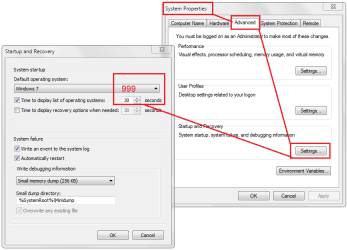
You could also set the delay to the maximum number of seconds (999) in
System properties -> Advanced tab -> Startup and Recovery [Settings] button -> Time to display list of operating systems
 

Attachments

  • timeout.PNG
    timeout.PNG
    23.4 KB · Views: 0
Last edited:

My Computer My Computer

At a glance

x64 (6.3.9600) Win8.1 Pro & soon dual boot x6...AMD A6-3420M APU with Radeon(tm) HD Graphics6.00 GBAMD Radeon(TM) HD 6520G
Computer type
Laptop
Computer Manufacturer/Model Number
HP Pavilion dv6-6c10us
OS
x64 (6.3.9600) Win8.1 Pro & soon dual boot x64 (6.1.7601) Win7_SP1 HomePrem
CPU
AMD A6-3420M APU with Radeon(tm) HD Graphics
Motherboard
Hewlett-Packard 1805
Memory
6.00 GB
Graphics Card(s)
AMD Radeon(TM) HD 6520G
Sound Card
(1) AMD High Definition Audio Device (2) IDT High Definiti
Monitor(s) Displays
HP W2072a 20" LCD (1600 x 900) @ 60 Hz
Screen Resolution
1366 x 768 x 32 bits (4294967296 colors) @ 60 Hz
Hard Drives
ST640LM0 00 HM641JI SATA Disk Device
Keyboard
Logitech k520 wireless KB
Mouse
Logitech m320 wireless mouse (bundled with KB)
Internet Speed
15/5 | 54 MB Wireless 'n'
Antivirus
Realtime: Defender or Avast | On-demand: Malwarebytes, ESET
Browser
IE 11 on Win8, IE 10 on win 7
Other Info
Media: [Gimp, Audacity, VLC] || Comm: [WEmail 2012, Skype] || Productivity: [OpenOffice,| Textpad] || Utils: [Sysinternals, cCleaner, Speccy, Defraggler]
If Bill's (Slartybart) suggestion works that might be your best option.

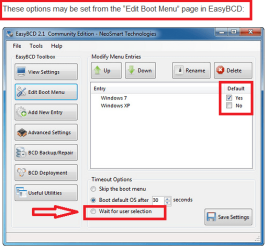
If not, the image I inserted is a snip from the EasyBCD documentation at:
https://neosmart.net/wiki/easybcd/b...ModPagespeed=noscript#Wait_for_user_selection

Do you have the Wait for user selection radio button ?
If not, can you uncheck the Default OS checkbox ?


BCDSP01.PNG

If you don't have those options, the documentation may not match the current version of the program.
The screen print shows EasyBCD 2.1 and the download shows 2.2
Let us know.
 

My Computer My Computer

At a glance

Multi-Boot W7_Pro_x64 W8.1_Pro_x64 W10_Pro_x6...AMD Athlon II x4 6206GB GSkill DDR2 800AMD 4670 GPU + AMD 4200 IGP
Computer type
PC/Desktop
Computer Manufacturer/Model Number
home built
OS
Multi-Boot W7_Pro_x64 W8.1_Pro_x64 W10_Pro_x64 +Linux_VMs +Chromium_VM
CPU
AMD Athlon II x4 620
Motherboard
Gigabyte GA-MA785G-UD3H
Memory
6GB GSkill DDR2 800
Graphics Card(s)
AMD 4670 GPU + AMD 4200 IGP
Sound Card
on board Realtek ALC889A
Monitor(s) Displays
RCA 40" LCD TV, Insignia 32" LCD TV, HP 15" LCD monitor
Screen Resolution
1680 x 1050
Hard Drives
OCZ Vertex 3 120GB,
Samsung F3 1TB (3),
Several others - WD, Seagate, Hitachi, ...
PSU
Corsair 500 W
Case
Rosewill mid tower
Cooling
CM 90mm rifle
Keyboard
Gyration wireless, Logitech wireless, Dell USB wired
Mouse
Gyration wireless, Logitech wireless, V7 USB wired
Internet Speed
Spectrum - 100Mbps D / 10Mbps U
Antivirus
Avast, MBAM3, EMET, WinPatrol
Browser
Pale Moon, Firefox, IE
Other Info
2 multi-boot PC's
Mainly HTPC/Office/Gen purpose (no gaming).
Trendnet USB KVM.
LG DVD burner/Blue Ray Player.
Tray system for removable SATA backup drives.

Not currently OCd, under-volted.
I use Hybrid sleep, rarely re-boot or shutdown.

Hauppauge HD-PVR, Avermedia PCIe TV Tuner, Hauppauge PCI TV Tuner.
I do have the, "Wait for user selection radio button."

I thought I was going to be able to set Win 8.1 OS to start with a specific key and the same thing with the Win 7 OS. I was planning to have Win 7 to start by pressing the F7 key and the Win 8.1 OS with the F8 key. Seems like I have no choice but to have a timer to go off after xx seconds so I know when I'm on the window to select an OS.
 

My Computer My Computer

At a glance

Dual boot config with Windows 7 Home premium ...FactoryFactoryFactory
Computer type
PC/Desktop
Computer Manufacturer/Model Number
EMachines ET1331G-03W
OS
Dual boot config with Windows 7 Home premium 64bit & Windows 8.1 64bit
CPU
Factory
Motherboard
Factory
Memory
Factory
Graphics Card(s)
Factory
Hard Drives
Factory
Antivirus
Microsoft security essentials
Browser
Internet explore 10
If you did the dual boot correctly, you should have a screen during bootup and you can choose which operating system you want to boot into and use.

Don`t you have that ?

It will look something like this, but I`m not sure what the Windows 7 and 8 boot screen will look like.
 
Last edited:

My Computer My Computer

At a glance

Windows 10 Pro x64Intel Core i7 6700KGSkill TridentZ RGB 16GB 3600 16-16-16-36EVGA GTX 980 Ti SC x2
Computer type
PC/Desktop
Computer Manufacturer/Model Number
Skylake Special #666
OS
Windows 10 Pro x64
CPU
Intel Core i7 6700K
Motherboard
Asus Sabertooth Z170 Mark 1
Memory
GSkill TridentZ RGB 16GB 3600 16-16-16-36
Graphics Card(s)
EVGA GTX 980 Ti SC x2
Sound Card
Realtek High Definition
Monitor(s) Displays
AOC G2460PG
Screen Resolution
1920 x 1080 144Hz
Hard Drives
Samsung 860 Pro 256GB, Seagate Barracuda 4TB x2
PSU
EVGA 1000 P2, EVGA White Custom Braided Cables
Case
Corsair Vengeance C70 Gunmetal Black
Cooling
Corsair H100i v2, Corsair ML120 x2, Thermal Grizzly Kryonaut
Keyboard
Logitech G910 Orion Spectrum
Mouse
Logitech G700s
Internet Speed
Verizon Fios Quantum Gateway 75/75
Antivirus
Windows Defender, Malwarebytes Free 3.8.3
Browser
Chrome
Other Info
Corsair SP120 x4, LG Blu-ray Drive, Durabrand HT-395 100 Watt Dolby Digital Amp, Corsair H2100 Wireless 7.1 Headset
I do have the, "Wait for user selection radio button."

I thought I was going to be able to set Win 8.1 OS to start with a specific key and the same thing with the Win 7 OS. I was planning to have Win 7 to start by pressing the F7 key and the Win 8.1 OS with the F8 key. Seems like I have no choice but to have a timer to go off after xx seconds so I know when I'm on the window to select an OS.

Hello TheBlindMan12v,

That sounds like you want to be able to
1) Start up the PC by pushing the power button
2) Then tap the F7 or F8 key to choose which OS to run, before the OS selection screen is displayed

I don't know if that's possible, seems like it would require some special BIOS setting / ability.
I also don't know if it's possible to enable an audible beep when the OS selection screen is displayed so you don't have to use a timer to know it's displayed.
I don't know IF EasyBCD has an option for an audible beep alert.

If you're not aware of it, you might consider using a Virtual Machine (VM).
That way you could always have the PC boot up to your Primary (most used) OS, and run your secondary OS whenever you want to, within the Primary OS.
Then there is no need for a dual-boot / OS selection screen.

There are Pros and Cons to VMs and dual-booting, I'm just throwing this idea out as something to consider in case you're not aware of it.
 

My Computer My Computer

At a glance

Multi-Boot W7_Pro_x64 W8.1_Pro_x64 W10_Pro_x6...AMD Athlon II x4 6206GB GSkill DDR2 800AMD 4670 GPU + AMD 4200 IGP
Computer type
PC/Desktop
Computer Manufacturer/Model Number
home built
OS
Multi-Boot W7_Pro_x64 W8.1_Pro_x64 W10_Pro_x64 +Linux_VMs +Chromium_VM
CPU
AMD Athlon II x4 620
Motherboard
Gigabyte GA-MA785G-UD3H
Memory
6GB GSkill DDR2 800
Graphics Card(s)
AMD 4670 GPU + AMD 4200 IGP
Sound Card
on board Realtek ALC889A
Monitor(s) Displays
RCA 40" LCD TV, Insignia 32" LCD TV, HP 15" LCD monitor
Screen Resolution
1680 x 1050
Hard Drives
OCZ Vertex 3 120GB,
Samsung F3 1TB (3),
Several others - WD, Seagate, Hitachi, ...
PSU
Corsair 500 W
Case
Rosewill mid tower
Cooling
CM 90mm rifle
Keyboard
Gyration wireless, Logitech wireless, Dell USB wired
Mouse
Gyration wireless, Logitech wireless, V7 USB wired
Internet Speed
Spectrum - 100Mbps D / 10Mbps U
Antivirus
Avast, MBAM3, EMET, WinPatrol
Browser
Pale Moon, Firefox, IE
Other Info
2 multi-boot PC's
Mainly HTPC/Office/Gen purpose (no gaming).
Trendnet USB KVM.
LG DVD burner/Blue Ray Player.
Tray system for removable SATA backup drives.

Not currently OCd, under-volted.
I use Hybrid sleep, rarely re-boot or shutdown.

Hauppauge HD-PVR, Avermedia PCIe TV Tuner, Hauppauge PCI TV Tuner.
Another thought.
I would suggest using another key rather than F8.
Most system have other uses for the F8 key by default.
 

My Computer My Computer

At a glance

Windows 10 Pro. 64/ version 1709 Windows 7 Pr...Intel i7-6800K @ 4.3Corsair Platinum 16 gig @2400EVGA GTX 1070 OC
Computer type
PC/Desktop
Computer Manufacturer/Model Number
Home made Desktop
OS
Windows 10 Pro. 64/ version 1709 Windows 7 Pro/64
CPU
Intel i7-6800K @ 4.3
Motherboard
ASUS X-99 Deluxe II
Memory
Corsair Platinum 16 gig @2400
Graphics Card(s)
EVGA GTX 1070 OC
Monitor(s) Displays
Asus 27" LED LCD/VE278Q
Screen Resolution
1920-1080 or 1280-720 HDMI
Hard Drives
INTEL SSD 730-240 Gb Sata 3.0/
PSU
EVGA Platium 1200W
Case
Phanteks Luxe Tempered Glass 8 fans/ one radiator
Cooling
XSPC/ Water Cooled CPU
Keyboard
Das 4 Professional
Mouse
Logitech M705/MX Anywhere 2-S
Internet Speed
100 mbits
Antivirus
Microsoft Security Essentials/ Malwarebytes Premium 3.0/ SAS
Browser
I.E. 11 default/Firefox/ ISP Time Warner Cable/Spectrum
Other Info
LG BluRay Burner/
Sound system-KLipsch-THX/
Icy Dock ssd Hot Swap bays.
Appreciate the feedback. I was aware of the virtual machine, but didn't go with that option since I read that it can affect performance.Having the key to select an OS isn't as big of a deal then what I'm making it to be, it'd just be convenient if it were possible. I'll just stick with a Default OS at start up if I don't slect an OS when I'm prompted. Once again, thanks.
 

My Computer My Computer

At a glance

Dual boot config with Windows 7 Home premium ...FactoryFactoryFactory
Computer type
PC/Desktop
Computer Manufacturer/Model Number
EMachines ET1331G-03W
OS
Dual boot config with Windows 7 Home premium 64bit & Windows 8.1 64bit
CPU
Factory
Motherboard
Factory
Memory
Factory
Graphics Card(s)
Factory
Hard Drives
Factory
Antivirus
Microsoft security essentials
Browser
Internet explore 10
Give a virtual machine, like Oracle VirtualBox a try. You'd be surprised how well it runs.
 

My Computer My Computer

At a glance

Windows 10 Pro X64Intel Quad Core i7-4770 @ 3.4Ghz16.0GB PC3-12800 DDR3 SDRAM 1600 MHzIntel Integrated HD Graphics
Computer type
PC/Desktop
Computer Manufacturer/Model Number
Lenovo IdeaCenter 450
OS
Windows 10 Pro X64
CPU
Intel Quad Core i7-4770 @ 3.4Ghz
Memory
16.0GB PC3-12800 DDR3 SDRAM 1600 MHz
Graphics Card(s)
Intel Integrated HD Graphics
Sound Card
Realtek HD Audio
Monitor(s) Displays
HP 22" LCD
Screen Resolution
1680 x 1050
Hard Drives
250GB Samsung EVO SATA-3 SSD
2TB Seagate ST2000DM001 SATA-2
1.5TB Seagate ST3150041AS SATA
Keyboard
Dell USB
Mouse
Lenovo USB
Internet Speed
Cable via Road Runner 3MB Upload, 30MB Download
Antivirus
Windows Defender, MBAM Pro, MBAE
Browser
Seamonkey
Other Info
UEFI/GPT
PLDS DVD-RW DH16AERSH
Back
Top